
Qianli Apollo Interstellar One 6 in 1 Phone Programmer User Manual
Brand: QianLi | Model: apollo1
Introduction
The QianLi Apollo Interstellar ONE is a versatile 6-in-1 tool designed for professional phone repair technicians. This device facilitates various repair and data management tasks for compatible iPhone models, ensuring efficient and accurate service.
Key Features
The Apollo Interstellar ONE offers the following core functionalities:
- Battery Read/Write/Repair: Comprehensive management of battery data.
- True Tone Read/Write: Restore True Tone display functionality after screen replacement.
- Data-line Detection: Diagnose issues related to data transmission.
- Photosensitive Original Colour Repair: Correct display color issues.
- Vibrator Repair: Address vibrator function problems.
- Baseband Chip Read/Write/Repair: Essential for network and communication module repairs.
- Cable Detection: Verify the integrity of connection cables.
Setup
The QianLi Apollo Interstellar ONE does not contain a built-in battery. It requires a Type-C cable connection for power and operation.
- Powering On: Connect the device to a power source using a standard Type-C USB cable. The device will power on automatically.
- Initial Device View: Upon powering on, the main interface will be displayed. Familiarize yourself with the device's ports and buttons.
- Language Selection: The device supports multiple languages. Navigate through the menu to select your preferred language (Chinese, English, or Spanish).
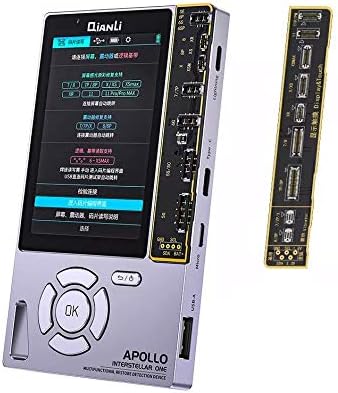
Image: The Qianli Apollo Interstellar One device with an accompanying repair board, showcasing its compact design and various connection points.

Image: The device's interface demonstrating support for multiple languages, including Chinese, English, and Spanish, for user convenience.
Operating Instructions
This section outlines the general procedures for utilizing the Apollo Interstellar ONE's various functions.
True Tone Read/Write
To restore True Tone functionality after a screen replacement:
- Connect the original screen to the appropriate port on the Apollo Interstellar ONE.
- Select the 'True Tone Read' function from the device menu. The device will read and store the original True Tone data.
- Disconnect the original screen and connect the new replacement screen.
- Select the 'True Tone Write' function. The stored data will be written to the new screen, restoring True Tone.

Image: An overview of the Qianli Apollo Interstellar One's six-in-one multifunctional repair capabilities, highlighting its various features including True Tone restoration.
Battery Data Read/Write/Repair
For battery data management and repair, including copying original battery data to a new battery:
- Connect the original battery to the corresponding connector on the device's battery board.
- Select the 'Battery Read' function to read the original battery data.
- Connect the new battery.
- Select the 'Battery Write' function to transfer the original data to the new battery. This helps avoid compatibility issues and ensures proper functionality.

Image: The device's screen displaying battery detection and data repair options, showing detailed battery information.

Image: A visual representation of the process for copying original battery data using the Apollo Interstellar One, ensuring seamless battery replacement.
Other Functions
For data-line detection, photosensitive original colour repair, vibrator repair, baseband chip read/write/repair, and cable detection, follow the on-screen prompts after selecting the respective function from the main menu. Ensure the correct component is connected to the device.
Compatibility
The QianLi Apollo Interstellar ONE is compatible with the following iPhone models:
- iPhone 7
- iPhone 7 Plus
- iPhone 8
- iPhone 8 Plus
- iPhone X
- iPhone XR
- iPhone XS
- iPhone XS Max
- iPhone 11
- iPhone 11 Pro
- iPhone 11 Pro Max
Maintenance
Proper maintenance ensures the longevity and optimal performance of your device.
- Cleaning: Use a soft, dry cloth to clean the device's exterior. Avoid using liquid cleaners or abrasive materials.
- Storage: Store the device in a cool, dry place away from direct sunlight and extreme temperatures.
- Firmware Updates: Periodically check the manufacturer's official website for firmware updates to ensure compatibility with new models and access to improved functionalities.
Troubleshooting
If you encounter issues with your QianLi Apollo Interstellar ONE, consider the following common solutions:
- Device Not Powering On: Ensure the Type-C cable is securely connected to a working power source. Since the device has no built-in battery, a continuous power supply is required for operation.
- Data Transfer Issues: Verify that the components (screens, batteries) are correctly connected to the appropriate ports. Ensure the device's firmware is up to date.
- Unresponsive Screen/Buttons: Disconnect and reconnect the power cable to restart the device. If the issue persists, contact customer support.
For persistent issues or advanced troubleshooting, please refer to the official QianLi support resources or contact their customer service.
Specifications
| Attribute | Value |
|---|---|
| Product Dimensions | 5.91 x 2.76 x 0.2 inches |
| Item Weight | 13.7 ounces |
| Model Number | apollo1 |
| Color | Grey |
| Manufacturer | QianLi |
| Material | Aluminum, Brass, Carbon Fiber, Metal |
| Compatible Devices | Smartphone (iPhone 7 to 11 Pro Max series) |
| Batteries Included | No |
| Batteries Required | No (requires external Type-C power) |
Warranty and Support
Specific warranty details for the QianLi Apollo Interstellar ONE are not provided in this manual. For information regarding warranty coverage, technical support, or service, please contact the manufacturer directly or refer to the product's packaging and official website.