
Cort CAP10OP
Cort Standard Series Trailblazer Acoustic Guitar Pack Instruction Manual
Model: CAP10OP
Introduction
This manual provides essential instructions for the setup, operation, and maintenance of your Cort Standard Series Trailblazer Acoustic Guitar Pack. Please read this manual thoroughly before using your new instrument to ensure proper handling and longevity.
Package Contents
Your Cort Trailblazer Acoustic Guitar Pack includes the following items:
- Cort AD810 Dreadnought Acoustic Guitar
- Gig Bag
- Comfortable Shoulder Strap with built-in pick pocket
- Cort E310C Clip-on Electronic Tuner
- 3 Medium Thickness Picks

Image: The retail box for the Cort Trailblazer Acoustic Guitar Pack, showing the guitar, gig bag, tuner, picks, and strap.
Setup
1. Unpacking the Guitar
Carefully remove the guitar and accessories from the gig bag. Inspect the guitar for any visible damage that may have occurred during shipping.

Image: The Cort AD810 acoustic guitar laid out with its gig bag, strap, and picks, ready for setup.
2. Attaching the Shoulder Strap
Locate the strap buttons on your guitar. One is typically at the base of the body, and the other near the neck joint. Securely attach the strap to both buttons. The included strap features a pick pocket for convenience.

Image: Close-up of the Cort guitar strap, showing the pick pocket and how it attaches to the guitar body.
3. Tuning the Guitar with the E310C Tuner
- Clip the Cort E310C tuner onto the headstock of your guitar. Ensure it is securely attached and the display is visible.
- Press the power button to turn on the tuner. Select the appropriate tuning mode (e.g., Guitar mode).
- Pluck each string individually. The tuner display will show the note being played and indicate if it is sharp (too high) or flat (too low).
- Adjust the corresponding tuning peg for each string until the tuner indicates the correct pitch (E, A, D, G, B, E for standard tuning) and the needle is centered.

Image: The Cort E310C clip-on electronic tuner attached to the headstock of the acoustic guitar.

Image: A close-up of the Cort E310C tuner display, showing a green light indicating a correctly tuned note.
Operating Your Guitar
Holding the Guitar
When seated, rest the guitar on your right leg (for right-handed players) with the waist of the guitar body resting on your thigh. The neck should be angled slightly upwards. When standing, use the shoulder strap to support the guitar at a comfortable height.

Image: A full front view of the Cort AD810 acoustic guitar, showcasing its dreadnought body shape and spruce top.
Strumming and Picking
Use the included picks to strum or pick the strings. Experiment with different strumming patterns and picking techniques to produce various sounds. Hold the pick firmly but relaxed between your thumb and index finger.
Fretting Notes and Chords
Press down on the strings just behind the frets with your left-hand fingertips (for right-handed players) to produce clear notes. Apply enough pressure to prevent buzzing. Combine multiple notes to form chords.
Maintenance
Cleaning
Wipe down your guitar with a soft, dry cloth after each use to remove sweat and oils. For deeper cleaning, use guitar-specific cleaning products sparingly. Avoid harsh chemicals.
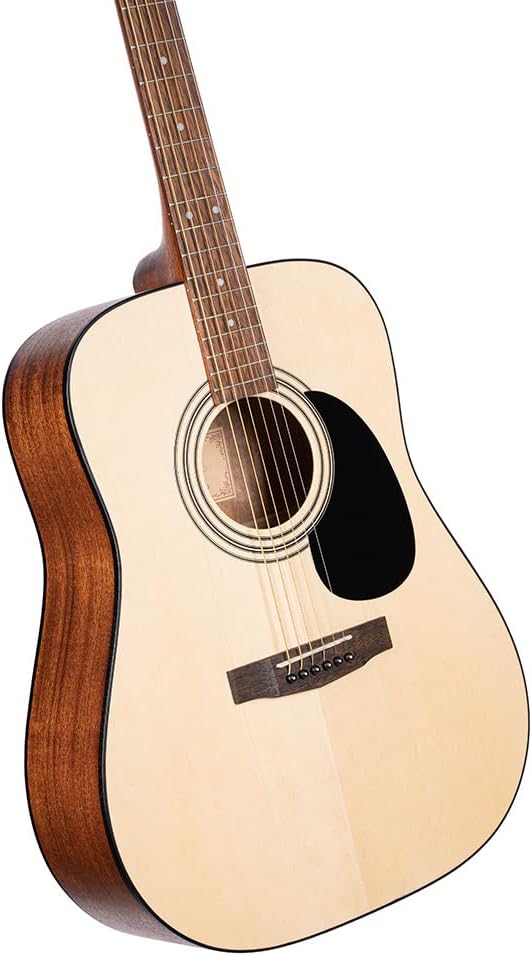
Image: An angled view of the Cort AD810 acoustic guitar, highlighting the smooth finish of the body and soundhole.
String Replacement
Strings should be replaced regularly, typically every 1-3 months depending on usage, or when they sound dull or show signs of corrosion. Replace strings one at a time to maintain neck tension.
Humidity Control
Acoustic guitars are sensitive to humidity changes. Store your guitar in its gig bag when not in use, and consider using a guitar humidifier in dry environments to prevent wood damage.

Image: The back of the Cort AD810 acoustic guitar, showing the mahogany wood grain.
Troubleshooting
- Buzzing Strings:
Ensure you are pressing firmly enough on the strings just behind the fret. Check if the action (string height) is too low. If persistent, consult a guitar technician.
- Guitar Not Staying in Tune:
New strings often stretch and require frequent tuning. Ensure strings are properly wound around tuning pegs. Check for loose tuning machine components. Extreme temperature changes can also affect tuning stability.
- Dull Sound:
Old or corroded strings can cause a dull sound. Replace strings regularly. Ensure the guitar is clean and free of debris.
- Tuner Not Responding:
Check the battery in the Cort E310C tuner. Ensure it is clipped securely to the headstock and the guitar mode is selected.
Specifications
| Feature | Detail |
|---|---|
| Model | CAP10OP (AD810 Guitar) |
| Body Type | Dreadnought |
| Top Material | Spruce Wood |
| Back & Sides Material | Mahogany Wood |
| Neck Material | Mahogany |
| Fretboard Material | Merbau |
| Scale Length | 25.5 inches |
| Number of Strings | 6 |
| String Material | Phosphor Bronze or Bronze |
| Item Weight | 7.7 pounds |
| Product Dimensions | 47.24 x 13.78 x 3.15 inches |
Warranty and Support
For warranty information and technical support, please refer to the official Cort website or contact your authorized Cort dealer. Keep your proof of purchase for warranty claims.
Online resources and additional support may be available at the Cort Store on Amazon.