1. Introduction
The Zenacasa AL-130 is a versatile 2-in-1 device designed for both banknote counting and counterfeit detection. It provides reliable verification for Euro, US Dollar, and British Pound currencies, ensuring the authenticity of banknotes and accurate counting of denominations. This manual provides essential information for the proper setup, operation, and maintenance of your device.

Image: The Zenacasa AL-130 in operation, detecting a 50 Euro banknote.
2. Safety Information
Please read and understand all safety instructions before using the device. Keep this manual for future reference.
- Keep the device away from children.
- Do not attempt to disassemble or repair the device yourself. Refer to qualified service personnel.
- Use only the provided power adapter and batteries.
- Avoid exposing the device to water or excessive moisture.
3. Product Features
The Zenacasa AL-130 offers advanced features for reliable banknote verification:
- 2-in-1 Functionality: Acts as both a banknote counter and a counterfeit detector.
- Multi-Currency Support: Detects and counts Euro, US Dollar, and British Pound banknotes.
- 5 Detection Points: Utilizes multiple security checks for accuracy:
- Ultraviolet (UV) security
- Magnetic (MG) ink quality control
- Infrared (IR) sensor detection
- Dimensional validation
- Paper quality control
- ECB Tested: 100% success rate in European Central Bank (ECB) counterfeit tests for Euro banknotes.
- Portable Design: Compact and durable, suitable for various environments, powered by an adapter or included rechargeable batteries.
- Free Software Updates: Ensures compatibility with new banknote series.

Image: The AL-130 highlighting its dual function as a bill counter and counterfeit detector.
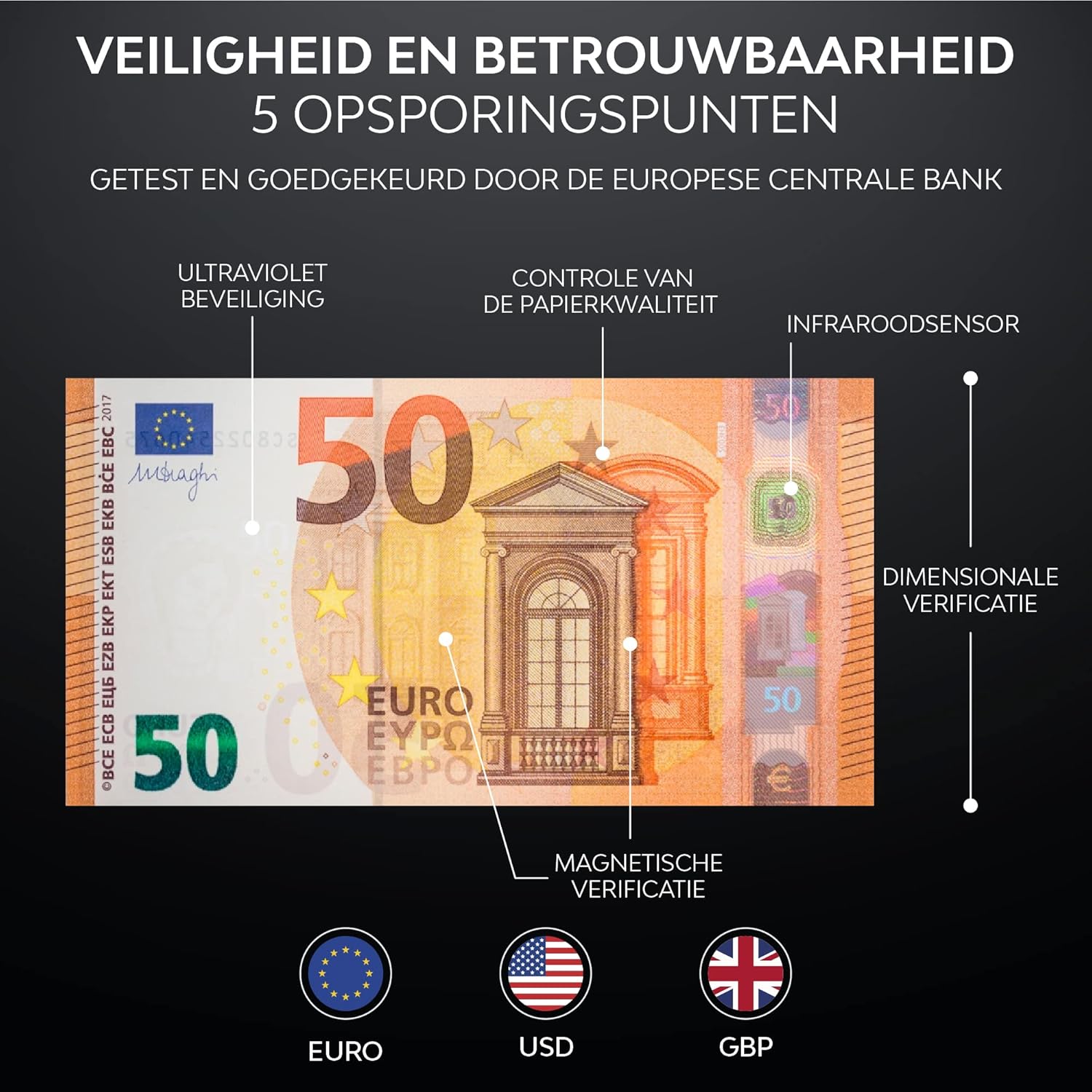
Image: Detailed view of the 5 detection points for security and reliability.
4. Setup
4.1 Unpacking
Carefully remove all components from the packaging. Ensure the following items are present:
- Zenacasa AL-130 Counterfeit Detector
- Power Adapter
- 2 Rechargeable Lithium-ion Batteries
- User Manual
4.2 Battery Installation
The device operates on either the included power adapter or the two rechargeable Lithium-ion batteries. For portable use, install the batteries:
- Locate the battery compartment on the underside of the device.
- Open the compartment cover.
- Insert the two Lithium-ion batteries, ensuring correct polarity.
- Close the battery compartment cover securely.
4.3 Power Connection
Connect the power adapter to the DC input port on the device and then plug it into a standard electrical outlet. The device can be used while charging the batteries.

Image: The portable design of the AL-130, powered by an adapter or rechargeable battery.
5. Operating Instructions
5.1 Powering On/Off
Press the power button (usually indicated by a universal power symbol) to turn the device on or off. The LED display will illuminate upon startup.
5.2 Inserting Banknotes
Insert banknotes one by one into the designated slot. The device accepts banknotes in any orientation. Ensure the banknote is inserted smoothly and fully into the slot for accurate detection and counting.
5.3 Understanding the Display
The LED display provides real-time information:
- Currency Indicator: Shows the detected currency (e.g., EUR, USD, GBP).
- Detection Icons: Displays active detection methods (UV, MG, IR).
- Banknote Count: Shows the number of banknotes processed (PCS).
- Total Value: Displays the cumulative value of detected banknotes.
- Error Codes: Indicates issues or counterfeit detection.
5.4 Currency Selection (CUR/DIR Button)
Use the CUR/DIR button to cycle through available currencies (Euro, US Dollar, British Pound) if manual selection is required, or to change the direction of banknote output if supported.
5.5 Clearing Count (REP/CLR Button)
Press the REP/CLR button to clear the current count and total value on the display, or to repeat the last detection result.
5.6 Counterfeit Detection
If a counterfeit banknote is detected, the device will typically:
- Emit an audible alert.
- Display an error code (e.g., E11) or a clear message indicating a counterfeit.
- Stop processing the banknote, often ejecting it back or holding it in the output tray.

Image: The device indicating a counterfeit banknote with an 'E11 Matching failure' error.
6. Maintenance
6.1 Cleaning the Device
Regular cleaning ensures optimal performance:
- Turn off and unplug the device before cleaning.
- Use a soft, dry cloth to wipe the exterior.
- For the banknote path and sensors, use a soft brush or compressed air to remove dust and debris. Avoid using liquid cleaners directly on sensors.
6.2 Software Updates
The Zenacasa AL-130 supports free software updates to ensure compatibility with new banknote series and improved detection algorithms. Refer to the manufacturer's website or contact customer support for instructions on how to download and install the latest software updates.

Image: The importance of free software updates for long-term reliability.
7. Troubleshooting
If you encounter issues with your Zenacasa AL-130, refer to the following common problems and solutions:
| Problem | Possible Cause | Solution |
|---|---|---|
| Device does not power on | No power, dead batteries, faulty adapter | Check power adapter connection. Ensure batteries are charged or replace them. |
| Banknote rejected / Error code (e.g., E11) | Counterfeit detected, banknote damaged, incorrect insertion, dirty sensors | Remove the rejected banknote. Inspect for damage. Re-insert correctly. Clean sensors as per maintenance section. |
| Inaccurate counting | Dirty sensors, worn banknotes | Clean the sensors. Ensure banknotes are not excessively worn or folded. |
| Device freezes or malfunctions | Temporary software glitch | Turn off the device, wait a few seconds, then turn it back on. |
If the problem persists after attempting these solutions, please contact customer support.
8. Specifications
- Model: AL-130
- Brand: Zenacasa
- Manufacturer: BMS International
- Product Dimensions: 19 x 16 x 14 cm
- Weight: 1.48 kg
- Power Source: AC Adapter, 2 x Lithium-ion Batteries (included)
- Supported Currencies: Euro, US Dollar, British Pound
- Detection Methods: UV, MG, IR, Dimensional, Paper Quality
9. Warranty and Support
9.1 Warranty
The Zenacasa AL-130 comes with a 1-year warranty from the date of purchase. This warranty covers manufacturing defects and malfunctions under normal use. It does not cover damage caused by misuse, accidents, unauthorized repairs, or normal wear and tear.
9.2 Customer Support
For technical assistance, warranty claims, or any questions regarding your Zenacasa AL-130, please contact Zenacasa customer support through the retailer where the product was purchased or visit the official Zenacasa website for contact information.


