
1. Introduction
This manual provides essential information for the safe and efficient use of your Movement V2 Vertical Exercise Bike. It covers assembly, operation, maintenance, and troubleshooting. The V2 bike is designed for effective home fitness, featuring an ergonomic design, intuitive controls, and a magnetic resistance system to enhance your workout experience. Its vertical design promotes intense muscle engagement and cardiovascular benefits.
2. Safety Information
Please read all instructions carefully before using the exercise bike. Retain this manual for future reference.
- Consult a physician before starting any exercise program.
- Ensure all parts are correctly assembled and tightened before each use.
- Place the exercise bike on a flat, stable surface.
- Keep children and pets away from the equipment during use.
- Do not exceed the maximum user weight capacity of 110 kg.
- Wear appropriate exercise clothing and footwear.
- Stop exercising immediately if you feel faint, dizzy, or experience pain.
3. Product Overview
The Movement V2 Vertical Exercise Bike is engineered for comfort and performance. Key features include:
- 3.5-inch LCD Module: Displays essential workout data such as speed, distance, time, heart rate, calories burned, and a scan function.
- 8-Level Magnetic Resistance System: Allows for varied training intensity to suit different fitness levels.
- Anatomical Seat: Designed for comfort during extended workout sessions.
- Multi-Grip Handlebar: Provides various hand positions for different exercise postures.
- Hand Pulse Sensors: Integrated into the handlebars for real-time heart rate monitoring.
- Adjustable Seat Height: Intuitive system to adapt the equipment to various user heights.
- Integrated Water Bottle Holder: Conveniently located for easy access to hydration during workouts.
- Pedals with Foot Straps: Ensure stability and safety, even during high-speed pedaling.
- Transport Wheels: Facilitate easy relocation and storage of the bike.
- Injected Fairing: Provides a low-noise operation and protects internal components from dirt.
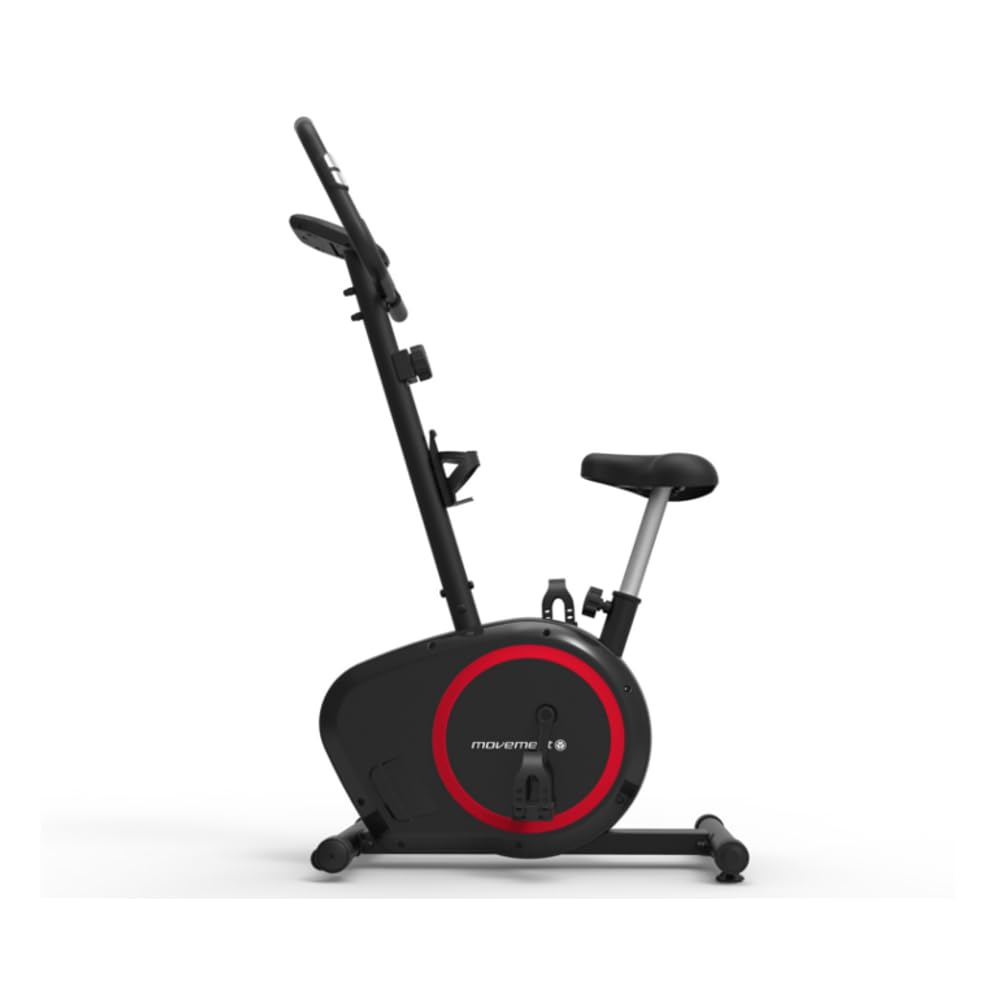
Figure 1: Main view of the Movement V2 Vertical Exercise Bike. This image shows the overall structure, including the seat, handlebars, pedals, and the main resistance unit.
4. Setup
4.1 Assembly
The Movement V2 Vertical Exercise Bike requires assembly. Please refer to the separate assembly guide included with your product for detailed step-by-step instructions. Note: Equipment assembly is not included with purchase.
4.2 Placement
Choose a flat, stable surface for your exercise bike. Ensure there is adequate space around the bike for safe entry and exit, and for comfortable movement during exercise. The integrated transport wheels allow for easy relocation if needed.

Figure 2: Side view of the Movement V2 Vertical Exercise Bike, illustrating its compact design and transport wheels.
4.3 Seat Adjustment
To adjust the seat height, locate the adjustment knob or lever beneath the seat post. Pull or twist it to release the seat, then slide the seat post up or down to your desired height. Ensure your leg has a slight bend at the knee when the pedal is at its lowest point. Securely fasten the adjustment knob/lever before use.
5. Operating Instructions
5.1 Console Functions
The 3.5-inch LCD module provides real-time feedback on your workout. It typically displays the following metrics:
- TIME: Duration of your workout.
- SPEED: Current cycling speed.
- DISTANCE: Total distance covered during the workout.
- CALORIES: Estimated calories burned.
- PULSE: Your heart rate (when holding the hand pulse sensors).
- SCAN: Automatically cycles through all display functions.
Use the buttons below the display (e.g., MODE, SET, RESET) to navigate through functions, set targets, or clear data. Refer to the console-specific instructions in the assembly guide for detailed button functionality.

Figure 3: Close-up of the LCD console display, showing workout metrics and control buttons.
5.2 Adjusting Resistance
The V2 bike features an 8-level magnetic resistance system. To increase or decrease the workout intensity, turn the resistance knob, usually located on the main frame below the handlebars. Turn clockwise to increase resistance and counter-clockwise to decrease it.
5.3 Heart Rate Monitoring
To monitor your heart rate, firmly grasp the hand pulse sensors located on the handlebars. Your heart rate will be displayed on the LCD console after a few seconds. Ensure your hands are clean and dry for accurate readings.
6. Maintenance
Regular maintenance ensures the longevity and optimal performance of your Movement V2 Exercise Bike.
- Cleaning: Wipe down the bike with a damp cloth after each use to remove sweat and dust. Avoid abrasive cleaners or solvents. The injected fairing helps protect against dirt accumulation.
- Inspection: Periodically check all bolts, nuts, and moving parts for tightness and wear. Tighten any loose fasteners.
- Lubrication: The magnetic resistance system is generally maintenance-free. Do not attempt to lubricate internal components unless specifically instructed by the manufacturer.
- Storage: Store the bike in a dry, cool place away from direct sunlight and extreme temperatures. Use the transport wheels to move it easily.
7. Troubleshooting
If you encounter issues with your Movement V2 Exercise Bike, refer to the following common solutions:
- Console not displaying: Check if the batteries are correctly installed and have sufficient charge. Replace batteries if necessary.
- Inaccurate heart rate reading: Ensure your hands are firmly and completely covering the hand pulse sensors. Skin moisture or dryness can affect readings.
- Unusual noise during operation: Check all visible bolts and connections for tightness. Ensure the bike is on a level surface. If the noise persists, contact customer support.
- Resistance not changing: Verify that the resistance knob is functioning correctly and is not stuck.
For issues not covered here, please contact Movement customer support.
8. Specifications
| Feature | Specification |
|---|---|
| Model | V2 |
| Brand | Movement |
| Color | Black/Red |
| Drive System | Belt |
| Material | Carbon Steel |
| Recommended Max User Height | 1.9 Meters |
| Power Source (Console) | Battery |
| Special Features | Ergometric |
| Maximum Weight Capacity | 110 Kilograms |
| Product Dimensions (L x W x H) | 89 x 51 x 132 cm |
| Product Weight | 19 Kilograms |
9. Warranty and Support
9.1 Warranty Information
The Movement V2 Vertical Exercise Bike comes with a manufacturer's warranty of up to 2 years. Please refer to your purchase documentation or the official Movement website for specific terms and conditions of the warranty.
9.2 Customer Support
For technical assistance, spare parts, or warranty claims, please contact Movement customer support directly. Contact information can typically be found on the official Movement website or on your product packaging.