
1. Introduction
This manual provides essential information for setting up, operating, maintaining, and troubleshooting your (Renewed) HP Elite E7100 Intel Core i3-540M Desktop. This product is an Amazon Renewed purchase, ensuring it is fully functional and compatible with accessories, though they may not be original. The unit has been restored to its original factory settings and may show minor signs of prior use. It is packaged in either its original packaging or a new, clean cardboard box.
2. Product Overview
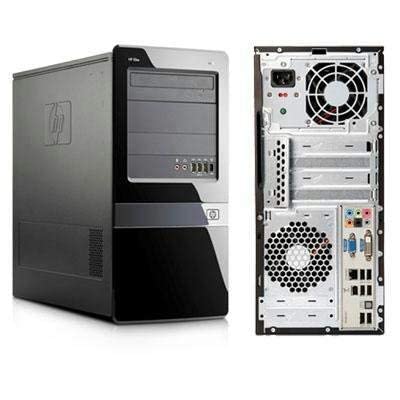
Figure 2.1: Front and rear view of the HP Elite E7100 Desktop. The front panel features optical drive bays and front I/O ports, while the rear panel displays various connectivity options including USB, VGA, DVI, Ethernet, and audio ports.
The HP Elite E7100 is a tower form factor desktop PC designed for reliable performance. It features an Intel Core i3-540M processor, 8GB of DDR3 RAM, and a 500GB HDD, making it suitable for various computing tasks. The system comes preloaded with Windows 10 Pro and MS Office 2019.
3. Setup Guide
Follow these steps to set up your HP Elite E7100 Desktop:
- Unpack Components: Carefully remove the CPU unit, power cord, monitor, keyboard, mouse, and Wi-Fi adapter from their packaging.
- Connect Monitor: Connect your monitor to the desktop using either the VGA or DVI port on the rear panel. Ensure the connection is secure.
- Connect Peripherals:
- Plug the keyboard and mouse into any available USB ports (USB 2.0 or 3.0) on the front or rear of the desktop.
- Connect the Wi-Fi adapter to an available USB port.
- If using wired internet, connect an Ethernet cable to the RJ-45 port.
- For audio, connect headphones or speakers to the appropriate audio jacks.
- Connect Power: Insert the power cord into the power input on the rear of the desktop, then plug the other end into a grounded electrical outlet.
- Power On: Press the power button located on the front of the desktop. The system will boot up, and Windows 10 Pro will load.
4. Operating Instructions
Your HP Elite E7100 Desktop is ready for use upon successful setup. Here are some key operational aspects:
- Operating System: The desktop comes pre-installed with Windows 10 Pro, providing a familiar and robust operating environment.
- Productivity Software: MS Office 2019 is preloaded with a lifetime license, allowing immediate access to essential office applications.
- Connectivity: Utilize the 10 USB ports (a mix of 2.0 and 3.0) for connecting various peripherals. The integrated Wi-Fi adapter provides wireless network access.
- Optical Drive: The integrated DVD R/W Slot allows for reading and writing to optical discs.
- Performance: The Intel Core i3-540 processor and 8GB DDR3 RAM provide sufficient power for everyday tasks, office applications, and multimedia consumption.
- Storage: The 500GB 7200 RPM SATA HDD offers ample storage space and fast data access. Additional slots are available for future storage expansion (HDD/SSD).
5. Maintenance
Regular maintenance helps ensure the longevity and optimal performance of your desktop:
- Keep Clean: Regularly clean the exterior of the desktop with a soft, dry cloth. Use compressed air to clear dust from vents and fans to prevent overheating. Ensure the system is powered off and unplugged before cleaning.
- Software Updates: Keep your Windows operating system and all installed software updated to the latest versions to ensure security and performance.
- Antivirus Protection: Maintain up-to-date antivirus software to protect against malware and viruses.
- Data Backup: Periodically back up important data to an external drive or cloud storage to prevent data loss.
- Proper Shutdown: Always shut down the computer properly through the operating system rather than simply unplugging it.
6. Troubleshooting
This section addresses common issues you might encounter with your HP Elite E7100 Desktop.
| Problem | Possible Cause | Solution |
|---|---|---|
| Computer does not power on. | Power cord loose; power outlet issue; power supply failure. | Ensure power cord is securely connected to both the desktop and the wall outlet. Test the outlet with another device. |
| No display on monitor. | Monitor not connected; monitor off; incorrect input source. | Check monitor power and video cable connections. Ensure monitor is set to the correct input (VGA/DVI). |
| No internet connection. | Wi-Fi adapter not installed/configured; router issue; network driver issue. | Verify Wi-Fi adapter is properly connected and drivers are installed. Restart your router. Check network settings in Windows. |
| System is slow or unresponsive. | Too many programs running; low disk space; malware. | Close unnecessary applications. Free up disk space. Run a full antivirus scan. Consider restarting the system. |
7. Specifications
Detailed technical specifications for the HP Elite E7100 Desktop:
| Brand | HP |
| Model Name | Hp Elite E7100-cr |
| Form Factor | Tower |
| Processor Brand | Intel |
| Processor Type | Core i3-540M |
| Processor Speed | 2.8 GHz |
| RAM Size | 8 GB |
| Memory Technology | DDR3 |
| Memory Slots Available | 2 |
| Hard Drive Size | 500 GB |
| Hard Disk Rotational Speed | 7200 RPM |
| Graphics Coprocessor | Intel HD Graphics 2000 |
| Operating System | Windows 10 Pro (Preloaded) |
| USB Ports | 10 (mix of 2.0/3.0) |
| Video Output | VGA, DVI |
| Network Connectivity | RJ-45 Ethernet, Wi-Fi (via adapter) |
| Audio | Microphone/Headphone Jack, Line In/Out |
| Included Components | CPU, Power Cord, Monitor, Keyboard, Wi-Fi Adapter, Mouse |
| Product Dimensions | 17.78 x 36.83 x 49.02 cm |
| Item Weight | 5 kg |
8. Warranty and Support
Your (Renewed) HP Elite E7100 Desktop is backed by the Amazon Renewed Guarantee, ensuring your satisfaction with the product's functionality and condition.
- Warranty: This product includes a 6-Month Warranty Care. Please refer to the Amazon.in Return Policy for detailed terms and conditions regarding renewed products.
- Support: For technical assistance, troubleshooting beyond this manual, or warranty claims, please contact Amazon Renewed customer support through your Amazon account or visit the Amazon Renewed Store page for contact information.