
1. Introduction
This manual provides comprehensive instructions for the installation, operation, and maintenance of the FTVOGUE A2-8015 Variable Frequency Drive (VFD). The A2-8015 is a high-performance inverter designed for precise motor speed control, offering high torque, accuracy, and a wide speed regulation range. It is suitable for various industrial applications requiring efficient and reliable motor management.
2. Safety Information
WARNING: Improper installation or operation can result in serious injury or equipment damage. Read this manual thoroughly before installation and operation.
- Ensure all power is disconnected before performing any wiring or maintenance.
- Only qualified personnel should install, operate, and maintain this device.
- Verify input voltage and current ratings match the VFD specifications.
- Ground the VFD properly to prevent electrical shock.
- Do not touch internal components immediately after power-off, as residual voltage may be present.
- Protect the VFD from moisture, dust, corrosive gases, and direct sunlight.
3. Product Overview
3.1 Features
- Constructed from industrial ABS plastic, offering heat resistance, flame retardancy, and impact safety.
- User-friendly design with a humanized keyboard and clear display for ease of operation.
- Efficient heat dissipation system featuring a large aluminum base and a powerful fan for strong airflow.
- Simple wiring and operation, ensuring quick start and stop responses.
- High precision and strong anti-interference capabilities for enhanced stability.
- Suitable for a wide range of applications including spindle motors, lathes, milling machines, pumps, treadmills, conveyors, winding machines, mixers, extruders, separators, compressors, fans, elevators, centrifuges, and other machinery.
3.2 Product Views and Dimensions

Figure 1: FTVOGUE A2-8015 VFD showing approximate dimensions (140mm x 115mm x 80mm).
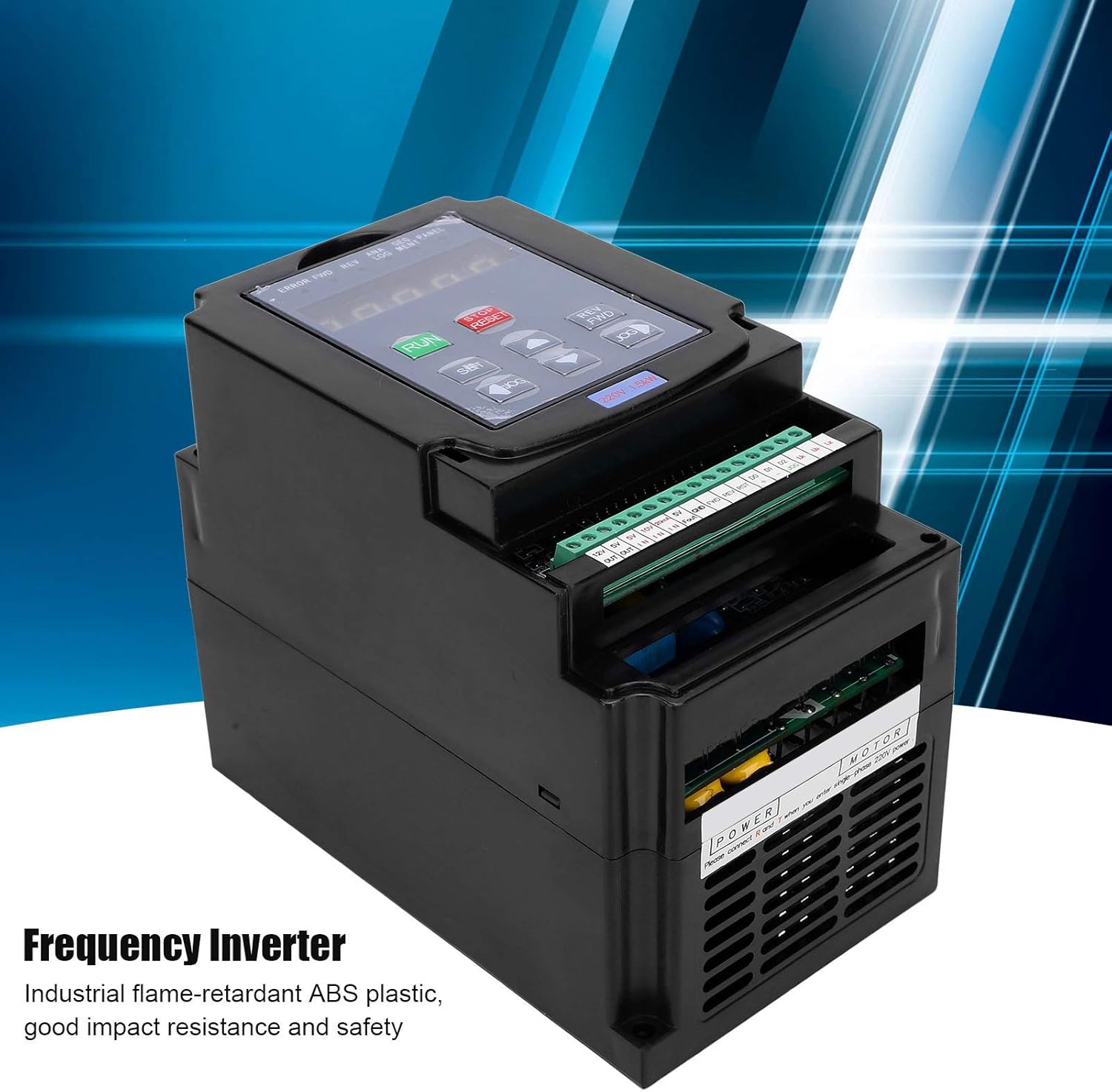
Figure 2: Front view of the FTVOGUE A2-8015 Variable Frequency Drive, highlighting its industrial design and control panel.
4. Specifications
| Parameter | Value |
|---|---|
| Model | A2-8015 |
| Material | Industrial ABS Plastic Shell |
| Input Voltage | 1-Phase / 3-Phase AC 180-250V |
| Input Current | 7.5 A |
| Input Frequency | 40-60 Hz |
| Output Voltage | 3-Phase 220V |
| Output Current | 10 A |
| Output Frequency Range | 0-400 Hz |
| Power | 1.5 kW |
| Applicable Motor Voltage | 180-250 V |
| Approximate Dimensions (L x W x H) | 140 mm x 115 mm x 80 mm (5.5 x 4.5 x 3.1 inches) |
| Item Weight | 1017 Grams |
| Manufacturer | FTVOGUE |
| Country of Origin | China |
5. Setup
5.1 Installation Environment
- Install the VFD in a well-ventilated area, free from direct sunlight, excessive dust, moisture, and corrosive gases.
- Ensure adequate clearance around the unit for proper heat dissipation.
- Mount the VFD vertically on a stable, non-flammable surface.
- Operating temperature range: -10°C to 40°C.
- Humidity: Less than 90% RH (non-condensing).
5.2 Wiring Instructions
Refer to the wiring diagram below for proper electrical connections. Ensure all connections are secure and comply with local electrical codes.

Figure 3: Detailed wiring diagram for the FTVOGUE A2-8015 VFD, showing main power, motor output, and control signal connections.
Terminal Descriptions:
| Port Name | Description |
|---|---|
| R, S, T | Three-phase 220V power input. For single-phase 220V input, connect to R and T. |
| U, V, W | Three-phase AC output ports. Connect only to pure resistance or inductance loads such as motors or electric heaters. |
| RUN | Run command input. |
| REV | Reverse command input. |
| STOP | Stop command input. |
| D0-D2 | Multi-speed digital inputs. |
| JOG | Jogging command input. |
| GND | Common control signal ground. |
| 5V_IN, 10V_IN, 0-20mA_IN | External analog signal inputs (0-5V, 0-10V, 0-20mA). |
| 5V_OUT, 12V_OUT | 5V and 12V power outputs for external control components. |
| Relay Output (Normally Open/Closed) | Programmable relay output for status indication or control. |
6. Operating Instructions
The FTVOGUE A2-8015 VFD features a user-friendly control panel for easy operation. Specific parameter settings may vary based on application requirements. Refer to the detailed programming manual (if available) for advanced configurations.
6.1 Control Panel Overview

Figure 4: Top-down view of the FTVOGUE A2-8015 VFD, showing the control panel with buttons and display.
6.2 Basic Operation
- Power On: After ensuring all wiring is correct and secure, apply power to the VFD. The display will illuminate.
- Start Motor: Press the RUN button on the control panel to start the motor.
- Adjust Speed: Use the UP and DOWN arrow buttons to adjust the output frequency and thus the motor speed.
- Stop Motor: Press the STOP/RESET button to stop the motor.
- Reverse Direction: If configured, use the REV button or corresponding digital input to change the motor's rotation direction.
- Parameter Setting: Press the SET button to enter the parameter setting mode. Use the arrow keys to navigate and adjust parameters. Press SET again to confirm changes.
7. Maintenance
Regular maintenance ensures optimal performance and extends the lifespan of your VFD.
- Daily Inspection: Check for any unusual noises, vibrations, or odors. Monitor the display for error codes.
- Weekly Cleaning: Keep the VFD clean and free from dust and debris. Use a soft, dry cloth. Ensure ventilation openings are clear.
- Monthly Check: Inspect all wiring connections for tightness. Check for any signs of overheating or discoloration on terminals.
- Annual Inspection: Have a qualified technician inspect the internal components, including capacitors and cooling fans, for wear and tear.
- Environmental Control: Maintain the recommended operating environment to prevent premature component failure.
8. Troubleshooting
This section provides solutions to common issues. For problems not listed here, contact technical support.
| Problem | Possible Cause | Solution |
|---|---|---|
| Motor does not start | No power, incorrect wiring, emergency stop active, parameter error. | Check power supply, verify wiring, release emergency stop, check motor parameters. |
| VFD displays an error code | Overcurrent, overvoltage, undervoltage, overheating, motor overload. | Refer to the VFD's specific error code list (not provided in this manual) for diagnosis and corrective actions. Address the underlying cause (e.g., reduce load, check input voltage). |
| Motor speed is unstable | Poor grounding, motor parameters incorrect, external interference. | Ensure proper grounding, verify motor parameters (e.g., rated frequency, voltage), check for sources of electromagnetic interference. |
| VFD overheats | Insufficient ventilation, ambient temperature too high, VFD overloaded. | Improve ventilation, reduce ambient temperature, check motor load and VFD capacity. Clean cooling fins. |
9. Warranty and Support
FTVOGUE products undergo strict quality control and assurance processes to ensure high safety and reliability. Specific warranty terms and conditions are typically provided at the point of purchase or with the product packaging.
For technical support, service, or warranty claims, please contact your retailer or the manufacturer directly. Ensure you have your product model number (A2-8015) and purchase details available when seeking assistance.