
Arovec AV-P152B-R1
Arovec H13 True HEPA Air Purifier User Manual
Model: AV-P152B-R1
Introduction
Thank you for choosing the Arovec H13 True HEPA Air Purifier. This manual provides important information regarding the safe operation, maintenance, and troubleshooting of your air purifier. Please read it thoroughly before use and retain it for future reference.
The Arovec H13 True HEPA Air Purifier is designed to improve indoor air quality by filtering out harmful airborne pollutants, including dust, pollen, odors, allergens, pet dander, and smoke. Its 3-stage filtration system ensures a cleaner and healthier environment for you and your family.
Safety Instructions
To reduce the risk of fire, electric shock, or injury, please observe the following safety precautions:
- Always unplug the air purifier before moving it, cleaning it, or performing any maintenance.
- Do not operate the air purifier if the cord or plug is damaged.
- Keep the air purifier away from water or other liquids. Do not immerse it in water.
- Do not block air inlets or outlets. Ensure adequate space around the unit for proper airflow.
- This appliance is not intended for use by persons (including children) with reduced physical, sensory or mental capabilities, or lack of experience and knowledge, unless they have been given supervision or instruction concerning use of the appliance by a person responsible for their safety.
- Do not use the air purifier in environments with high humidity, such as bathrooms.
- Do not use abrasive cleaners or flammable liquids to clean the unit.
- Only use genuine Arovec replacement filters.
Product Overview
Components
The Arovec H13 True HEPA Air Purifier consists of the main unit, a power cord, and a multi-stage filter system.
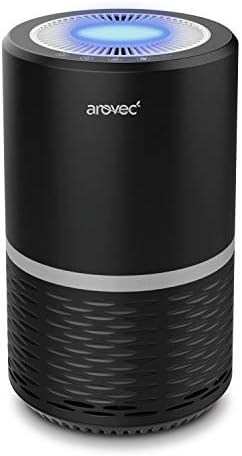
Figure 1: Arovec H13 True HEPA Air Purifier. This image shows the compact black cylindrical air purifier with a blue light emanating from the top air outlet, indicating operation.
Control Panel and Indicators
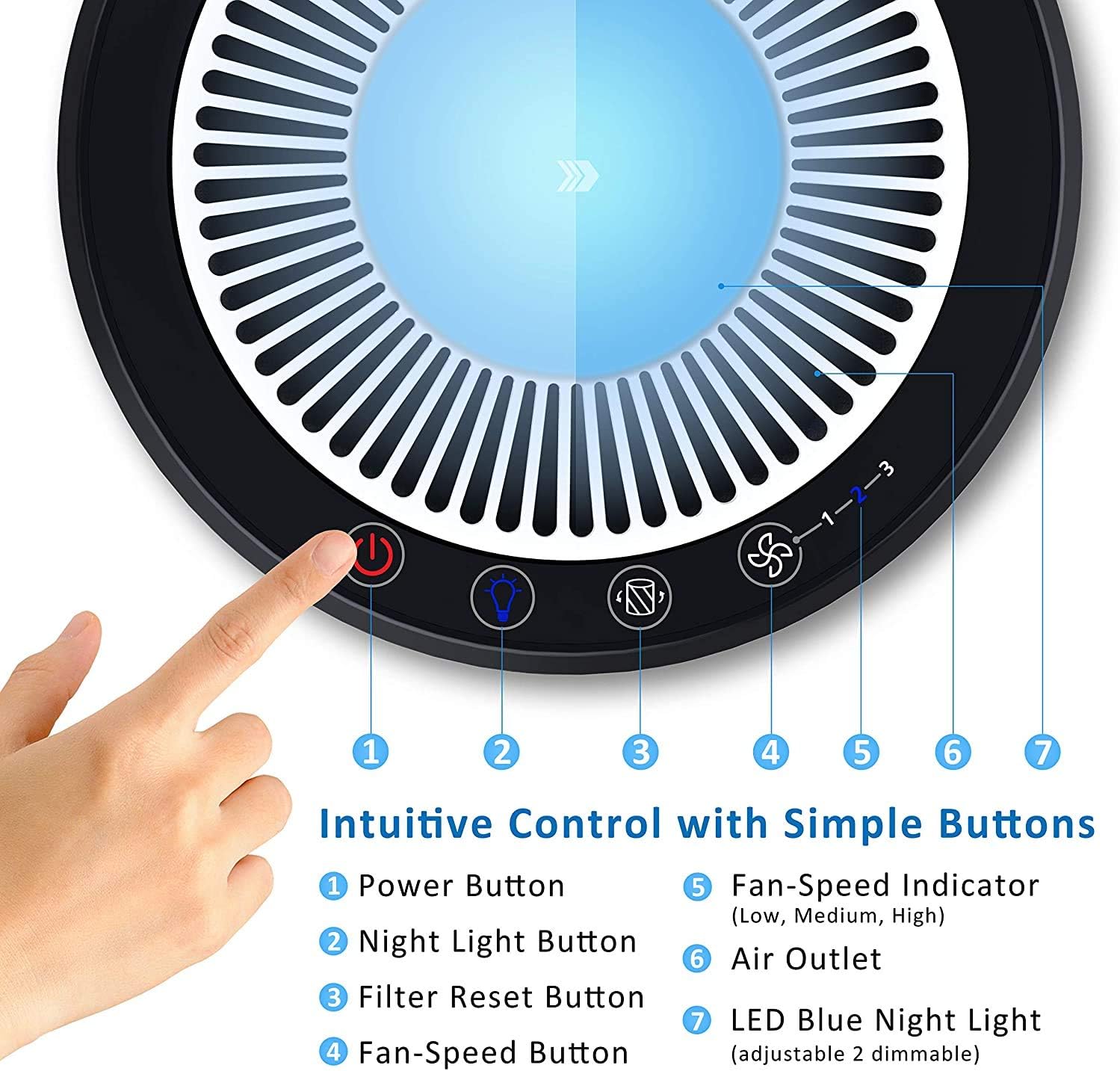
Figure 2: Intuitive Control Panel. This image details the top control panel of the air purifier, showing the power button, night light button, filter reset button, fan speed button, fan speed indicator (1-3), air outlet, and LED blue night light.
- Power Button: Turns the unit on or off.
- Night Light Button: Activates or deactivates the night light function.
- Filter Reset Button: Resets the filter replacement indicator after a new filter is installed.
- Fan-Speed Button: Cycles through fan speeds (Low, Medium, High).
- Fan-Speed Indicator: Displays the current fan speed setting (1, 2, or 3).
- Air Outlet: Where purified air is released.
- LED Blue Night Light: Provides ambient lighting.
3-Stage Filtration System

Figure 3: 3-Stage Filtration System. This diagram illustrates the layers of the filter: a Fine Preliminary Filter at the bottom, followed by a True HEPA Filter, and an Activated Carbon Filter at the top, demonstrating how air passes through each stage for purification.
- Fine Preliminary Filter: Captures large particles such as dust, lint, fibers, and pet fur, extending the life of the other filters.
- True HEPA Filter: Traps 99.97% of airborne particles as small as 0.3 microns, including pollen, dust mites, mold spores, and pet dander.
- Activated Carbon Filter: Absorbs odors from pets, cooking, smoke, and harmful VOCs (Volatile Organic Compounds).
Setup
- Unpack: Carefully remove the air purifier and all packaging materials from the box.
- Filter Installation: Before first use, ensure the filter is properly installed and any plastic packaging around it is removed. Refer to the "Maintenance" section for detailed filter installation instructions.
- Placement: Place the air purifier on a firm, level surface. Ensure there is at least 15 cm (6 inches) of space around all sides of the unit for optimal airflow. Avoid placing it near heat sources or in direct sunlight.
- Power Connection: Plug the power cord into a standard electrical outlet.
Operating Instructions
- Power On/Off: Press the Power Button (1) to turn the air purifier on or off. The unit will start at the lowest fan speed.
- Adjust Fan Speed: Press the Fan-Speed Button (4) repeatedly to cycle through the fan speeds: Low (1), Medium (2), High (3). The corresponding indicator light (5) will illuminate.
- Night Light Function: Press the Night Light Button (2) to turn the LED blue night light (7) on or off. This function operates independently of the air purification.
- Optimal Use: For best results, operate the air purifier in an enclosed room. Keep windows and doors closed while the unit is running.
Maintenance
Regular maintenance ensures optimal performance and extends the lifespan of your air purifier.
Filter Replacement
The filter should be replaced every 4 to 6 months, depending on usage and air quality. A filter replacement indicator light may illuminate when replacement is due.
- Unplug: Always unplug the air purifier from the power outlet before replacing the filter.
- Remove Base: Turn the unit upside down. Twist the base cover counter-clockwise to unlock and remove it.
- Remove Old Filter: Carefully pull out the old filter.
- Install New Filter: Insert the new Arovec replacement filter into the unit, ensuring it is seated correctly.
- Replace Base: Place the base cover back on and twist clockwise to lock it securely.
- Reset Filter Indicator: Plug the unit back in. With the unit powered on, press and hold the Filter Reset Button (3) for 3-5 seconds until the indicator light turns off.
Cleaning the Air Purifier
- Exterior: Wipe the exterior of the air purifier with a soft, dry cloth. Do not use abrasive cleaners or solvents.
- Air Inlets/Outlets: Use a soft brush or vacuum cleaner with a brush attachment to gently clean dust from the air inlets and outlets.
- Pre-filter: The preliminary filter can be gently vacuumed to remove larger particles between full filter replacements. Do not wash the filter.
Troubleshooting
| Problem | Possible Cause | Solution |
|---|---|---|
| Air purifier does not turn on. | Not plugged in; Power outage; Damaged power cord. | Ensure the power cord is securely plugged into a working outlet. Check the circuit breaker. Contact customer support if the cord is damaged. |
| Weak airflow or no air coming out. | Blocked air inlets/outlets; Clogged filter; Incorrect filter installation. | Check for obstructions around the unit. Clean the pre-filter. Ensure the filter is installed correctly and remove any plastic packaging. Replace filter if heavily soiled. |
| Unusual noise. | Filter not seated properly; Foreign object inside; Unit not on a level surface. | Ensure the filter is securely in place. Unplug and check for any foreign objects. Place the unit on a stable, flat surface. |
| Odor persists or air quality not improving. | Filter needs replacement; Room size too large; Strong odor source. | Replace the filter. Ensure the room size is within the recommended effective area (up to 15 square meters). Identify and remove the source of the strong odor if possible. |
Specifications
| Feature | Detail |
|---|---|
| Brand | Arovec |
| Model Number | AV-P152B-R1 |
| Colour | Black |
| Product Dimensions | 20 x 20 x 32 cm (D x W x H) |
| Item Weight | 2.5 kg |
| Noise Level | 30 dB (at lowest setting) |
| Filter Type | H13 True HEPA, Activated Carbon, Fine Preliminary |
| Effective Room Size | Up to 15 square meters |
| Power Source | Corded Electric |
Warranty and Support
Arovec offers a 6-Month Warranty for this product, ensuring quality and peace of mind. For any inquiries, technical assistance, or warranty claims, please contact Arovec customer support.
Arovec is proudly Australian owned and operated, committed to providing helpful customer support services for the lifetime of your product.
For support, please refer to the contact information provided on the product packaging or the official Arovec website.