
Nilox NXBK041
Nilox Backpack 15.6" Style Black Instruction Manual
Model: NXBK041
Product Overview
The Nilox Backpack 15.6" Style Black is designed for daily use, offering practical storage and comfortable carrying for laptops up to 15.6 inches and other essentials. Its durable construction and thoughtful design make it suitable for various activities, from commuting to casual travel.

Front view of the Nilox backpack, showcasing the main zipper and front pocket.

Angled view of the Nilox backpack, highlighting its profile and side mesh pocket.

Rear view of the Nilox backpack, showing the padded back panel and adjustable shoulder straps.
Key Features
- Spacious main compartment designed to fit laptops up to 15.6 inches.
- Multiple pockets for organized storage of accessories, documents, and personal items.
- Adjustable shoulder straps for comfortable carrying.
- Durable material construction for long-lasting use.
- Integrated USB charging port for convenient device charging on the go (power bank not included).

Interior view of the backpack's front pocket, showing organizational slots for sunglasses, a phone, and pens.

Overhead view of the backpack with a laptop, pens, and sunglasses laid out next to it, demonstrating its capacity.
Setup
- Unpacking: Carefully remove the backpack from its packaging. Inspect for any shipping damage.
- Adjusting Shoulder Straps: Place the backpack on your back. Use the adjustable buckles on the shoulder straps to achieve a comfortable fit. The top of the backpack should sit comfortably on your upper back, and the weight should be evenly distributed.
- Utilizing Laptop Compartment: Open the main zipper. Carefully slide your laptop (up to 15.6 inches) into the dedicated padded compartment. Ensure it fits snugly to prevent movement during transport.
- Connecting USB Charging Port: Locate the internal USB cable inside the backpack. Connect your portable power bank (not included) to this cable. The external USB port on the side of the backpack will then be ready for charging your devices.

Close-up of a hand connecting a USB cable to the internal port within the backpack.

Another close-up of the internal USB cable connection point.
Operating Instructions
- Carrying the Backpack: Always use both shoulder straps for balanced weight distribution and comfort, especially when carrying heavy loads.
- Organizing Contents: Utilize the various internal and external pockets to keep your items organized and easily accessible. The front zippered pocket is ideal for smaller items like pens, keys, or a phone.
- Using the USB Charging Port: Once your power bank is connected internally, plug your device's charging cable into the external USB port on the side of the backpack to charge your smartphone, tablet, or other USB-powered devices.
- Securing Zippers: Ensure all zippers are fully closed when carrying the backpack to prevent items from falling out.
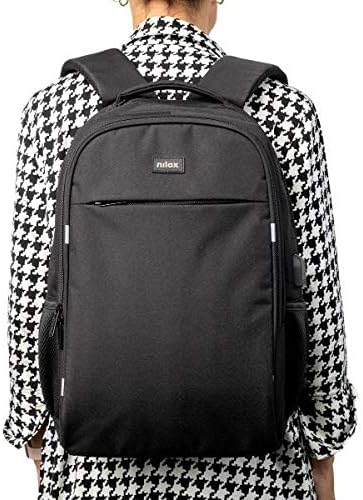
A person wearing the Nilox backpack, showing its fit and size on a user.

A person wearing the backpack and connecting a charging cable to the external USB port, demonstrating its use.
Maintenance
- Cleaning: For general cleaning, wipe the backpack with a damp cloth and mild soap. Do not machine wash or tumble dry. Allow to air dry completely.
- Spot Cleaning: For stubborn stains, use a soft brush with a small amount of mild detergent. Rinse thoroughly with a damp cloth and air dry.
- Storage: Store the backpack in a cool, dry place away from direct sunlight when not in use.
- Zipper Care: Periodically check zippers for any debris. If a zipper becomes stiff, apply a small amount of zipper lubricant or wax.
Troubleshooting
| Problem | Possible Cause | Solution |
|---|---|---|
| USB port not charging device. | Power bank not connected or discharged; faulty cable. | Ensure power bank is fully charged and properly connected to the internal cable. Try a different charging cable for your device. |
| Zipper is stuck or difficult to move. | Fabric caught in zipper; lack of lubrication. | Gently pull fabric away from the zipper teeth. Apply a small amount of zipper lubricant (e.g., wax, silicone spray) to the teeth. |
| Backpack feels uncomfortable or heavy. | Improper strap adjustment; uneven weight distribution. | Adjust shoulder straps to ensure a snug fit and even weight distribution. Distribute contents evenly within the compartments. |
Specifications
- Brand: Nilox
- Model Number: NXBK041
- Color: No Colour (Black)
- Standing Screen Display Size: 15.6 Inches (for laptop compartment)
- Item Weight: 1.32 pounds
- Product Dimensions (LxWxH): 3.23 x 19.88 x 14.25 inches
- Department: Mens
- First Available Date: February 26, 2021
Warranty and Support
For warranty information and customer support, please refer to the documentation included with your purchase or visit the official Nilox website. Keep your proof of purchase for any warranty claims.
Manufacturer: NILOX
Ask a question about this manual
Ask about setup, troubleshooting, compatibility, parts, safety, or missing instructions. Manuals+ will review the question and use this page’s manual context to help answer it.