
LG WT7305CV
LG 4.8 cu. ft. Mega Capacity Smart wi-fi Enabled Top Load Washer
Model: WT7305CV
Introduction
This manual provides essential information for the safe and efficient operation, maintenance, and troubleshooting of your LG 4.8 cu. ft. Mega Capacity Smart wi-fi Enabled Top Load Washer. Please read this manual thoroughly before using the appliance and retain it for future reference.
Your LG washer features a 4.8 cu. ft. mega capacity, a 4-way agitator, TurboWash3D™ and 6Motion™ Technologies for a thorough yet gentle clean. It also includes Smart Pairing™ and ThinQ® Technology with ThinQ Care for enhanced convenience and smart diagnostics.

Figure 1: Front view of the LG 4.8 cu. ft. Mega Capacity Top Load Washer. This image displays the sleek Graphite Steel finish and the control panel located at the rear of the top surface.
Setup and Installation
Proper installation is crucial for the performance and longevity of your washer. Ensure the appliance is installed on a solid, level surface and that all connections are secure.
Unpacking and Location
- Remove all packaging materials, including the base packaging and any internal packing.
- Choose a location with adequate space, a grounded electrical outlet, and access to hot and cold water supply lines.
- Ensure the floor is strong enough to support the washer's weight, especially when filled with water and laundry.
- Product Dimensions (WxHxD): 27" x 44 1/2" x 28 3/8" (57 1/4" H with lid open). Allow additional space for water hoses and proper ventilation.
Connecting Water Hoses
Connect the hot and cold water inlet hoses to the corresponding valves on the back of the washer and to your household water supply. Ensure rubber washers are inserted into the hose connectors to prevent leaks.
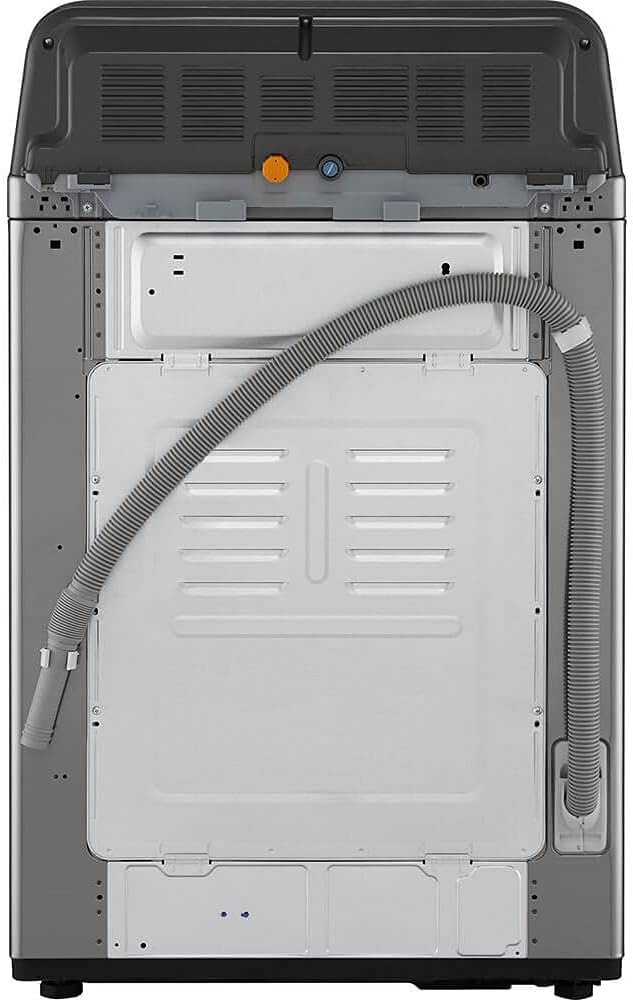
Figure 2: Rear view of the washer, highlighting the water inlet connections (hot and cold) and the drain hose. Proper connection is essential for preventing leaks and ensuring efficient operation.
Leveling the Washer
Use a level to ensure the washer is perfectly level from front to back and side to side. Adjust the leveling feet at the bottom of the washer as needed. A properly leveled washer reduces noise and vibration during operation.
Electrical Connection
The washer requires a 120V @ 60Hz electrical supply. Ensure the outlet is properly grounded and meets local electrical codes.
Operating Instructions
Familiarize yourself with the control panel and various wash cycles to optimize your laundry experience.
Control Panel Overview

Figure 3: Detailed view of the control panel, featuring the central Dial-A-Cycle™ knob, touch buttons for various options, and the digital display.
The control panel features a central Dial-A-Cycle™ knob for selecting wash programs and touch buttons for additional options and settings. The digital display shows cycle status, remaining time, and error codes.
Loading Laundry
Load items loosely into the drum, ensuring not to overload the washer. The 4.8 cu. ft. mega capacity allows for larger loads, but proper loading ensures effective cleaning and prevents imbalance.
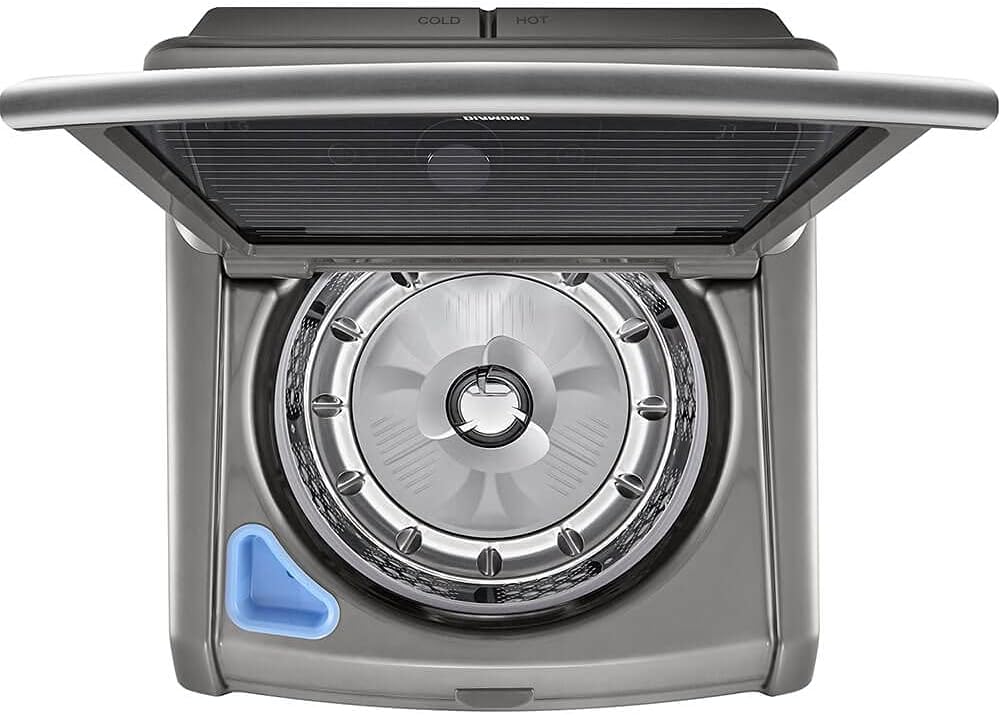
Figure 4: View into the washer drum, showing the stainless steel interior and the central agitator. This design facilitates the 4-way wash action for thorough cleaning.
Adding Detergent and Additives
Use the 3-tray dispenser for detergent, fabric softener, and bleach. Refer to the detergent manufacturer's instructions for recommended amounts.

Figure 5: The 3-tray dispenser for detergent, fabric softener, and bleach, designed for easy access and proper dispensing during the wash cycle.
Selecting a Wash Program
Turn the Dial-A-Cycle™ knob to select from 8 available wash programs:
- Normal
- Heavy Duty
- Bedding
- Deep Wash
- Pre Wash + Normal
- Delicates
- Waterproof
- Downloaded (via ThinQ App)
Customizing with Options
Enhance your wash cycle with 16 available options, including:
- TurboWash™: For faster wash times.
- Soak: For heavily soiled items.
- Deep Fill: Adds extra water to any cycle.
- ColdWash™: Optimized for cold water cleaning.
- Remote Start: Control your washer remotely via Wi-Fi.
- Control Lock: Prevents accidental changes to settings.
- Tub Clean: For periodic cleaning of the wash tub.
Smart Features (ThinQ® Technology)
Your washer is equipped with LG ThinQ® technology, allowing you to control and monitor your appliance remotely using the ThinQ app on your smartphone. Features include:
- Remote Start and Cycle Monitor: Start or pause cycles, check remaining time from anywhere.
- ThinQ Care: Receive proactive smart alerts, usage notifications, maintenance tips, and early diagnosis.
- Smart Pairing™: If you have a compatible LG smart dryer, the washer can communicate with it to select an optimal drying cycle.
Maintenance
Regular maintenance helps ensure optimal performance and extends the life of your LG washer.
Cleaning the Dispenser Drawers
Periodically remove and clean the detergent and fabric softener dispenser drawers to prevent residue buildup. Rinse them under warm water and dry thoroughly before reinserting.
Tub Clean Cycle
Run the "Tub Clean" cycle regularly (e.g., once a month) to remove detergent residue and buildup from the washer tub. Follow the instructions on the control panel for this cycle.
Exterior Cleaning
Wipe down the exterior of the washer with a soft, damp cloth. Avoid abrasive cleaners or solvents that could damage the finish.
Water Inlet Filters
Inspect the water inlet filters on the back of the washer periodically for clogs. If clogged, turn off the water supply, disconnect the hoses, and clean the filters with a small brush or pliers.
Troubleshooting
This section addresses common issues you might encounter with your washer. For more complex problems, refer to the ThinQ app's SmartDiagnosis™ feature or contact customer support.
| Problem | Possible Cause | Solution |
|---|---|---|
| Washer does not start | Power cord unplugged; Door not closed properly; Control Lock activated. | Ensure power cord is securely plugged in; Close the lid firmly; Deactivate Control Lock. |
| Washer vibrates or is noisy | Washer not level; Shipping bolts not removed; Overloaded or unbalanced load. | Adjust leveling feet; Ensure all shipping bolts are removed (if new installation); Redistribute laundry evenly in the drum. The TrueBalance™ Anti-Vibration System helps, but proper loading is key. |
| Water leaks | Loose hose connections; Clogged drain hose; Too much detergent causing oversudsing. | Check and tighten all water hose connections; Clear any obstructions from the drain hose; Use only recommended amounts of HE (High Efficiency) detergent. |
| Clothes are still wet after spin cycle | Overloaded drum; Unbalanced load; Drain hose kinked or clogged. | Reduce load size; Redistribute load; Check drain hose for kinks or blockages. |
SmartDiagnosis™
Your LG washer is equipped with SmartDiagnosis™ (3.0) technology. If you experience an issue, you can use the ThinQ app to record and send diagnostic information to LG customer service, allowing for quicker and more accurate troubleshooting.
Specifications
| Feature | Detail |
|---|---|
| Brand | LG |
| Model Number | WT7305CV |
| Capacity | 4.8 cu. ft. |
| Type | Top Load Washer with Agitator |
| Color | Graphite Steel |
| Material | Stainless Steel Drum |
| Max Spin Speed | 950 RPM |
| Wash Programs | 8 (Normal, Heavy Duty, Bedding, Deep Wash, Pre Wash+ Normal, Delicates, Waterproof, Downloaded) |
| Wash/Rinse Temps | 5 (Hot, Warm, Semi Warm, Cold, Tap Cold) |
| Spin Speeds | 5 (Extra High, High, Medium, Low, No Spin) |
| Special Features | TurboWash3D™, 6Motion™, Smart Pairing™, ThinQ® Technology, ColdWash™, SlamProof™ Lid, TrueBalance™ Anti-Vibration System, SmartDiagnosis™ |
| Electrical Requirements | 120V @ 60Hz |
| Product Dimensions (WxHxD) | 27" x 44 1/2" x 28 3/8" |
Warranty and Support
Limited Warranty
Your LG washer is covered by a limited warranty from the date of purchase:
- Parts and Labor: 1 Year
- Direct Drive Motor: 10 Years
- Drum: 3 Years
Please retain your proof of purchase for warranty service. For full warranty terms and conditions, refer to the warranty card included with your appliance or visit the official LG website.
Customer Support
For technical assistance, service inquiries, or to utilize the SmartDiagnosis™ feature, please contact LG Customer Service. You can also find helpful resources and FAQs on the LG website.
Utilize the LG Store on Amazon for additional product information and accessories.