
Hyper Tough 850012074069
Hyper Tough 500 Lumen Outdoor LED Solar Motion Pathway Light Instruction Manual
Model: 850012074069
1. Introduction
Thank you for choosing the Hyper Tough 500 Lumen Outdoor LED Solar Motion Pathway Light. This manual provides important information regarding the installation, operation, and maintenance of your new solar light. Please read it thoroughly before use and retain it for future reference.
This solar pathway light is designed for outdoor use, providing efficient and automatic illumination for pathways, driveways, and other outdoor areas. It features a high-efficiency solar panel, super-bright LEDs, and a motion sensor for enhanced security and energy saving.
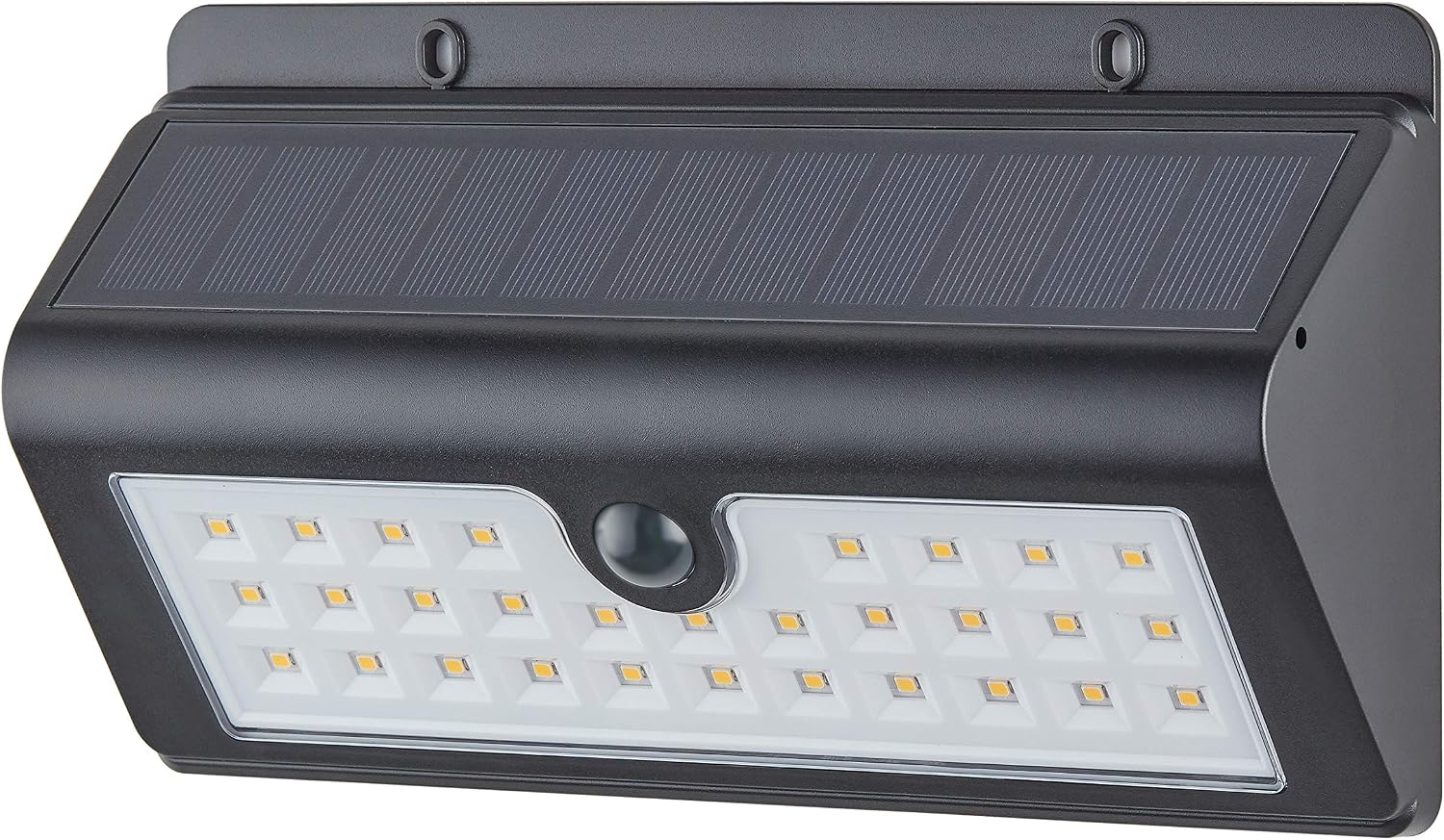
Figure 1.1: Front view of the Hyper Tough 500 Lumen Outdoor LED Solar Motion Pathway Light, showing the LED array, motion sensor, and solar panel.
2. Safety Information
Please observe the following safety precautions to prevent injury or damage to the product:
- Do not disassemble or modify the light. This may cause damage and void the warranty.
- Keep the light away from fire and extreme heat sources.
- Ensure the light is securely mounted to prevent it from falling.
- Do not look directly into the LED light when it is on, as it may cause eye strain.
- Dispose of batteries according to local regulations.
3. Package Contents
Verify that all components are present in the package:
- 1 x Hyper Tough 500 Lumen Outdoor LED Solar Motion Pathway Light
- 1 x Lithium-ion Battery (pre-installed or separate)
- Mounting Hardware (screws, wall anchors)
- Instruction Manual

Figure 3.1: Packaging for the Hyper Tough 500 Lumen Outdoor LED Solar Motion Pathway Light, indicating key features like 500 lumens, motion detection, and 2-year warranty.
4. Setup and Installation
Follow these steps for optimal performance:
- Choose a Location: Select an outdoor location that receives direct sunlight for at least 6-8 hours daily. This is crucial for the solar panel to fully charge the battery. Avoid areas under trees, eaves, or other obstructions that may block sunlight.
- Mounting:
- Mark the desired mounting points on the wall or surface using the light's mounting holes as a template.
- Drill pilot holes if necessary, and insert wall anchors if mounting into drywall or masonry.
- Secure the light using the provided screws. Ensure it is firmly attached.
- Initial Charge: After installation, allow the light to charge for at least 24-48 hours in direct sunlight before its first use. This ensures the battery reaches its full capacity.

Figure 4.1: The solar pathway light mounted on an exterior wall, demonstrating typical installation.

Figure 4.2: Top view of the light, highlighting the integrated solar panel which requires direct sunlight for charging.
5. Operating Instructions
The Hyper Tough Solar Motion Pathway Light operates automatically:
- Automatic Dusk-to-Dawn Operation: The light will automatically turn on at a low-level brightness when it gets dark.
- Motion Sensor Activation: When motion is detected within its range, the light will switch to full power (500 lumens) for approximately 30 seconds.
- Motion Detection Range: The motion sensor has a detection range of up to 25 feet. The actual range may vary based on environmental conditions such as weather and humidity.
- Return to Low Power: After 30 seconds of no detected motion, the light will revert to its low-level brightness to conserve battery power.
- Light Temperature: The light emits a warm white glow at 3000K.

Figure 5.1: The solar light providing illumination for a garage entrance at night, demonstrating its motion-activated brightness.
6. Maintenance
Regular maintenance ensures the longevity and optimal performance of your solar light:
- Clean the Solar Panel: Periodically wipe the solar panel with a soft, damp cloth to remove dust, dirt, or debris. A clean panel ensures maximum sunlight absorption and charging efficiency.
- Battery Replacement: The Lithium-ion battery is designed to be easily changeable. If the light's performance diminishes significantly over time, the battery may need replacement. Compatible Lithium-ion batteries can be purchased at many retail outlets. Refer to the specifications for battery type.
- Check Mounting: Periodically check that the light remains securely mounted.
7. Troubleshooting
If your solar light is not functioning as expected, try the following solutions:
| Problem | Possible Cause | Solution |
|---|---|---|
| Light does not turn on at night. | Insufficient sunlight for charging. | Relocate the light to an area with more direct sunlight. Ensure the solar panel is clean. |
| Light stays dim or only lights for a short period. | Battery not fully charged or nearing end of life. | Allow more charging time (24-48 hours initial charge). Consider replacing the Lithium-ion battery. |
| Motion sensor not detecting. | Sensor obstructed or outside detection range. | Clear any obstructions from the sensor. Ensure motion occurs within 25 feet of the light. |
8. Specifications
| Feature | Specification |
|---|---|
| Brand | Hyper Tough |
| Model Number | 850012074069 |
| Light Output | 500 Lumens (full power) |
| Light Source | LED |
| Light Temperature | 3000K (Warm White) |
| Power Source | Solar Powered |
| Battery Type | Lithium-ion (included) |
| Motion Sensor Range | Up to 25 feet |
| Motion Activation Duration | 30 seconds |
| Material | Aluminum |
| Color | White |
| Item Weight | 12.9 ounces |
| Dimensions (Package) | 8.98 x 5.12 x 2.24 inches |
| Water Resistance Level | Water Resistant |
9. Warranty and Support
This Hyper Tough product comes with a 2-Year Limited Warranty. Please retain your proof of purchase for warranty claims.
For technical support or warranty inquiries, please contact Hyper Tough customer service. Contact information can typically be found on the product packaging or the official Hyper Tough website.
Ask a question about this manual
Ask about setup, troubleshooting, compatibility, parts, safety, or missing instructions. Manuals+ will review the question and use this page’s manual context to help answer it.