
Introduction

Figure 0: The EONON 2DIN Android 10.1-inch IPS Car Navigation System.
This manual provides comprehensive instructions for the EONON 2DIN Android 10.1-inch IPS Car Navigation System, model GA2187J. This device integrates advanced features such as the Android 10 operating system, a high-definition touch screen, and various connectivity options to enhance your in-car experience. Please read this manual thoroughly before installation and operation to ensure proper use and optimal performance.
Setup and Installation
Package Contents
Verify that all items listed below are included in your package:
- GPS Antenna (1)
- Power Cable (1)
- AV Cable (2)
- Microphone (1)
- USB Cable (2)
- Wi-Fi Antenna (1)
- 15A Fuse (1)
- Disassembly Tool (1)
- Mounting Screws (4)
- User Manual (1)
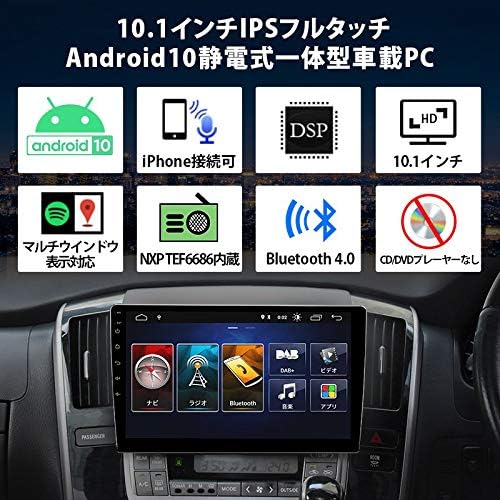
Figure 1: Contents of the EONON GA2187J package, including cables, antennas, and tools.
Wiring Diagram
Refer to the following diagram for correct wiring connections. Ensure all connections are secure before powering on the device. Incorrect wiring can cause damage to the unit or vehicle electrical system.

Figure 2: Detailed wiring connections for the EONON GA2187J unit, showing power, audio, and accessory inputs.
- Wi-Fi Upgrade Terminal
- Backup Camera Input
- SWC2 (Steering Wheel Control 2)
- ACC (Accessory Power)
- GND (Ground)
- Rear Speaker (Purple)+
- Brake Signal Cable
- SWC1 (Steering Wheel Control 1)
- Reverse Signal Cable
- Left Rear Speaker (Green)+
- Left Front Speaker (White)-
- Right Front Speaker (Gray)+
- Rear Speaker (Purple)-
- Front Speaker (White)+
- Headlight Signal Cable
- Rear Speaker (Gray)-
- 12V Battery Power Cable
- Rear Speaker (Green)-
- Ground Cable
- RR Audio Output
- RL Audio Output
- FR Audio Output
- FL Audio Output
- Subwoofer Output
- Video Output 1
- Video Output 2
- AMP (Amplifier Control)
- ANT (Antenna Control)
- USB Port
- USB Port
- External Microphone
- AUX Audio Input (Right)
- AUX Audio Input (Left)
- Video Input
- DR-V Input
- GPS Antenna
Operating Instructions
Android 10 System Overview
The GA2187J operates on Android 10, providing a stable and responsive user experience. It features an MTK 8227L 1.2GHz ARM A7 Quad-core processor, 2GB RAM, and 16GB ROM, allowing for quick application launches and smooth multitasking.

Figure 3: The main interface of the Android 10 operating system, showing various application icons.
Display and User Interface
The device is equipped with a 10.1-inch HD digital full-touch capacitive IPS screen, offering a resolution of 1024x600 pixels and supporting 1080P HD video playback. The IPS technology ensures clear and vibrant visuals from various viewing angles. The multi-window display feature allows you to run two applications simultaneously, splitting the screen for enhanced productivity.
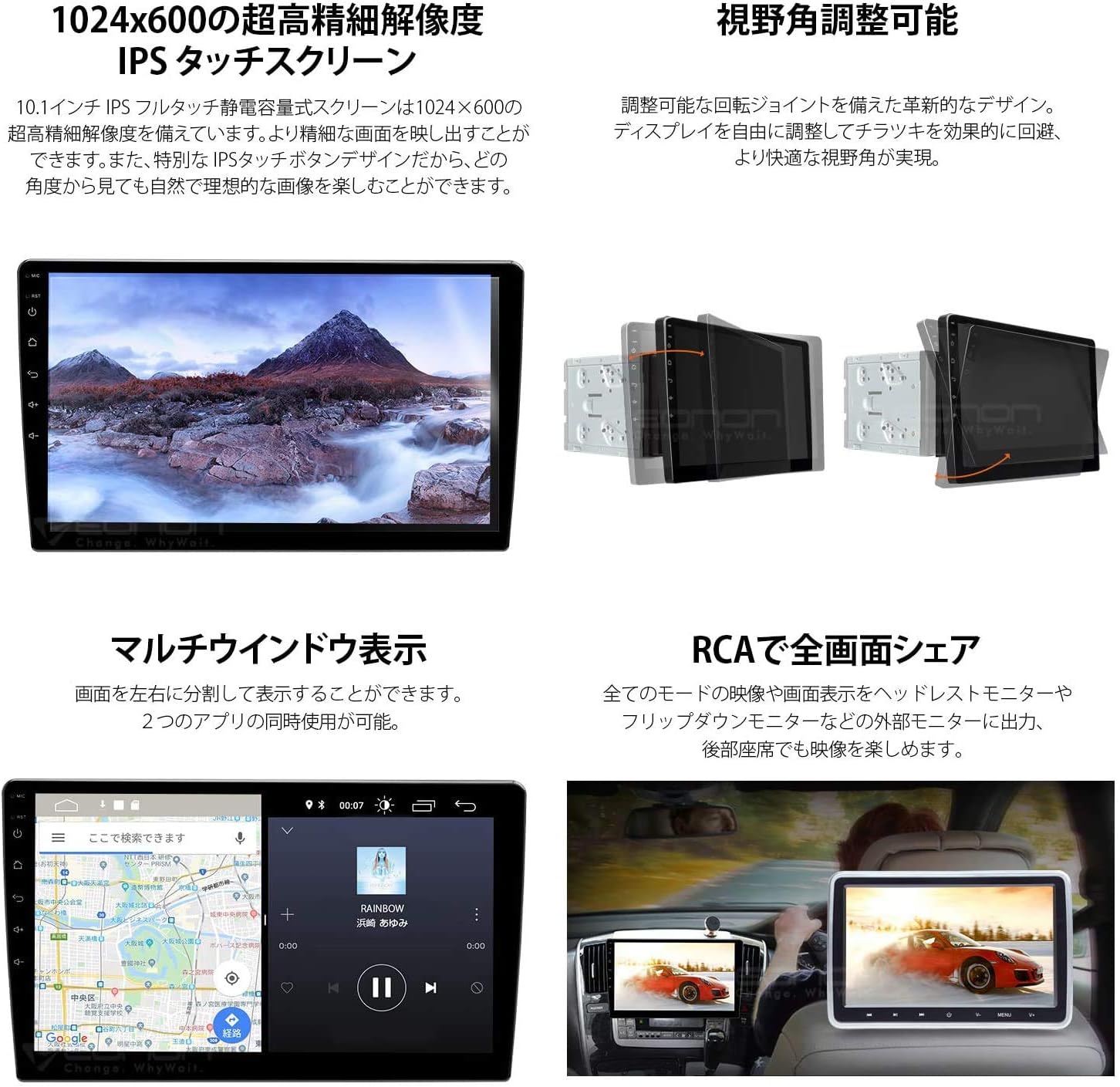
Figure 4: The 10.1-inch display showcasing multi-window functionality and the adjustable viewing angle mechanism.
Connectivity (Wi-Fi, 4G, Bluetooth)
Wi-Fi & 4G: Connect to a Wi-Fi hotspot or a 4G dongle (sold separately) to access online maps, stream music and videos, and download applications from the Google Play Store.
Bluetooth: Pair your mobile phone via Bluetooth (version 2.0 or higher) to enjoy wireless music streaming and hands-free calling. The system supports phonebook synchronization and caller ID display.

Figure 5: Overview of connectivity options and compatible accessories such as Wi-Fi, 4G dongle, drive recorder, OBD2, and backup camera.
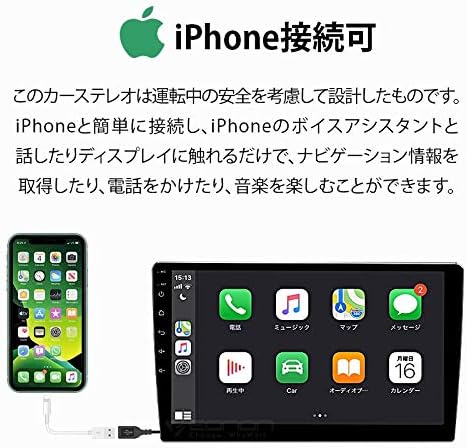
Figure 6: An iPhone connected to the unit, demonstrating the Mirror Link functionality for voice assistant and app control.
Navigation
The system supports navigation applications. You can use online maps via Wi-Fi/4G or install offline maps using an SD card (e.g., EONON Android Map Card G3046, sold separately). Features include 3D map display, clear route guidance, automatic speed checker point display, speed control point alerts, and accident information.

Figure 7: The EONON Android Map Card (16GB) and a screenshot of the navigation interface with route guidance.
Multimedia Functions
Audio/Video Playback: Enjoy music and videos from various sources, including USB, SD card, and streaming apps.
RCA Full Screen Share: Share the display content to external monitors, such as headrest monitors or flip-down monitors, allowing passengers in the rear to enjoy videos.
Digital TV Tuner (Optional): Connect an EONON digital TV tuner (V0050R, sold separately) to watch TV directly on the unit's screen. The tuner can be controlled via the navigation system's touch panel.
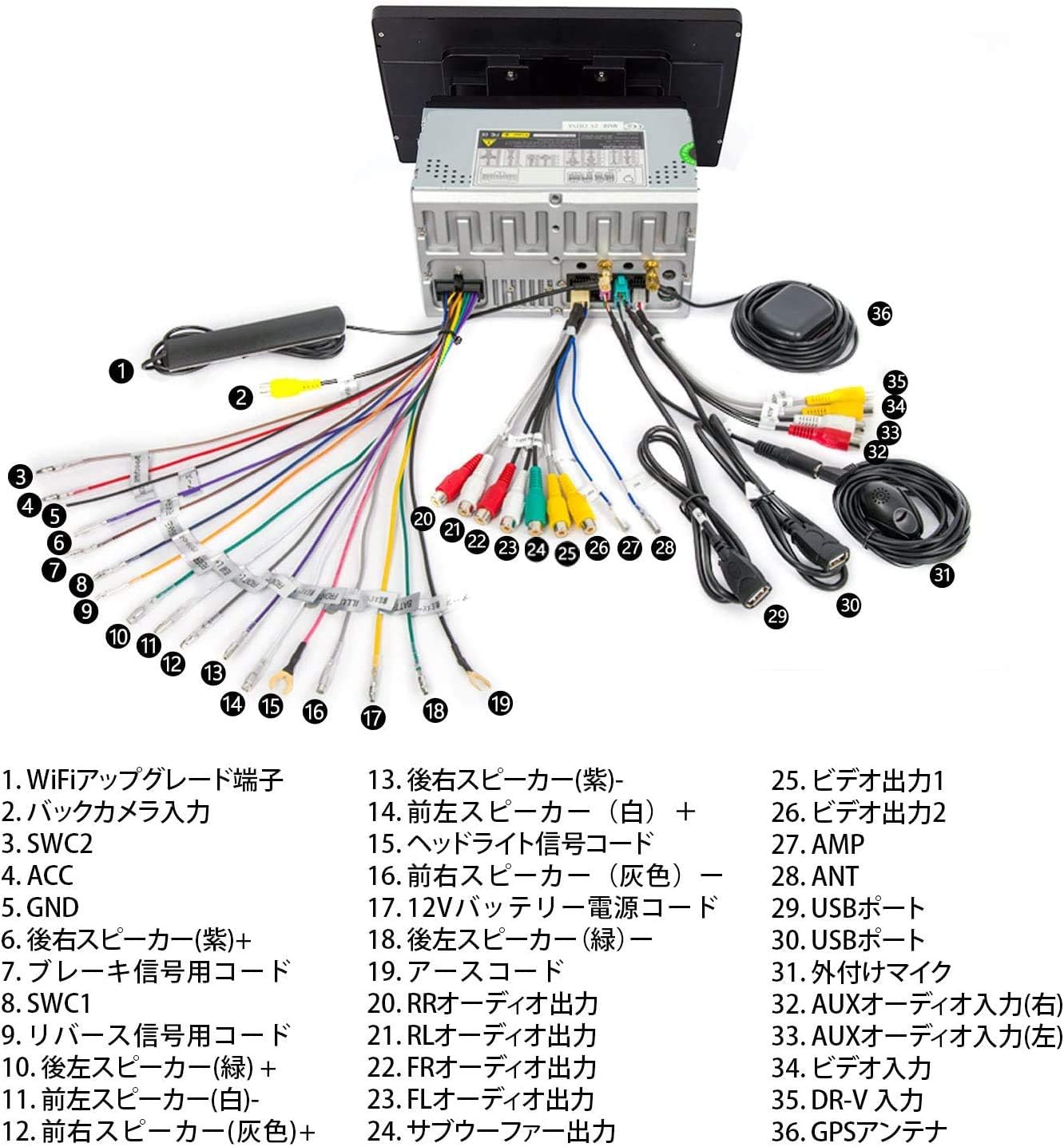
Figure 8: Demonstrates RCA full-screen sharing to a rear monitor and the connection setup for the optional EONON V0050R digital TV tuner.
Optional Accessories Integration
- Drive Recorder Mode (EONON R0015, sold separately): Connect a compatible drive recorder to view recorded footage and traffic conditions on the large screen.
- OBD2 Support (EONON V0056 OBD2, sold separately): Monitor engine RPM, speed, voltage, water temperature, and other vehicle performance data.
- Backup Camera Linkage (EONON A0119N, A0125N, A0130N, sold separately): When reverse gear is engaged, the system automatically switches to the backup camera display.
- CarPlay/USB Dongle (EONON A0585, sold separately): Connect a USB dongle for CarPlay functionality, integrating your smartphone's features into the car system.
Maintenance
To ensure the longevity and optimal performance of your EONON car navigation system, follow these maintenance guidelines:
- Cleaning the Screen: Use a soft, lint-free cloth to gently wipe the screen. For stubborn smudges, slightly dampen the cloth with water or a screen-safe cleaner. Avoid harsh chemicals or abrasive materials.
- Software Updates: Periodically check for system software updates to ensure you have the latest features and bug fixes. Updates can typically be performed via Wi-Fi.
- Cable Connections: Regularly check all cable connections to ensure they are secure and free from damage. Loose connections can lead to intermittent issues.
- Avoid Extreme Temperatures: Do not expose the device to extreme heat or cold, as this can affect its electronic components and screen.
Troubleshooting
If you encounter issues with your EONON car navigation system, refer to the following common problems and solutions:
- No Power:
- Check the power cable connection to the unit and the vehicle's power source.
- Verify the vehicle's fuse box for any blown fuses related to the car stereo.
- Ensure the ACC (Accessory) wire is correctly connected and receiving power when the ignition is on.
- No Sound:
- Check speaker wire connections.
- Ensure the volume is not muted or set to a very low level.
- Verify that the correct audio source is selected.
- If using an external amplifier, check its power and connections.
- GPS Signal Loss or Inaccurate Navigation:
- Ensure the GPS antenna is properly installed and has a clear view of the sky.
- Check the GPS antenna connection to the unit.
- Update navigation maps if they are outdated.
- Bluetooth Connection Issues:
- Ensure Bluetooth is enabled on both the car unit and your mobile device.
- Delete previous pairings and try pairing again.
- Move your mobile device closer to the unit.
- Restart both the car unit and your mobile device.
- Touch Screen Unresponsive:
- Restart the unit.
- Ensure the screen is clean and free from debris.
- If the issue persists, a factory reset might be necessary (consult support).
Specifications
| Feature | Detail |
|---|---|
| Brand | OLLMART |
| Model Number | GA2187JR |
| Screen Size | 10.1 inches |
| Display Type | LCD |
| Resolution | 1024x600 |
| Connectivity Technology | AUX, RCA, USB, Wi-Fi |
| Map Type | Street |
| Memory Storage Capacity | 16 GB |
| Human Interface Input | Touchscreen, Buttons, Microphone |
| Control Method | Touch |
| Compatible Vehicle Type | Passenger Car |
| Batteries Included | No |
Warranty and Support
This product comes with a 1-year manufacturer's warranty. For warranty details, please refer to the official EONON website: EONON Warranty Policy.
For any questions regarding operation or if you encounter any issues with the product, please contact EONON customer support directly at 03-4405-5960. When contacting support, please provide your order number, name, details of the issue, and the product's serial number.