
Lamisola LA
Lamisola Digital Alarm Clock Model LA User Manual
Model: LA
Introduction
Thank you for choosing the Lamisola Digital Alarm Clock. This device combines modern aesthetics with practical functionality, serving as a time display, alarm clock, dual USB charging station, and a mirror. Please read this manual carefully to ensure proper setup and operation.

The Lamisola Digital Alarm Clock features a large LED display that also functions as a mirror, blending seamlessly into modern home decor.
Package Contents
- Lamisola Digital Alarm Clock (Model LA)
- USB Power Cable
- User Manual
- CR2016 Battery (pre-installed for memory backup)
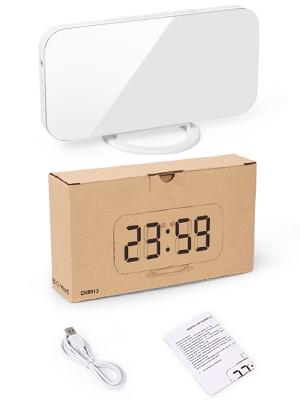
The package includes the Lamisola Digital Alarm Clock, a USB power cable for operation, and a user manual for detailed instructions.
Product Diagram

This diagram illustrates the key components of the clock, including control buttons for settings, USB charging ports, and the battery compartment for memory backup.
- Light Sensor: Automatically adjusts display brightness.
- M Button: Mode/Menu button for settings.
- + Button: Increase value / Switch ON.
- - Button: Decrease value / Switch OFF.
- SNOOZE Button: Activates snooze function.
- Dual USB Charging Ports: For charging external devices.
- Input Port: For connecting the USB power cable.
- CR2016 Battery Compartment: Houses the memory backup battery.
- Detachable Stand: For tabletop placement.
- Wall Hanging Hole: For wall mounting.
Setup
- Unpack: Carefully remove all components from the packaging.
- Remove Protective Film: Peel off the protective film from the mirror display surface.
- Install Battery: Ensure the CR2016 battery is correctly installed in the battery compartment. This battery provides memory backup for time and alarm settings during power outages. The clock display will not light up with only battery power.
- Connect Power: Plug the provided USB power cable into the clock's input port and connect the other end to a USB power adapter (not included) or a powered USB port. The display will light up.
- Attach Stand (Optional): If using on a tabletop, attach the detachable stand to the bottom of the clock. For wall mounting, use the wall hanging hole.

Before first use, remove the protective film from the mirror surface. Ensure the CR2016 battery is correctly installed for time memory during power outages. The dual USB ports allow simultaneous charging of two devices.
Operating Instructions
Time Setting
- In time display mode, press and hold the 'M' button for 3 seconds to enter time setting mode. The hour digits will flash.
- Use the '+' or '-' buttons to adjust the hour.
- Press the 'M' button again to switch to minute setting. The minute digits will flash.
- Use the '+' or '-' buttons to adjust the minute.
- Press the 'M' button a third time to select 12-hour or 24-hour format. Use '+' or '-' to choose.
- Press the 'M' button again to confirm and exit time setting mode.
Video tutorial demonstrating how to set the time, alarm, and snooze duration on the Lamisola Digital Alarm Clock.
Alarm Setting
- In time display mode, press the 'M' button once to enter alarm setting mode. The alarm icon (AL) will appear, and the hour digits will flash.
- Use the '+' or '-' buttons to adjust the alarm hour.
- Press the 'M' button again to switch to alarm minute setting. The minute digits will flash.
- Use the '+' or '-' buttons to adjust the alarm minute.
- Press the 'M' button again to confirm and exit alarm setting mode.
- To turn the alarm ON/OFF, press the '-' button in time display mode. The alarm icon will appear/disappear.
Video demonstrating the alarm setting process and the bed shaker feature for heavy sleepers with the Lamisola Digital Alarm Clock.
Brightness Adjustment
The clock offers both manual and automatic brightness adjustment.
- Manual Adjustment: In time display mode, press the '+' button to cycle through 3 brightness levels: Low (L1), Medium (L2), High (L3).
- Automatic Adjustment: The clock has a built-in light sensor that automatically adjusts the display brightness based on ambient light. This feature ensures the display is not too bright at night.

The clock offers three adjustable brightness levels (Low, Medium, High) to suit different lighting conditions and personal preferences, ensuring comfortable viewing day or night.
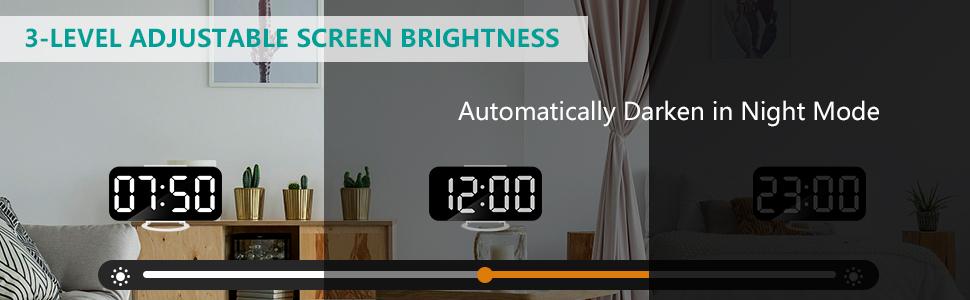
The clock features an automatic brightness adjustment that adapts to ambient light, dimming the display at night to prevent disturbance and protect your eyes.
Snooze Function
When the alarm rings, press the large 'SNOOZE' button on top of the clock. The alarm will pause and ring again after the preset snooze interval. The default snooze interval is 5 minutes, and it can be adjusted from 5 to 60 minutes.
- To set the snooze interval, in time display mode, press the 'M' button twice to enter snooze setting mode. The snooze time will flash.
- Use the '+' or '-' buttons to adjust the snooze duration (5-60 minutes).
- Press the 'M' button again to confirm and exit snooze setting mode.

The prominent 'SNOOZE' button on the top allows for easy activation of the snooze function, providing adjustable extra sleep time.
Night Mode
The clock has a Night Mode feature that automatically dims the display during a specified period. This is separate from the auto-brightness adjustment.
- In time display mode, press the 'M' button three times to enter Night Mode setting. 'ON' or 'OFF' will flash.
- Use the '+' or '-' buttons to turn Night Mode 'ON' or 'OFF'.
- If 'ON' is selected, press 'M' again to set the start hour, then minutes, then end hour, then minutes. Use '+' or '-' to adjust.
- Press 'M' to confirm each setting.
Dual USB Charging Ports
The Lamisola Digital Alarm Clock is equipped with two USB ports (5V/1A) on the side, allowing you to charge your electronic devices conveniently.
- Connect your smartphone, tablet, or other USB-powered devices to the USB ports using their respective charging cables.
- The clock must be connected to its power source for the USB charging ports to function.

Utilize the dual USB charging ports to conveniently power your smartphone, tablet, or other USB-powered devices directly from the clock.
Mirror Functionality
The large, reflective surface of the clock serves as a functional mirror, adding versatility to its design.
- Use the mirror for quick checks of your appearance or for applying makeup.
- To use solely as a mirror without the time display, you can either unplug the clock or set the brightness to its lowest level (L1) or activate Night Mode during the day.

Beyond time-telling, the clock's large mirror surface can be used for quick checks or makeup application, adding practical utility to its design.
Maintenance
- Cleaning: Wipe the mirror display with a soft, lint-free cloth. For stubborn smudges, use a small amount of glass cleaner applied to the cloth, not directly to the clock.
- Power: Always use the provided USB cable and a compatible 5V/1A USB power adapter.
- Battery: Replace the CR2016 battery annually or if you notice settings are not retained during power interruptions.
- Placement: Avoid placing the clock in direct sunlight or near heat sources, as this may affect the display and internal components.
Troubleshooting
| Issue | Possible Cause | Solution |
|---|---|---|
| Display is off | No power connection. | Ensure the USB power cable is securely connected to the clock and a working power source. |
| Settings are lost after power outage | CR2016 battery is dead or missing. | Replace the CR2016 battery. Ensure it is inserted with the correct polarity. |
| Alarm does not sound | Alarm is turned OFF or set incorrectly. | Check alarm settings and ensure the alarm icon is displayed. Verify AM/PM setting if using 12-hour format. |
| USB charging not working | Clock is not powered or device cable is faulty. | Ensure the clock is connected to its main power source. Try a different USB cable or device. |
| Display too bright/dim | Brightness setting needs adjustment. | Press the '+' button to manually adjust brightness. Check Night Mode settings if applicable. |
Specifications
| Feature | Detail |
|---|---|
| Brand | Lamisola |
| Model Number | LA |
| Display Type | Digital LED Mirror |
| Product Dimensions | 6.22"W x 3.07"H |
| Item Weight | 6.7 ounces |
| Power Source | Corded Electric (USB 5V/1A) |
| Battery for Memory Backup | 1 CR2016 battery (included) |
| USB Charging Ports | 2 ports (5V/1A output) |
| Special Features | Adjustable Brightness (3 levels + Auto), Alarm, Snooze (5-60 min), Night Mode, Mirror Functionality |
| Material | Acrylonitrile Butadiene Styrene |
| Mounting Type | Tabletop (with stand) / Wall Mount |
Warranty and Support
This Lamisola Digital Alarm Clock comes with a Limited Warranty. For specific details regarding warranty coverage, duration, and terms, please refer to the warranty information provided with your purchase or contact Lamisola customer support.
If you encounter any issues not covered in this manual or require further assistance, please contact Lamisola customer support through the retailer's platform or the official brand website.