
1. Setup
This HCDZ replacement remote control is designed to work with compatible Pioneer Micro Hi-Fi CD Receiver Audio Systems without requiring any programming. Simply install the batteries, and the remote will be ready for use.
1.1 Battery Installation
- Locate the battery compartment on the back of the remote control.
- Slide the battery compartment cover downwards or outwards to open it.
- Insert two (2) AAA alkaline batteries, ensuring the positive (+) and negative (-) terminals match the diagrams inside the compartment.
- Close the battery compartment cover by sliding it back into place until it clicks securely.
Note: Batteries are not included with the remote control.

Image: Back of the remote control with the battery compartment open, illustrating the correct orientation for AAA battery insertion.
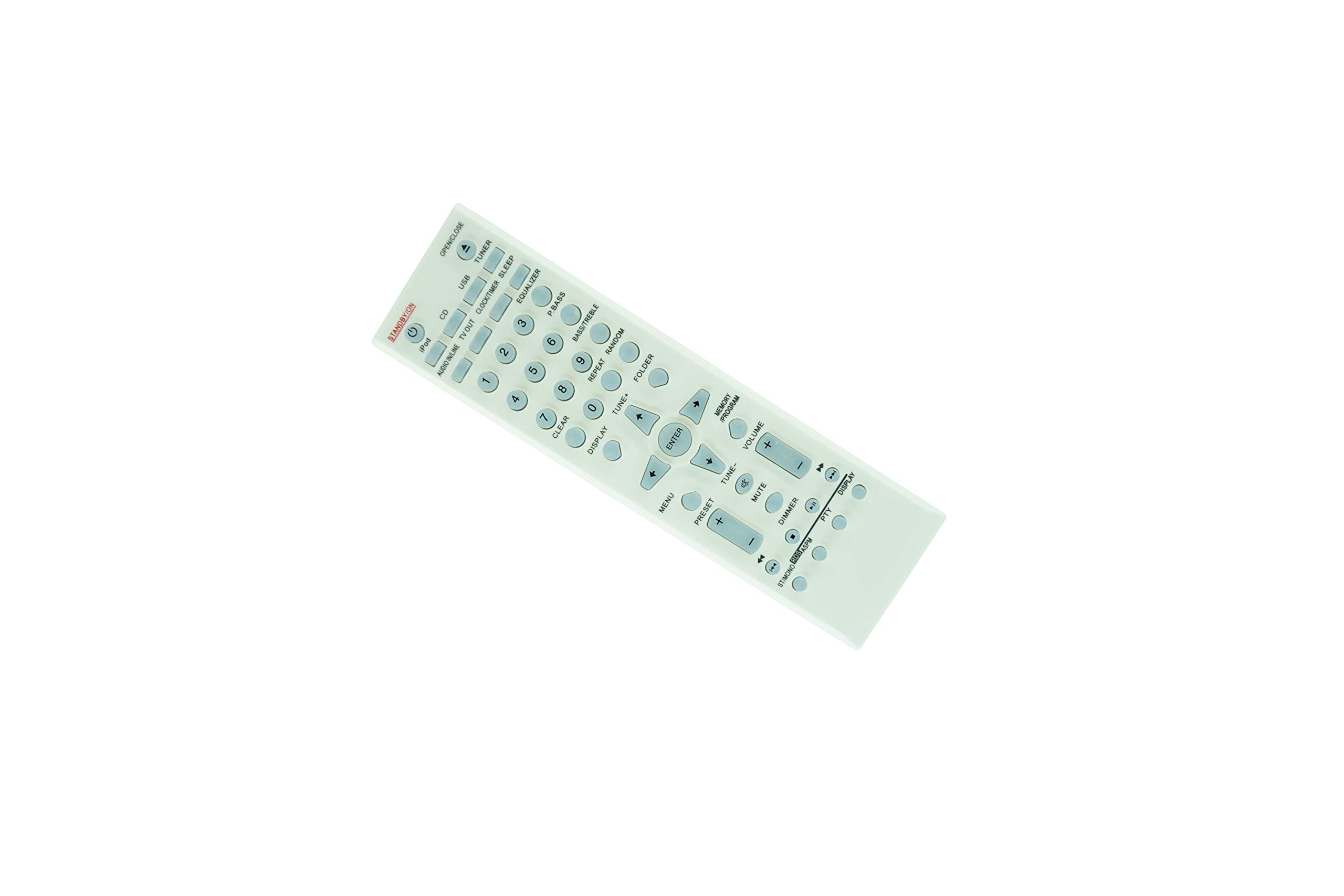
Image: Back of the remote control with the battery compartment closed after battery installation.
2. Operating Instructions
Once batteries are installed, the remote control is ready for immediate use with your compatible Pioneer Micro Hi-Fi CD Receiver Audio System.
2.1 Basic Operation
- Point the remote control directly towards the infrared (IR) sensor on your Pioneer audio system.
- Press the desired function button (e.g., Power, Volume Up/Down, Play, Stop, Source) to control your device.
- The remote has a maximum operating range of approximately 10 meters (33 feet). Ensure there are no obstructions between the remote and the audio system's IR sensor.

Image: Front view of the HCDZ replacement remote control, displaying its button layout for various functions.
3. Maintenance
Proper care and maintenance will extend the life of your remote control.
3.1 Battery Care
- Do not mix new batteries with old ones. Always replace all batteries simultaneously.
- If the remote control will not be used for an extended period (e.g., one month or more), remove the batteries to prevent potential damage from leakage and corrosion.
- Dispose of used batteries according to local regulations.
3.2 Cleaning
- Wipe the remote control with a soft, dry cloth.
- Do not use abrasive cleaners, solvents, or chemical agents, as these can damage the remote's surface or internal components.
3.3 Environmental Conditions
- Avoid leaving the remote control in extremely hot or humid environments. High temperatures or moisture can cause malfunction or damage.
- Do not expose the remote control's infrared sensor to direct sunlight or strong artificial lighting, as this may interfere with its operation.
4. Troubleshooting
If you experience issues with your remote control, refer to the following common solutions:
- Remote not responding:
- Check if the batteries are inserted correctly with the correct polarity (+/-).
- Replace old batteries with fresh AAA alkaline batteries.
- Ensure there is a clear line of sight between the remote control and the IR sensor on your audio system. Remove any obstructions.
- Confirm that the remote is pointed directly at the audio system's sensor.
- No programming needed: This remote control is a direct replacement and does not require any programming or code setup. If it is not working after battery installation, please review the troubleshooting steps above.
5. Specifications
| Brand | HCDZ |
| Compatible Devices | Pioneer Micro Hi-Fi CD Receiver Audio Systems |
| Controller Type | Button Control |
| Max Number of Supported Devices | 1 |
| Maximum Range | 10 Meters (approx. 33 feet) |
| Number of Batteries Required | 2 |
| Battery Type | AAA Alkaline |
| Special Feature | No programming needed, works out of package |
6. Warranty Information
This HCDZ replacement remote control comes with a 90-day warranty from the date of purchase. This warranty covers manufacturing defects. Please retain your proof of purchase for any warranty claims.
7. Support
If you have followed the troubleshooting steps and are still experiencing issues with your HCDZ replacement remote control, please refer to the retailer or your point of purchase for further assistance. Ensure you have your product model information and purchase details available.