
1. Important Safety Information
Please read and understand this entire owner's manual, including all safety information, before plugging in or using this product. Failure to do so could result in electric shock, fire, serious injury, or death.
- Always disconnect the fireplace from the power supply before cleaning or performing maintenance.
- Do not use this fireplace outdoors. It is designed for indoor use only.
- Keep combustible materials such as furniture, pillows, bedding, papers, clothes, and curtains at least 3 feet (0.9 m) from the front of the fireplace.
- Do not insert or allow foreign objects to enter any ventilation or exhaust opening as this may cause an electric shock or fire, or damage the fireplace.
- This appliance is hot when in use. To avoid burns, do not let bare skin touch hot surfaces.
- Close supervision is necessary when any heater is used by or near children or invalids.
2. Product Features
- Insert Installation: Designed for recessed installation, fitting into existing fireplace openings or custom-built spaces.
- Multi-Flame Modes: Features realistic resin logs and an ember bed with 3 color atmosphere lights and 5 variable flame intensity levels.
- Dual Heating Options: Offers 750W and 1500W heat settings, providing supplemental heat for rooms up to 400 sq. ft. Can operate without heat for year-round ambiance.
- Fire Cracking Sound: Built-in speaker simulates the sound of charcoal cracking for an enhanced fireplace experience.
- Remote Control & Timer: Conveniently adjust settings with the included remote control. Features a timer function for automatic shut-off.
- Safety Features: Equipped with auto-heat kill safety protection to prevent overheating.

Figure 1: Overview of Main Product Features
3. Setup and Installation
3.1 Unpacking
Carefully remove the fireplace insert from its packaging. Retain the packaging for future storage or transport. Inspect the unit for any damage that may have occurred during shipping. If any damage is observed, do not install or operate the unit; contact customer service immediately.
3.2 Dimensions and Placement
The overall dimensions of the fireplace insert are 28.7 inches (L) x 8.84 inches (D) x 21.2 inches (H). For proper recessed installation, the advised opening size is 25.6-25.7 inches (L) x 8.5-8.7 inches (D) x 20.3-20.4 inches (H). Ensure the chosen location has a stable, level surface and is near a standard 120V AC outlet.

Figure 2: Overall Product Dimensions
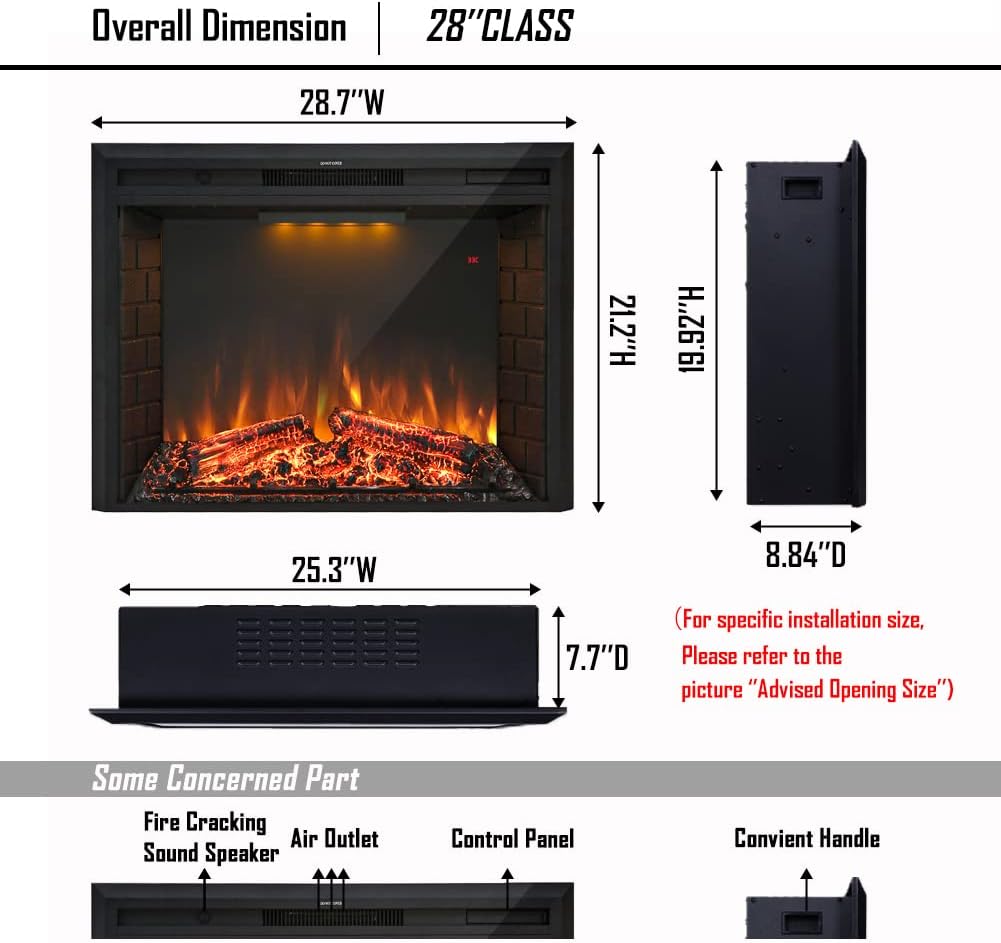
Figure 3: Advised Opening Size for Installation
3.3 Power Connection
The fireplace insert comes with a 6-foot power cable. Connect the power cable to a grounded 120V AC outlet. Do not use extension cords or power strips with this appliance.
4. Operating Instructions
4.1 Control Panel and Remote Control
The fireplace can be operated using the control panel located on the unit or the included remote control. The remote control allows for convenient adjustment of all functions from a distance.

Figure 4: Remote Control Functions
4.2 Power On/Off
Press the 'Power' button on the control panel or remote control to turn the fireplace on or off.
4.3 Flame Effects
The fireplace features realistic dancing flames and a burning log effect. You can adjust the flame intensity and top light color:
- Flame Intensity: Use the 'Dimmer' button (L1 to L5 brightness) on the remote to cycle through 5 levels of flame brightness.
- Top Light Color: Press the 'Top Light' button to change the atmosphere light color (Purple, Blue, Yellow).

Figure 5: Flame and Top Light Options
4.4 Heating Function
The fireplace offers two heating options:
- Press the 'Heater' button to select between 750W (low heat) and 1500W (high heat) settings.
- The heater can be operated independently of the flame effects, allowing for ambiance without heat during warmer seasons.
- The front air vent on top of the fireplace heater provides supplemental heating.
4.5 Fire Cracking Sound
Activate or deactivate the simulated fire cracking sound by pressing the 'Log Speaker' button on the remote control.
4.6 Timer Function
Use the 'Timer' button on the remote control to set an automatic shut-off time, ranging from 1 hour to 9 hours.
5. Maintenance
5.1 Cleaning
Always unplug the fireplace from the power outlet before cleaning. Use a soft, damp cloth to clean the exterior surfaces. Do not use abrasive cleaners or solvents. For the glass panel, use a soft cloth and a glass cleaner. Ensure all surfaces are dry before plugging the unit back in.
5.2 Storage
When not in use, store the fireplace in a dry, cool location, preferably in its original packaging to protect it from dust and damage.
6. Troubleshooting
- No Power: Ensure the power cord is securely plugged into a grounded 120V AC outlet. Check the circuit breaker. If the unit still has no power, contact customer support.
- Heater Not Working: Verify that the heater function is activated. Check if the room temperature is above the set temperature (if applicable). The auto-heat kill safety protection may have activated due to overheating; unplug the unit, wait 10-15 minutes, and plug it back in.
- Remote Control Not Responding: Check and replace the batteries in the remote control. Ensure there are no obstructions between the remote and the fireplace sensor.
- Fire Cracking Sound Quality: The simulated fire cracking sound is designed for ambiance. If the sound is perceived as static or too loud, it can be turned off using the 'Log Speaker' button on the remote.
- Unusual Noises: If you hear unusual noises, immediately turn off and unplug the fireplace. Contact customer service.
7. Specifications
| Feature | Detail |
|---|---|
| Brand | Masarflame |
| Model Name | 718893076001 |
| Power Source | Corded Electric |
| Product Dimensions | 8.84"D x 28.7"W x 21.2"H |
| Installation Type | Insert |
| Heat Output | 5100 British Thermal Units (BTU) |
| Heating Coverage | Up to 400 square feet |
| Heating Options | 750W / 1500W |
| Special Feature | Timer, Remote Control, Fire Cracking Sound |
| Material | Resin (logs) |
| Color | Black, Brown |
| Item Weight | 47.1 pounds |
| Batteries Required | Yes (for remote control) |
8. Warranty and Support
8.1 Warranty Information
This Masarflame Electric Fireplace Insert comes with a 1-year limited warranty from the date of purchase. This warranty covers manufacturing defects and workmanship under normal use. It does not cover damage caused by misuse, accident, alteration, or improper installation.
8.2 Customer Support
For any questions, concerns, or warranty claims, please contact Masarflame customer service. Our team is dedicated to providing satisfied solutions.
Please refer to the contact information provided on the product packaging or the official Masarflame website for the most current support details.