
Important Safety Instructions
Read all instructions carefully before using the air conditioner. Keep this manual for future reference.
- Ensure the air conditioner is installed by a qualified technician. Improper installation can lead to electric shock, fire, or injury.
- Do not operate the unit with wet hands.
- Do not insert fingers or objects into the air inlet/outlet.
- Turn off the power supply before cleaning or performing any maintenance.
- Keep children away from the unit.
- Do not use flammable sprays near the unit.
Product Overview
This section provides an overview of the main components of your TOSHIBA Inverter Split AC system.

Image: Front view of the TOSHIBA indoor unit, showing the air outlet and the TOSHIBA branding. An energy savings guide sticker is visible on the right side.
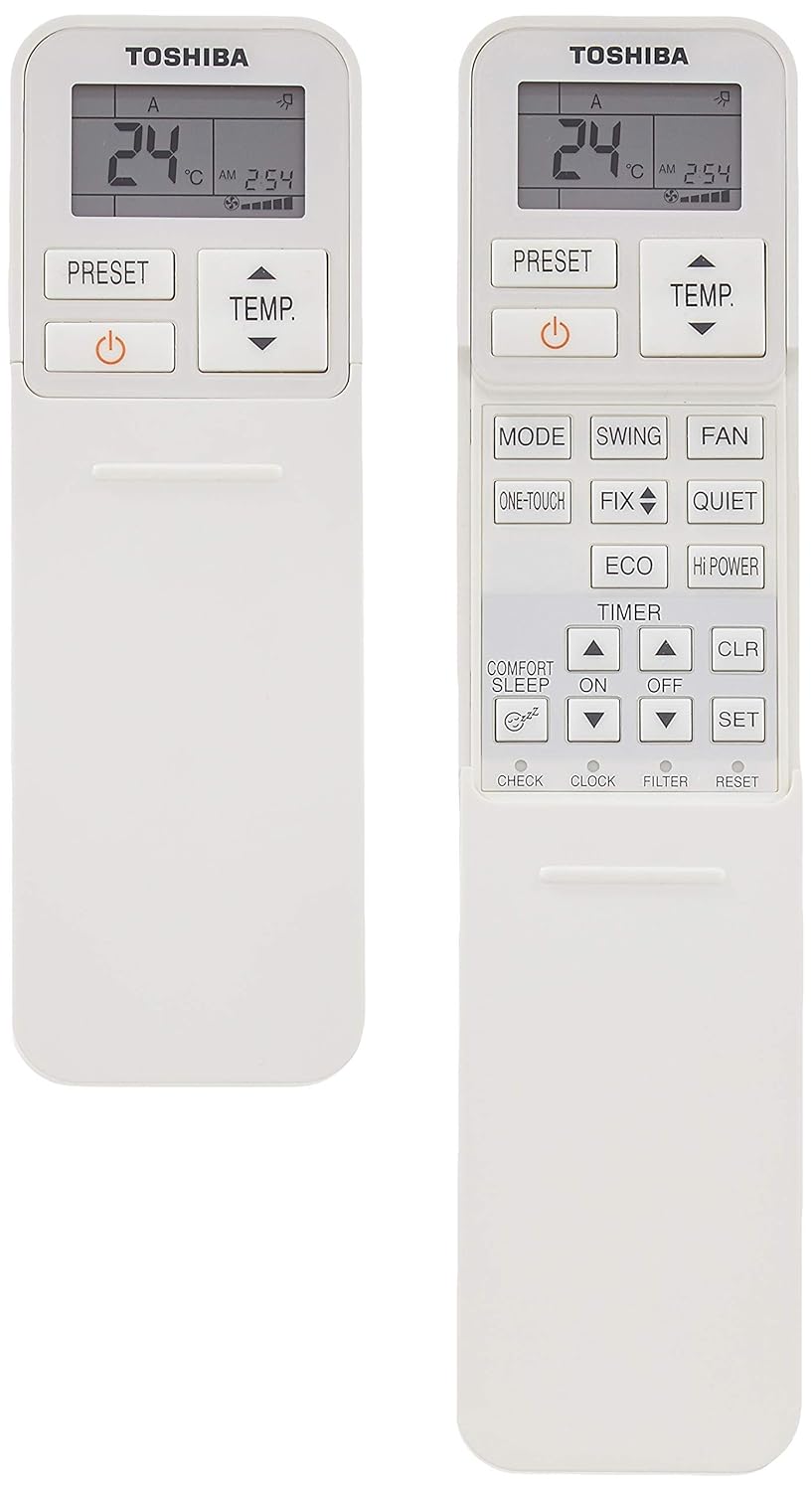
Image: The remote control for the TOSHIBA AC, displaying temperature, time, and various function buttons like MODE, SWING, FAN, ECO, QUIET, TIMER, and SET.

Image: Side view of the TOSHIBA outdoor unit, highlighting its dimensions: Height (H) 53 cm, Length (L) 66 cm, and Width (W) 24 cm. The unit features a large fan grille and TOSHIBA INVERTER branding.

Image: Side view of the TOSHIBA indoor unit, showing its dimensions: Height (H) 23 cm, Width (W) 2.62 cm, and Length (L) 79.8 cm. The air flap is open, and the TOSHIBA branding is visible.

Image: Close-up of the energy efficiency label, indicating a 3-star rating and an ISEER of 3.85. It details the model (RAS-13BKCV-IN+RAS-13BACV-IN/2018), cooling capacity, electricity consumption, and compressor type.
Setup and Installation
Proper installation is crucial for the optimal performance and safety of your air conditioner. It is highly recommended that installation be performed by a certified professional.
General Installation Guidelines:
- Location Selection: Choose a location for the indoor unit that allows for even air distribution and easy access for maintenance. The outdoor unit should be placed in a well-ventilated area, away from direct sunlight or obstructions.
- Mounting: Securely mount the indoor unit to a wall using the provided mounting plate. The outdoor unit should be placed on a stable, level surface.
- Refrigerant Piping: Connect the refrigerant pipes between the indoor and outdoor units, ensuring proper insulation and leak-free connections.
- Drainage: Install the drain hose with a downward slope to ensure proper condensation drainage.
- Electrical Wiring: Connect the power supply and communication wiring according to the wiring diagram in the full installation manual. Ensure all electrical connections are secure and meet local electrical codes.
- Vacuuming and Test Run: After installation, vacuum the refrigerant lines to remove air and moisture. Perform a test run to verify proper operation and check for any abnormalities.
Operating Instructions
This section explains how to use your air conditioner's remote control and various operating modes.
Remote Control Functions:
The remote control allows you to adjust settings from a distance. Point the remote control towards the indoor unit when operating.
- POWER Button: Turns the unit ON or OFF.
- MODE Button: Cycles through operating modes: Cool, Dry, Fan, Auto.
- TEMP. Buttons (▲/▼): Adjusts the temperature setting.
- FAN Button: Adjusts fan speed (Auto, Low, Medium, High).
- SWING Button: Controls the vertical airflow direction.
- TIMER ON/OFF: Sets the timer for automatic ON/OFF operation.
- ECO Mode: Activates energy-saving operation.
- QUIET Mode: Reduces fan noise for quieter operation.
Basic Operation:
- Turn On: Press the POWER button. The unit will start in the last selected mode.
- Select Mode: Press the MODE button repeatedly until your desired mode (e.g., Cool) is displayed.
- Set Temperature: Use the TEMP. ▲/▼ buttons to set your preferred temperature.
- Adjust Fan Speed (Optional): Press the FAN button to cycle through fan speed options.
- Turn Off: Press the POWER button again.
Maintenance
Regular maintenance ensures efficient operation and extends the lifespan of your air conditioner. Always turn off the power supply before performing any maintenance.
Air Filter Cleaning:
Clean the air filters every two weeks or more frequently if the unit is used often or in dusty environments.
- Open the front panel of the indoor unit.
- Gently remove the air filters.
- Wash the filters with lukewarm water and a mild detergent. Rinse thoroughly.
- Allow the filters to dry completely in a shaded area before reinstalling. Do not expose to direct sunlight.
- Reinstall the dry filters and close the front panel.
Outdoor Unit Cleaning:
Periodically check the outdoor unit for any obstructions (leaves, debris) around the fan and condenser coils. Carefully remove any blockages. For thorough cleaning of the outdoor unit, it is recommended to contact a professional service technician.
Troubleshooting
If you encounter issues with your air conditioner, refer to the table below for common problems and solutions. If the problem persists, contact customer support.
| Problem | Possible Cause | Solution |
|---|---|---|
| Unit does not turn on. | No power supply. Remote control batteries are dead. | Check circuit breaker. Replace remote control batteries. |
| Insufficient cooling/heating. | Dirty air filters. Blocked outdoor unit. Incorrect temperature setting. | Clean air filters. Clear obstructions from outdoor unit. Adjust temperature setting. |
| Unusual noise. | Loose parts. Obstruction in fan. | Contact a service technician. |
| Water leakage from indoor unit. | Clogged drain pipe. Improper installation. | Check and clear drain pipe. Contact a service technician for inspection. |
Specifications
Key technical specifications for the TOSHIBA 1 Ton 3 Star Inverter Split AC.
| Feature | Detail |
|---|---|
| Brand | TOSHIBA |
| Model | RAS-13BKCV-IN+RAS-13BACV-IN |
| Capacity | 1 Ton |
| Energy Efficiency | 3 Star Rating (ISEER 3.85) |
| Installation Type | Split System |
| Special Features | Dust Filter, Inverter Technology |
| Colour | Gloss White |
| Control Console | Remote Control |
| Voltage | 230 Volts |
| Material | Plastic |
| Included Components | Air Conditioner (Indoor Unit + Outdoor Unit) |
| Indoor Unit Dimensions (LxWxH) | 79.8 x 23 x 29.3 Centimeters |
| Outdoor Unit Dimensions (LxWxH) | 66 x 24 x 53 Centimeters (approximate, derived from image) |
| Item Weight | 10 kg (Indoor Unit, approximate) |
Warranty and Support
This product comes with a minimum six-month supplier-backed warranty, ensuring coverage for manufacturing defects and malfunctions under normal use conditions.
For warranty claims, technical assistance, or service requests, please contact your retailer or the authorized service center. Keep your purchase receipt and product model information handy when contacting support.
For further assistance, please refer to the contact information provided at the time of purchase or visit the official TOSHIBA India website for service center details.