
1. Introduction
The Humminbird APEX 16 MEGA SI+ CHARTPLOTTER Fish Finder (Control Head Only) provides professional-grade fish finding capabilities with a 15.6-inch Full-HD touchscreen display. This unit integrates industry-leading MEGA Imaging+ and Dual Spectrum CHIRP sonar technology for detailed underwater visualization. It features dual sonar ports for various Humminbird sonar accessories and a dedicated port for 2D CHIRP transducers up to 2kW. Dual Ethernet ports allow for comprehensive system building without an external network hub, supporting multiple control heads and accessories like Minn Kota Advanced GPS and Humminbird CHIRP Radar. A dual-core processor ensures responsive performance across multiple functions. Additional connectivity includes NMEA 2000, HDMI In/Out, WiFi, and Bluetooth. The customizable user interface with an intuitive sidebar menu allows for tailored viewing preferences.
2. Setup and Installation
2.1 Control Head Only Model
This APEX 16 model is sold as a control head only and does not include a transducer. It is compatible with Minn Kota trolling motors featuring Built-in MEGA Imaging, MEGA 360 Imaging accessories, or existing Humminbird Ethernet network sonar sharing. A separate transducer must be acquired for sonar functionality.

Figure 1: Humminbird APEX 16 control head, indicating transducer is not included.
2.2 Mounting the Control Head
The APEX 16 control head can be installed using the included gimbal mounting bracket. It supports both flush mount and surface mount configurations. Ensure the mounting location provides clear visibility and easy access to the touchscreen and keypad controls.
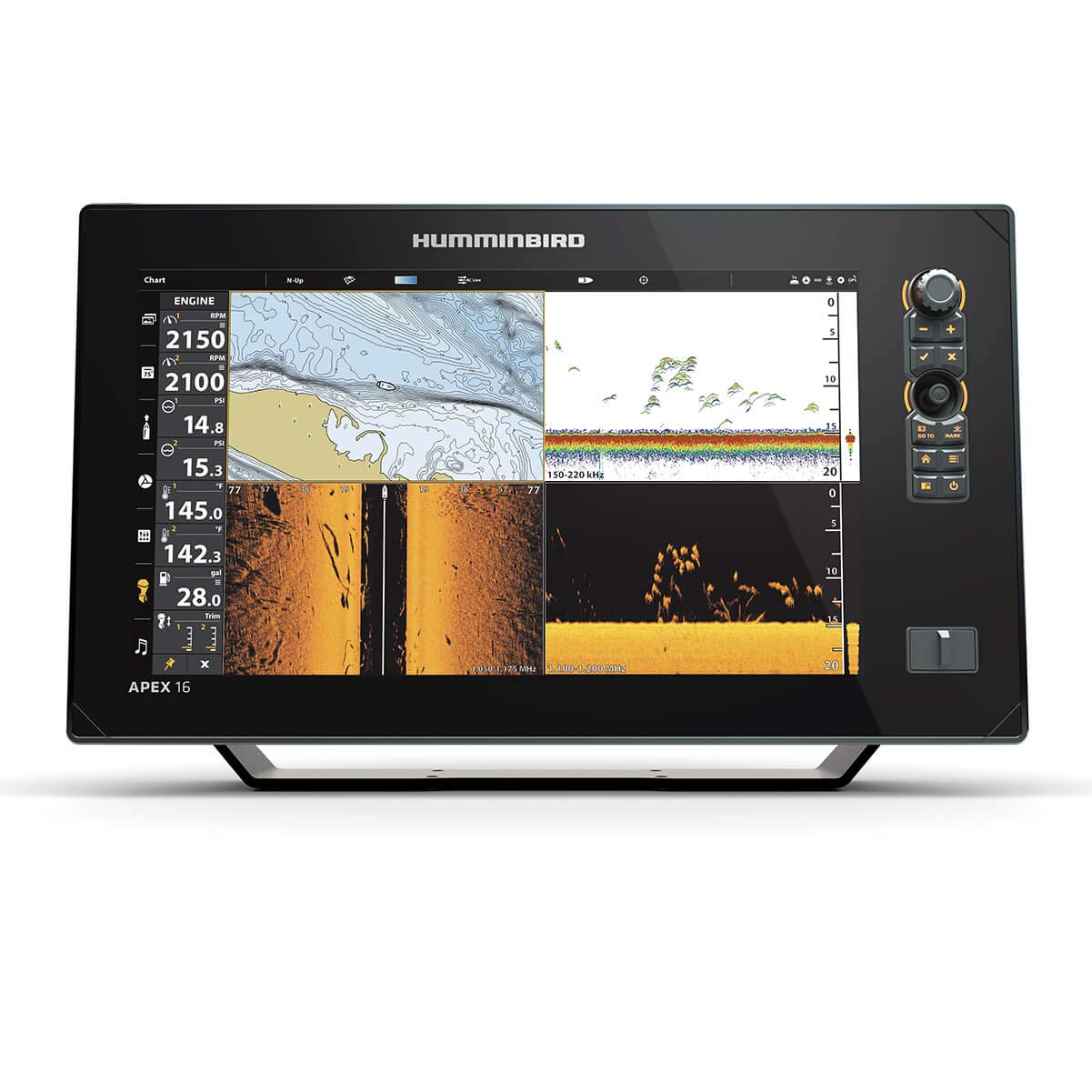
Figure 2: Humminbird APEX 16 control head mounted on its gimbal bracket.
2.3 Wiring and Connectivity
The unit requires a 12V power source. Connect the power cable to your boat's battery system. The APEX 16 features dual Ethernet ports for connecting multiple control heads and compatible accessories without an external network hub. It also includes NMEA 2000, HDMI In/Out, WiFi, and Bluetooth for extensive connectivity options.

Figure 3: Rear view of the APEX 16 control head, highlighting the various input/output ports including Ethernet, HDMI, and power.

Figure 4: Diagram showing the dual Ethernet ports and HDMI In/Out for expanded system integration.
3. Operating Instructions
3.1 Advanced Sonar Capabilities
The APEX 16 supports MEGA Side Imaging+ and MEGA Down Imaging+ for detailed underwater views up to 250 feet under and to either side of your boat. Dual Spectrum CHIRP sonar provides excellent 2D target separation and fish clarity. These technologies allow for precise identification of fish, structure, and contour changes.

Figure 5: The APEX 16 display showcasing various sonar views simultaneously.

Figure 6: Illustration of MEGA Imaging+ capabilities, showing crystal clear sonar images of fish, structure, and contour changes.

Figure 7: Diagram detailing Dual Spectrum CHIRP sonar for enhanced 2D target separation.
3.2 Navigation and Mapping
The unit features internal GPS with a Humminbird Basemap, providing coverage of over 10,000 lakes and continental U.S. coastlines. It is compatible with premium LakeMaster, CoastMaster, and Navionics charts for advanced navigation. AutoChart Live allows you to create real-time maps of depth contours, bottom hardness, and vegetation, with eight hours of built-in recording time.

Figure 8: Compatible mapping solutions including LakeMaster, SmartStrike, and CoastMaster Premium.

Figure 9: AutoChart Live feature for creating custom, real-time maps of underwater contours and features.
3.3 Display and Controls
The 1920 x 1080 resolution Full HD display offers both touchscreen and keypad controls. The customizable user interface includes an intuitive sidebar menu, allowing you to personalize settings and views to match your fishing needs.

Figure 10: A user operating the touchscreen interface of the APEX 16.

Figure 11: A user utilizing the physical keypad controls for precise adjustments.

Figure 12: The Cross Touch Interface allows for flexible control via both touchscreen and physical buttons.
3.4 One-Boat Network Integration
The APEX integrates seamlessly with the One-Boat Network, enabling communication with Minn Kota motors and Cannon Optimum downriggers to enhance boat control and fishing capabilities.

Figure 13: The One-Boat Network provides integrated control over various marine devices.
4. Maintenance
To ensure optimal performance and longevity of your Humminbird APEX 16, regular maintenance is recommended:
- Cleaning: Gently wipe the screen and unit housing with a soft, damp cloth. Avoid abrasive cleaners or solvents that could damage the display or finish.
- Connections: Periodically check all cable connections (power, sonar, Ethernet, etc.) to ensure they are secure and free from corrosion.
- Software Updates: Regularly check the Humminbird website for software updates to ensure you have the latest features and performance enhancements.
- Storage: When not in use for extended periods, store the unit in a dry, temperature-controlled environment. Use the provided screen cover to protect the display.
5. Troubleshooting
If you encounter issues with your APEX 16, consider the following common troubleshooting steps:
- Compatibility Issues: If experiencing problems with older Humminbird accessories, verify compatibility with the APEX series. Newer units may have different interface requirements.
- User Interface Complexity: The APEX features an advanced menu system. If finding options difficult, refer to the comprehensive digital manual available on the Humminbird support website for detailed guidance on navigation and settings.
- Depth Reading at Speed: Inaccurate or lost depth readings at cruising speeds can indicate improper transducer installation or placement. Ensure the transducer is mounted correctly and free from obstructions or air bubbles.
- Slow Boot-up/Response: While the unit has a dual-core processor, ensure all software is up to date. If issues persist, consult Humminbird support.
6. Specifications
| Feature | Specification |
|---|---|
| Brand | Humminbird |
| Model Name | APEX |
| Item Model Number | 411500-1CHO |
| Screen Size | 15.6 inches |
| Display Type | Color TFT |
| Display Resolution | 1920 x 1080 (Full HD) |
| Human Interface Input | Touchscreen |
| Power Source | Battery Powered |
| Maximum Measuring Depth | 250 Feet (Sonar dependent) |
| Mounting Type | Flush Mount or Surface Mount |
| Connectivity Technologies | Bluetooth, HDMI, Ethernet, NMEA 2000, WiFi |
| Item Weight | 15.2 Pounds |
| Package Dimensions | 22 x 15 x 11.7 inches |
| Date First Available | February 20, 2021 |
7. What's in the Box
The Humminbird APEX 16 (Control Head Only) package includes the following items:
- Fish finder control head
- Power cable
- Mounting hardware
- Gimbal mounting bracket
- Unit cover
8. Warranty and Support
The Humminbird APEX 16 comes with a 2-Year Limited Warranty. For warranty claims, technical assistance, or additional support, please refer to the official Humminbird website or contact their customer service department. Detailed manuals and FAQs are also available online.


