
DORHEA 13658-1
DORHEA Digital 38kHz IR Receiver and Transmitter Sensor Module Kit
Model: 13658-1
1. Overview
This instruction manual provides detailed information for the DORHEA Digital 38kHz IR Receiver and Transmitter Sensor Module Kit. This kit includes four 38kHz IR Receiver Sensor Modules (HX-M121) and four 38kHz IR Transmitter Sensor Modules (HX-53), designed for various electronic projects requiring infrared communication.
These modules are suitable for remote control applications and are compatible with popular development platforms such as Raspberry Pi, 51, AVR, and ARM microcontrollers. The receiver modules feature high sensitivity, while the transmitter modules require external program modulation for signal generation.
2. Product Components
The kit contains the following components:
- 4 x DORHEA 38kHz IR Receiver Sensor Modules (Model: HX-M121)
- 4 x DORHEA 38kHz IR Transmitter Sensor Modules (Model: HX-53)
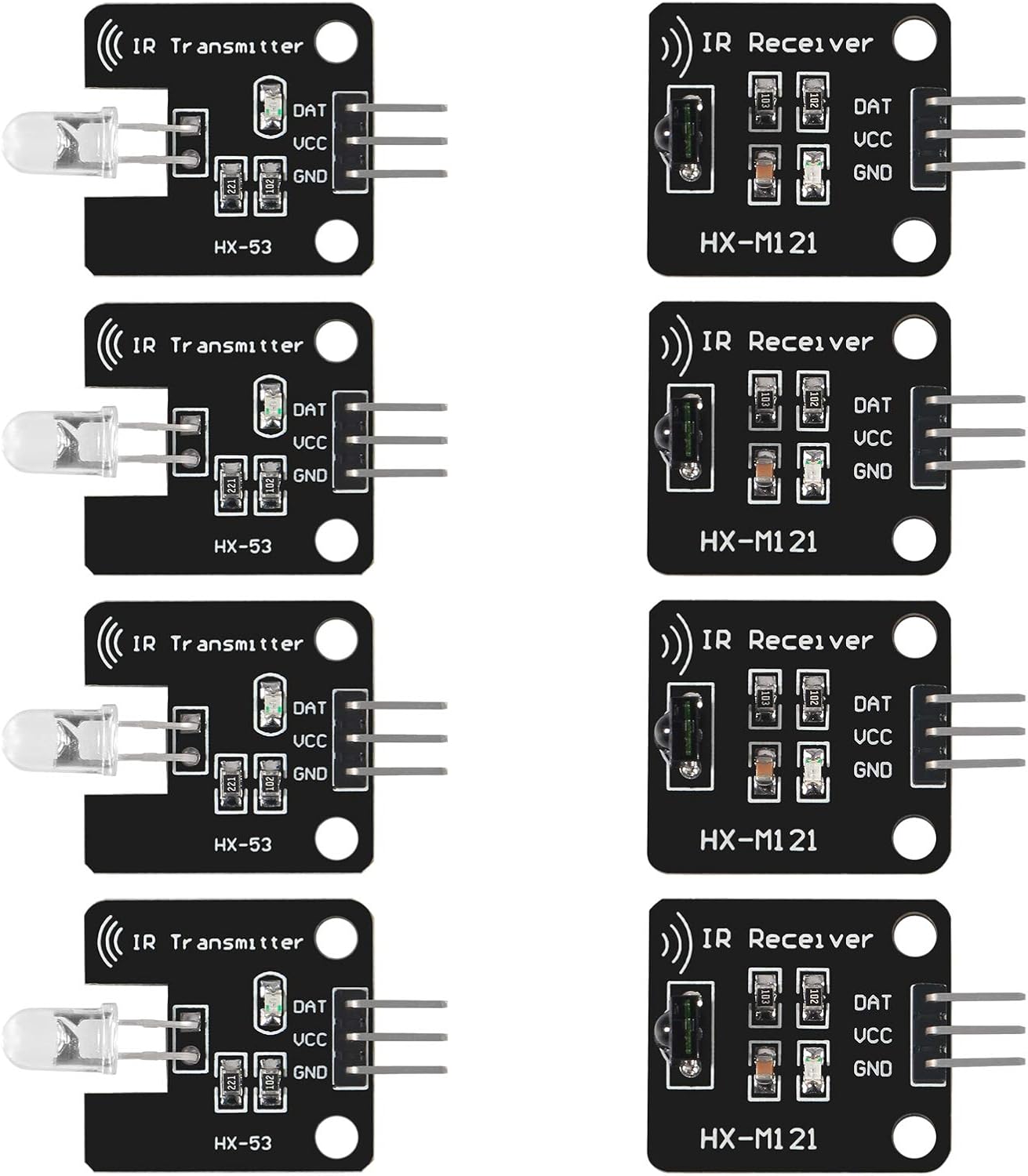
Figure 2.1: Overview of the 8-piece kit, showing four IR transmitter modules (HX-53) and four IR receiver modules (HX-M121).

Figure 2.2: Detailed view of a single IR transmitter module (HX-53) and a single IR receiver module (HX-M121).
3. Specifications
| Feature | Specification |
|---|---|
| Model Number | 13658-1 |
| Brand | DORHEA |
| IR Frequency | 38kHz |
| Receiver Sensitivity | High (1838 remote control receiver) |
| Transmitter Indicator | Emission signal indicator LED |
| Compatible Devices | Raspberry Pi, 51, AVR, ARM |
| Package Dimensions | 4.25 x 3.19 x 0.98 inches |
| Item Weight | 0.634 ounces |
4. Setup and Connection
Each module features a 3-pin header for connection: DAT (Data), VCC (Power), and GND (Ground).
4.1 IR Receiver Module (HX-M121)
The IR receiver module requires power to operate. Connect the pins as follows:
- VCC: Connect to your microcontroller's 5V power supply (or 3.3V, depending on the microcontroller's tolerance and signal level).
- GND: Connect to the common ground of your system.
- DAT: Connect to a digital input pin on your microcontroller. This pin will output a low signal when a 38kHz IR signal is detected.

Figure 4.1: Top view of the IR Receiver Module (HX-M121) showing DAT, VCC, and GND pins.
4.2 IR Transmitter Module (HX-53)
The IR transmitter module consists of an IR LED and a current-limiting resistor. The VCC pin on the header is typically not connected internally to the power supply of the LED. The DATA pin serves as the positive input for the IR LED. To operate, the module requires a modulated signal on its DATA pin.
- VCC: This pin is often a dummy pin and may not be internally connected. Do not rely on it for power.
- GND: Connect to the common ground of your system.
- DAT: Connect to a digital output pin on your microcontroller. This pin should be driven with a 38kHz modulated signal to activate the IR LED.
Important Note for Transmitter:
- The IR transmitter module requires the microcontroller to generate the 38kHz modulation directly on the DATA pin.
- For optimal range and performance, especially with 3.3V microcontrollers like Raspberry Pi, consider using an external transistor to drive the IR LED from a 5V rail. Directly driving from a 3.3V GPIO pin may result in limited range.

Figure 4.2: Top view of the IR Transmitter Module (HX-53) showing DAT, VCC, and GND pins.
4.3 Software Configuration (Raspberry Pi Example)
For Raspberry Pi users, modern operating systems often include built-in support for IR communication. You can enable IR functionality by adding specific lines to your /boot/config.txt (or /boot/firmware/config.txt for Debian 12) file:
- For IR Receiver:
dtoverlay=gpio-ir,gpio_pin=<GPIO_NUMBER> - For IR Transmitter:
dtoverlay=gpio-ir-tx,gpio_pin=<GPIO_NUMBER>
Replace <GPIO_NUMBER> with the actual GPIO pin number you are using (not the physical pin number). If using both a transmitter and receiver simultaneously, they will typically be assigned as /dev/lirc0 and /dev/lirc1. You will need to specify the correct device when using commands like ir-ctl (e.g., ir-ctl --device=/dev/lirc0).
5. Operating Principles
5.1 Infrared Communication Basics
Infrared (IR) communication relies on transmitting data using infrared light. Many remote controls use a 38kHz carrier frequency to modulate data. This modulation helps distinguish the IR signal from ambient light noise.
5.2 IR Transmitter Operation
The IR transmitter module (HX-53) contains an infrared light-emitting diode (IR LED). When the DATA pin is driven with a 38kHz modulated electrical signal, the IR LED emits infrared light pulses at that frequency. The specific data (e.g., a remote control command) is encoded within the pattern of these 38kHz pulses. The small onboard LED indicator illuminates when the IR LED is active, aiding in debugging.
5.3 IR Receiver Operation
The IR receiver module (HX-M121) is designed to detect 38kHz modulated infrared light. It filters out ambient light and demodulates the 38kHz signal, providing a clean digital output on its DATA pin. This output can then be read by a microcontroller to decode the transmitted data. The 1838 receiver IC provides high sensitivity for reliable signal detection.
6. Maintenance
These modules are robust electronic components, but proper care ensures longevity:
- Handling: Handle modules by their edges to avoid damaging components or bending pins.
- Environment: Store and operate in a dry environment, away from extreme temperatures and direct sunlight.
- Cleaning: If necessary, gently clean the modules with a soft, dry, lint-free cloth. Avoid using liquids or abrasive materials.
- Connections: Ensure all connections are secure to prevent intermittent operation or short circuits.
7. Troubleshooting
7.1 IR Transmitter Not Emitting
- Check Wiring: Verify that GND is connected to ground and DAT is connected to a digital output pin. Remember that the VCC pin on the transmitter module is often not used for power.
- Modulation: Ensure your microcontroller code is correctly generating a 38kHz modulated signal on the DATA pin. The IR LED will not light up with a constant high signal.
- Power Supply: If using a 3.3V microcontroller, the IR LED's output range might be limited. Consider using an external transistor to drive the LED from a 5V supply for better performance.
- Indicator LED: Observe the small onboard indicator LED. If it does not flash when a signal is sent, there might be an issue with the signal or power to the IR LED.
7.2 IR Receiver Not Detecting Signals
- Check Wiring: Confirm VCC is connected to power (e.g., 5V), GND to ground, and DAT to a digital input pin.
- Power Supply: Ensure the receiver module is receiving adequate power.
- Signal Source: Verify that the IR source is emitting a 38kHz modulated signal. The receiver is tuned to this specific frequency.
- Line of Sight: Ensure there is a clear line of sight between the IR transmitter and receiver. Obstructions can block the infrared light.
- Ambient Light: Strong direct sunlight or other IR sources can interfere with receiver operation.
7.3 Limited Range
- Transmitter: For increased range, consider driving the IR LED with more current (e.g., via a transistor from a 5V supply) or reducing the series resistor if you are comfortable with component modification (advanced users only, proceed with caution).
- Receiver: Ensure the receiver's lens is clean and unobstructed.
7.4 Raspberry Pi Specific Issues (Both TX/RX)
- If you have both IR transmitter and receiver modules connected to a Raspberry Pi, ensure you are specifying the correct device (
/dev/lirc0or/dev/lirc1) when usingir-ctlor other IR software.
8. Warranty and Support
For technical assistance, product support, or warranty inquiries regarding your DORHEA Digital 38kHz IR Receiver and Transmitter Sensor Module Kit, please contact DORHEA customer service directly through the platform where your purchase was made. Please provide your order details and a clear description of the issue to facilitate prompt support.
Ask a question about this manual
Ask about setup, troubleshooting, compatibility, parts, safety, or missing instructions. Manuals+ will review the question and use this page’s manual context to help answer it.