
1. Introduction
Thank you for choosing the Soundcast SL-8400 DSP Active Line Array Speaker. This manual provides essential information for the safe and efficient installation, operation, and maintenance of your audio system. Please read this manual thoroughly before using the product to ensure optimal performance and to prevent damage.
2. Safety Information
Always observe the following safety precautions to reduce the risk of electric shock, fire, or injury:
- Power Source: Connect the speaker only to a grounded AC power outlet with the specified voltage. Ensure the power cord is not damaged or pinched.
- Placement: Position the speaker on a stable, level surface or use appropriate mounting hardware for line array configurations. Ensure adequate ventilation around the unit. Avoid exposure to direct sunlight, heat sources, or excessive moisture. This product is not waterproof.
- Handling: Use caution when moving the speaker due to its weight. Always lift with proper technique or use appropriate equipment.
- Servicing: Do not attempt to service this product yourself. Refer all servicing to qualified service personnel. Opening the unit may expose you to dangerous voltages or other risks.
- Hearing Protection: Prolonged exposure to high volume levels can cause permanent hearing damage. Use appropriate hearing protection when operating the speaker at high volumes.
3. Package Contents
Upon unpacking, please verify that the following item is included:
- One (1) Soundcast SL-8400 DSP Active Line Array Speaker
If any items are missing or damaged, please contact your dealer immediately.
4. Product Overview
The Soundcast SL-8400 DSP is a powerful 2-way active line array speaker designed for professional audio applications. It features integrated DSP for precise sound control and a robust enclosure for durability.
4.1 Front View
The front of the speaker features a protective grille covering the drivers and the Soundcast branding.
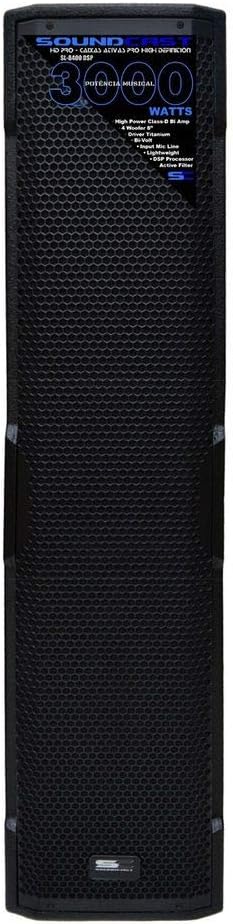
Image 1: Front view of the Soundcast SL-8400 DSP Active Line Array Speaker, showcasing the protective grille and branding.
4.2 Rear Panel and Controls
The rear panel houses all input/output connections, power controls, and the DSP interface for sound adjustments.

Image 2: Rear view of the Soundcast SL-8400 DSP Active Line Array Speaker, detailing the input/output ports, power switch, and DSP control interface.
4.3 Construction Details
The speaker features robust construction with integrated handles and mounting points for versatile deployment.

Image 3: Close-up of the top corner of the Soundcast SL-8400 DSP speaker, highlighting the textured finish and integrated handle for portability and rigging.
5. Setup
Follow these steps to set up your Soundcast SL-8400 DSP speaker:
- Unpacking: Carefully remove the speaker from its packaging. Retain the packaging for future transport or storage.
- Placement: Place the speaker on a stable, flat surface for floor mounting. For line array applications, ensure proper rigging and safety procedures are followed according to professional audio standards. Ensure sufficient space for ventilation around the rear panel.
- Power Connection: Connect the provided power cable to the AC inlet on the rear panel of the speaker, then plug it into a grounded electrical outlet.
- Audio Input Connection: Connect your audio source (e.g., mixer, game console, home theater system, television) to the appropriate input jacks on the rear panel. Use high-quality shielded cables to minimize noise.
- Initial Settings: Before powering on, ensure all volume controls are set to their minimum level.
6. Operating Instructions
Once the speaker is set up, follow these steps for operation:
- Power On: Flip the power switch on the rear panel to the 'ON' position. The power indicator light should illuminate.
- Volume Adjustment: Slowly increase the master volume control on the speaker and your audio source to the desired listening level. Avoid setting the volume too high, which can cause distortion and potential damage.
- DSP Control: Use the touch controls on the rear panel to access and adjust the Digital Signal Processing (DSP) settings. These settings allow for equalization, crossover adjustments, and other sound enhancements. Refer to the on-screen menu for specific DSP functions.
- Audio Source Selection: If multiple inputs are connected, use the input selector (if available) on the rear panel or via the DSP interface to choose the active audio source.
- Power Off: Before powering off, reduce the volume to minimum. Then, flip the power switch to the 'OFF' position.
7. Maintenance
Proper maintenance ensures the longevity and performance of your speaker:
- Cleaning: Disconnect the power before cleaning. Use a soft, dry cloth to wipe the exterior surfaces. Do not use abrasive cleaners, solvents, or waxes.
- Ventilation: Ensure that the ventilation openings on the rear panel are clear of dust and debris to prevent overheating.
- Storage: If storing the speaker for an extended period, place it in its original packaging or a protective case in a cool, dry environment.
- Cable Inspection: Periodically inspect all cables for signs of wear or damage. Replace any damaged cables immediately.
8. Troubleshooting
If you encounter issues with your Soundcast SL-8400 DSP speaker, refer to the following common problems and solutions:
- No Power:
- Check if the power cable is securely connected to both the speaker and the power outlet.
- Verify that the power outlet is functional by plugging in another device.
- Ensure the power switch on the rear panel is in the 'ON' position.
- No Sound:
- Confirm that the audio source is playing and its volume is turned up.
- Check the audio input cable connections at both the speaker and the source.
- Ensure the speaker's master volume is not set to minimum.
- Verify that the correct input source is selected via the DSP interface.
- Distorted Sound:
- Reduce the volume level on both the speaker and the audio source.
- Check for damaged audio cables.
- Ensure the audio source is not sending an overdriven signal.
- Review DSP settings for any extreme equalization or effects that might cause distortion.
If the problem persists after trying these solutions, please contact Soundcast customer support or a qualified service technician.
9. Specifications
| Feature | Specification |
|---|---|
| Brand | Soundcast |
| Model | SL-8400 DSP |
| Product Type | Active Line Array Speaker |
| Amplification Type | Active |
| Power Output | 1500 Watts RMS |
| Audio Output Mode | Mono |
| Main Speaker Driver Size | 8 Inches |
| Subwoofer Diameter | 12 Inches (Note: May refer to compatible external subwoofer or specific internal driver configuration) |
| Surround Sound Channel Configuration | 2 |
| Compatible Devices | Game Consoles, Home Theater Systems, Televisions |
| Intended Use | Events, Surround Sound Systems |
| Control Method | Touch (for DSP/interface) |
| Power Source | Wired Electric |
| Color | Black |
| Waterproof | No |
| Mounting Type | Floor Mount |
| Number of Items | 1 |
| ASIN | B08X16LKVB |
10. Warranty and Support
Soundcast products are manufactured to high-quality standards. For information regarding warranty coverage, technical support, or service, please refer to the warranty card included with your product or visit the official Soundcast website. Please have your product model (SL-8400 DSP) and ASIN (B08X16LKVB) available when contacting support.


