
Introduction
Welcome to the XGIMI HORIZON FHD Projector user manual. This guide provides essential information for setting up, operating, maintaining, and troubleshooting your new projector. The XGIMI HORIZON FHD is designed to deliver a superior home entertainment experience with its advanced features and user-friendly interface.
Key features include:
- Stunning 1080p Resolution: 1920×1080 FHD resolution with 2.07 million pixels and ultra-bright 1500 ISO Lumens. (Maximum Supported Resolution is 4K @ 60Hz)
- Room-Filling Sound: Dual 8W built-in Harman Kardon speakers, DTS-HD & DTS Studio Sound, Dolby Digital compatibility.
- Intelligent Screen Adaption Technology: ±40 Degrees Auto Keystone Correction (Horizontal & Vertical), Auto Screen Alignment, Auto Focus, and Obstacle Avoidance for super-fast setup and incredible ease of use.
- Advanced Image Engine: X-VUE 2.0 Image Engine, 60Hz MEMC super-smooth motion compensation. Also packed with HDR10 x HLG lifelike color format and AI Brightness Adjustment.
- Android TV 10.0: Access to 5000+ Google Play apps. Wirelessly cast entertainment from any Apple/Android device via Chromecast built-in. Google Assistant also provides intuitive voice control.
Setup Guide
Follow these steps for initial setup of your XGIMI HORIZON FHD Projector:
- Unboxing and Placement: Carefully remove the projector and its accessories from the packaging. Place the projector on a stable, flat surface. Ensure there is adequate ventilation around the device.
- Power Connection: Connect the power adapter to the projector's power input port, then plug the adapter into a power outlet.
- Initial Power On: Press the power button on the projector or the remote control to turn on the device.
- Automatic Adjustments: The HORIZON FHD features Intelligent Screen Adaption Technology. It will automatically perform auto focus, auto keystone correction (±40° vertical and horizontal), auto screen alignment, and obstacle avoidance. Allow a few moments for these adjustments to complete.
- Android TV Setup: Follow the on-screen instructions to set up your Android TV. This typically involves connecting to a Wi-Fi network, logging in with your Google account, and installing desired applications from the Google Play Store.
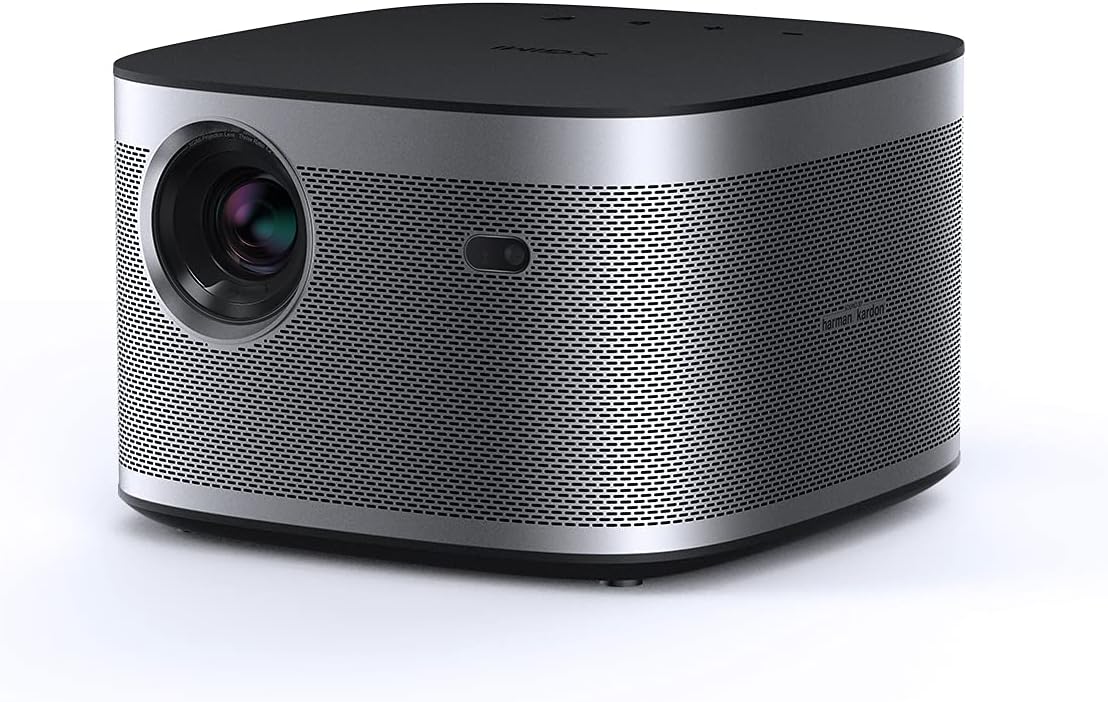
Image: Front view of the XGIMI HORIZON FHD Projector, showcasing its compact design and lens.

Image: Illustration of the Intelligent Obstacle Avoidance feature, showing the projector automatically adjusting the image to avoid objects on the projection surface.
Operating Instructions
Once set up, operating your XGIMI HORIZON FHD Projector is intuitive:
- Android TV Interface: Navigate the Android TV home screen using the provided remote control. Access installed apps, streaming services, and settings.
- Content Casting: Utilize the built-in Chromecast to wirelessly cast content from your compatible Apple or Android devices directly to the projector.
- External Device Connectivity: Connect external devices such as gaming consoles, Blu-ray players, or laptops via the HDMI ports. USB ports are available for media playback from external storage devices.
- Audio Output: The projector features dual 8W Harman Kardon speakers for immersive sound. For external audio, use the 3.5mm audio jack or Bluetooth connectivity.
- Image Quality Adjustments: The X-VUE 2.0 Image Engine and MEMC (Motion Estimation, Motion Compensation) enhance picture smoothness. HDR10 and HLG support provide lifelike colors. AI Brightness Adjustment automatically optimizes brightness based on ambient light conditions.

Image: A visual comparison demonstrating the remarkable 1080p Full HD picture quality of the XGIMI HORIZON FHD Projector compared to other projectors.

Image: Depiction of the Smart Brightness Adaptation feature, showing how the projector adjusts its output for optimal viewing in both dark and bright environments.

Image: An illustration emphasizing the powerful, theater-like sound experience provided by the Harman Kardon speakers integrated into the projector.

Image: Screenshot of the easy-to-use Android TV 10.0 user interface, showing various streaming apps and navigation options.
Maintenance
Proper maintenance ensures the longevity and optimal performance of your projector:
- Cleaning: Use a soft, dry cloth to clean the exterior of the projector. For the lens, use a specialized lens cleaning cloth and solution to avoid scratches. Do not use abrasive cleaners or solvents.
- Ventilation: Ensure the ventilation vents are clear of dust and obstructions. Good airflow is crucial to prevent overheating.
- Storage: When not in use for extended periods, store the projector in a cool, dry place, away from direct sunlight and extreme temperatures.
Troubleshooting
Here are solutions to common issues you might encounter:
- No Picture/Poor Picture Quality:
- Check power connections.
- Ensure the lens is clean.
- Verify input source selection is correct for external devices.
- Allow auto-focus and auto-keystone to complete. If issues persist, try manual adjustments in settings.
- No Sound:
- Check volume levels on the projector and connected devices.
- Ensure external audio devices are correctly connected or paired via Bluetooth.
- Netflix App Not Streaming Natively: Please note that the XGIMI HORIZON FHD Projector does not stream the native Netflix app directly. For Netflix content, it is recommended to use an external streaming device (e.g., Chromecast, Fire TV Stick) connected via HDMI.
- Remote Control Not Responding:
- Check and replace batteries.
- Ensure there are no obstructions between the remote and the projector.
Specifications
| Feature | Detail |
|---|---|
| Brand Name | XGIMI |
| Item Weight | 6.39 pounds |
| Product Dimensions | 8.58 x 8.19 x 5.35 inches |
| Item Model Number | XK03K |
| Color Name | Grey |
| Special Features | Auto Focus, HDR10, HLG, Low Blue Light Certified By TÜV Rheinland, Auto Keystone Correction (±40° Vertical and Horizontal) |
| Speaker Type | Surround (Harman Kardon) |
| Connectivity Technology | HDMI, USB, LAN, 3.5mm Jack |
| Display Resolution | 1920 x 1080 (FHD) |
Warranty and Support
For warranty information, please refer to the official XGIMI website or the documentation included with your purchase. XGIMI offers a 30-day price match guarantee. For any product support or inquiries, you can contact XGIMI customer service.
- Customer Support Email: Service-usa@xgimi.com
- User Manual (PDF): For a comprehensive guide, download the official PDF user manual from the XGIMI website or via this link: XGIMI HORIZON User Manual