
Introduction
This manual provides essential instructions for the proper use, setup, and maintenance of your FORSINING WD19 Men's Mechanical Hand-Wind Skeleton Watch. Please read this manual thoroughly to ensure optimal performance and longevity of your timepiece.
Product Overview
The FORSINING WD19 is a mechanical hand-wind skeleton watch featuring a stainless steel mesh bracelet. Its design showcases the intricate internal movement through a transparent dial and case back.

Figure 1: Front view of the FORSINING WD19 Skeleton Watch, showcasing the visible mechanical movement and mesh bracelet.
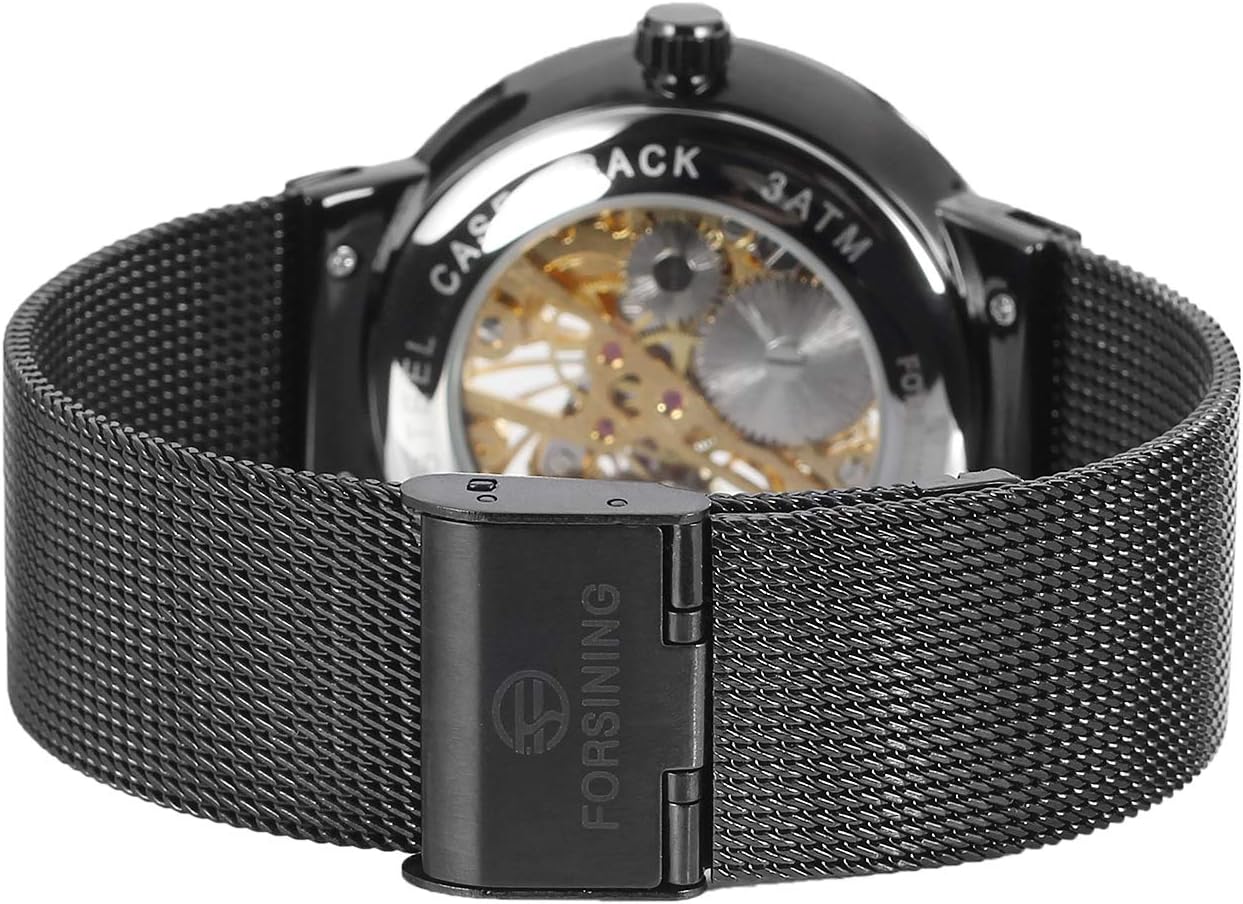
Figure 2: Rear view of the watch, highlighting the stainless steel case back and the clasp mechanism of the mesh bracelet.

Figure 3: Side view illustrating the watch's profile and the visible mechanical gears through the transparent case.

Figure 4: Close-up of the fold-over clasp with safety on the stainless steel mesh bracelet.
Setup
1. Winding the Watch
Your FORSINING WD19 is a mechanical hand-wind watch. It does not use a battery and requires manual winding to operate.
- Locate the crown on the side of the watch case.
- Ensure the crown is pushed fully in towards the watch case.
- Rotate the crown clockwise approximately 18-20 times. This will fully wind the mainspring and provide approximately 36 hours of power reserve.
- For daily use, it is recommended to wind the watch once every 24 hours to maintain consistent timekeeping.
Video 1: Demonstration of how to wind a mechanical watch and set the time. This video shows the crown being rotated clockwise to wind the watch and pulled out to adjust the time.
2. Setting the Time
- Gently pull the crown out one position.
- Rotate the crown to move the hands clockwise or counter-clockwise until the desired time is set.
- Once the time is set, push the crown back in firmly to its original position to engage the movement and prevent dust or moisture from entering.
3. Adjusting the Mesh Bracelet
The stainless steel mesh bracelet features a fold-over clasp with safety, which can be adjusted for a comfortable fit.
- Locate the small lever on the clasp.
- Use a small tool (like a flat-head screwdriver or a spring bar tool) to lift the lever, which will allow the clasp to slide along the mesh band.
- Adjust the clasp to the desired position for your wrist size.
- Press the lever back down firmly to secure the clasp in place. Ensure it clicks securely to prevent accidental opening.
Operating the Watch
After winding and setting the time, your watch will begin to operate. The skeleton design allows you to observe the intricate gears and springs in motion.
Note: Mechanical watches may have a slight deviation in timekeeping compared to quartz watches. Regular winding and proper care will help maintain accuracy.
Maintenance
- Cleaning: Wipe the watch case and crystal with a soft, dry cloth. For the mesh bracelet, a slightly damp cloth can be used, ensuring it is dried thoroughly afterward. Avoid harsh chemicals.
- Water Resistance: The watch has a water-resistant structure. However, it is not suitable for swimming, diving, or showering. Avoid direct contact with water to prevent damage to the mechanical movement.
- Storage: When not wearing the watch for extended periods, store it in a dry, cool place away from direct sunlight and strong magnetic fields, which can affect timekeeping accuracy.
- Avoid Shocks: Mechanical watches are delicate. Avoid dropping the watch or subjecting it to strong impacts.
Troubleshooting
| Problem | Possible Cause | Solution |
|---|---|---|
| Watch stops or runs intermittently | Insufficient winding | Manually wind the watch fully (18-20 clockwise rotations of the crown). |
| Time is inaccurate (running fast or slow) | Magnetic interference, shock, or need for regulation | Keep the watch away from strong magnetic fields. If inaccuracy persists, professional servicing may be required. |
| Condensation under the crystal | Moisture ingress | Avoid contact with water. If condensation appears, seek professional repair immediately to prevent corrosion. |
Specifications
- Model Number: WD19
- Movement: Mechanical Hand-Wind, 17-Jewels
- Case Material: Alloy
- Band Material: Stainless Steel Mesh
- Clasp Type: Fold-over-clasp-with-safety
- Crystal: Protective Mineral Crystal
- Water Resistance: Water-resistant (not for swimming/diving/showering)
- Power Reserve: Approximately 36 hours (when fully wound)
Warranty & Support
This FORSINING watch comes with a Two-Year Warranty from the manufacturer, covering manufacturing defects.
For warranty claims or technical support, please contact the seller, Forsining Watch, or refer to the contact information provided with your purchase.
Important: Any unauthorized repair or modification may void your warranty.
Additional Resources
Video 2: A general overview of a SEWOR mechanical skeleton watch, demonstrating its aesthetic and movement. This video provides a visual representation of a similar watch type.