
MUSKY DY28 PLUS
MUSKY DY28 PLUS Bluetooth Speaker User Manual
Model: DY28 PLUS
1. Introduction
The MUSKY DY28 PLUS is a versatile device combining a Bluetooth speaker, digital clock, alarm, and touch-sensitive LED lighting. It supports wireless audio streaming, hands-free calls, and music playback from USB drives or TF cards, offering a comprehensive audio and visual experience.
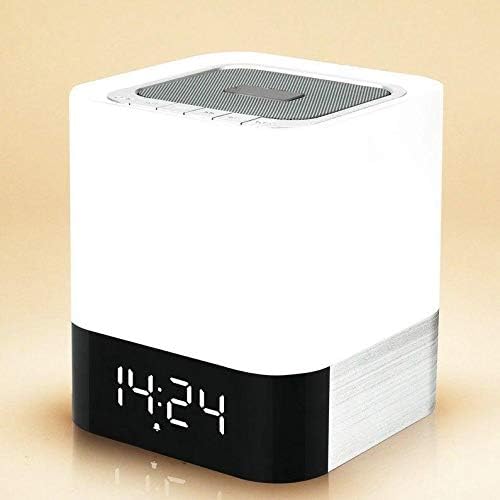
This image displays the front of the MUSKY DY28 PLUS speaker, highlighting its compact, cube-shaped design and the clear digital time display at the base.
2. Product Features
- Wireless Bluetooth function for audio streaming.
- Touch-sensitive display to check the time instantly.
- Hands-free calling with a built-in microphone, providing clear voice communication.
- Supports MP3 music playback directly from U-disk (USB drive) or TF (Micro SD) card.
- Integrated high-quality lithium battery, rechargeable via Micro USB port.
- Customizable alarm clock function.
- Delivers stereo and Hi-Fi audio quality.
- Modern and sleek design.
- Special music-responsive LED light with dynamic lamplight beat.
- Seven optional lamplight modes and various color options for personalized ambiance.
3. Package Contents
Please check the package for the following items:
- 1 x MUSKY DY28 PLUS Bluetooth Speaker
- 1 x Micro USB Charging Cable
- 1 x User Manual (This document)
4. Safety Information
To ensure safe and optimal operation of your MUSKY DY28 PLUS speaker, please observe the following precautions:
- Do not expose the device to extreme temperatures, direct sunlight, or high humidity.
- Avoid dropping or subjecting the device to strong impacts.
- Do not disassemble, repair, or modify the device yourself. Contact qualified service personnel for assistance.
- Keep the device away from water or other liquids to prevent electric shock or damage.
- Use only the provided or recommended charging cable and power adapter.
5. Setup
5.1 Initial Charging
Before first use, fully charge the speaker's built-in lithium battery. Charging can be done using a mobile phone adapter or a computer's USB port. A full charge typically takes approximately 8-10 hours.
5.2 Power On/Off
Locate the power switch on the rear panel of the speaker. Slide the switch to the 'ON' position to power on the device. Slide it to the 'OFF' position to power off.

The rear panel of the speaker features various connectivity options, including a USB host port, Micro SD card slot, AUX input, Micro USB charging port, and the power ON/OFF switch.
6. Operating Instructions
6.1 Bluetooth Pairing
- Ensure the speaker is powered on.
- Activate Bluetooth on your mobile device (smartphone, tablet, etc.).
- Search for available Bluetooth devices. The speaker will appear as "MUSKY DY28 PLUS" or similar.
- Select the speaker from the list to pair. A confirmation sound will indicate successful pairing.
6.2 Music Playback (U-disk / TF Card)
Insert a USB drive into the USB HOST port or a TF (Micro SD) card into the Micro SD slot on the rear of the speaker. The speaker will automatically detect the storage device and begin playing MP3 music files.
6.3 Hands-free Function
When connected via Bluetooth to a smartphone, the speaker supports hands-free calling. When a call comes in, the speaker will ring. Press the call answer button (usually indicated by a phone icon) on the speaker to answer the call. The built-in microphone ensures clear voice transmission without echo.
6.4 Clock and Alarm Setting
To display the time, gently touch the top surface of the speaker. The digital clock display will illuminate. Refer to the specific button layout on the top panel for setting the time and customizing the alarm bell as desired.
6.5 LED Light Modes
The speaker features a touch-sensitive LED light with multiple modes and colors. Gently press the top surface of the speaker to cycle through brightness levels: first press for low brightness, second for medium, and third for high. Continue pressing to cycle through the seven lamplight modes and different color options. The light can also beat in sync with the music.

This series of images illustrates the touch-sensitive LED light function. A single touch activates low brightness, a second touch increases to medium brightness, and a third touch sets it to high brightness.

The MUSKY DY28 PLUS offers seven distinct lamplight modes with various color options, allowing users to customize the visual ambiance.
7. Maintenance
7.1 Cleaning
To clean the speaker, use a soft, dry cloth. Do not use abrasive cleaners, waxes, or solvents as they may damage the finish. Ensure no liquids enter the ports or openings.
7.2 Battery Maintenance
If the device will not be used for an extended period, it is recommended to fully charge the lithium rechargeable battery every two to three months. This helps prevent the battery from losing its capacity or becoming non-functional. Alternatively, you may remove the lithium battery if the device allows for it and will be stored for a very long duration.
8. Troubleshooting
- No Power: Ensure the speaker is fully charged. Connect the Micro USB charging cable and allow sufficient time for charging. Check the power switch is in the 'ON' position.
- No Sound: Verify that the speaker's volume is turned up. Check if the device is properly paired via Bluetooth or if the U-disk/TF card is inserted correctly and contains playable MP3 files.
- Bluetooth Disconnection: Ensure your Bluetooth device is within the effective range (typically 10 meters) and there are no significant obstacles. Try unpairing and re-pairing the device.
- Clock Not Displaying: Gently touch the top surface of the speaker to activate the time display.
9. Specifications
| Feature | Detail |
|---|---|
| Brand Name | MUSKY |
| Model Name | DY28 PLUS |
| Item Model Number | DY28 PLUS |
| Speaker Type | Bluetooth Speakers |
| Connectivity Technology | Wired/Wireless |
| Speaker Maximum Output Power | 10 Watts |
| Audio Output Mode | Stereo |
| Mounting Type | Tabletop |
| Special Features | Wireless, Bluetooth |
| Compatible Devices | Laptop, MP3 Player, Desktop, Smartphone |
| Recommended Uses For Product | For Gaming Consoles, For Computers, For Televisions, For Smartphones or Tablets, For Music Players |
| Package Dimensions | 23.3 x 13.6 x 12.6 cm |
| Product Weight | 1 kg |
| Manufacturer | Musky |
10. Warranty Information
This product comes with a standard manufacturer's warranty. Please refer to the warranty card included in your product packaging for detailed terms and conditions, including warranty period and coverage. Keep your purchase receipt as proof of purchase for any warranty claims.
11. Customer Support
For any questions, technical assistance, or support regarding your MUSKY DY28 PLUS Bluetooth Speaker, please contact your retailer or the manufacturer's customer service. Contact information can typically be found on the product packaging or the manufacturer's official website.
Ask a question about this manual
Ask about setup, troubleshooting, compatibility, parts, safety, or missing instructions. Manuals+ will review the question and use this page’s manual context to help answer it.