
Introduction
The BOSS Audio Systems MR500UAB is a marine-grade digital media receiver designed for use in boats and other outdoor environments. This unit features Bluetooth audio streaming and hands-free calling, a USB port for media playback and charging, and an AM/FM radio tuner. Its weatherproof design ensures durability against splashing water, making it suitable for marine applications. This manual provides essential information for the proper setup, operation, and maintenance of your MR500UAB receiver.
Key Features
- Bluetooth Connectivity: Stream music wirelessly from your smartphone or MP3 player and utilize apps like Spotify/Pandora. Supports hands-free calling.
- Weatherproof Design: IPX6 rated to protect against splashing water, ensuring reliable performance in marine conditions.
- Media Playback Options: Enjoy audio via Bluetooth, USB port, or AM/FM radio.
- USB Port: Provides access to a vast library of audio files and offers USB charging for compatible devices.
- Auxiliary Input: Compatible with audio output from smartphones and MP3 players via a 3.5mm jack.
- Audio Outputs: Features front/rear pre-amp outputs for connecting external speakers.
- Compact Dimensions: Measures 1.97" (H) x 7.01" (W) x 4.25" (D) for easy installation.
What's in the Box
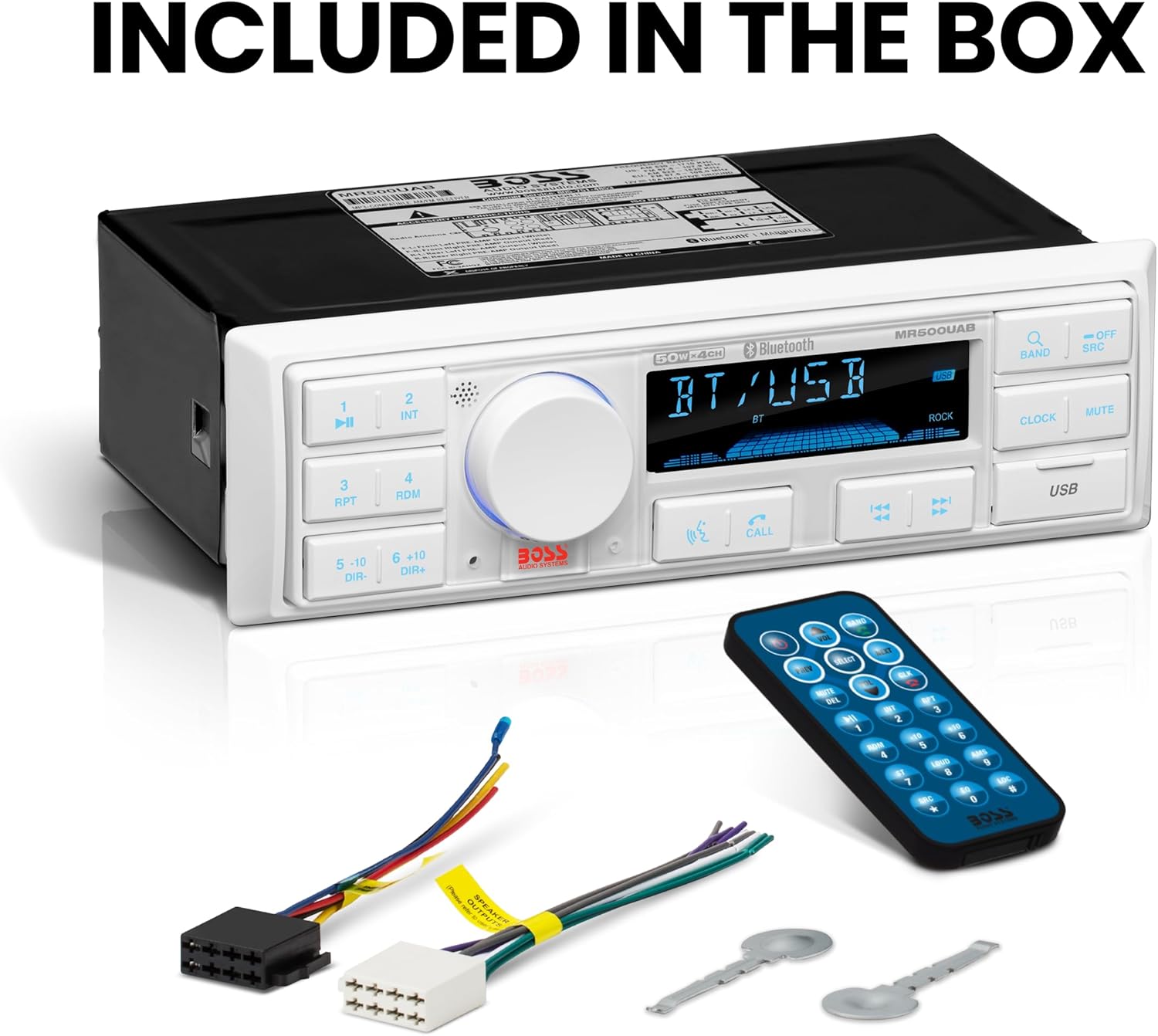
Image: Included components with the MR500UAB receiver.
- BOSS Audio Systems MR500UAB Marine Radio Receiver
- Remote Control
- Wiring Harnesses
- Removal Keys
- Instruction Manual
Product Overview

Image: Front and Rear Panel Controls and Connections.
Front Panel Controls:
- Play/Pause Button: Controls media playback.
- LCD Screen: Displays current status, track information, and radio frequency.
- Volume/Select Knob: Adjusts volume and navigates menu options.
- Band Button: Selects radio bands (AM/FM).
- Power/Source Button: Turns the unit on/off and switches input sources.
- Mute Button: Mutes audio output.
- USB Port: Connects USB devices for media playback and charging.
- Microphone: For hands-free calling.
- Push To Talk Button: Activates voice assistant on connected smartphone.
- Answer/End Call Button: Manages phone calls.
- Previous/Next/Fast Forward/Rewind Buttons: Controls track selection and radio tuning.
- Clock Button: Displays or sets the time.
Rear Panel Connections:
- Radio Antenna Input: Connects to your marine antenna.
- Audio Output (FL, FR, RL, RR): RCA pre-amp outputs for front and rear speakers.
- ISO Connector: Main wiring harness connection.
- Fuse: Protects the unit from power surges.
Setup and Installation
Proper installation is crucial for the performance and longevity of your MR500UAB receiver. Due to the complexity of marine electrical systems, professional installation is strongly recommended to ensure safe and correct functionality.
Installation Steps (General Guidance):
- Power Disconnection: Always disconnect the boat's battery before beginning any electrical work to prevent short circuits and damage.
- Mounting: Choose a suitable location for the receiver, ensuring it is protected from direct exposure to extreme weather conditions, despite its weatherproof rating. The unit is designed for a single-DIN fit.
- Wiring: Connect the provided wiring harnesses according to the wiring diagram in the full installation guide (not included in this manual). Pay close attention to power, ground, speaker, and accessory connections.
- Antenna Connection: Connect your marine radio antenna to the designated input on the rear of the unit.
- Testing: Reconnect the battery and perform a functional test of all features before securing the unit completely.
Note: Refer to the detailed wiring diagrams and mounting instructions provided with your product packaging for specific installation procedures.
Operating Instructions
Power On/Off and Source Selection:
- Press the Power/Source button to turn the unit on or off.
- Press the Power/Source button repeatedly to cycle through available sources: FM, AM, Bluetooth, USB, AUX.
Volume Control:
- Rotate the Volume/Select knob clockwise to increase volume and counter-clockwise to decrease volume.
- Press the Mute button to temporarily silence the audio. Press again to restore.
Bluetooth Pairing and Audio Streaming:

Image: Bluetooth Audio Streaming feature icon.
- Ensure Bluetooth is enabled on your mobile device.
- Select Bluetooth as the source on the MR500UAB. The unit will enter pairing mode.
- On your mobile device, search for available Bluetooth devices and select "BOSS MR500UAB" (or similar) to connect.
- Once paired, you can stream audio from your device to the receiver. Use the Play/Pause and Previous/Next buttons on the receiver to control playback.
Hands-Free Calling:
- When a call comes in, press the Answer/End Call button to answer.
- Press the Answer/End Call button again to end the call.
- Use the built-in microphone for communication.
- Press the Push To Talk button to activate your smartphone's voice assistant (e.g., Siri, Google Assistant).
USB Playback:

Image: USB feature icon.
- Insert a USB flash drive containing MP3 audio files into the USB port.
- The unit will automatically switch to USB source and begin playback.
- Use the Play/Pause and Previous/Next buttons to control playback.
AM/FM Radio:
- Select FM or AM as the source using the Power/Source button.
- Press the Band button to switch between FM1, FM2, FM3, AM1, and AM2 bands.
- Use the Previous/Next buttons to tune to the next/previous station. Long press for automatic seek.
- To save a preset, tune to the desired station, then long press one of the numbered preset buttons (1-6).
Auxiliary Input:

Image: Auxiliary Input feature icon.
- Connect an external audio device (e.g., MP3 player, smartphone) to the auxiliary input using a 3.5mm audio cable.
- Select AUX as the source on the MR500UAB.
- Control playback directly from your connected device.
Maintenance

Image: Fully Marinized feature icon.
To ensure the longevity and optimal performance of your BOSS Audio Systems MR500UAB Marine Radio Receiver, follow these maintenance guidelines:
- Cleaning: Use a soft, damp cloth to clean the unit's exterior. Avoid abrasive cleaners, solvents, or harsh chemicals, as they can damage the finish or seals.
- Water Exposure: While the unit is weatherproof (IPX6 rated), it is not designed for submersion. Avoid directing high-pressure water sprays directly at the unit.
- Connections: Periodically check all wiring connections for corrosion or looseness, especially in a marine environment. Ensure all caps and covers for unused ports are securely in place.
- Storage: If the boat will be stored for an extended period, especially in harsh conditions, consider covering the unit or removing it if possible to protect it from extreme temperatures and moisture.
- Fuse Replacement: If the unit fails to power on, check the fuse located on the rear panel. Replace it with a fuse of the same type and rating (refer to specifications for correct fuse type).
Troubleshooting
If you encounter issues with your MR500UAB receiver, consult the following common troubleshooting steps:
| Problem | Possible Cause | Solution |
|---|---|---|
| No Power | Blown fuse; Loose power connection; Vehicle battery low. | Check and replace fuse; Verify power and ground connections; Charge or replace battery. |
| No Sound | Volume too low; Mute activated; Loose speaker connections; Incorrect source selected. | Increase volume; Deactivate mute; Check speaker wiring; Select correct audio source. |
| Bluetooth Pairing Fails | Bluetooth not enabled on device; Unit not in pairing mode; Device too far. | Ensure Bluetooth is on; Put unit in pairing mode; Move device closer (within 33 ft/10m). |
| USB Not Playing | Unsupported file format; USB drive corrupted; Loose USB connection. | Ensure files are MP3; Try a different USB drive; Reinsert USB drive firmly. |
| Poor Radio Reception | Antenna not connected; Damaged antenna; Weak signal area. | Check antenna connection; Inspect antenna for damage; Try tuning to stronger stations. |
If problems persist after attempting these solutions, contact BOSS Audio Systems customer support or consult a qualified technician.
Specifications
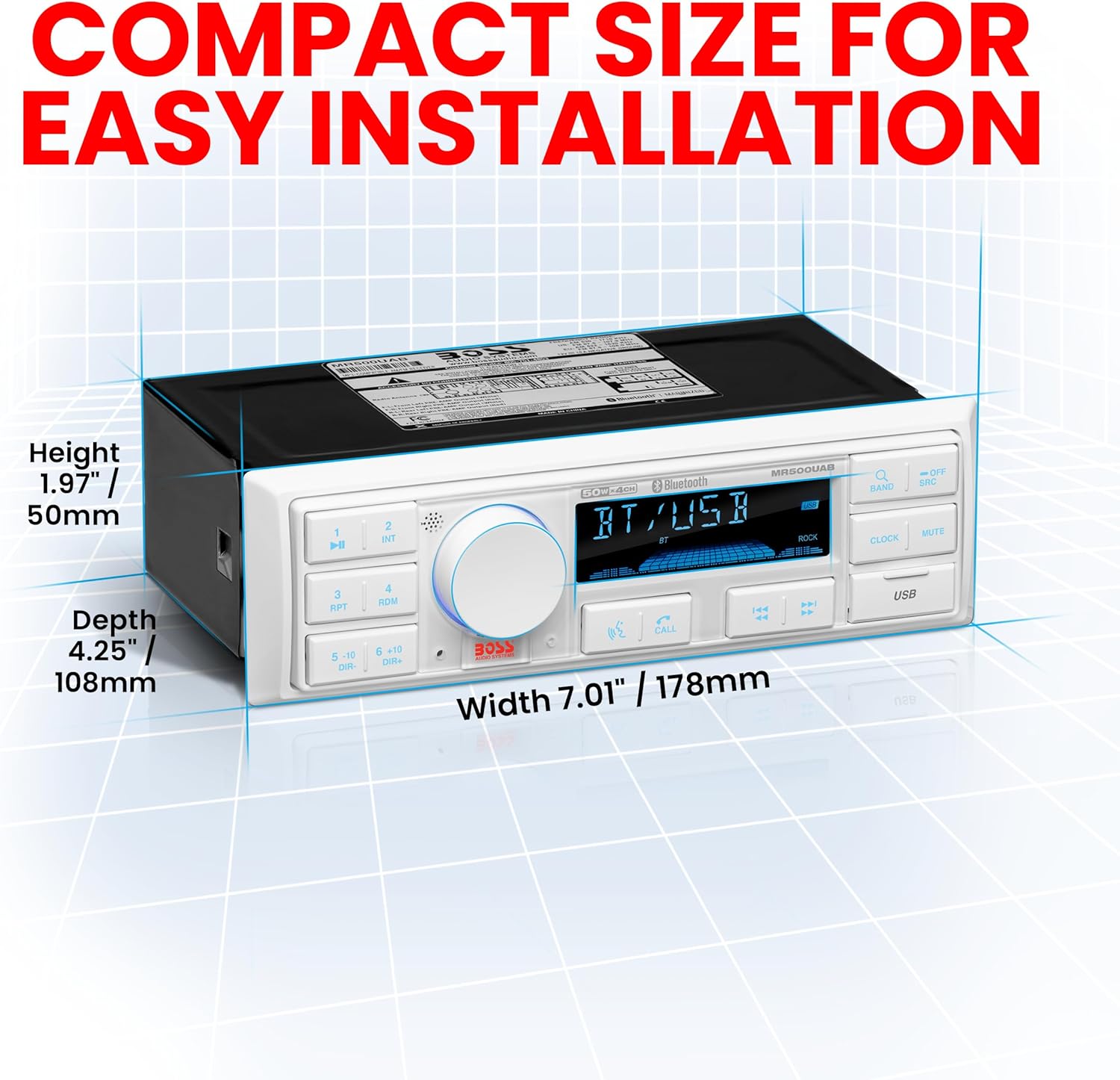
Image: MR500UAB Dimensions.
| Feature | Specification |
|---|---|
| Model Number | MR500UAB |
| Brand | BOSS Audio Systems |
| Connectivity Technology | Bluetooth, USB |
| Special Features | AM/FM Radio Receiver, Bluetooth Audio and Hands-Free Calling, Digital Media MP3 Player, IPX6 Rated Weatherproof, No CD Player, USB Port |
| Compatible Devices | MP3 Player, Smartphone |
| Connector Type | 3.5mm Jack, USB |
| Audio Output Mode | Stereo |
| Product Dimensions (D x W x H) | 4.25" x 7.01" x 1.97" (108mm x 178mm x 50mm) |
| Item Weight | 499 Grams (1.1 lbs) |
| Output Power | 200 Watts (50 Watts x 4 Channels) |
| Number of Channels | 4 |
| Supported Internet Services | Pandora, Spotify |
| Control Method | App (via Bluetooth) |
| Audio Output Type | Speakers (via pre-amp outputs) |
| Format | MP3 Audio |
| Wireless Technology | AM/FM, Bluetooth |
| UPC | 791489130967 |
Warranty and Support

Image: BOSS Audio Systems 3-Year Platinum Online Dealer Warranty.
Warranty Information:
BOSS Audio Systems provides a powerful 3-year platinum online dealer warranty, valid for purchases made through Amazon.com. This warranty covers defects in materials and workmanship under normal use. Please register your product online after purchase to activate your warranty.
Customer Support:
For technical assistance, troubleshooting beyond this manual, or warranty claims, please contact BOSS Audio Systems customer support. Contact information can typically be found on the official BOSS Audio Systems website or within your product packaging.
We strongly encourage professional installation of this product to ensure proper and safe functionality, which may also be a condition for warranty validity.