
Bore LCX-137
Instruction Manual: AIWA LCX-137 CD Player Laser Head Replacement
Model: LCX-137 Optical Pick-up Unit
Product Overview
This document provides essential information for the installation and maintenance of the replacement laser head optical pick-up unit for the AIWA LCX-137 Radio CD Player. This component is designed to restore disc reading functionality to compatible devices.
- Brand Name: ZUCZUG
- Model Number: LCX-137
- Package: Yes
- Include Display: No (This unit does not include a display)
- Use: Home (Intended for home audio equipment repair)
Setup and Installation
Installation of this optical pick-up unit requires technical proficiency and familiarity with electronic component replacement. It is recommended that installation be performed by a qualified technician.
- Preparation: Ensure the AIWA LCX-137 CD Player is powered off and disconnected from all power sources. Open the device casing carefully, following the original service manual if available.
- Removal of Old Unit: Carefully disconnect all cables and mounting screws securing the existing optical pick-up unit. Note the orientation and connection points for reassembly.
- Installation of New Unit: Position the new LCX-137 optical pick-up unit in place. Secure it with the appropriate screws. Reconnect all cables, ensuring proper alignment and secure connections.
- Crucial Step - Short Circuit Removal: Before powering on the device, it is imperative to remove the anti-static short circuit protection point (often marked 'A' or similar) on the new laser head. This short circuit protects the laser diode during shipping and must be removed for the unit to function correctly. Failure to remove this short circuit will prevent the unit from reading discs.
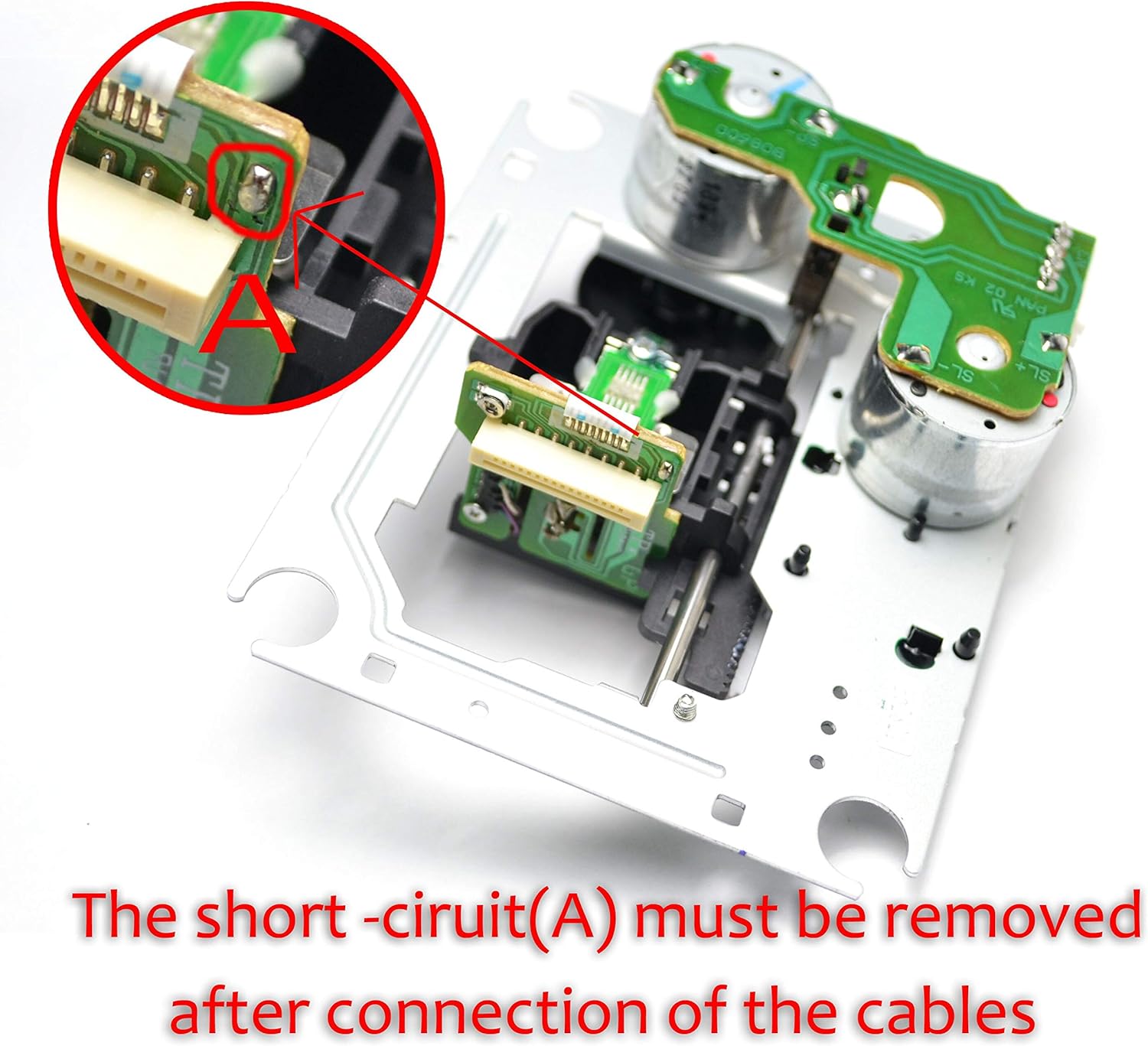
Figure 1: Detail showing the anti-static short circuit (A) that must be removed after connecting the cables. This is a critical step for proper operation.

Figure 2: The complete replacement optical pick-up unit for AIWA LCX-137.
- Reassembly: Once the short circuit is removed and all connections are secure, carefully reassemble the device casing.
- Testing: Connect the device to power and test its CD playback functionality.
Operating Considerations
This product is a replacement component. Its operation is entirely dependent on the proper functioning of the AIWA LCX-137 CD Player it is installed in. Once installed, the CD player should operate as intended, reading audio CDs and data discs compatible with the original unit.
Maintenance
The optical pick-up unit is a sensitive component. Proper maintenance of the CD player can extend its lifespan:
- Dust Prevention: Keep the CD player in a clean, dust-free environment. Dust accumulation on the laser lens can impair reading performance.
- Cleaning: If disc reading issues occur, a specialized CD lens cleaner disc can be used. Avoid touching the laser lens directly.
- Handling: Handle the CD player and discs carefully to prevent physical damage to the optical mechanism.
Troubleshooting
If the CD player does not read discs after installation of the new optical pick-up unit, consider the following:
- No Disc Reading / Disc Error:
- Check Short Circuit: The most common issue is forgetting to remove the anti-static short circuit protection point (refer to "Setup and Installation" section, Figure 1). This must be removed for the laser to function.
- Cable Connections: Ensure all ribbon cables and power connectors are securely and correctly attached to the optical unit and the main board.
- Disc Condition: Test with a known good, clean, and scratch-free audio CD.
- Skipping / Intermittent Playback:
- Dust on Lens: The laser lens may be dirty. Use a CD lens cleaner disc.
- Disc Quality: Try different discs to rule out issues with specific media.
If problems persist after checking these points, professional assistance may be required.
Specifications
| Attribute | Value |
|---|---|
| Model Number | LCX-137 |
| Brand Name (Component) | ZUCZUG |
| Manufacturer (Seller) | Bore |
| ASIN | B08WJBQ715 |
| Date First Available | 12 February 2021 |
| Intended Use | Home CD Player Repair |
Warranty and Support
This product is typically covered by the seller's return policy. According to available information, this item is 15 days Returnable. For specific warranty details or technical support, please contact the seller directly through the platform where the purchase was made.
Seller: Boer Mercury