Instruction Manual
Bore Replacement Optical Pick-up Laser Head
Model: DCD-460
1. Introduction
This instruction manual provides comprehensive guidance for the proper installation, operation, and maintenance of the Bore Replacement Optical Pick-up Laser Head, specifically designed for DENON DCD-460 series CD players. This component is crucial for reading audio data from compact discs, ensuring optimal performance of your CD player. Please read this manual thoroughly before proceeding with installation or any maintenance.
2. Safety Information
Observe the following safety precautions to prevent damage to the product or injury to yourself:
- Static Electricity: Optical pick-up units are highly sensitive to electrostatic discharge (ESD). Always wear an anti-static wrist strap and work on an anti-static mat when handling the unit. Avoid touching the laser diode or optical lens directly.
- Laser Radiation: This product contains a laser diode. Do not look directly into the laser beam. Exposure to the laser beam may cause eye damage.
- Power Disconnection: Always disconnect the CD player from the main power supply before attempting any installation or maintenance.
- Professional Installation: Installation of this component requires technical knowledge and experience with electronic repairs. If you are unsure, seek assistance from a qualified technician.
3. Setup and Installation
The replacement of an optical pick-up laser head typically involves disassembling the CD player, carefully removing the old unit, and installing the new one. The following images illustrate the component:
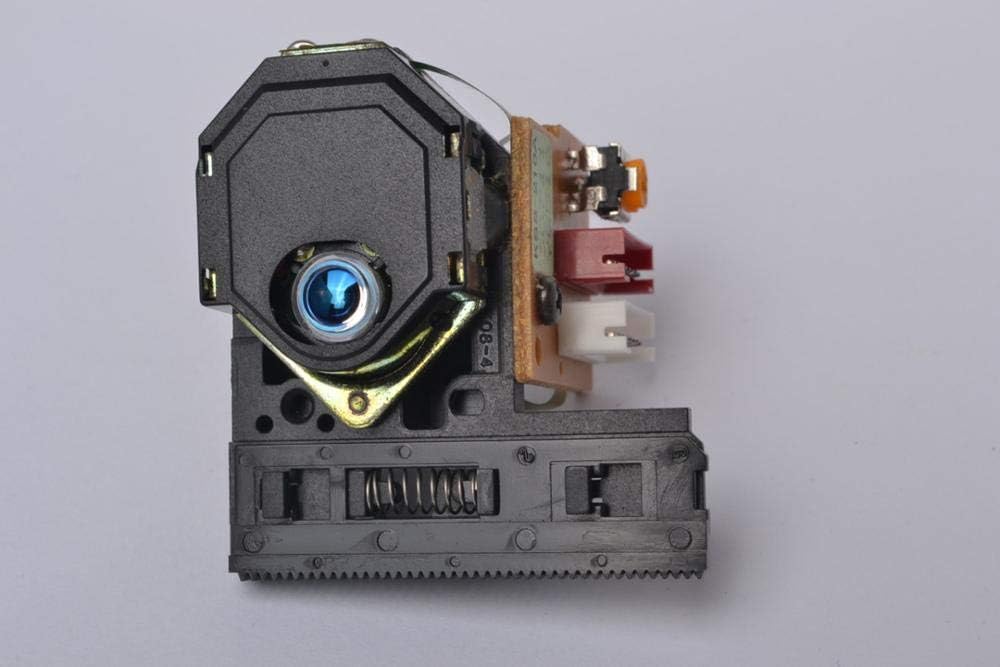
Figure 3.1: Front view of the DCD-460 optical pick-up laser head, showing the blue-tinted laser lens and the main housing.

Figure 3.2: Rear view of the DCD-460 optical pick-up laser head, displaying the integrated circuit board and connection points.
Installation Steps (General Guide):
- Preparation: Ensure the CD player is unplugged. Prepare a clean, static-free workspace.
- Disassembly: Carefully open the CD player casing according to its service manual. Locate the existing optical pick-up unit.
- Disconnection: Gently disconnect the ribbon cables and any power connectors attached to the old pick-up unit. Note their orientation.
- Removal: Unscrew and remove the old optical pick-up unit from its rail system.
- Installation of New Unit: Carefully place the new DCD-460 optical pick-up unit onto the rail system and secure it with screws.
- Connection: Reconnect all ribbon cables and power connectors, ensuring they are seated correctly and in the proper orientation.
- Laser Diode Protection: Some new optical pick-up units come with a solder shorting point to protect the laser diode during shipping. This point MUST be desoldered before installation. Consult the product packaging or specific instructions for your unit.
- Reassembly: Carefully reassemble the CD player casing.
- Testing: Connect the CD player to power and test its functionality with a known good audio CD.
4. Operating Principles
The optical pick-up laser head is the core component responsible for reading data from a compact disc. It emits a focused laser beam onto the disc's surface. The light reflected from the disc is then detected by a photodiode array within the pick-up. Variations in the reflected light, caused by the pits and lands on the disc's surface, are converted into electrical signals. These signals are then processed by the CD player's circuitry to reconstruct the audio or data information. The pick-up also contains mechanisms for focusing the laser beam and tracking the spiral data track on the disc.
5. Maintenance
Proper maintenance can extend the lifespan of your optical pick-up unit:
- Lens Cleaning: If disc reading issues occur, the laser lens may be dirty. Use a specialized CD lens cleaning disc or a soft, lint-free cloth with a small amount of isopropyl alcohol to gently clean the lens. Avoid abrasive materials.
- Dust Prevention: Keep the CD player in a clean, dust-free environment. Dust accumulation on the lens can impair reading performance.
- Handling: Always handle the optical pick-up unit by its frame, avoiding contact with the lens or internal components.
6. Troubleshooting
If you encounter issues after installation, consider the following common problems and solutions:
| Problem | Possible Cause | Solution |
|---|---|---|
| Disc not recognized / No Disc error | Dirty lens, faulty ribbon cable connection, laser diode protection solder point not removed. | Clean the lens. Recheck ribbon cable connections. Ensure the laser diode protection solder point has been desoldered. |
| Skipping or stuttering audio | Dirty lens, disc scratches, tracking issues. | Clean the lens. Try a different, clean disc. Verify the pick-up unit is properly seated on its rails. |
| Tray opens but disc does not spin | Motor issue, pick-up not detecting disc. | Check if the pick-up unit moves correctly. Ensure all connections are secure. |
If troubleshooting steps do not resolve the issue, professional repair may be required.
7. Specifications
- Product Type: Replacement Optical Pick-up Laser Head
- Model Number: DCD-460
- Compatibility: Designed for DENON DCD-460 series CD players
- Package: Yes
- Display Included: No (This component does not include a display)
- Intended Use: Home audio equipment repair
8. Warranty and Support
For information regarding warranty coverage and technical support for your Bore Replacement Optical Pick-up Laser Head, please refer to the documentation provided at the time of purchase or contact your retailer. Keep your proof of purchase for warranty claims.