
1. Introduction
Thank you for choosing the EVVO R5 Robot Vacuum Cleaner. This advanced cleaning device is designed to provide efficient and thorough cleaning for your home with its powerful 4000Pa suction, intelligent Gyro navigation, and versatile cleaning modes. This manual will guide you through the setup, operation, and maintenance of your EVVO R5 to ensure optimal performance and longevity.
2. Important Safety Instructions
Please read these safety instructions carefully before using your EVVO R5 Robot Vacuum Cleaner and keep them for future reference.
- Ensure the robot is fully charged before first use.
- Do not operate the robot in wet environments or near liquids.
- Keep loose clothing, hair, and body parts away from the brushes and suction port.
- Remove any loose cables, small objects, or fragile items from the floor before cleaning to prevent entanglement or damage.
- Do not allow children or pets to play with the robot.
- Use only the original charging adapter and dock provided by EVVO.
- Do not use the robot to pick up burning or smoking materials, large debris, or sharp objects.
- Regularly clean the brushes and filters to maintain optimal performance.
- If the robot is not functioning correctly, do not attempt to repair it yourself. Contact customer support.
3. Package Contents
Verify that all items are present in the package:

Image 3.1: EVVO R5 Robot Vacuum Cleaner with its charging dock, remote control, power adapter, main brush, side brushes, HEPA filter, and mop cloth.
- EVVO R5 Robot Vacuum Cleaner Unit
- Charging Dock
- Power Adapter
- Side Brushes (2 pairs)
- Main Brush (pre-installed)
- Dustbin with integrated Water Tank
- HEPA Filter (pre-installed, plus spare)
- Mop Cloth (pre-installed, plus spare)
- Remote Control
- User Manual (this document)
4. Setup
4.1 Charging Dock Placement
Place the charging dock against a wall in an open area, ensuring there are no obstacles within 1 meter (3 feet) to the front and 0.5 meters (1.5 feet) to the sides. Connect the power adapter to the charging dock and plug it into a power outlet.
4.2 Initial Charging
Place the EVVO R5 onto the charging dock. Ensure the charging contacts on the robot align with those on the dock. The indicator light on the robot will show charging status. For first use, charge the robot for at least 6 hours.
4.3 Installing Side Brushes
Turn the robot over. Align the side brushes with the corresponding posts on the bottom of the robot and press them down until they click into place.
4.4 App Connection (EVVO Clean)
- Download the "EVVO Clean" app from your smartphone's app store (iOS or Android).
- Register an account and log in.
- Follow the in-app instructions to add your EVVO R5 robot vacuum. This typically involves connecting to your home Wi-Fi network (2.4GHz only).
- Once connected, you can control, schedule, and monitor your robot from the app.

Image 4.1: The EVVO R5 Robot Vacuum Cleaner shown alongside a smartphone displaying the EVVO Clean application interface, illustrating app connectivity.
5. Operating Instructions
5.1 Powering On/Off
- Power On: Press and hold the power button on the robot or use the app/remote control.
- Power Off: Press and hold the power button on the robot until it shuts down, or use the app/remote control.
5.2 Cleaning Modes
The EVVO R5 offers three primary cleaning modes, selectable via the app or remote control:
- Zigzag Mode: The robot cleans in an efficient S-shaped pattern, covering the entire area systematically using its Gyro navigation.
- Spiral Mode: Ideal for concentrated cleaning of a specific dirty area. The robot cleans in an expanding spiral pattern.
- Edge Mode: The robot cleans along walls and furniture edges to ensure thorough coverage.

Image 5.1: The EVVO R5 Robot Vacuum Cleaner navigating and cleaning under dining chairs, demonstrating its ability to cover complex areas.
5.3 Suction Levels
Adjust the suction power based on your cleaning needs and floor type:
- Soft: For light cleaning and quieter operation.
- Normal: Standard cleaning for everyday dirt.
- Strong: Maximum suction for deep cleaning, especially on carpets or heavily soiled areas.
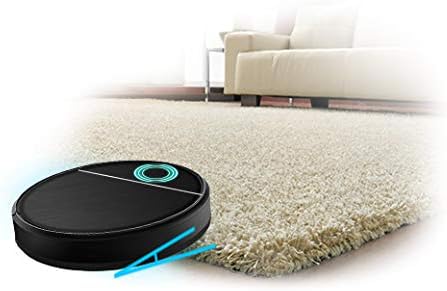
Image 5.2: The EVVO R5 Robot Vacuum Cleaner positioned on a thick carpet, indicating its suitability for various floor types including carpets.
5.4 Mopping Function
The EVVO R5 features an integrated water tank and electronic water pump for mopping.
- Fill the water tank with clean water. Do not use cleaning solutions that may clog the pump.
- Attach the mop cloth to the bottom of the water tank.
- Insert the combined dustbin/water tank unit back into the robot.
- Select the mopping mode or a combined vacuuming and mopping mode via the app. You can adjust the water flow level (low, medium, high) as needed.

Image 5.3: A close-up view of the EVVO R5 Robot Vacuum Cleaner, highlighting the transparent water tank component.
5.5 Scheduling and Auto-Recharge
- Scheduling: Use the EVVO Clean app to set daily or weekly cleaning schedules.
- Auto-Recharge: When the battery is low, the robot will automatically return to its charging dock. If a cleaning task is unfinished, it will resume cleaning after recharging.

Image 5.4: The EVVO R5 Robot Vacuum Cleaner actively cleaning a wooden floor, demonstrating its operation in a typical home environment.
6. Maintenance
Regular maintenance ensures your EVVO R5 operates efficiently and extends its lifespan. Always power off the robot before performing any maintenance.
6.1 Emptying the Dustbin and Cleaning Filters
- Press the dustbin release button and pull out the dustbin/water tank unit.
- Open the dustbin lid and empty its contents into a trash bin.
- Remove the HEPA filter and foam filter. Tap them gently to remove dust. Do not wash the HEPA filter with water.
- Rinse the dustbin and foam filter with water. Ensure they are completely dry before reassembling.
- Reinstall the filters and dustbin.
Frequency: Empty dustbin after each use. Clean filters weekly. Replace HEPA filter every 3-6 months.
6.2 Cleaning the Main Brush
- Turn the robot over and remove the main brush cover by pressing the release tabs.
- Lift out the main brush.
- Use the cleaning tool (if provided) or scissors to remove hair and debris tangled around the brush.
- Reinstall the main brush and cover.
Frequency: Clean weekly.
6.3 Cleaning Side Brushes
Pull the side brushes upwards to remove them. Remove any hair or debris. If brushes are bent or damaged, replace them.
Frequency: Clean monthly. Replace every 3-6 months or when worn.
6.4 Cleaning Sensors and Charging Contacts
Wipe the anti-drop sensors (on the bottom), anti-collision sensors (on the bumper), and charging contacts (on the robot and dock) with a clean, dry cloth.
Frequency: Clean monthly.
6.5 Cleaning the Mop Cloth and Water Tank
Remove the mop cloth after each mopping session and wash it thoroughly. Allow it to air dry completely. Empty any remaining water from the water tank and rinse it.
Frequency: Clean mop cloth after each use. Rinse water tank after each use.
7. Troubleshooting
If you encounter issues with your EVVO R5, refer to the following common problems and solutions:
| Problem | Possible Cause | Solution |
|---|---|---|
| Robot does not power on. | Low battery; Power button not pressed correctly. | Charge the robot; Press and hold the power button for 3 seconds. |
| Robot does not charge. | Charging contacts are dirty; Power adapter not connected; Robot not properly docked. | Clean charging contacts on both robot and dock; Ensure power adapter is plugged in; Re-dock the robot. |
| Poor suction or cleaning performance. | Dustbin full; Filters clogged; Main brush or side brushes tangled. | Empty dustbin; Clean/replace filters; Clean main and side brushes. |
| Robot gets stuck frequently. | Obstacles on the floor; Sensors are dirty. | Clear obstacles (cables, rugs, small items); Clean all sensors. |
| App connection issues. | Incorrect Wi-Fi password; Robot too far from router; Router is 5GHz only. | Ensure correct 2.4GHz Wi-Fi password; Move robot closer to router; Check router settings for 2.4GHz band. |
| Mopping function not working. | Water tank empty; Water outlet clogged; Mop cloth not attached. | Fill water tank; Clean water tank and mop cloth; Ensure mop cloth is correctly attached. |
8. Specifications
| Feature | Detail |
|---|---|
| Brand | EVVO |
| Model | R5 |
| Suction Power | 4000 Pa |
| Motor Type | Inverter BLCD |
| Navigation System | Gyro |
| Battery Type | Lithium-ion |
| Battery Capacity | 2600 mAh |
| Max Runtime | Up to 120 minutes |
| Max Cleaning Area | Up to 140 m² |
| Dustbin/Water Tank Capacity | 250 ml (water tank) |
| Noise Level | 68 dB |
| Height | 90 mm (9.0 cm) |
| Dimensions (L x W x H) | 39 cm x 39 cm x 9.6 cm |
| Weight | 5.3 kg |
| Control Methods | EVVO Clean App, Remote Control |
| Filtration System | Triple HEPA filter |
| Sensors | TOF Technology, Anti-collision, Anti-fall |
| Special Features | Mopping function, Auto-recharge, Programmable cleaning |
9. Warranty and Support
The EVVO R5 Robot Vacuum Cleaner comes with a standard manufacturer's warranty. For detailed warranty terms and conditions, please refer to the warranty card included in your package or visit the official EVVO website.
For technical support, troubleshooting assistance, or to inquire about replacement parts, please contact EVVO customer service through their official website or the contact information provided in your product documentation.