
1. General Safety Instructions
Please read this instruction manual carefully before using the appliance and keep it for future reference. Failure to follow these instructions may result in electric shock, fire, or serious injury.
- Ensure the power supply voltage matches the rating label on the appliance.
- Do not operate the appliance with a damaged cord or plug.
- Do not immerse the appliance, cord, or plug in water or other liquids.
- Keep the appliance out of reach of children.
- Unplug the appliance before cleaning, maintenance, or when not in use.
- Do not block the air inlets or outlets.
- Use the appliance only on a stable, flat surface.
- Do not use the appliance in damp or high-humidity environments.
- Avoid prolonged exposure to the direct airflow, especially for children or individuals with health conditions.
- Regularly clean the water tank to prevent mold and bacterial growth.
2. Product Overview
The Klarstein Skyscraper Ice is a versatile 5-in-1 device designed to enhance your indoor climate. It functions as an air cooler, humidifier, fan, air purifier, and includes a night mode for quiet operation.

Image: The Klarstein Skyscraper Ice air cooler, showcasing its sleek black and silver tower design with blue airflow indicating cooling function.
Key Features:
- 5-in-1 Functionality: Combines cooling, humidifying, fanning, air purification, and a dedicated night mode.
- Powerful Airflow: Delivers a strong breeze with 180 m³/h air circulation.
- Wide Oscillation: Features 90° oscillation to distribute cool air evenly across the room.
- Energy Efficient: Operates with low power consumption (45W) and is refrigerant-free.
- Mobile Design: Equipped with wheels for easy portability, no exhaust hose required.
- Large Water Tank: 6-liter capacity for extended operation.

Image: Visual representation of the 5-in-1 functions: Cooling, Ventilation, Humidification, Ionization, and Night Mode, with the air cooler in a living room setting.

Image: The air cooler shown in various room settings (attic, office, bedroom, kitchen), highlighting its portability and the absence of an exhaust hose.
3. Setup
3.1 Unpacking and Placement
- Carefully remove the appliance from its packaging.
- Place the air cooler on a stable, level surface. Ensure there is sufficient space around the unit for proper airflow.
- The appliance is equipped with wheels for easy movement.
3.2 Filling the Water Tank and Using Ice Packs
For cooling and humidifying functions, the water tank must be filled. For enhanced cooling, use the included ice packs.
- Pull out the water tank from the bottom rear of the unit.
- Fill the tank with clean water up to the "MAX" indicator. Do not overfill.
- For colder air, place the two included ice packs in a freezer until completely frozen.
- Once frozen, place the ice packs into the water tank.
- Carefully slide the water tank back into the appliance until it clicks into place.

Image: Close-up of the control panel and remote, alongside the water tank with ice packs and ice cubes, illustrating how to prepare the unit for cooling.

Image: Two blue ice packs and ice cubes, indicating their use for enhanced cooling within the water tank.
4. Operating Instructions
The Klarstein Skyscraper Ice can be operated via the touch control panel on top of the unit or with the included remote control.
Image: Detailed view of the intuitive control panel and the remote control for convenient operation.
4.1 Power On/Off
- Press the ON/OFF button on the control panel or remote to turn the unit on or off.
4.2 Mode Selection
Press the MODE button to cycle through the following operating modes:
- Normal Mode: Provides a continuous airflow at the selected speed.
- Natural Mode: Simulates natural wind by varying the fan speed.
- Sleep Mode (Night Mode): Gradually reduces fan speed and dims display lights for quiet operation during sleep.
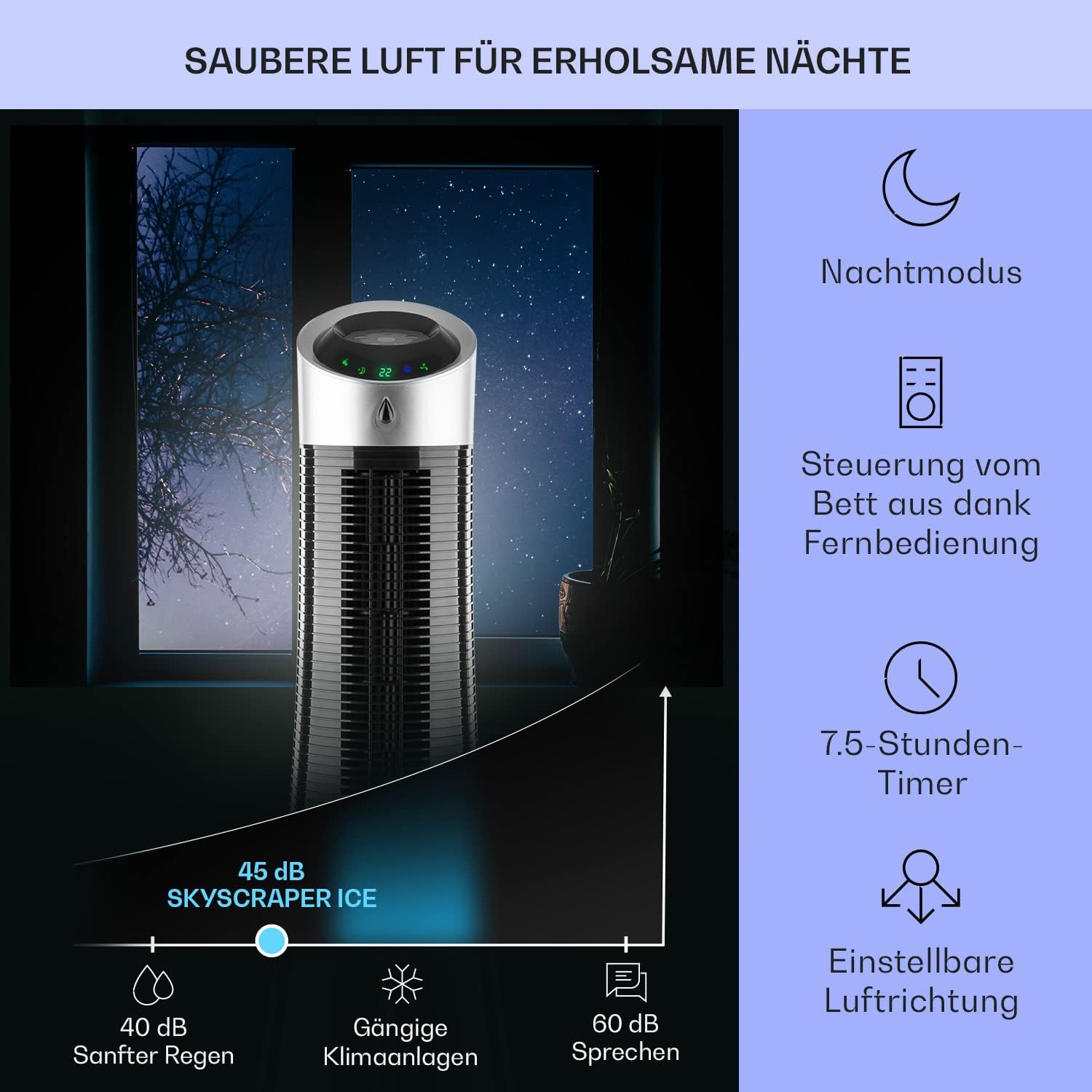
Image: The air cooler in a bedroom setting at night, illustrating the quiet operation (45 dB) and the 7.5-hour timer function for undisturbed sleep.
4.3 Fan Speed Adjustment
Press the SPEED button to adjust the fan speed (Low, Medium, High).
4.4 Cooling/Humidifying Function
Press the COOLER/HUMIDIFIER button to activate the evaporative cooling and humidifying function. Ensure the water tank is filled.
4.5 Oscillation
Press the SWING button to activate or deactivate the 90° oscillation function, which distributes air across a wider area.

Image: Top view of the air cooler showing the 90° oscillation symbol, indicating its ability to rotate and distribute air widely.
4.6 Timer Function
Press the TIMER button to set the operating time. The timer can be set in increments up to 7.5 hours, after which the unit will automatically turn off.
5. Maintenance
Regular maintenance ensures optimal performance and extends the lifespan of your Klarstein Skyscraper Ice.
5.1 Cleaning the Water Tank
To prevent the growth of mold and bacteria, clean the water tank regularly, ideally once a week or every four weeks depending on usage.
- Unplug the appliance from the power outlet.
- Remove the water tank from the unit.
- Empty any remaining water.
- Clean the inside of the tank with a soft cloth and mild detergent. Rinse thoroughly with clean water.
- Allow the tank to air dry completely before reinserting it.
5.2 Cleaning the Air Filter
The air filter helps purify the air. Clean it periodically to maintain efficiency.
- Unplug the appliance.
- Locate the air filter at the rear of the unit (often behind the evaporative pad).
- Carefully remove the filter.
- Clean the filter with a soft brush or vacuum cleaner to remove dust. If heavily soiled, rinse with water and mild detergent, then allow to dry completely.
- Reinsert the dry filter back into the unit.

Image: Internal view of the air cooler showing the evaporative filter pad, which requires regular cleaning.
5.3 Storage
If the appliance will not be used for an extended period:
- Empty and clean the water tank and filter thoroughly.
- Ensure all parts are completely dry.
- Store the appliance in a cool, dry place, away from direct sunlight and extreme temperatures.
6. Troubleshooting
Before contacting customer support, please refer to the following table for common issues and their solutions.
| Problem | Possible Cause | Solution |
|---|---|---|
| Unit does not turn on. | No power supply; Power cord not properly plugged in; Power button not pressed. | Check power outlet; Ensure power cord is securely plugged in; Press the ON/OFF button. |
| No cool air/humidification. | Water tank empty; Cooling/Humidifying function not activated; Ice packs not frozen or used. | Fill water tank; Press the COOLER/HUMIDIFIER button; Use frozen ice packs. |
| Weak airflow. | Air filter clogged; Fan speed set too low; Air inlets/outlets blocked. | Clean the air filter; Increase fan speed; Ensure no obstructions around the unit. |
| Unpleasant odor from unit. | Stagnant water in tank; Mold/bacteria growth. | Empty and thoroughly clean the water tank and evaporative pad. Use fresh water. |
| Unit is noisy. | Unit not on a level surface; Foreign object inside; Water pump noise. | Place on a flat surface; Check for obstructions; Some pump noise is normal, especially when water level is low. |
7. Specifications
| Attribute | Value |
|---|---|
| Brand | Klarstein |
| Model Name | Skyscraper Ice |
| Model Number | KSKE-2200-dpeö |
| Product Dimensions | 28 x 9 x 95 cm (11 x 3.5 x 37.4 inches) |
| Item Weight | 6 Kilograms (13.2 lbs) |
| Color | Black |
| Power Consumption | 45 Watt |
| Voltage | 220 Volt |
| Airflow Capacity | 180 m³/h (210 CFPH) |
| Noise Level | 57.6 dB |
| Tank Capacity | 6 Liters |
| Control Type | Remote Control, Touch Panel |
| Special Feature | Easy to install, Mobile |

Image: Diagram showing the dimensions of the Klarstein Skyscraper Ice: 96cm height and 28cm diameter.
8. What's in the Box
The following items are included in your Klarstein Skyscraper Ice package:
- 1 x Klarstein Skyscraper Ice Air Cooler Unit
- 2 x Ice Packs
- 1 x Remote Control (incl. button cell battery)
- 1 x Instruction Manual (this document)

Image: A visual representation of the package contents, including the main unit, two ice packs, and the instruction manual.
9. Warranty and Support
Klarstein products are manufactured with high quality standards. In the unlikely event of a defect or issue, please contact your retailer or the Klarstein customer support for assistance.
Please retain your proof of purchase for warranty claims. Specific warranty terms and conditions may vary by region and retailer.
For further information or technical support, please visit the official Klarstein website or contact their customer service department.
Online Support: www.klarstein.com/support (Example link, actual link not provided in input)