
Diamond Multimedia VS600RX
Diamond Multimedia VS600RX Wireless HDMI Receiver Instruction Manual
Model: VS600RX
1. Introduction
The Diamond Multimedia VS600RX is an additional wireless HDMI receiver designed to extend your high-definition video and audio experience. This receiver works in conjunction with the VS600 Wireless HDMI Sender to transmit full HD 1080P video and audio signals wirelessly from any HDMI source to an HDTV, monitor, or projector. It operates on a 5GHz frequency, ensuring strong anti-interference capabilities and a long transmission range of up to 300 feet in clear line of sight. The system is designed for ease of use, allowing for simple channel selection and plug-and-play functionality without requiring complex setup or computer configuration.
2. Product Overview
The VS600RX is a compact and powerful wireless HDMI receiver unit. It is part of the Diamond VStream series, which enables seamless streaming of content across multiple displays. The unit features robust dual antennas for enhanced signal reception and stability. It is compatible with HDMI 1.3 and HDCP 1.2 standards, ensuring broad compatibility with various HDMI-enabled devices.

Figure 2.1: Diamond Multimedia VS600RX Wireless HDMI Receiver. This image shows the compact black receiver unit with its two adjustable antennas, highlighting its sleek design and readiness for wireless connectivity.

Figure 2.2: Rear view of the VS600RX Receiver. This image provides a clear view of the rear panel of the receiver, showcasing the various ports for connectivity and the antennas, along with a 'Lifetime U.S. Customer Support' badge, emphasizing product reliability and support.
3. Features
- Full HD 1080P Streaming: Allows for seamless full HD 1080P at 60/50Hz streaming from any HDMI enabled source without the need for cables, transmitting to your HD TV/Projector up to 300 ft. clear line of sight.
- HDMI Loop-Through: The VS600 (sender unit) includes an HDMI loop-through, allowing simultaneous viewing of the same video content in two rooms. With an additional VS600RX receiver, you can view simultaneously in three rooms.
- Selectable Wireless Channels: With selectable wireless channels, you can have two separate extender kits operating at the same time without conflict. Each kit includes a remote to control the wireless channel, which is convenient when the receiver is out of arm's reach.
- Multi-Display Capability: The VS600 system allows you to simultaneously view the same content on two different displays (one via receiver and another via HDMI loop-through feature). Adding another VS600RX receiver enables viewing on three different displays.
- Plug and Play: The system is completely plug and play, requiring no setup or computer configuration.
- IR Remote Control Support: Supports IR remote control, providing total control over your video source from the receiving end.
4. What's in the Box
The VS600 Kit includes one sender and one receiver. This product, the VS600RX, is an additional receiver unit and typically includes:
- VS600RX Receiver Unit
- Power Adapter
- IR Receiver Cable
Note: The VS600 sender unit and its accessories are sold separately.
5. Setup
Setting up your Diamond Multimedia VS600RX Wireless HDMI Receiver is straightforward. Follow these steps for proper installation and connection:
- Connect the Sender Unit (VS600): Ensure your VS600 sender unit is connected to your HDMI source (e.g., laptop, set-top box, Blu-Ray player) via an HDMI cable. Connect the sender's power adapter and the IR Blaster cable to the sender unit.
- Connect the Receiver Unit (VS600RX): Connect the VS600RX receiver unit to your HDTV, monitor, or projector using an HDMI cable.
- Power On: Connect the provided power adapter to the VS600RX receiver unit and plug it into a power outlet.
- Positioning: Place the sender and receiver units within the recommended transmission range (up to 300 ft clear line of sight) and ensure their antennas are oriented for optimal signal reception.
- IR Receiver Cable: If you wish to control your HDMI source from the receiver's location, connect the IR Receiver cable to the IR port on the VS600RX receiver unit. Position the IR receiver eye in a location where it can receive signals from your remote control.

Figure 5.1: Connection Diagram. This diagram illustrates the connection points for both the sender and receiver units, including power, HDMI input/output, and IR ports, providing a visual guide for proper setup.
6. Operating
Once the VS600 sender and VS600RX receiver units are set up, operating the system is simple:
- Power On Devices: Ensure both your HDMI source device, the VS600 sender, the VS600RX receiver, and your display device (HDTV/projector) are powered on.
- Automatic Connection: The sender and receiver units should automatically establish a wireless connection. The status indicator lights on the units will confirm a successful connection.
- Channel Selection: If you are using multiple VS600 systems in close proximity, you can use the channel selection button (if available on your specific model or via remote) to prevent interference and ensure the correct video is displayed on the intended receiver.
- IR Remote Control: Use your original remote control for the HDMI source device. Point the remote at the IR receiver eye connected to the VS600RX unit. The signal will be transmitted back to the sender unit and then to your source device, allowing you to control it remotely.

Figure 6.1: Multi-Room Setup. This diagram illustrates how a single HDMI source can wirelessly transmit its signal to two different rooms, each with its own display, showcasing the multi-room viewing capability of the system.
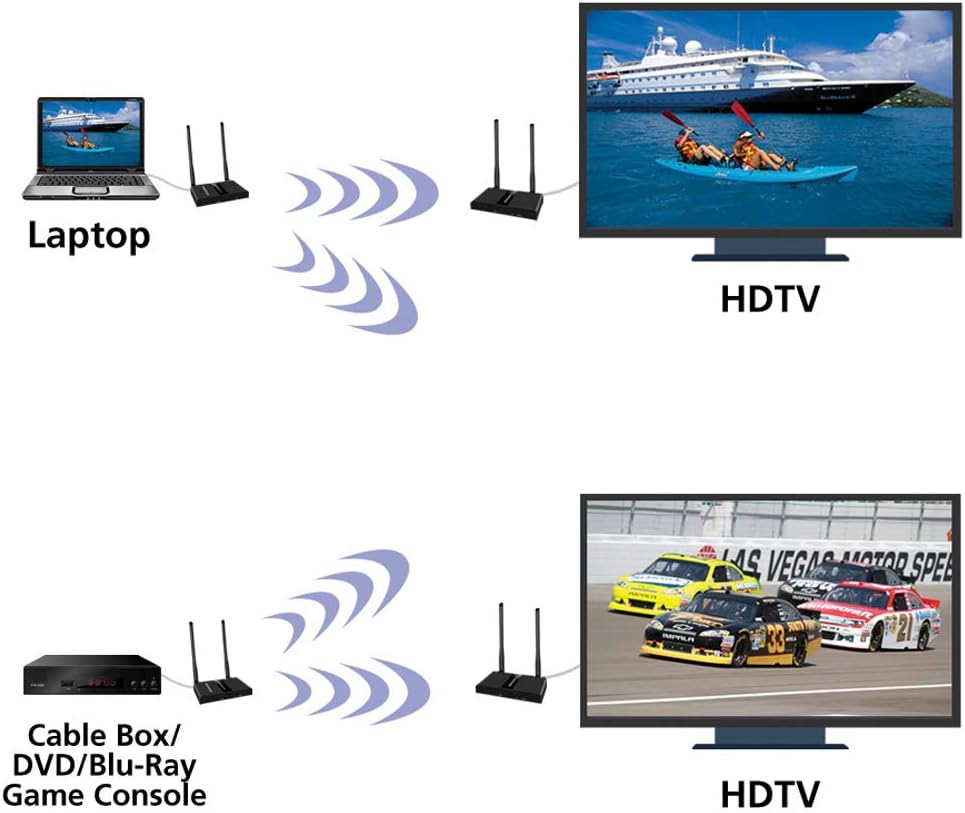
Figure 6.2: Source to Display Connection. This image depicts two common scenarios: wirelessly connecting a laptop to an HDTV and a cable box/DVD/Blu-Ray/Game Console to an HDTV, demonstrating the versatility of the wireless HDMI system for various media sources.

Figure 6.3: Conference Room Application. This image shows a modern conference room with multiple large screens displaying presentations, illustrating how the wireless HDMI system can be effectively used for meetings and conferences to share content wirelessly.
7. Maintenance
The Diamond Multimedia VS600RX Wireless HDMI Receiver requires minimal maintenance. To ensure optimal performance and longevity:
- Keep the units in a dry, well-ventilated area, away from direct sunlight and extreme temperatures.
- Avoid placing heavy objects on the units.
- Clean the exterior of the units with a soft, dry cloth. Do not use liquid cleaners or aerosols.
- Ensure proper airflow around the units to prevent overheating.
8. Troubleshooting
If you encounter issues with your VS600RX receiver, please refer to the following common problems and solutions:
| Problem | Possible Cause | Solution |
|---|---|---|
| No picture/signal on display | Loose HDMI cable connection Power issue Out of range Incorrect channel selection | Check all HDMI cable connections. Ensure both sender and receiver units are powered on. Move units closer together or ensure clear line of sight. Verify sender and receiver are on the same channel. |
| Picture flickering or unstable | Interference Weak signal | Ensure no other 5GHz devices are causing interference. Adjust antenna positions or reduce distance between units. |
| IR remote control not working | IR cables not properly connected IR receiver/blaster misaligned | Check connections of IR emitter and receiver cables. Ensure IR blaster is positioned correctly near the source device's IR sensor and IR receiver is visible to your remote. |
9. Specifications
- Model Number: VS600RX
- Brand: Diamond Multimedia
- Connectivity Technology: HDMI (Wireless)
- Operating Frequency: 5GHz
- Transmission Distance: Up to 300 feet (clear line of sight)
- Video Resolution: Full HD 1080P at 60/50Hz
- HDMI Version: HDMI 1.3
- HDCP Compliance: HDCP 1.2
- IR Support: Yes
- Color: Black
- Item Weight: Approximately 1.59 pounds
- Product Dimensions (LxWxH): Approximately 4.7 x 3.5 x 0.8 inches
- Audio Output Mode: Stereo, Surround
- Video Encoding: H.264, MPEG-4
10. Warranty
Diamond Multimedia offers a one-year warranty for all its products, including the VS600RX Wireless HDMI Receiver. Please retain your proof of purchase for warranty claims. For detailed warranty terms and conditions, please refer to the official Diamond Multimedia website or contact customer support.
11. Support
For technical assistance, troubleshooting, or any product-related inquiries, Diamond Multimedia provides dedicated customer support. You can reach our support team via our free 800 telephone number or email. Our customer support is available from our home office in Los Angeles, CA, ensuring prompt and reliable assistance.
For the most up-to-date contact information, please visit the official Diamond Multimedia website: www.diamondmm.com
Related documentsVS600RX


Ask a question about this manual
Ask about setup, troubleshooting, compatibility, parts, safety, or missing instructions. Manuals+ will review the question and use this page’s manual context to help answer it.