
Replacement Parts BD460, BD461W
Instruction Manual: Replacement Belt for Task Force BD460 & BD461W Disc Sanders
Model Numbers: BD460, BD461W
Introduction
This manual provides essential instructions for the proper installation and maintenance of your new replacement belt for Task Force BD460 and BD461W Disc Sanders. Please read this manual thoroughly before proceeding with installation to ensure safe and effective operation.
Safety Information
Always prioritize safety when working with power tools. Failure to follow these safety guidelines may result in injury or damage to equipment.
- Disconnect Power: Before attempting any installation or maintenance, ensure the disc sander is unplugged from its power source.
- Wear Protective Gear: Always wear appropriate personal protective equipment, including safety glasses and gloves.
- Consult Sander Manual: Refer to your original Task Force BD460 or BD461W Disc Sander manual for specific safety instructions and disassembly procedures.
- Inspect Components: Before installation, inspect the new belt and all sander components for any damage.
Setup and Installation
Follow these steps to replace the drive belt on your Task Force BD460 or BD461W Disc Sander.
- Prepare the Sander: Ensure the disc sander is unplugged. Place it on a stable, clean workbench.
- Access the Belt Compartment: Locate and remove the cover that encloses the drive belt. This typically involves unscrewing a few fasteners. Refer to your sander's original manual for exact instructions on accessing the belt.
- Remove Old Belt: Carefully remove the old, worn, or broken belt from the pulleys. Note its orientation if it's a directional belt, though most drive belts are not.
- Install New Belt: Position the new replacement belt onto the smaller pulley first, then stretch it over the larger pulley. Ensure the belt is seated correctly in the grooves of both pulleys. The belt should be taut but not excessively tight.
- Verify Alignment: Rotate the pulleys manually a few times to ensure the belt is properly aligned and moves freely without rubbing against any housing components.
- Reassemble: Replace the belt compartment cover and secure it with the fasteners.
- Test Operation: Plug in the sander and briefly turn it on to confirm the new belt operates smoothly. Listen for unusual noises and observe for any wobbling or misalignment.
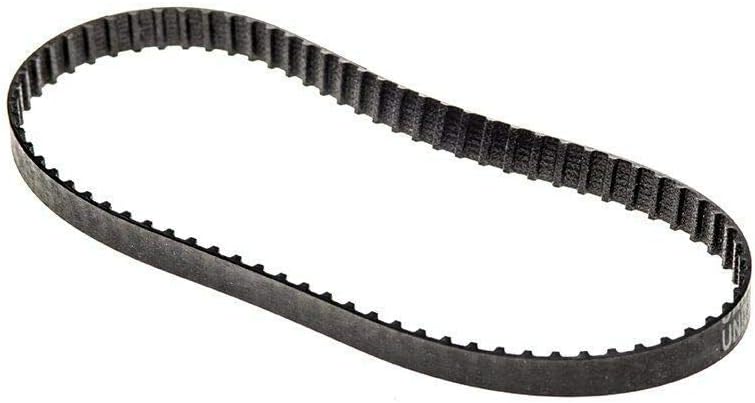
Figure 1: New replacement drive belt. This belt is designed for power transmission between pulleys in disc sanders.
Operating Guidelines
Once the replacement belt is installed, the sander should operate as intended. Adhere to the operating instructions provided in your original Task Force BD460 or BD461W Disc Sander manual. The primary function of this replacement belt is to transmit power efficiently from the motor to the sanding disc.
- Ensure the belt is free from debris before each use.
- Avoid overloading the sander, as this can put undue stress on the drive belt and motor.
Maintenance
Regular maintenance extends the life of your replacement belt and ensures optimal performance of your disc sander.
- Regular Inspection: Periodically inspect the belt for signs of wear, cracking, fraying, or stretching. Replace the belt if any damage is observed.
- Cleaning: Keep the belt and pulley area clean and free of sawdust and debris. Accumulation can cause slippage or premature wear. Use compressed air or a brush to clean.
- Storage: When not in use, store the sander in a clean, dry environment. Avoid extreme temperatures that can degrade belt material.
Troubleshooting
| Problem | Possible Cause | Solution |
|---|---|---|
| Sander not powering on or disc not spinning | Belt is broken or slipped off pulleys. | Inspect the belt compartment. Reinstall or replace the belt if necessary. Ensure power is connected. |
| Unusual noise or vibration during operation | Belt misalignment, debris in belt path, or worn belt. | Disconnect power. Check belt alignment and tension. Clean the belt and pulley area. Replace belt if worn. |
| Reduced sanding performance | Belt slippage due to wear or contamination. | Inspect belt for wear or glazing. Clean belt and pulleys. Replace belt if severely worn. |
Specifications
- Product Type: Replacement Drive Belt
- Compatibility: Task Force BD460, Task Force BD461W Disc Sanders
- Material: Durable rubber composite
- UPC: 343393925681
Warranty and Support
This replacement belt is manufactured to meet or exceed original equipment specifications. For specific warranty information regarding this replacement part, please refer to the seller or manufacturer's documentation at the time of purchase. For support related to the operation or repair of your Task Force BD460 or BD461W Disc Sander, please consult the original sander's instruction manual or contact the sander manufacturer directly.
For further assistance with this replacement part, please contact the vendor from whom it was purchased.
Related Documents - BD460, BD461W
 |
Direct Replacement Parts List for Motors - Cross Reference Guide Comprehensive list of direct replacement part numbers for various motor brands including Century, GE, Carrier, Rheem, Trane, and more. Find compatible parts easily. |
Ask a question about this manual
Ask about setup, troubleshooting, compatibility, parts, safety, or missing instructions. Manuals+ will review the question and use this page’s manual context to help answer it.