
Introduction
This manual provides instructions for the Anloti NS-RC4NA-18 Universal Replacement Remote Control. This remote is designed to be compatible with various Insignia Smart TV models, offering a direct replacement for your original remote without the need for complex programming.
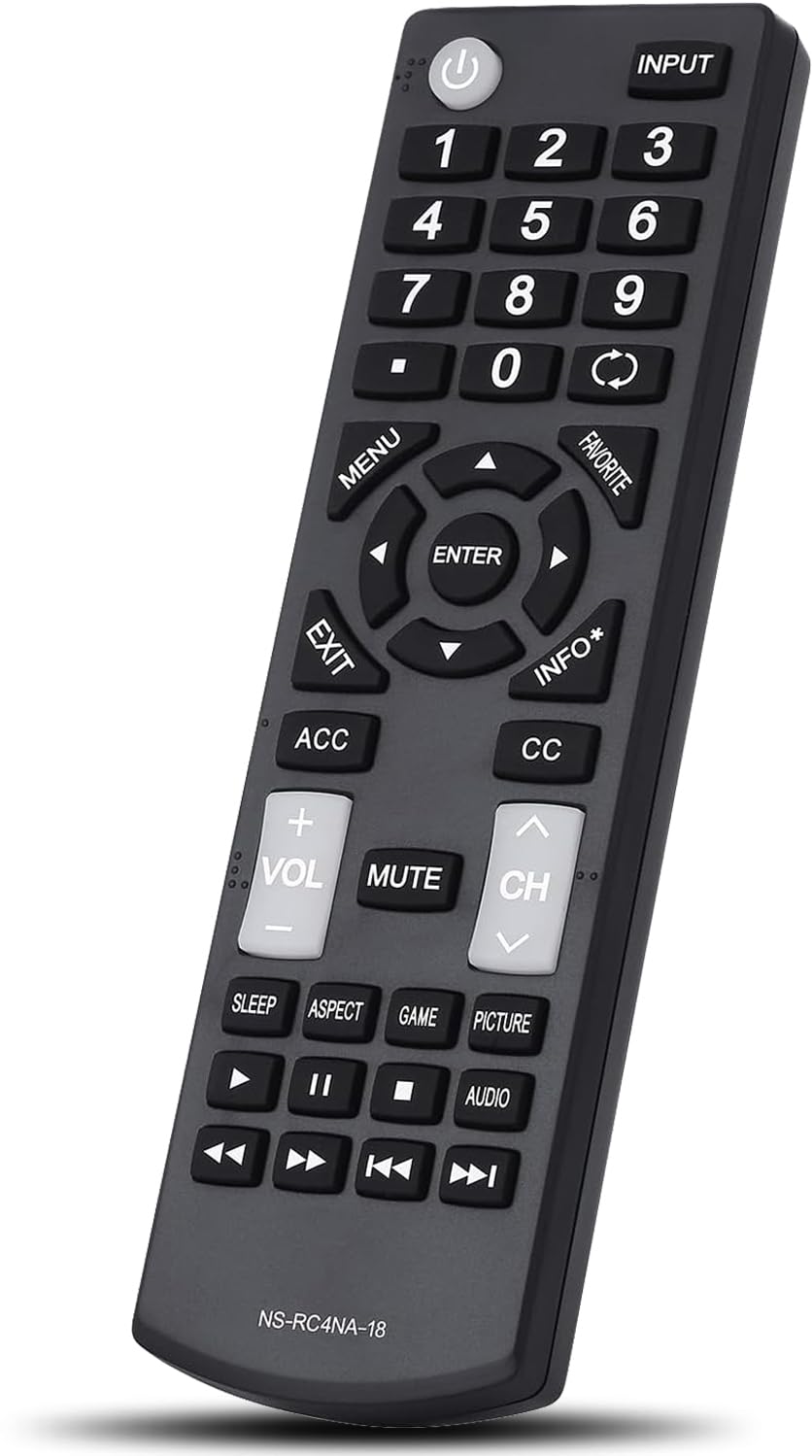
Image: The Anloti NS-RC4NA-18 universal replacement remote control, showing its full button layout.
Product Features
- Universal Compatibility: Designed to work with a wide range of Insignia Smart TV models.
- No Programming Required: Functions immediately after battery installation.
- Durable Construction: Made from premium ABS material for extended lifespan.
- Responsive Buttons: Features highly sensitive and soft buttons for comfortable use.
- Stable Performance: Utilizes advanced infrared technology for quick response and stable signal transmission.
- Long-Distance Control: Effective control range of over 10 meters (approximately 40 feet).

Image: A hand holding the remote control, highlighting its precise long-distance control and stable signal transmission, with an overlay of a smart chip diagram.
Setup
1. Battery Installation
- Locate the battery compartment on the back of the remote control.
- Slide the battery cover downwards to open it.
- Insert two (2) AAA batteries, ensuring the positive (+) and negative (-) terminals align correctly with the markings inside the compartment.
- Slide the battery cover back into place until it clicks securely.
Note: Batteries are not included with the remote control. Please use new AAA batteries for optimal performance.
2. Initial Use
The Anloti NS-RC4NA-18 remote control requires no setup or programming. Once batteries are installed, it is ready for immediate use with compatible Insignia Smart TVs.
Operating Instructions
Familiarize yourself with the button layout and their functions:

Image: A close-up view of the Anloti NS-RC4NA-18 remote control, clearly showing all buttons and their labels.
- Power Button (⏻): Turns the TV on or off.
- Input: Selects the input source (HDMI, AV, etc.).
- Number Buttons (0-9): Directly selects channels.
- Menu: Accesses the TV's main menu.
- Navigation Pad (Up, Down, Left, Right, Enter): Navigates through menus and confirms selections.
- Exit: Exits the current menu or screen.
- Favorite: Accesses favorite channels or content.
- Info*: Displays information about the current program or input.
- ACC (Accessibility): Accesses accessibility features.
- CC (Closed Caption): Toggles closed captions on or off.
- Volume (+/-): Adjusts the TV volume.
- Mute: Mutes or unmutes the TV sound.
- Channel (CH +/-): Changes the TV channel.
- Playback Controls (Play, Pause, Stop, Rewind, Fast Forward, Skip): Controls media playback.
- Sleep: Sets the sleep timer.
- Aspect: Adjusts the screen aspect ratio.
- Game: Activates game mode (if supported by TV).
- Picture: Adjusts picture settings.
- Audio: Adjusts audio settings.

Image: A family comfortably watching television, with the Anloti remote control in the foreground, illustrating its ease of use in a home environment.
Maintenance
Battery Replacement
Replace batteries when the remote's response becomes sluggish or stops working. Always replace both AAA batteries at the same time with new ones. Do not mix old and new batteries, or different types of batteries.
Cleaning
Wipe the remote control with a soft, dry cloth. Do not use liquid cleaners or abrasive materials, as these may damage the remote's surface or internal components.
Troubleshooting
- Remote not responding:
- Ensure batteries are correctly installed with proper polarity.
- Replace old batteries with new AAA batteries.
- Check for any obstructions between the remote and the TV's infrared sensor.
- Ensure you are within the effective operating range (up to 10 meters).
- Some buttons not working:
- Verify that the specific function is supported by your Insignia TV model. While this is a universal replacement, some advanced or model-specific functions might vary.
- Clean the remote's surface, especially around the unresponsive buttons, to ensure no debris is interfering.
- No setup or programming required, but it's not working:
- Double-check that your TV is an Insignia Smart TV model listed as compatible.
- Ensure the TV's infrared receiver is not blocked or damaged.
Specifications
| Model Number | NS-RC4NA-18 |
| Brand | Anloti |
| Compatible Devices | Insignia Smart Televisions |
| Power Source | 2 x AAA Batteries (not included) |
| Product Dimensions | 3.15 x 1.97 x 0.79 inches |
| Item Weight | 2.89 ounces |
| Color | Black |
| Special Feature | Universal, No Programming Required |
Warranty and Support
The Anloti NS-RC4NA-18 Universal Replacement Remote Control comes with a one-year warranty, ensuring quality and stable performance.
For any questions or issues regarding your remote control, please contact Anloti customer service. Refer to your purchase documentation for specific contact details.