
1. Introduction
Thank you for choosing the FUNKOCO EW-WDWH001 White Small Desk with Drawers. This manual provides essential information for the safe assembly, proper use, and maintenance of your new desk. Please read these instructions carefully before beginning assembly and retain them for future reference.
This versatile desk is designed for various uses, including a home office workstation, study desk, writing desk, or vanity table. Its compact design and integrated storage drawers make it suitable for small spaces.
2. Safety Information
Important Safety Warnings:
- Always ensure the desk is properly assembled and stable before use.
- Do not exceed the maximum weight capacity of 120 lbs (54.4 kg). Overloading can lead to instability and damage.
- Use caution when moving or adjusting the desk to prevent injury. It is recommended to have two people for moving the assembled desk.
- This product has not undergone UL safety tests.
- Keep small parts and packaging materials away from children to prevent choking hazards.
3. Package Contents
Before assembly, please verify that all components listed below are present and undamaged. If any parts are missing or damaged, please contact customer support.

Figure 3.1: Exploded view diagram showing all individual parts required for assembling the FUNKOCO EW-WDWH001 desk. This includes the tabletop, side panels, back panel, drawer components, and four solid wood legs.
The desk contains a total of 15 different parts for full assembly. While a 4mm hex key may be included, a Phillips head screwdriver (both small and large sizes recommended) will be required and is not included.
4. Assembly Instructions
Assembly is required for this product. It is recommended that two people participate in the assembly process to ensure stability and ease of construction. Please follow the steps carefully.
Tools Required (Not Included):
- Phillips Head Screwdriver (small and large)
Assembly Steps:
- Unpack and Identify Parts: Carefully unpack all components and lay them out on a clean, soft surface to prevent scratches. Refer to Figure 3.1 to identify each part.
- Assemble the Main Desk Frame: Follow the diagram to connect the side panels, back panel, and any internal supports to the tabletop using the provided hardware. Ensure all connections are secure but do not overtighten screws initially.
- Assemble the Drawers: Construct the two sliding drawers according to the diagram. Pay attention to the orientation of the drawer slides and panels.
- Install Drawers into Frame: Carefully slide the assembled drawers into their respective compartments within the desk frame. Ensure they glide smoothly.
- Attach Legs: Securely attach the four solid wood legs to the underside of the desk frame. Ensure they are tightened evenly for stability.
- Install Handles: Attach the metal handles to the front of each drawer.
- Final Tightening: Once the desk is fully assembled, gently tighten all screws and fasteners. Do not overtighten to avoid damaging the wood.
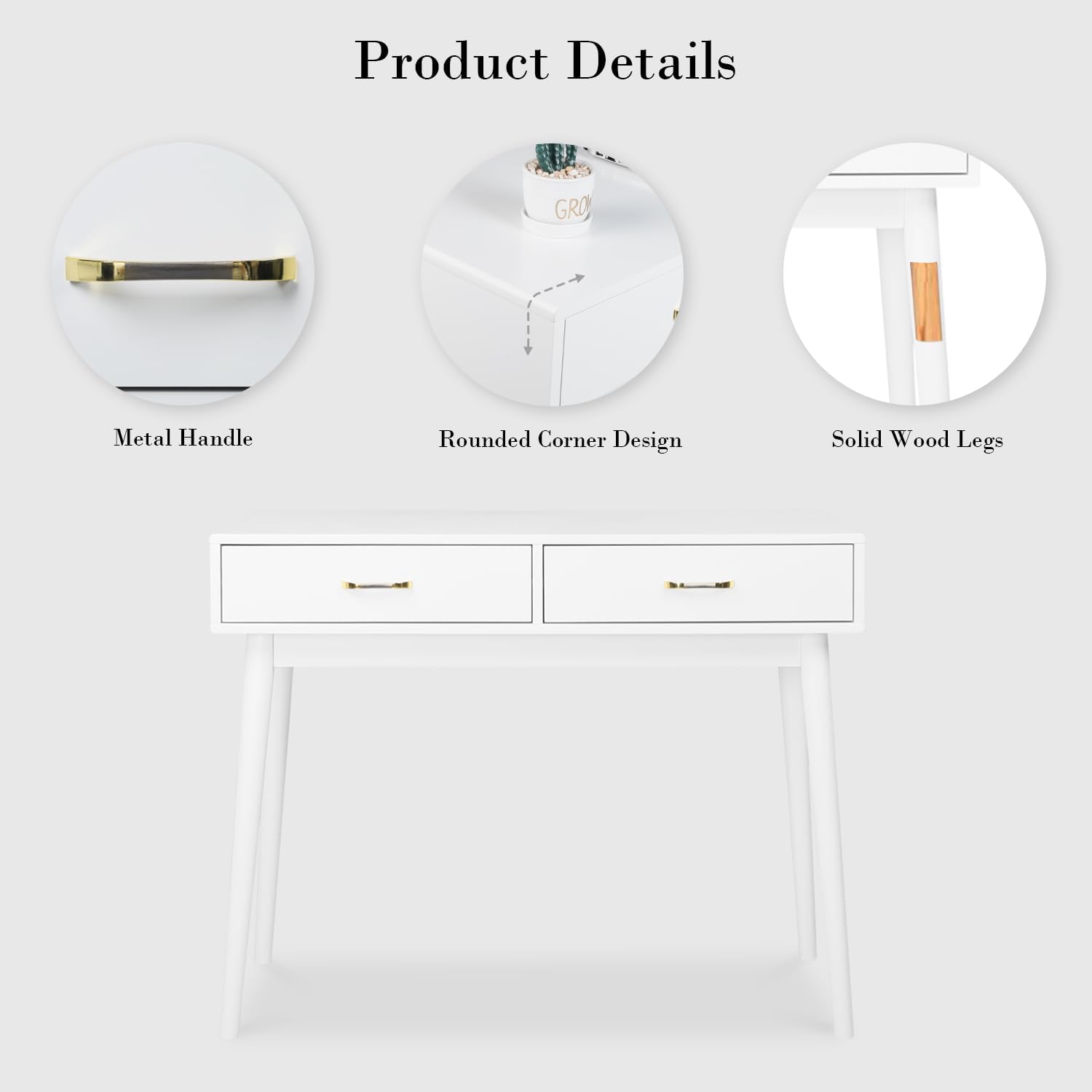
Figure 4.1: Detailed view of key desk features including the metal handle, rounded corner design for safety, and the solid wood construction of the legs.
5. Usage and Features
The FUNKOCO EW-WDWH001 desk is designed for multi-functional use in various home environments.
Multi-Use Functionality:
- Home Office Desk: Provides a compact and functional workspace for laptops, documents, and office supplies.
- Study/Writing Desk: An ideal surface for studying, reading, or creative writing tasks.
- Vanity Table: Can be used as a stylish vanity for makeup and personal grooming, especially when paired with a mirror and stool.

Figure 5.1: The FUNKOCO white desk configured as a vanity table in a bedroom, demonstrating its aesthetic appeal and functional use for personal care items.
Adequate Storage with Two Sliding Drawers:
The desk is equipped with two large sliding drawers, designed to help keep your desktop clean and organized. These drawers are suitable for storing stationery, cosmetics, jewelry, and other small items efficiently.

Figure 5.2: The desk's drawers are shown open, illustrating their depth and capacity for organizing various items, contributing to a tidy workspace.
6. Maintenance
To ensure the longevity and appearance of your FUNKOCO desk, follow these simple maintenance guidelines:
- Cleaning: Wipe the desk surface and legs with a damp cloth. Avoid using harsh chemicals or abrasive cleaners, as these can damage the painted finish.
- Spills: Clean up spills immediately to prevent staining or damage to the wood.
- Sunlight: Avoid prolonged exposure to direct sunlight, which can cause fading or discoloration.
- Heat: Do not place hot items directly on the desk surface. Use coasters or protective pads.
- Drawer Mechanism: Periodically check the drawer glide mechanism for smooth operation. If needed, a small amount of silicone lubricant can be applied to the metal glides.
7. Troubleshooting
If you encounter any issues with your desk, please refer to the following common troubleshooting tips:
- Desk Wobbles: Check all screws and fasteners to ensure they are securely tightened. Uneven flooring can also cause wobbling; try repositioning the desk or using furniture pads to level it.
- Drawers Stick or Don't Slide Smoothly: Verify that the drawer slides are correctly installed and aligned. Ensure no objects are obstructing the drawer's path. A small amount of lubricant on the metal glides may help.
- Missing Parts: If you discover any missing parts during assembly, please refer to the 'Package Contents' section and contact customer support immediately.
- Damaged Parts: If any parts arrived damaged, do not proceed with assembly. Contact customer support for assistance.
8. Specifications
| Feature | Detail |
|---|---|
| Brand | FUNKOCO |
| Model Number | EW-WDWH001 |
| Product Dimensions (D x W x H) | 15.74"D x 39.37"W x 30.71"H (40cm D x 100cm W x 78cm H) |
| Item Weight | 42 Pounds (19.05 kg) |
| Color | Cream White |
| Style | Minimalism |
| Top Material Type | Engineered Wood |
| Base Material | Wood |
| Furniture Leg Material | Pine Wood |
| Finish Type | Painted |
| Number of Drawers | 2 |
| Drawer Glide Material | Metal |
| Maximum Weight Recommendation | 120 Pounds (54.4 kg) |
| Required Assembly | Yes |
| Recommended Number of People for Assembly | 2 |
| Product Care Instructions | Wipe with Damp Cloth |

Figure 8.1: Detailed dimensions of the FUNKOCO EW-WDWH001 desk, including overall measurements and internal drawer space.
9. Warranty Information
The FUNKOCO EW-WDWH001 White Small Desk with Drawers comes with a Limited Warranty. This warranty covers manufacturing defects and issues arising from normal use. Please retain your proof of purchase for any warranty claims.
For specific details regarding the terms and conditions of your limited warranty, please refer to the documentation included with your purchase or contact FUNKOCO customer support.
10. Customer Support
If you have any questions, require assistance with assembly, or need to report missing/damaged parts, please do not hesitate to contact our customer support team. We are committed to providing prompt and helpful service.
Please have your model number (EW-WDWH001) and purchase information ready when contacting support to expedite the process.
For support, please visit the FUNKOCO store on Amazon or refer to the contact information provided with your product packaging.
Thank you for choosing FUNKOCO.