
Introduction
Thank you for choosing the Merkury 3-in-1 Device Stand Desktop Charging Station. This manual provides essential information for the proper setup, operation, and maintenance of your device. Please read this manual thoroughly before use and retain it for future reference.
This versatile charging station is designed to organize and charge your iPhone, Apple Watch, and AirPods simultaneously, providing a neat and efficient desktop solution. It is made of durable silicone for a stable and secure hold.
Package Contents
Please verify that all items listed below are present in your package:
- 1 x Merkury 3-in-1 Device Stand Desktop Charging Station (Midnight Blue)
- Note: Charging cables for iPhone, Apple Watch, and AirPods are not included and must be supplied by the user.

Figure 1: Front view of the Merkury 3-in-1 Device Stand Desktop Charging Station. The stand is black with "MERKURY" embossed on the front left side. It features a slot for a phone, a circular cutout for an Apple Watch charger, and a rectangular slot for AirPods.
Setup
Follow these steps to set up your Merkury 3-in-1 Device Stand:
- Prepare Your Cables: Gather your existing charging cables for your iPhone (Lightning cable), Apple Watch (magnetic charging cable), and AirPods (Lightning cable).
- Install Apple Watch Charger: Carefully insert your Apple Watch magnetic charging cable into the circular cutout on the right side of the stand. Route the cable through the designated channel underneath the stand to keep it tidy.
- Install iPhone Cable: Insert your iPhone's Lightning cable through the slot on the left side of the stand. Ensure the connector is positioned correctly to align with your phone's charging port when placed on the stand.
- Install AirPods Cable: Insert your AirPods' Lightning cable into the rectangular slot next to the Apple Watch section. Route the cable similarly to the iPhone cable.
- Connect to Power: Connect the other ends of all charging cables to a suitable USB power adapter (not included) or a powered USB hub.
- Place on Surface: Position the fully assembled charging station on a stable, flat surface, such as a desk or nightstand.
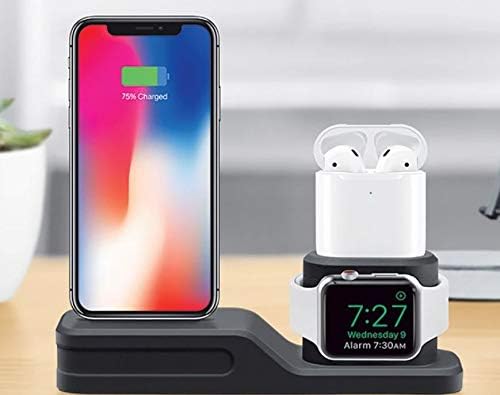
Figure 2: The Merkury 3-in-1 Device Stand shown in use, charging an iPhone, Apple Watch, and AirPods. The iPhone is upright on the left, the Apple Watch is on the right, and AirPods are in their case above the Apple Watch.
Operating Instructions
Once the charging station is set up and connected to power, you can begin charging your devices:
- Charging iPhone: Place your iPhone onto the left slot, ensuring the Lightning connector aligns and connects securely to the phone's charging port. The phone should stand upright.
- Charging Apple Watch: Place your Apple Watch onto the magnetic charging puck in the circular cutout. The watch should magnetically snap into place and begin charging.
- Charging AirPods: Insert your AirPods charging case into the rectangular slot. Ensure the Lightning connector aligns and connects securely to the AirPods case's charging port.
Verify that each device displays its charging indicator to confirm a successful connection.
Maintenance
To ensure the longevity and proper function of your charging stand, follow these maintenance guidelines:
- Cleaning: Disconnect all devices and power cables before cleaning. Wipe the stand with a soft, damp cloth. Do not use harsh chemicals, abrasive cleaners, or immerse the stand in water.
- Cable Management: Periodically check the cables routed through the stand to ensure they are not pinched or damaged. Adjust as necessary to maintain a neat and safe setup.
- Storage: If storing the stand for an extended period, ensure it is clean and dry. Store it in a cool, dry place away from direct sunlight and extreme temperatures.
Troubleshooting
If you encounter issues with your Merkury 3-in-1 Device Stand, refer to the following common problems and solutions:
| Problem | Possible Cause | Solution |
|---|---|---|
| Device not charging. |
|
|
| Stand is unstable. |
|
|
Specifications
| Feature | Detail |
|---|---|
| Product Name | Merkury 3-in-1 Device Stand Desktop Charging Station |
| Model Number | 194383007562 |
| Brand | Merkury Innovations |
| Material | Silicone |
| Color | Midnight Blue |
| Compatible Devices | iPhone, Apple Watch, AirPods (requires user-supplied cables) |
| Dimensions (approx.) | 8.31 x 6.26 x 2.6 inches |
| Item Weight | 8 ounces |
Warranty and Support
For warranty information or technical support, please contact Merkury Innovations directly. Refer to the product packaging or the official Merkury Innovations website for the most current contact details and warranty terms.
Manufacturer: Merkury
ASIN: B08W22Y2H5