
Introduction
Thank you for purchasing the Supersonic IQ-235TWS-RSG True Wireless Bluetooth Earbuds. This manual provides essential information for setting up, operating, and maintaining your new earbuds. Please read it thoroughly before use to ensure optimal performance and longevity of your device.
Product Overview
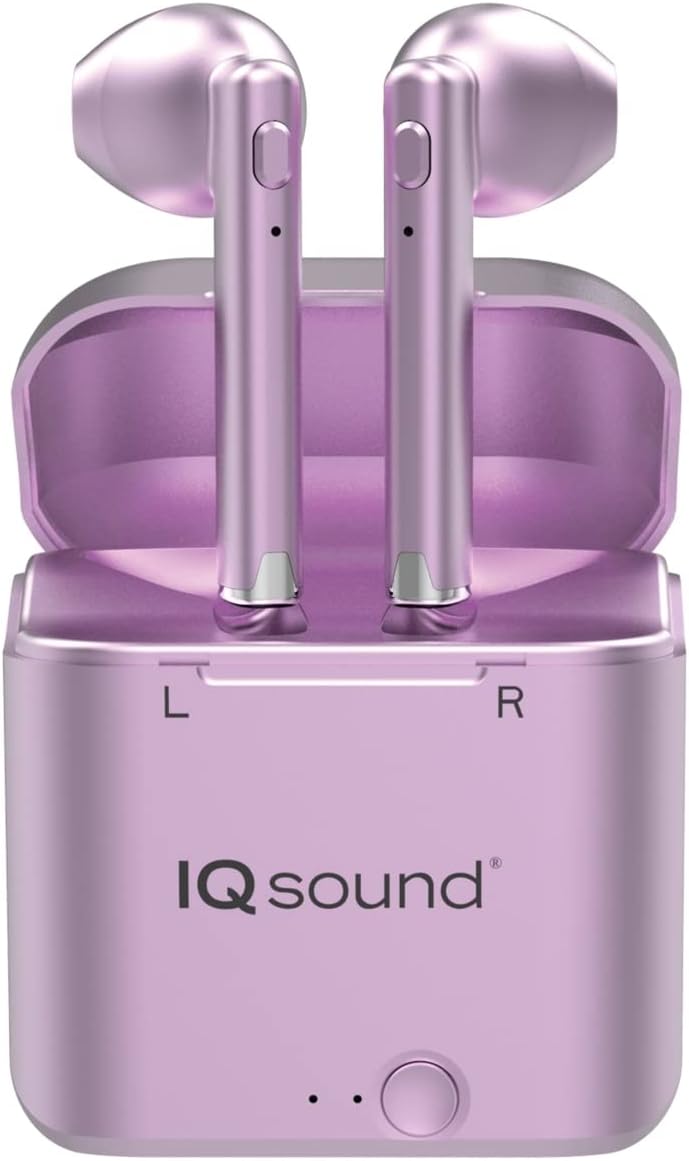
Image: Supersonic IQ-235TWS-RSG True Wireless Bluetooth Earbuds shown inside their charging case. The earbuds are purple with silver accents, and the charging case is also purple, featuring "IQ sound" branding and an indicator light/button at the bottom.
The Supersonic IQ-235TWS-RSG earbuds offer a completely wireless audio experience with premium sound quality. They come with a portable charging case that doubles as a power bank, ensuring your earbuds are always ready for use. Designed for both daily use and sports, these earbuds provide freedom of movement and convenient call management.
What's in the Box
- Supersonic IQ-235TWS-RSG True Wireless Bluetooth Earbuds (Left and Right)
- Portable Charging Case with Built-in Power Bank
- USB Charging Cable
- User Manual (This document)
Setup
1. Charging the Earbuds and Case
Before first use, fully charge both the earbuds and the charging case. The charging case includes a built-in power bank for convenient re-charging on the go.
- Place the earbuds into their respective slots in the charging case. Ensure they are seated correctly.
- Connect the charging cable to the charging port on the case and the other end to a USB power source (e.g., wall adapter, computer USB port).
- The indicator lights on the case and/or earbuds will show charging status.
- Once fully charged, disconnect the charging cable.
2. Bluetooth Pairing
The earbuds utilize Bluetooth 5.0 for a stable wireless connection up to 32 feet (10 meters).
- Ensure the earbuds are charged and removed from the charging case. They should automatically enter pairing mode.
- On your smartphone or Bluetooth-enabled device, go to the Bluetooth settings.
- Search for new devices. You should see "IQ-235TWS-RSG" or a similar name appear in the list of available devices.
- Select the earbuds from the list to initiate pairing.
- Once paired, your device will confirm the connection, and the earbuds will be ready for use.
- If pairing fails, turn off Bluetooth on your device, place earbuds back in case, then retry the process.
Operating Instructions
Power On/Off
- Power On: The earbuds automatically power on when removed from the charging case.
- Power Off: Place the earbuds back into the charging case to automatically power them off and begin charging.
Music Playback
Control music playback using the touch controls on the earbuds.
- Play/Pause: Single touch on either earbud.
- Next Track: Double touch on the right earbud.
- Previous Track: Double touch on the left earbud.
- Volume Up: Triple touch on the right earbud.
- Volume Down: Triple touch on the left earbud.
Call Management
The built-in microphone allows for wireless phone calls.
- Answer Call: Press the function button once on either earbud.
- Reject Call: Press the function button twice on either earbud.
- End Call: Press the function button once during a call.
- Note: During a call, only the master earbud (typically the right) will have sound. This safety feature allows you to hear your surroundings.
Voice Assistant
- Activate Voice Assistant: Long press (hold for 2 seconds) on either earbud.
Maintenance
Proper maintenance ensures the longevity and performance of your earbuds.
- Cleaning: Use a soft, dry, lint-free cloth to clean the earbuds and charging case. Do not use abrasive cleaners or solvents.
- Storage: When not in use, store the earbuds in their charging case to protect them and keep them charged.
- Temperature: Avoid exposing the earbuds to extreme temperatures (hot or cold) or high humidity.
- Water Resistance: These earbuds are not waterproof. Avoid contact with water or excessive moisture.
Troubleshooting
| Problem | Solution |
|---|---|
| Earbuds not pairing. |
|
| No sound from one earbud. |
|
| Charging case not charging. |
|
| Poor sound quality. |
|
Specifications
| Model Name: | Supersonic - True Wireless Bluetooth Earbuds with Charging Case (IQ-235TWS-RSG) |
| Model Number: | IQ-235TWS RSG |
| Brand: | Supersonic |
| Connectivity Technology: | Bluetooth 5.0 |
| Wireless Range: | Up to 32 feet (10 meters) |
| Control Method: | Touch / Button |
| Power Source: | Battery Powered |
| Special Features: | Portable, Built-in Power Bank in Charging Case, Built-in Microphone |
| Recommended Use: | Sports and Exercise, Daily Use |
| Color: | STANDARD (visually appears Rose Gold/Purple) |
| UPC: | 639131902350 |
Warranty and Support
For warranty information and technical support, please refer to the documentation included with your purchase or visit the official Supersonic website. Keep your proof of purchase for any warranty claims.
Manufacturer: Supersonic
Date First Available: February 5, 2021
For further assistance, please contact Supersonic customer service.