
Introduction
This manual provides comprehensive instructions for the N-Gear Sing Mic S20L Bluetooth Vocal Microphone. It covers product features, setup, operation, maintenance, troubleshooting, and technical specifications. Please read this manual thoroughly before using the device to ensure proper function and longevity.
Safety Information
- Do not expose the device to water or excessive moisture.
- Avoid dropping or subjecting the device to strong impacts.
- Keep out of reach of children.
- Use only the specified charging cable and power adapter.
- Do not attempt to disassemble or repair the device yourself. Contact qualified service personnel.
- Dispose of the battery according to local regulations.
Package Contents
The N-Gear Sing Mic S20L package typically includes:
- N-Gear Sing Mic S20L Microphone
- USB Charging Cable
- User Manual (this document)
Product Overview
Familiarize yourself with the components and controls of your N-Gear Sing Mic S20L.
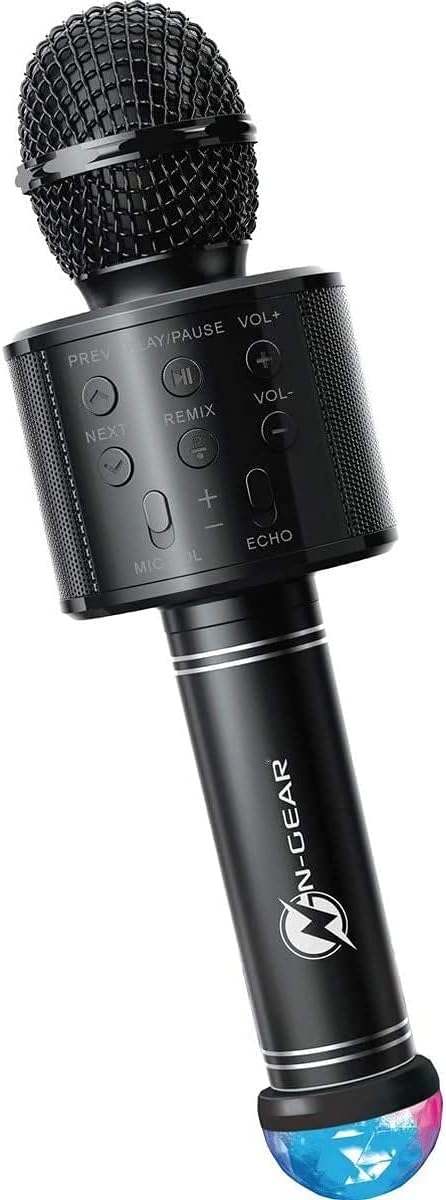
Figure 1: N-Gear Sing Mic S20L Bluetooth Microphone. This image shows the overall design of the microphone, including the mesh head, control panel, handle, and the detachable disco ball at the base.
Controls and Ports Diagram

Figure 2: Detailed diagram of the N-Gear Sing Mic S20L showing the control panel buttons, top-mounted ports (DC 5V, TF, AUX OUT, USB), and the Disco Ball USB port at the bottom.
Control Panel Functions
- PREV: Short press for previous track.
- PLAY/PAUSE: Short press to play or pause music. Long press for power On/Off.
- NEXT: Short press for next track.
- VOL+: Increase music volume.
- VOL-: Decrease music volume.
- REMIX: Activates or deactivates the remix sound effect.
- MIC VOL (+/-): Adjust microphone input volume.
- ECHO (+/-): Adjust the level of the echo effect on your voice.
Available Ports
- DC 5V: Micro USB port for charging the microphone's internal battery.
- TF: Slot for a Micro SD (TF) card to play MP3 audio files directly.
- AUX OUT: 3.5mm audio output jack to connect to external speakers or headphones.
- USB: Standard USB-A port for playing MP3 audio files from a USB flash drive.
- DISCO BALL USB: Dedicated USB-A port at the bottom of the handle for connecting the included disco light accessory.
Setup
Charging the Microphone
- Connect the provided USB charging cable to the DC 5V port on the microphone.
- Connect the other end of the USB cable to a standard 5V USB power adapter (not included) or a computer USB port.
- The charging indicator (if present) will illuminate during charging and turn off when fully charged.
- A full charge typically takes approximately 2-3 hours and provides up to 4 hours of playing time.
Attaching the Disco Ball
The disco ball is a separate attachment that connects via USB.
- Locate the USB connector on the disco ball.
- Insert the disco ball's USB connector into the DISCO BALL USB port at the bottom of the microphone handle.
- The disco light will activate automatically when connected and the microphone is powered on.
Operating Instructions
Power On/Off
- To power on, press and hold the power button (usually integrated with Play/Pause or a separate button, refer to specific product markings if available).
- To power off, press and hold the power button again.
Bluetooth Connection
- Ensure the microphone is powered on. It will automatically enter Bluetooth pairing mode.
- On your smartphone, tablet, or other Bluetooth-enabled device, enable Bluetooth and search for available devices.
- Select "N-Gear Sing Mic S20L" from the list of devices.
- Once paired, you will hear a confirmation tone, and the microphone is ready for wireless audio streaming.
Music Playback (Bluetooth/USB/SD Card)
- Bluetooth: Play music from your paired device. Use the PREV, PLAY/PAUSE, and NEXT buttons on the microphone to control playback. Adjust music volume with VOL+ and VOL-.
- USB/SD Card: Insert a USB drive into the USB port or a Micro SD card into the TF slot. The microphone will automatically detect and play MP3 files. Use the playback controls as described for Bluetooth.
Using the Microphone for Vocals
- Once music is playing, speak or sing into the microphone.
- Adjust your vocal volume using the MIC VOL (+/-) buttons.
- Apply an echo effect using the ECHO (+/-) buttons to enhance your singing.
- Press the REMIX button to activate or deactivate the special remix effect.
Recording Function
The microphone supports a listen/record function. Specific instructions for activating recording may vary. Typically, this involves a dedicated record button or a long press of the Play/Pause button in certain modes. Refer to the device's on-screen prompts or additional quick start guides if available for precise recording steps.
Using AUX OUT
Connect an audio cable (not included) from the AUX OUT port to an external speaker or audio system to output the microphone's sound.
Maintenance
- Cleaning: Wipe the microphone with a soft, dry cloth. Do not use abrasive cleaners or solvents.
- Storage: Store the device in a cool, dry place away from direct sunlight and extreme temperatures.
- Battery Care: For optimal battery life, charge the device regularly, even if not in frequent use. Avoid fully discharging the battery for extended periods.
Troubleshooting
| Problem | Possible Solution |
|---|---|
| Microphone does not power on. | Ensure the battery is charged. Connect to a power source and try again. |
| No sound from the speaker. | Check music volume (VOL+) and microphone volume (MIC VOL+). Ensure Bluetooth is connected or media is playing from USB/SD. |
| Cannot connect via Bluetooth. | Ensure Bluetooth is enabled on your device and the microphone is in pairing mode. Forget previous pairings on your device and try again. Move closer to the microphone. |
| Disco light is not working. | Ensure the disco ball is securely plugged into the DISCO BALL USB port and the microphone is powered on. |
| Poor sound quality / static. | Ensure there are no obstructions between the microphone and the paired device. Reduce distance. Check for interference from other electronic devices. |
Specifications
- Brand: N-Gear
- Model Name: Sing Mic S20L
- Model Number: 9420071
- Connectivity Technology: Bluetooth
- Power Source: Battery Powered
- Audio Sensitivity: 115 Decibels
- Item Dimensions (L x W x H): 9.5 x 9.5 x 28 centimeters
- Number of Channels: 1
- Recommended Uses: Karaoke
- Connector Type: USB (for charging and media playback)
- Polar Pattern: Omnidirectional
- Color: Black
Warranty and Support
Information regarding specific warranty terms and support contact details is not available in the provided product data. Please refer to the product packaging or the manufacturer's official website for the most up-to-date warranty information and customer support options.
