
1. Introduction
This manual provides comprehensive instructions for the installation, operation, maintenance, and troubleshooting of the ViaGasaFamido A2-8030 3KW Variable Frequency Drive (VFD). This device is designed to control the speed of three-phase motors, offering precise control and efficient performance for various industrial applications.
2. Safety Information
Please read all safety warnings and instructions carefully before installation and operation to prevent injury or damage to the equipment.
- High Voltage Warning: The VFD contains high voltage components. Do not open the casing or attempt to service the unit unless you are a qualified electrician.
- Discharge Time: After disconnecting power, wait at least 5 seconds for internal capacitors to discharge before touching any components. Ensure the "CHARGE" lamp is off.
- Correct Wiring: Ensure all wiring connections are correct and secure. Incorrect wiring can lead to severe damage or electric shock.
- Grounding: The VFD must be properly grounded to prevent electric shock.
- Environment: Install the VFD in a clean, dry, and well-ventilated area, away from direct sunlight, corrosive gases, and excessive vibration.
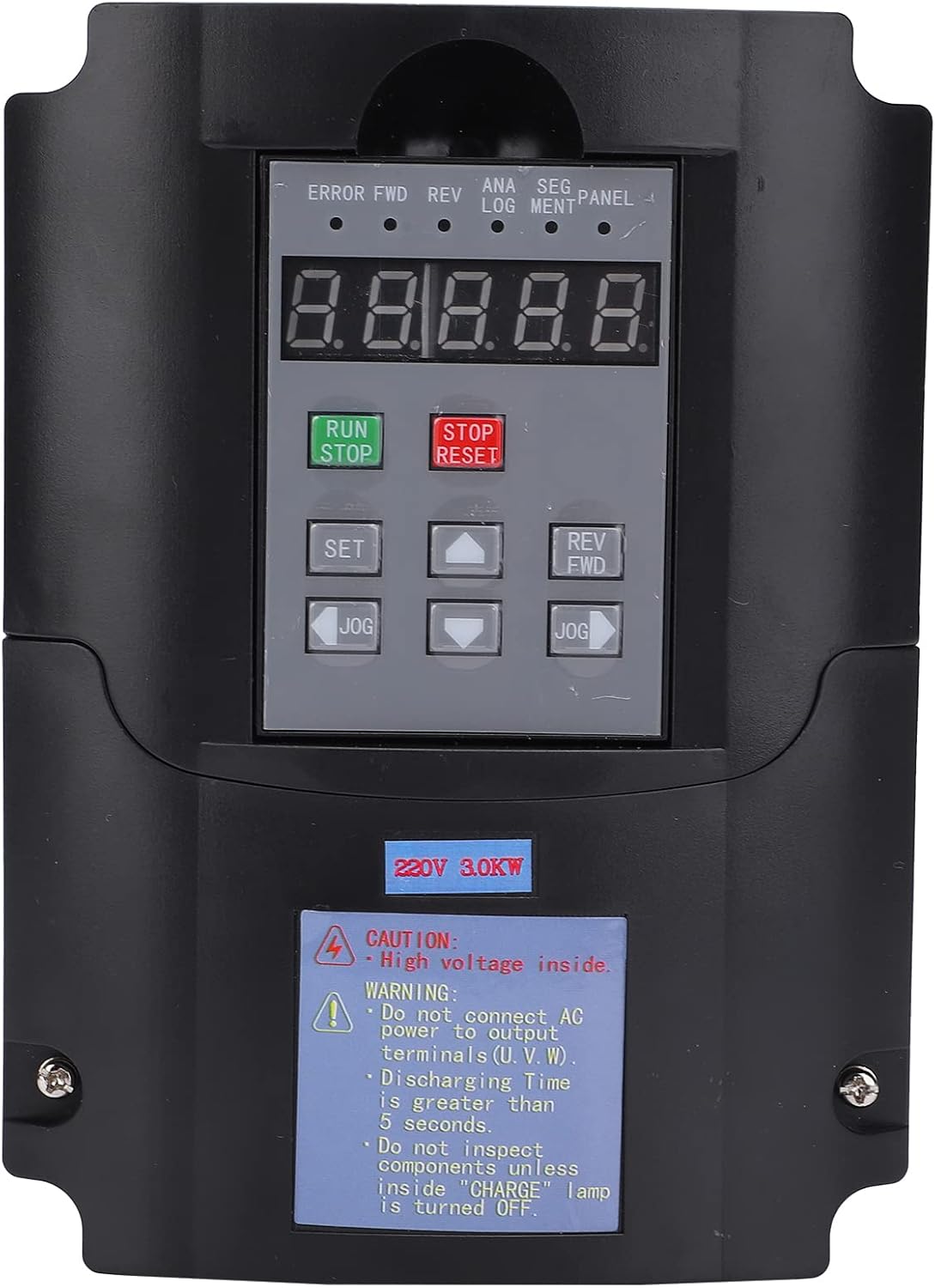
Figure 2.1: Front view of the VFD with control panel and safety warning.
This image displays the front of the ViaGasaFamido A2-8030 Variable Frequency Drive, highlighting the digital display and control buttons. A prominent warning label is visible, indicating "CAUTION: High voltage inside" and advising against connecting AC power to output terminals (U, V, W), waiting for 5 seconds discharge time, and not inspecting components until the "CHARGE" lamp is off.
3. Product Features
- Enhanced Safety: Manufactured with strict quality control, ensuring a high safety factor for reliable operation.
- User-Friendly Interface: Features a humanized keyboard design for easy operation and a clear display for monitoring.
- Efficient Heat Dissipation: Equipped with a large aluminum base heat sink and a powerful imported fan for rapid and effective heat dissipation, ensuring stable performance.
- Wide Application Range: Versatile functionality suitable for various applications including spindle motors, lathes, milling machines, pumps, treadmills, conveyors, winding machines, mixers, extruders, splitters, compressors, vents, elevators, centrifuges, and other machinery.
- Durable Construction: Made from industrial flame-retardant ABS plastic, providing heat resistance, fire resistance, and impact resistance for enhanced safety and longevity.
4. Package Contents
Upon unpacking, please verify that all items listed below are present and undamaged:
- 1 x ViaGasaFamido A2-8030 Variable Frequency Drive
- 1 x User Manual (Chinese and English)
5. Specifications
| Feature | Specification |
|---|---|
| Model | A2-8030 |
| Material | Industrial Flame-Retardant ABS Plastic |
| Input Voltage | AC 180-250V (Single-phase or Three-phase) |
| Input Current | 14A |
| Input Frequency | 40-60Hz |
| Output Voltage | Three-phase 220V |
| Output Current | 20A |
| Output Frequency | 0-400Hz |
| Power | 3KW |
| Product Dimensions | Approx. 170 x 160 x 125 mm (6.7 x 6.3 x 4.9 inches) |
| Weight | Approx. 100g (Note: This weight seems unusually low for a 3KW VFD and might be a data entry error. Please refer to product packaging for accurate weight.) |
| Compatible Peripherals | Spindle motors, lathes, milling machines, pumps, etc. |
6. Setup
Proper installation is critical for the safe and efficient operation of the VFD. If you are not experienced with electrical installations, consult a qualified professional.
6.1 Mounting
- Mount the VFD vertically on a stable, non-flammable surface.
- Ensure adequate clearance around the unit for proper ventilation and heat dissipation.
- Avoid mounting in areas with excessive dust, moisture, or direct heat sources.
6.2 Wiring Connections
Refer to the wiring diagram on the unit and the following instructions for connections.

Figure 6.1: Rear view of the VFD with connection terminals.
This image shows the rear panel of the ViaGasaFamido A2-8030 VFD. Clearly visible are the input power terminals labeled "POWER" and the output motor terminals labeled "MOTOR". The input specifies "Single phase input 220V connection R and T", indicating where the single-phase AC power should be connected.
- Power Input (R, T): Connect the AC 180-250V single-phase or three-phase power supply to the input terminals labeled 'R' and 'T'. Ensure the power source matches the VFD's specifications.
- Motor Output (U, V, W): Connect the three-phase motor to the output terminals labeled 'U', 'V', and 'W'. Do not connect AC power directly to these terminals.
- Grounding: Connect the ground terminal of the VFD to a reliable earth ground.
- Control Wiring: If using external control signals (e.g., potentiometer for speed control, external start/stop buttons), refer to the detailed wiring diagram in the included physical manual for specific terminal assignments.
6.3 Initial Power-Up
- Before applying power, double-check all wiring connections for correctness and security.
- Ensure no loose wires or foreign objects are inside the VFD.
- Apply power to the VFD. The display should illuminate.
- Observe for any error codes or unusual behavior.
7. Operating Instructions
The A2-8030 VFD features a control panel for direct operation and parameter setting.
7.1 Control Panel Overview
The control panel typically includes:
- Digital Display: Shows operating frequency, output current, voltage, and error codes.
- RUN/STOP Buttons: To start and stop the motor.
- SET Button: To enter parameter setting mode.
- UP/DOWN Arrows: To navigate through parameters and adjust values.
- JOG Button: For momentary operation at a preset low speed.
- REV/FWD Button: To change motor rotation direction.
7.2 Basic Operation
- Start Motor: Press the RUN button. The motor will accelerate to the set frequency.
- Stop Motor: Press the STOP/RESET button. The motor will decelerate and stop.
- Adjust Frequency: In operating mode, use the UP/DOWN arrow buttons to adjust the output frequency (motor speed).
- Change Direction: Press the REV/FWD button to reverse the motor's direction of rotation.
7.3 Parameter Setting
The VFD has various parameters that can be adjusted to optimize performance for specific applications. Refer to the detailed parameter list in the physical user manual for complete instructions.
- Press the SET button to enter parameter setting mode.
- Use the UP/DOWN arrows to navigate through parameter groups and individual parameters.
- Press SET again to select a parameter for editing.
- Use the UP/DOWN arrows to change the parameter value.
- Press SET to save the new value.
- Press STOP/RESET to exit parameter setting mode.
8. Maintenance
Regular maintenance ensures the longevity and reliable operation of your VFD.
- Cleaning: Keep the VFD clean and free from dust and debris. Use a soft, dry cloth for cleaning. Do not use liquid cleaners.
- Ventilation: Ensure that the ventilation openings are not blocked. Periodically check and clean the cooling fan to ensure proper airflow.
- Connections: Periodically check all electrical connections for tightness. Loose connections can cause overheating and malfunction.
- Inspection: Visually inspect the VFD for any signs of damage, discoloration, or unusual odors.
- Storage: If storing the VFD for an extended period, ensure it is kept in a dry, temperature-controlled environment.

Figure 8.1: Side view of the VFD highlighting ventilation.
This image shows a side view of the ViaGasaFamido A2-8030 VFD, emphasizing the ventilation grilles designed for heat dissipation. Proper airflow through these grilles is essential for the unit's efficient operation and longevity.
9. Troubleshooting
This section provides solutions to common issues you might encounter. For problems not listed here, or if solutions do not resolve the issue, contact technical support.
| Problem | Possible Cause | Solution |
|---|---|---|
| VFD does not power on | No input power; Incorrect wiring; Blown fuse | Check power supply; Verify input wiring (R, T); Check internal/external fuses. |
| Motor does not run | Motor wiring incorrect; VFD in STOP mode; Parameter settings incorrect; Motor fault | Verify motor wiring (U, V, W); Press RUN button; Check frequency and other motor parameters; Test motor independently. |
| VFD displays an error code | Overcurrent; Overvoltage; Undervoltage; Overheat; Other internal fault | Refer to the specific error code in the full manual for detailed troubleshooting steps. Address the underlying cause (e.g., reduce load, check power supply, ensure ventilation). |
| Motor runs in wrong direction | Incorrect phase sequence; Direction parameter setting | Press REV/FWD button; If persistent, swap any two of the motor output wires (U, V, W). |
| Poor speed control | Incorrect parameter settings; Motor not suitable for VFD control | Adjust acceleration/deceleration times, min/max frequency, and other relevant parameters. Ensure motor is compatible with VFDs. |
10. Warranty and Support
For warranty information, please refer to the terms and conditions provided at the time of purchase or contact your retailer. ViaGasaFamido products are designed for reliability, but should you encounter any issues or require technical assistance, please contact the seller or manufacturer directly.
When contacting support, please have the following information ready:
- Product Model: A2-8030
- Date of Purchase
- Detailed description of the issue