
Lockly PGD728WYMB
Lockly Secure Pro Wi-Fi Smart Door Lock Instruction Manual
Model: PGD728WYMB
Introduction
This manual provides detailed instructions for the installation, operation, and maintenance of your Lockly Secure Pro Wi-Fi Smart Door Lock. Please read this manual thoroughly before installation and use to ensure proper function and to maximize the security features of your device. Keep this manual for future reference.

Image: Lockly Secure Pro Smart Door Lock with Wi-Fi Hub and smartphone app interface.
Safety Information
- Do not attempt to disassemble or modify the lock. This may cause damage to the product, void the warranty, and compromise security.
- Use only specified batteries (AA Alkaline). Do not mix old and new batteries or different types of batteries.
- Ensure all components are securely fastened during installation to prevent malfunction.
- Keep physical keys in a secure location outside the property to be used as a backup.
- Protect your PIN codes and fingerprint data. Do not share them with unauthorized individuals.
Product Overview
Key Features
- Multiple Access Methods: Patented PIN Genie digital keypad, 3D biometric fingerprint reader, smartphone app, voice control (Alexa/Hey Google), and physical key.
- PIN Genie Digital Keypad: Features dynamic shuffling of digits to prevent code guessing.
- 3D Biometric Fingerprint Sensor: Quick access with less than 0.3-second recognition, storing up to 99 fingerprints.
- Mobile App Control: Remote lock/unlock, real-time monitoring, and access history via the Lockly App.
- Voice Control: Compatible with Amazon Alexa and Hey Google for hands-free operation.
- Programmable Auto-Lock: Customizable auto-lock feature for enhanced security.
- Offline Access Codes: Generate access codes usable without Wi-Fi or internet connection.
- Weather Resistant: Durable design suitable for various environmental conditions.
Components
The Lockly Secure Pro package includes the smart lock assembly, a Wi-Fi hub, a door sensor, four AA batteries, and two backup physical keys.

Image: Summary of Lockly Secure Pro features.
Setup and Installation
Door Compatibility
Before installation, ensure your door meets the following specifications:
- Door thickness: 1 3/8" - 2"
- Backset: 2 3/8" or 2 3/4"
- Cross bore diameter: 2 1/8"
- Edge bore diameter: 1"

Image: Door compatibility measurements.
Installation Process
The Lockly Secure Pro is designed for easy DIY installation using common household tools. A detailed installation guide video is available to assist you through each step.

Image: Installation guide video demonstration.
Wi-Fi Hub Setup
The included Wi-Fi hub enables remote control and monitoring of your smart lock. Simply plug it into a power outlet within range of your lock and follow the instructions in the Lockly app for plug-n-play setup.

Image: Lockly Wi-Fi Hub for remote connectivity.
Operating Instructions
Unlocking and Locking Methods
Your Lockly Secure Pro offers multiple convenient ways to secure and access your property:
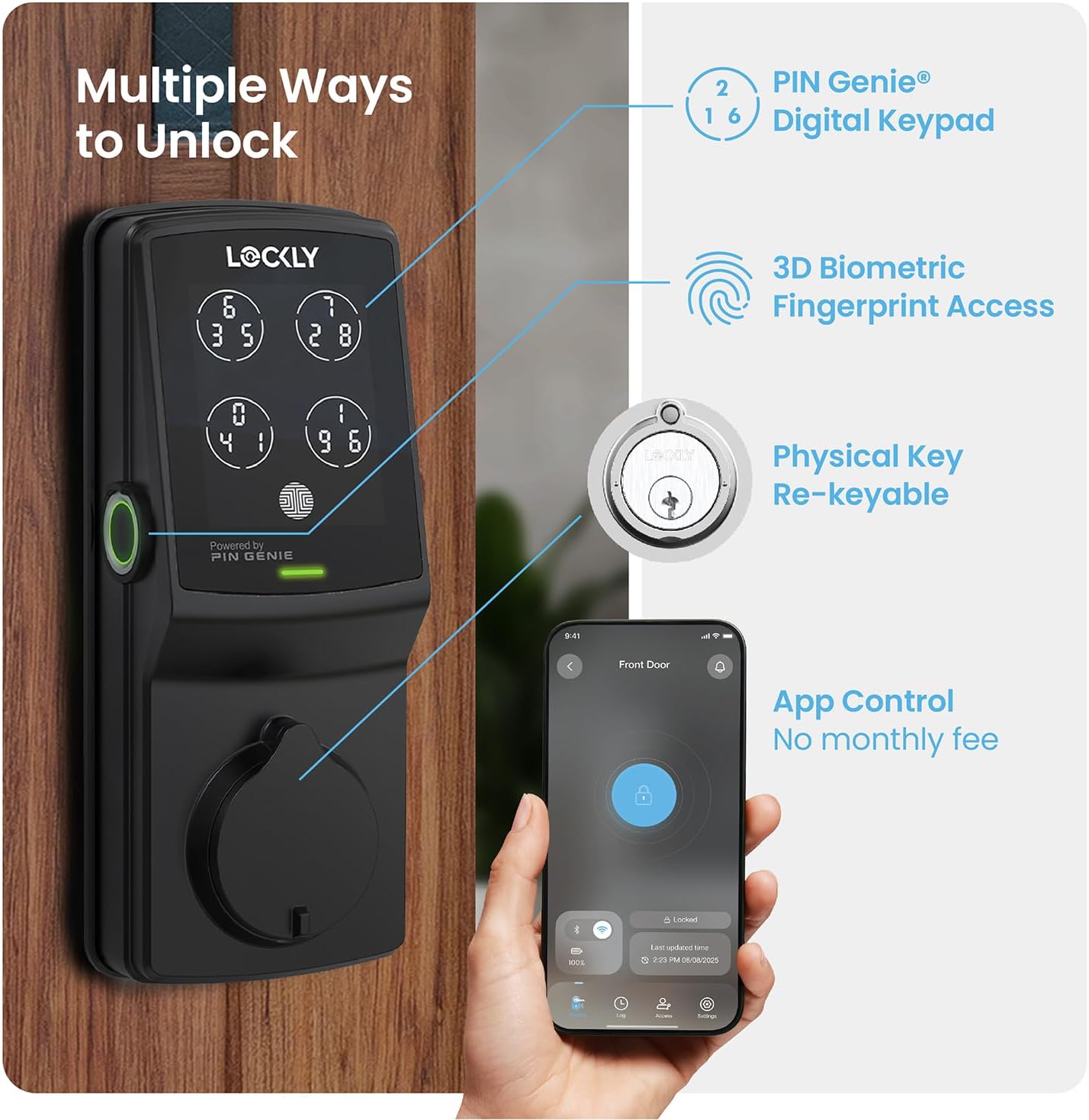
Image: Overview of multiple unlocking methods.
- PIN Genie Digital Keypad: Enter your secure PIN code on the patented keypad. The numbers on the four virtual buttons dynamically shuffle after each use, making it difficult for onlookers to guess your code.
- 3D Biometric Fingerprint Sensor: Place your registered finger on the sensor for quick access. The sensor recognizes fingerprints in less than 0.3 seconds and opens the lock in under 0.5 seconds.
- Smartphone App Control: Use the Lockly App to remotely lock or unlock your door from anywhere. The app also provides real-time monitoring and access history.
- Voice Control: Integrate with Amazon Alexa or Hey Google to unlock, lock, or check the status of your door using voice commands.
- Physical Key: Two backup physical keys are included for manual access in case of power failure or other issues. The lock also features rekeying capability.

Image: PIN Genie keypad in operation.

Image: Using the 3D biometric fingerprint sensor.

Image: Lockly App interface for remote control.

Image: Voice control and physical key backup.
Advanced Features
- Programmable Auto-Lock: Customize the auto-lock duration (5 to 300 seconds) to ensure your door is always secured after closing.
- eKeys & eBadges: Grant and revoke access to family, friends, or visitors directly through the Lockly app.
- Offline Access Codes: Generate temporary or permanent access codes that can be used even when the lock is not connected to Wi-Fi.

Image: Programmable auto-lock feature.
Maintenance
Battery Management
The Lockly Secure Pro operates on four AA batteries, providing up to 8 months of battery life. The Lockly app will send real-time notifications for low battery alerts. In case of complete battery depletion, an external 9V battery can be used for emergency power supply.

Image: Battery and emergency power supply details.
Cleaning and Durability
Clean the lock's exterior with a soft, damp cloth. Avoid abrasive cleaners or solvents. The Lockly Secure Pro features a durable, weather-resistant design (IP54 rated) to withstand various outdoor conditions.

Image: Lockly Secure Pro demonstrating weather resistance.

Image: Durability and weather resistance specifications.
Rekeying
The lock cylinder can be rekeyed by a professional locksmith without needing to replace the entire lock, using a standard rekey kit.

Image: Rekeyable cylinder feature.
Troubleshooting
If you encounter issues with your Lockly Secure Pro, please refer to the following common solutions:
- Lock Not Responding: Check battery levels. Replace batteries if low. Ensure the lock is properly installed and all cables are connected.
- Fingerprint Not Recognized: Ensure your finger is clean and dry. Re-register your fingerprint if recognition issues persist.
- PIN Code Issues: Verify the correct PIN is being entered. Remember the PIN Genie keypad shuffles digits; ensure you are pressing the correct virtual button for each digit.
- App Connectivity Problems: Ensure your Wi-Fi hub is powered on and within range of the lock. Check your home Wi-Fi network status. Restart the Lockly app or your smartphone.
- Auto-Lock Not Engaging: Verify the auto-lock feature is enabled and configured with the desired delay in the Lockly app.
For further assistance, consult the Lockly app's help section or contact customer support.
Specifications
| Feature | Detail |
|---|---|
| Brand | Lockly |
| Model Name | Lockly Secure Pro |
| Item Model Number | PGD728WYMB |
| Lock Type | Smart Lock, Deadbolt |
| Material | Zinc |
| Color | Matte Black |
| Finish Type | Brushed |
| Item Dimensions (L x W x H) | 7.4 x 3.15 x 4.5 inches |
| Item Weight | 3.8 Pounds |
| Power Source | 4 x AA Alkaline Batteries |
| Emergency Power | 9V Battery Port |
| Connectivity Protocol | Bluetooth, Wi-Fi (via included hub) |
| Control Method | App, Remote, Touch, Voice |
| Controller Type | Amazon Alexa, Google Assistant |
| Special Features | App Control, Auto-Lock, Left Fingerprint Reader, Voice Control, Waterproof (IP54) |
| UPC | 810055600656 |
Warranty Information
The Lockly Secure Pro comes with a limited 5-year mechanical and finish warranty and a 2-year electronics warranty. Please retain your proof of purchase for warranty claims.
Customer Support
Lockly provides lifetime technical support for all its products. For assistance with installation, operation, or troubleshooting, please contact Lockly customer support through their official website or the contact information provided in the Lockly app.
Ask a question about this manual
Ask about setup, troubleshooting, compatibility, parts, safety, or missing instructions. Manuals+ will review the question and use this page’s manual context to help answer it.