

Introduction
This manual provides comprehensive instructions for the proper use and maintenance of your Haiz HZ-M77 16-Channel USB Walkie Talkie. Please read this manual thoroughly before operating the device to ensure optimal performance and safety. The Haiz HZ-M77 is an Anatel-approved two-way radio, designed for reliable communication over distances ranging from 1km to 12km, depending on environmental conditions.

An image showing two Haiz HZ-M77 walkie-talkies placed on their charging bases. This illustrates the product's appearance and how it sits on the charger.
Package Contents
The Haiz HZ-M77 package includes the following items:
- 2 x HZ-M77 Walkie Talkie Radios
- 2 x Rechargeable Li-ion Batteries
- 2 x Charging Bases
- 2 x Antennas
- 2 x Wrist Straps
- 2 x Belt Clips
- 2 x Earpieces
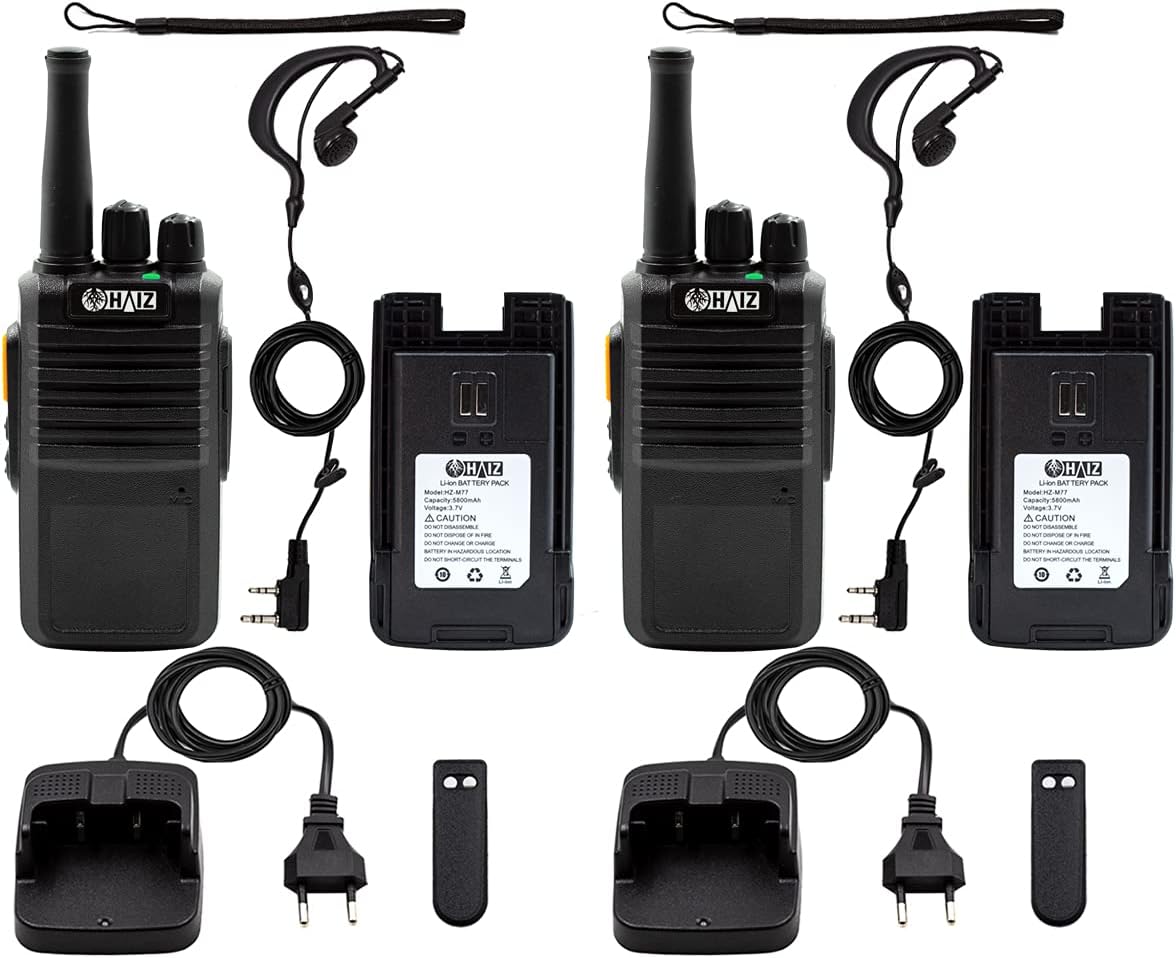
An image showing all components included in the Haiz HZ-M77 walkie-talkie package: two radios, two batteries, two charging bases, two antennas, two wrist straps, two belt clips, and two earpieces.
Product Overview
Familiarize yourself with the various parts and controls of your Haiz HZ-M77 walkie-talkie.
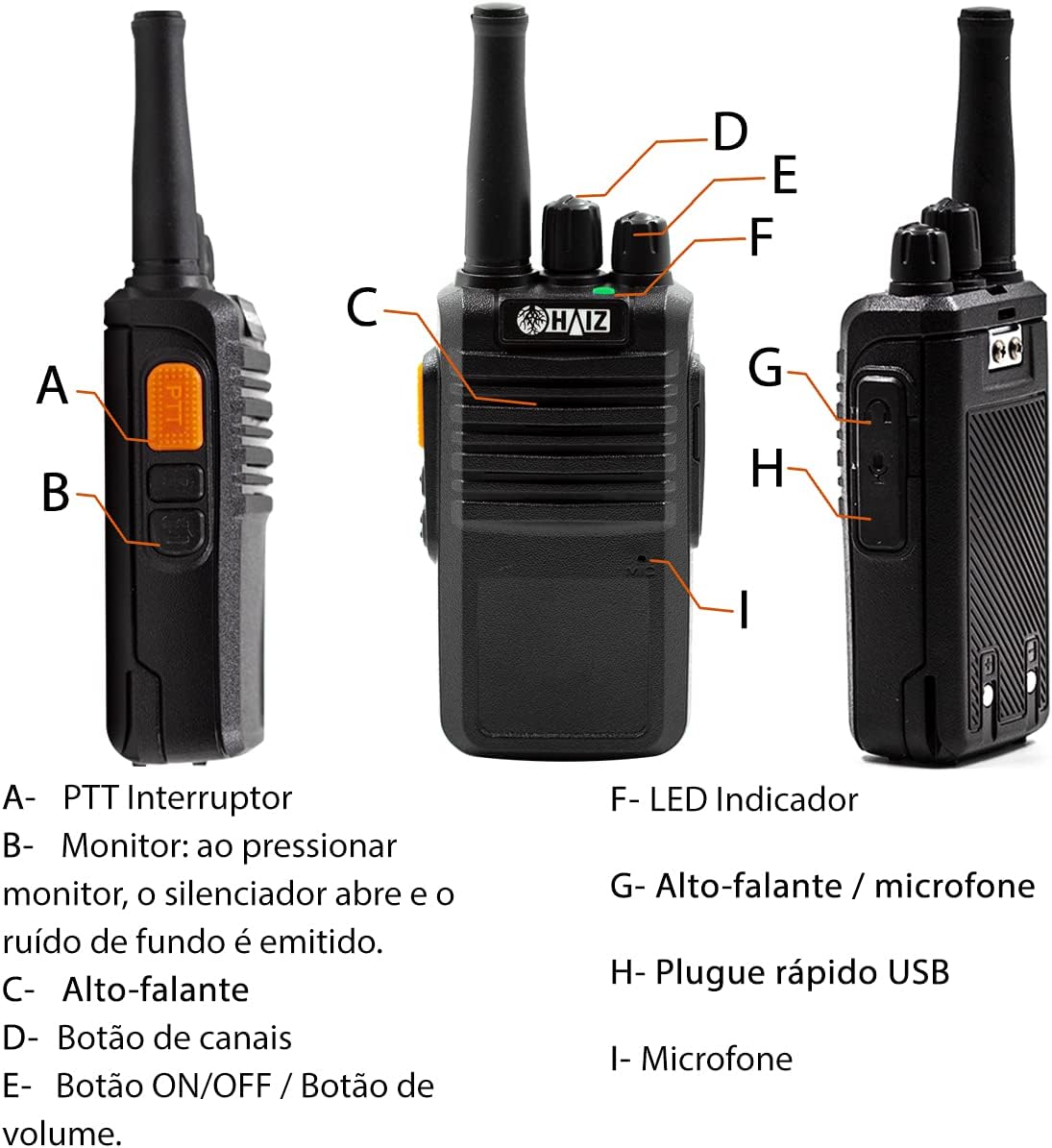
A diagram illustrating the different parts of the Haiz HZ-M77 walkie-talkie. Key components labeled include: A-PTT Switch, B-Monitor Button, C-Speaker, D-Channel Knob, E-ON/OFF & Volume Knob, F-LED Indicator, G-Speaker/Microphone Jack, H-USB Charging Port, I-Microphone.
Controls and Functions:
- A - PTT (Push-To-Talk) Switch: Press and hold to transmit, release to receive.
- B - Monitor Button: Press to open the squelch and listen for weak signals or background noise.
- C - Speaker: Outputs received audio.
- D - Channel Knob: Rotate to select one of the 16 available communication channels.
- E - ON/OFF / Volume Knob: Rotate clockwise to power on and increase volume; rotate counter-clockwise to decrease volume and power off.
- F - LED Indicator: Provides visual feedback on radio status (e.g., transmitting, receiving, battery low).
- G - Speaker / Microphone Jack: Connect external earpieces or microphones.
- H - USB Charging Port: For charging the radio using a Micro USB V8 cable (not included).
- I - Microphone: Captures your voice during transmission.
Setup
1. Battery Installation
Insert the provided Li-ion battery into the back compartment of the walkie-talkie, ensuring it clicks securely into place.
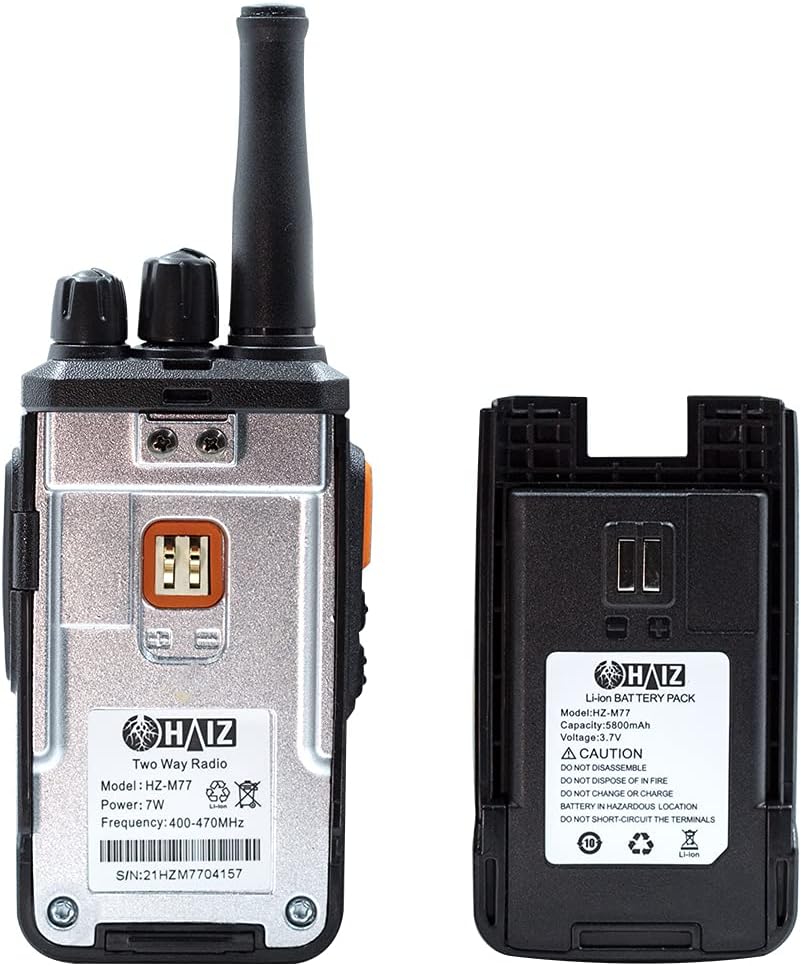
An image showing the back of the Haiz HZ-M77 walkie-talkie with its battery removed, and the separate Li-ion battery pack. This illustrates how the battery connects to the radio.
2. Charging the Battery
Your walkie-talkie can be charged using the included charging base or a Micro USB V8 cable (not included).
Using the Charging Base:
- Connect the charging base to a standard 110V or 220V power outlet using the included power adapter.
- Place the walkie-talkie into the charging base. Ensure the charging contacts align.
- The LED indicator on the radio or base will show the charging status.

A close-up image of the Haiz HZ-M77 walkie-talkie charging base and its power adapter, ready to be plugged into an electrical outlet.
Using the USB Charging Port:
- Connect a Micro USB V8 cable (not included) to the USB charging port (H) on the side of the radio.
- Connect the other end of the USB cable to a compatible USB power source (e.g., computer, USB wall adapter).
Note: Fully charge the battery before first use for optimal performance.
3. Antenna Installation
Screw the antenna clockwise into the connector on the top of the walkie-talkie until it is finger-tight.
4. Belt Clip Installation
Attach the belt clip to the designated slot on the back of the radio for convenient carrying.
5. Earpiece Connection
If desired, connect the included earpiece to the Speaker/Microphone Jack (G) on the side of the radio.

A detailed image of the included earpiece for the Haiz HZ-M77 walkie-talkie, showing its two-pin connector for audio input and output.
Operating Instructions
1. Power On/Off and Volume Control
Rotate the ON/OFF / Volume Knob (E) clockwise to turn on the radio. Continue rotating clockwise to increase the volume. Rotate counter-clockwise to decrease the volume and turn off the radio.
2. Channel Selection
Rotate the Channel Knob (D) to select one of the 16 available channels. Ensure all radios intended for communication are set to the same channel.
3. Transmitting and Receiving (PTT)
To transmit, press and hold the PTT Switch (A) on the side of the radio. Speak clearly into the microphone (I). Release the PTT Switch to stop transmitting and return to receive mode.
4. Monitor Function
Press and hold the Monitor Button (B) to temporarily disable the squelch. This allows you to listen for very weak signals or to hear background noise on a channel, which can be useful for checking if a channel is clear.
5. Battery Low Alert
The radio will emit an audible alert when the battery level is low, indicating that it needs to be recharged.
6. Battery Save Mode
The Haiz HZ-M77 features a battery save mode to extend battery life. This mode automatically activates when the radio is not actively transmitting or receiving for a certain period.
Technical Specifications
| Feature | Specification |
|---|---|
| Model | HZ-M77 |
| Frequency Range | UHF 400-470MHz |
| Number of Channels | 16 |
| Communication Range | 1km to 12km (varies with terrain and obstacles) |
| Power Output | 5W |
| Battery Type | Li-ion Rechargeable |
| Battery Capacity | 1500mAh |
| Operating Voltage | 3.7V (Radio), 7.4V (Battery) |
| Charging Input | Bivolt (110V/220V) via charging base; Micro USB V8 (cable not included) |
| Special Features | Noise Reduction Circuit, LED Indicators, Battery Save Mode, Low Battery Alert, Automatic Channel Search |
| Dimensions (Radio) | 16 cm (height with antenna) x 5 cm (width) x 2.5 cm (depth) |
| Weight (Radio with battery & antenna) | Approximately 159g |
| Anatel Certification | 10362-21-14108 |

An image displaying the dimensions of the Haiz HZ-M77 walkie-talkie, showing a height of 16cm (with antenna), width of 5cm, and depth of 2.5cm. The weight is listed as 159g with battery and antenna.
Maintenance
Cleaning:
Wipe the radio's surface with a soft, damp cloth. Do not use harsh chemicals or abrasive cleaners.
Battery Care:
To prolong battery life, avoid overcharging or completely draining the battery. Store the radio and battery in a cool, dry place when not in use for extended periods.
Antenna Care:
Do not bend or force the antenna, as this can damage the radio's performance.
Troubleshooting
| Problem | Possible Cause | Solution |
|---|---|---|
| No power | Battery is dead or not properly installed. | Charge the battery. Ensure the battery is correctly inserted. |
| Cannot communicate with other radios | Radios are on different channels. Out of range. | Ensure all radios are set to the same channel. Move closer to the other radio. |
| Poor audio quality / Static | Weak signal. Interference. Volume too low. | Move to an open area. Adjust volume. Use the Monitor function to check for activity. |
| Battery drains quickly | Battery not fully charged. Old battery. | Ensure battery is fully charged. Consider replacing the battery if it's old. |
Safety Information
- Do not disassemble or modify the radio.
- Do not expose the radio to extreme temperatures, direct sunlight, or moisture.
- Use only approved batteries and chargers.
- Keep the radio away from medical devices that may be affected by radio frequency energy.
- Observe all local regulations regarding radio communication.
Warranty and Support
For warranty information or technical support, please refer to the contact details provided by your retailer or visit the official Haiz website. Keep your purchase receipt as proof of purchase.

