
Pyle PT888BTWM
Pyle PT888BTWM 5.2 Channel Home Theater Receiver User Manual
Model: PT888BTWM
Brand: Pyle
1. Product Overview
The Pyle PT888BTWM is a 5.2 Channel AV Receiver System designed to deliver an immersive Hi-Fi home theater surround sound experience. This versatile amplifier features built-in Bluetooth for wireless audio streaming, next-gen audio DSP technology for superior sound quality, and supports 4K Ultra HD and 3D video with Blu-ray pass-through. It includes two 2-channel UHF wireless microphones for added convenience, an AM/FM radio tuner, and multiple connectivity options for various external devices.
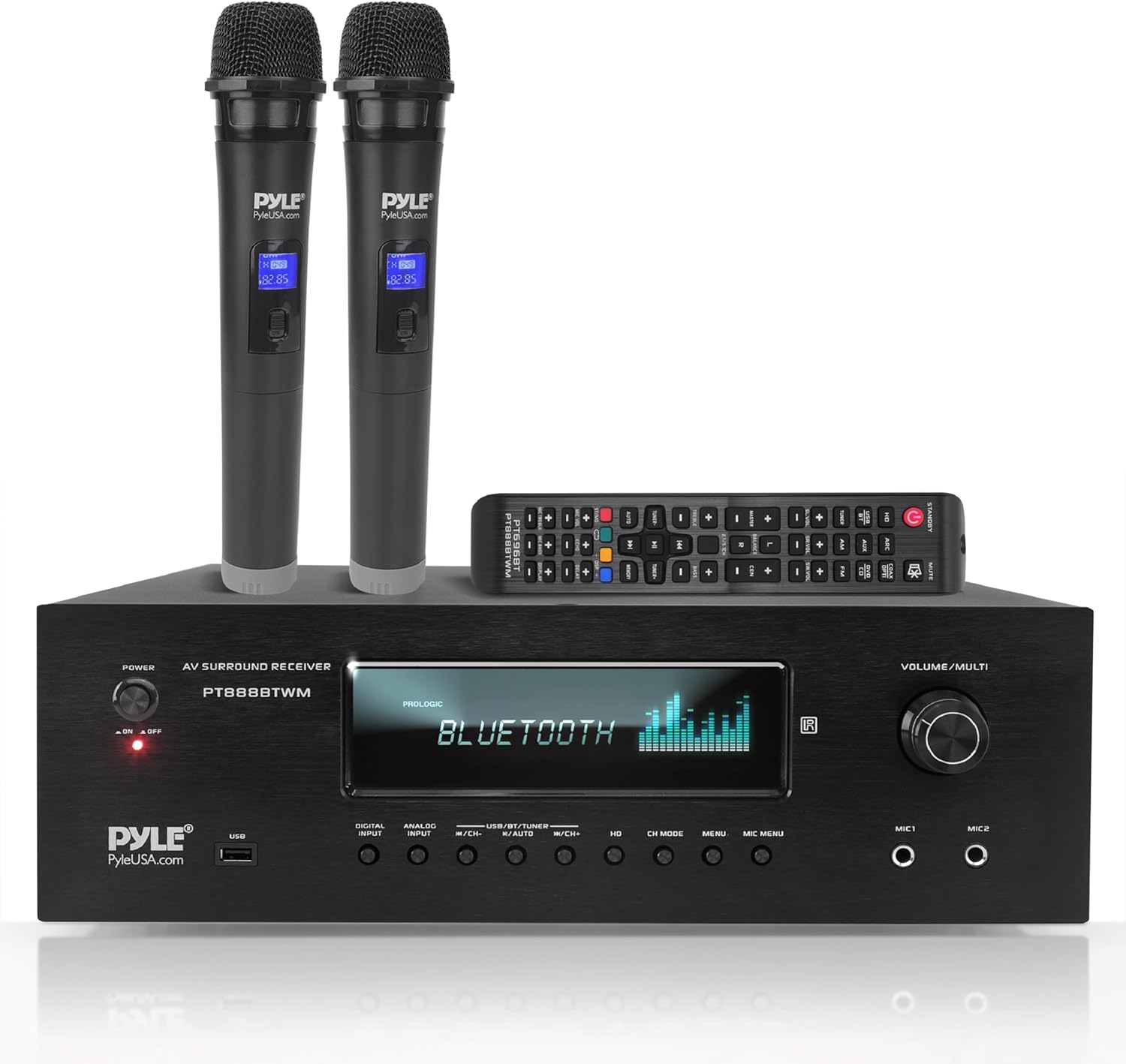
Figure 1: Pyle PT888BTWM Home Theater Receiver with included accessories.
2. What's in the Box
Carefully unpack all components and ensure the following items are included:
- Pyle PT888BTWM Home Theater Receiver
- Remote Control
- 2 x UHF Wireless Microphones
- AM/FM Antenna
- Loop Antenna
- Audio Jack Cable (RCA)
- Power Cord

Figure 2: All items included in the product packaging.
3. Setup
3.1 Connections
Before powering on the unit, ensure all necessary connections are made securely.

Figure 3: Front and Rear Panel Layout with connection points.
Speaker Connections
- Connect your speakers to the Speaker Terminal binding posts on the rear panel. Ensure correct polarity (+ to + and - to -) for each speaker. The receiver supports 4-16 Ohm speaker impedance.
- For a 5.2 channel setup, connect Front Left (FL), Front Right (FR), Center (CEN), Surround Left (SL), and Surround Right (SR) speakers.
- Connect your subwoofer(s) to the dedicated RCA Subwoofer Output.
Audio/Video Source Connections
- HDMI Inputs: Connect HDMI-enabled devices (e.g., Blu-ray player, game console, streaming device) to the HDMI INPUT 1, 2, or 3 ports.
- HDMI Output: Connect the HDMI OUTPUT to your TV or projector for video pass-through.
- Optical/Coaxial Digital Audio: For digital audio sources, connect to the OPTICAL or COAXIAL input ports.
- RCA (L/R) Audio: Connect analog audio devices (e.g., CD player, DVD player) to the AUX/DVD/CD INPUT RCA ports.
- USB Input: Insert a USB flash drive into the USB port on the front panel for MP3 digital file playback.
Antenna Connections
- Connect the supplied AM/FM Antenna to the respective terminals on the rear panel for radio reception.
- Attach the Bluetooth Antenna to the BT ANT port for optimal wireless streaming performance.
3.2 Initial Power-On
Once all connections are secure, plug the power cord into a wall outlet. Turn the POWER switch on the front panel to the 'ON' position. The VFD display will illuminate, indicating the unit is ready for operation.
4. Operating Instructions
4.1 Power On/Off
- To power on the receiver, turn the POWER knob on the front panel clockwise to the 'ON' position.
- To power off, turn the POWER knob counter-clockwise to the 'OFF' position.
4.2 Input Selection
Use the DIGITAL INPUT, ANALOG INPUT, or USB/BT/TUNER buttons on the front panel or the remote control to select your desired audio/video source (e.g., HDMI 1, Optical, Bluetooth, AM/FM).
4.3 Bluetooth Connectivity
The receiver features Bluetooth 5.0 for wireless audio streaming from compatible devices.

Figure 4: Seamless Bluetooth wireless music streaming.
- Select 'Bluetooth' as the input source using the USB/BT/TUNER button. The VFD display will show 'BLUETOOTH'.
- On your mobile device (smartphone, tablet, etc.), enable Bluetooth and search for available devices.
- Select 'Pyle PT888BTWM' from the list to pair.
- Once paired, you can stream audio wirelessly from your device to the receiver.
4.4 USB Playback
The front USB port allows playback of MP3 digital audio files.
- Insert a USB flash drive containing MP3 files into the USB port.
- Select 'USB' as the input source. The receiver will automatically begin playing compatible files.
- Use the playback controls (e.g., Play/Pause, Next/Previous Track) on the front panel or remote.
4.5 AM/FM Radio Operation
To listen to AM/FM radio:
- Select 'TUNER' as the input source.
- Use the tuning buttons (e.g., CH+/CH-) to scan for radio stations.
- The VFD display will show the current frequency.
4.6 Microphone Use and Controls
The receiver includes two 1/4-inch microphone inputs and two UHF wireless microphones for karaoke or public address.

Figure 5: Using the UHF wireless microphones with the receiver.
- Connect wired microphones to the MIC 1 or MIC 2 inputs on the front panel.
- Ensure the UHF wireless microphones are powered on and paired.
- Adjust microphone volume using the MIC VOL control.
- Utilize the MIC ECHO, MIC BASS, and MIC TREBLE controls to fine-tune microphone audio.
4.7 Audio Adjustments
The receiver features DSP sound processing technology and various controls for audio customization.

Figure 6: Enjoying high-quality audio and video with the receiver.
- Master Volume: Adjust the overall system volume using the large VOLUME/MULTI knob.
- DSP EQ: The receiver includes digital sound processing for enhanced audio. Refer to the on-screen menu (if applicable) or remote control for specific EQ settings.
- Channel Mode: Use the CH MODE button to cycle through different audio channel modes (e.g., Stereo, Surround).
5. Maintenance
To ensure the longevity and optimal performance of your Pyle PT888BTWM receiver, follow these maintenance guidelines:
- Cleaning: Use a soft, dry cloth to clean the exterior of the unit. Do not use liquid cleaners or aerosols, as they may damage the finish or internal components.
- Ventilation: Ensure adequate ventilation around the receiver. Do not block the ventilation openings on the top or sides of the unit. Avoid placing the receiver in an enclosed cabinet without proper airflow.
- Power Cord: Regularly inspect the power cord for any signs of damage. If damaged, discontinue use and contact Pyle support.
- Storage: If storing the unit for an extended period, disconnect it from the power outlet and store it in a cool, dry place away from direct sunlight and extreme temperatures.
6. Troubleshooting
This section addresses common issues you might encounter with your receiver. If the problem persists after attempting these solutions, please contact Pyle customer support.
| Problem | Possible Cause | Solution |
|---|---|---|
| No power | Power cord not securely connected; Power switch off; Power outage. | Ensure power cord is firmly plugged into the unit and wall outlet. Turn the power switch to 'ON'. Check household circuit breaker. |
| No sound output | Incorrect input source selected; Speaker wires loose or incorrectly connected; Volume too low; Mute function active. | Select the correct input source. Check all speaker wire connections for proper polarity. Increase volume. Deactivate mute. |
| Bluetooth pairing failure | Receiver not in Bluetooth mode; Device too far; Bluetooth not enabled on source device. | Ensure receiver input is set to 'Bluetooth'. Move device closer to receiver. Enable Bluetooth on your source device and retry pairing. |
| Poor radio reception | Antenna not connected or positioned poorly. | Connect the AM/FM antenna securely. Adjust antenna position for better signal. |
| Unit displays 'Protect' | Over-current, short circuit, or over-voltage protection activated. | Immediately power off the unit and disconnect from power. Check speaker wiring for any short circuits. Allow unit to cool down. Reconnect and power on. If issue persists, contact support. |
7. Specifications
Detailed technical specifications for the Pyle PT888BTWM Home Theater Receiver:
- Output Wattage: 1000 Watts (Peak Power)
- Number of Channels: 5.2 Channel
- Speaker Impedance: 4-16 Ohms
- Connectivity Technology: RCA, Bluetooth, USB, HDMI
- Bluetooth Version: 5.0
- HDMI Inputs: 3
- HDMI Outputs: 1
- Microphone Inputs: 2 x 1/4-inch
- Digital Audio Inputs: Optical, Coaxial
- USB Support: MP3 Digital Files
- Radio Tuner: AM/FM
- Product Dimensions (L x W x H): 16.9 x 13.8 x 5.5 inches
- Item Weight: 23.8 Pounds
- Model Number: PT888BTWM
- UPC: 842893132792
- Manufacturer: Pyle
- Country of Origin: China
8. Warranty and Support
Pyle products are designed and manufactured to the highest quality standards. For detailed warranty information, please refer to the warranty card included with your product or visit the official Pyle USA website.
For technical support, troubleshooting assistance, or service inquiries, please contact Pyle customer support. You can also refer to the comprehensive User Manual PDF for additional information and diagrams: Download User Manual (PDF)
Related documentsPT888BTWM


Ask a question about this manual
Ask about setup, troubleshooting, compatibility, parts, safety, or missing instructions. Manuals+ will review the question and use this page’s manual context to help answer it.