Introduction
This manual provides comprehensive instructions for the setup, operation, maintenance, and troubleshooting of your Eastar EK-620 Electronic Keyboard Piano Kit. Please read this manual thoroughly before using the product to ensure proper function and longevity.
The Eastar EK-620 is a 61-key electronic keyboard designed for beginners and children, offering a rich musical experience with 350 tones, 350 rhythms, and 50 demonstration songs. It includes essential accessories such as a stand, bench, music stand, and microphone, making it a complete kit for musical learning and entertainment.
Package Contents
Verify that all items listed below are included in your package:
- Eastar EK-620 61-Key Electronic Keyboard (Pink)
- Adjustable Keyboard Stand
- Padded Piano Bench
- Detachable Music Stand
- Microphone
- Headphones
- Power Adapter
- Keyboard Stickers
- User Manual (this document)

Image: The complete Eastar EK-620 Electronic Keyboard Piano Kit, showing the pink 61-key keyboard, a black adjustable stand, a black padded bench, headphones, a microphone, and a power adapter.
Setup
1. Assembling the Keyboard Stand
- Unfold the keyboard stand legs and ensure they are securely locked into place.
- Adjust the height of the stand to a comfortable playing position using the adjustment knobs.
- Place the Eastar EK-620 keyboard securely on top of the stand.
2. Powering the Keyboard
The keyboard supports dual power supply modes: AC adapter or batteries.
- AC Adapter: Connect the provided power adapter to the DC 12V input jack on the back of the keyboard. Plug the adapter into a standard wall outlet.
- Batteries: For portable use, insert 6 D-cell batteries (not included) into the battery compartment located on the underside of the keyboard. Ensure correct polarity.

Image: Illustration of the dual power supply options for the Eastar EK-620 keyboard, indicating compatibility with 6 D-cell batteries and a power adapter.
3. Connecting Peripherals
- Headphones: Connect the headphones to the "Headphone" jack on the back of the keyboard for private practice.
- Microphone: Connect the microphone to the "Microphone Socket" on the back of the keyboard for vocal accompaniment.
- USB: The USB port can be used for connectivity with other devices.
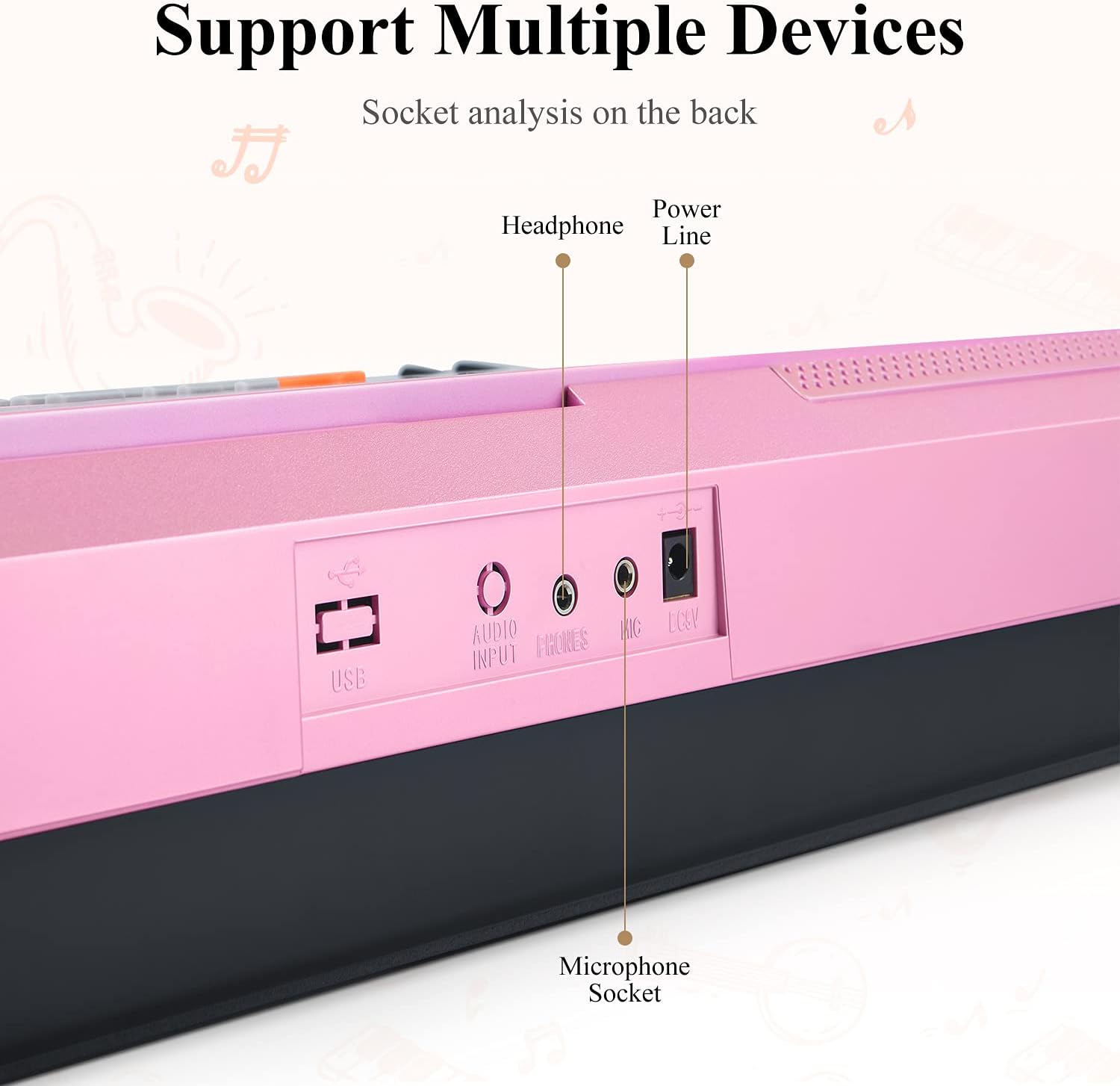
Image: Detailed view of the rear panel of the Eastar EK-620 keyboard, highlighting the USB, Audio Input, Headphone, Microphone, and Power Line connection ports.
Operating Instructions
1. Basic Operation
- Power On/Off: Press the Power button to turn the keyboard on or off.
- Volume Control: Use the volume buttons or knob to adjust the master volume.
- LCD Display: The clear LCD screen displays current functions, tones, rhythms, and notes being played.

Image: A close-up of the Eastar EK-620 keyboard's central control panel, featuring the LCD display which shows musical information, surrounded by buttons for various functions like metronome, demo songs, and teaching modes.
2. Tones and Rhythms
- The keyboard features 350 tones and 350 rhythms. Use the dedicated buttons or numeric keypad to select desired tones (instruments) and rhythms (styles).
- Refer to the tone and rhythm lists printed on the keyboard panel for quick reference.

Image: The control panel of the Eastar EK-620 keyboard, displaying extensive lists of 350 available tones and 350 rhythms, alongside indicators for USB and SD card jacks.
3. Demonstration Songs
- The keyboard includes 50 demonstration songs. Press the "Demo" button to cycle through or select a specific demo song.
4. Teaching Functions
The EK-620 offers three teaching functions to assist beginners:
- Teach 1, Teach 2, Teach 3: These modes guide users through learning songs step-by-step. Follow the on-screen prompts and key indicators.
5. Advanced Functions
- Metronome: Use the metronome function to practice with a steady beat.
- Chord Function: Explore various chord playing modes.
- Vibrato: Add vibrato effect to notes.
- MP3 Function: Play MP3 files through the keyboard's speakers.
- Record/Program/Play/Split: Utilize these functions for recording your performances, programming sequences, playing back, or splitting the keyboard for two different tones.
Maintenance
- Cleaning: Wipe the keyboard surface with a soft, dry cloth. Do not use abrasive cleaners or solvents.
- Storage: Store the keyboard in a cool, dry place away from direct sunlight and extreme temperatures.
- Battery Care: If using batteries, remove them if the keyboard will not be used for an extended period to prevent leakage.
- Key Care: The keys are made of durable ABS material. Avoid excessive force or sharp objects on the keys.

Image: A close-up view of the 61 keys on the Eastar EK-620 electronic keyboard, emphasizing the ABS safety material used in their construction.
Troubleshooting
| Problem | Possible Cause | Solution |
|---|---|---|
| Keyboard does not power on. | Power adapter not connected or faulty; batteries drained or incorrectly inserted. | Ensure power adapter is securely connected and working. Replace batteries or check polarity. |
| No sound from speakers. | Volume too low; headphones connected; speaker mute activated. | Increase volume. Disconnect headphones. Check if speaker mute function is active. |
| Keys are not responding. | Keyboard may be in a specific mode (e.g., demo mode) that disables manual play. | Exit any active demo or teaching modes. Power cycle the keyboard. |
| Microphone not working. | Microphone not properly connected; microphone volume too low. | Ensure microphone is fully plugged into the correct socket. Adjust microphone volume if available. |
Specifications
| Feature | Detail |
|---|---|
| Model Name | EK-620 |
| Item Model Number | EK-620S |
| Number of Keys | 61 |
| Tones | 350 |
| Rhythms | 350 |
| Demonstration Songs | 50 |
| Connectivity | USB, 3.5mm Jack (Headphones, Microphone, Audio Input) |
| Power Source | AC Adapter (DC 12V) or 6 D-cell Batteries |
| Material Type | Acrylonitrile Butadiene Styrene (ABS) |
| Item Weight | 3 Kilograms (6.6 pounds) |
| Product Dimensions | 32.99 x 15 x 22.48 inches |
| Color | Pink |
| Skill Level | Beginner |
Warranty and Support
Eastar products are designed for quality and reliability. For specific warranty information regarding your EK-620 Electronic Keyboard, please refer to the warranty card included in your product packaging or visit the official Eastar website.
For technical support, troubleshooting assistance, or inquiries about replacement parts, please contact Eastar customer service through their official channels. Keep your purchase receipt and model number (EK-620S) ready when contacting support.
You can find more information and support resources by visiting the Eastar Store on Amazon.
Product Videos
Watch these official videos for additional guidance and demonstrations of the Eastar EK-620 Electronic Keyboard.
Video: A short preview video demonstrating the Eastar EK-620 Electronic Keyboard. This video highlights key features and provides a brief overview of the product in use.
Video: An official product video for the Eastar EK-620 Electronic Keyboard, showcasing its various functions, sound capabilities, and ease of use for beginners.