
1. Introduction
Thank you for choosing the Hop-Sport Power Tower HS-1016K. This multifunctional fitness equipment is designed to provide a comprehensive bodyweight training experience, suitable for both beginners and advanced users. It allows for a variety of exercises including pull-ups, dips, push-ups, and leg raises, targeting multiple muscle groups. The integrated expanders offer additional versatility for arm, shoulder, chest, and back muscle strengthening.
Please read this manual thoroughly before assembly and use to ensure proper operation, maximize your training benefits, and maintain safety.

2. Safety Guidelines
Your safety is paramount. Adhere to the following guidelines to prevent injury and ensure safe use of the Power Tower:
- Maximum Weight Capacity: Do not exceed the maximum user weight of 150 kg (330 lbs).
- Stable Surface: Always place the Power Tower on a flat, stable, and non-slip surface. Ensure adequate clearance around the equipment for safe movement.
- Assembly Check: Before each use, verify that all bolts, nuts, and connections are securely tightened. Loose parts can lead to instability and injury.
- Pre-Workout Check: Inspect the equipment for any signs of wear, damage, or loose components. Do not use if damaged.
- Proper Form: Perform exercises with correct form to avoid muscle strain or injury. If you are unsure, consult a fitness professional.
- Children and Pets: Keep children and pets away from the equipment during use.
- Medical Advice: Consult a physician before starting any new exercise program, especially if you have pre-existing health conditions.
3. Package Contents
Carefully unpack all components and verify that you have received all parts listed below. If any parts are missing or damaged, please contact customer support.
- Main Frame Components (Powder-coated steel)
- Adjustable Pull-up Bar
- Dip Station Handles
- Padded Armrests
- Backrest Pad
- Base Feet with Anti-slip Covers
- 2 x Expanders (Resistance Bands with Handles)
- Assembly Hardware (Bolts, Nuts, Washers, Tools)
- User Manual
4. Assembly Instructions
Assembly typically requires two people. Follow these general steps. Refer to the included assembly diagram for detailed illustrations and specific hardware usage.
- Prepare the Area: Clear a spacious area for assembly. Lay out all components and hardware.
- Assemble the Base: Connect the main base frames using the provided bolts and nuts. Ensure the base feet are securely attached.
- Attach Vertical Supports: Secure the vertical support beams to the assembled base.
- Install Dip Station and Backrest: Mount the dip station handles, padded armrests, and backrest pad to the vertical supports. Ensure they are at a comfortable height for your use.
- Mount Pull-up Bar: Attach the adjustable pull-up bar to the top of the vertical supports. The pull-up bar can be adjusted to different heights to accommodate various users and exercises.
- Attach Expanders: The expanders can be attached to designated holes at three different heights (top, middle, bottom) on the frame, offering varied resistance levels.
- Final Tightening: Once all components are loosely assembled, go back and securely tighten all bolts and nuts. Do not overtighten.


5. Using Your Power Tower
The Hop-Sport Power Tower HS-1016K offers a versatile platform for various bodyweight exercises. Here are some common exercises you can perform:
5.1. Pull-ups
Utilize the top pull-up bar for various grip positions (wide, narrow, pronated, supinated) to target different back and arm muscles.

5.2. Dips
Use the parallel dip handles to work your triceps, chest, and shoulders. Position yourself between the handles, supporting your weight with your arms.


5.3. Push-ups
The base of the Power Tower can be used for elevated push-ups, allowing for a deeper range of motion and increased challenge.
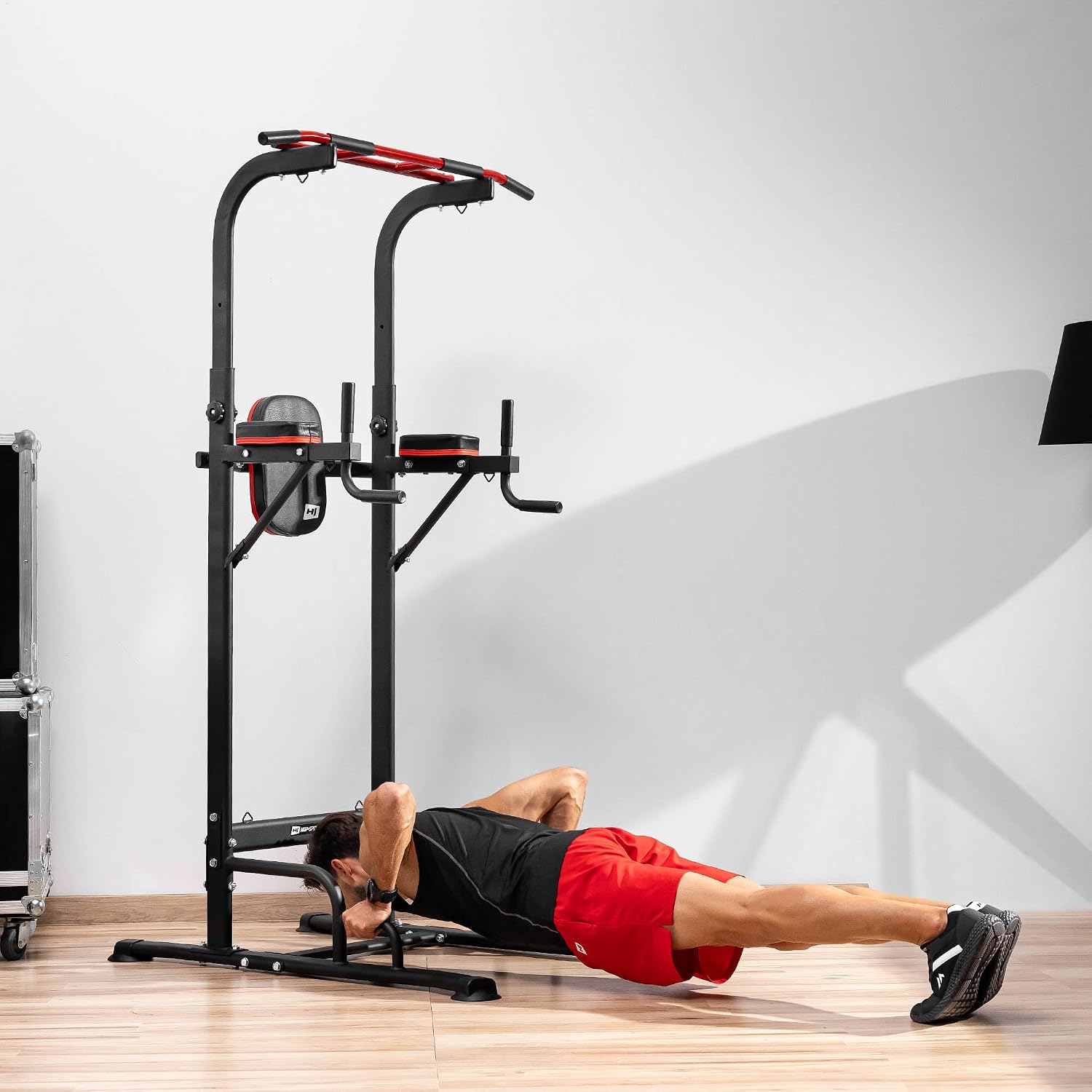
5.4. Leg Raises / Knee Raises
Using the padded armrests and backrest for support, perform leg raises or knee raises to target your abdominal muscles.
5.5. Expander Exercises
Attach the included expanders to the designated hooks on the frame. These can be used for various resistance exercises for arms, shoulders, chest, and back. Experiment with different attachment heights for varied resistance.

5.6. Official Product Videos
No official product videos from the seller were found for this model in the provided data.
6. Maintenance and Care
Regular maintenance will prolong the life of your Power Tower and ensure continued safe operation.
- Cleaning: Wipe down the frame and pads with a damp cloth after each use to remove sweat and dirt. Use mild soap if necessary, then wipe dry. Avoid abrasive cleaners.
- Inspection: Periodically inspect all bolts, nuts, and connections for tightness. Re-tighten as needed. Check for any signs of rust, cracks, or damage to the frame, pads, or expanders.
- Storage: Store the Power Tower in a dry environment, away from direct sunlight and extreme temperatures, to prevent material degradation.
7. Troubleshooting Common Issues
If you encounter any issues with your Power Tower, refer to the following common problems and solutions:
| Problem | Possible Cause | Solution |
|---|---|---|
| The Power Tower wobbles or feels unstable. | Loose connections; uneven floor; incorrect assembly. | Ensure all bolts and nuts are securely tightened. Move the unit to a flat, level surface. Review assembly instructions to confirm correct setup. |
| Parts do not fit together during assembly. | Incorrect parts used; manufacturing tolerance. | Double-check the assembly diagram to ensure you are using the correct hardware for each step. If parts still do not fit, contact customer support. |
| Expanders lose elasticity or break. | Normal wear and tear; excessive stretching. | Expanders are consumable items. Replace them if they show signs of wear or damage. Avoid overstretching. |
8. Product Specifications
- Model: HS-1016K
- Brand: HS HOP-SPORT
- Material: Powder-coated steel
- Color: Black
- Dimensions (L x W x H): 115 cm x 78 cm x 158/238 cm (adjustable height)
- Weight: 25 kg (approx.)
- Maximum User Weight: 150 kg
- Components: Adjustable pull-up bar, dip station with padded armrests, backrest, base feet, 2 expanders.
9. Warranty and Customer Support
The Hop-Sport Power Tower HS-1016K comes with a 2-year warranty on spare parts, covering manufacturing defects and material flaws under normal use and service conditions.
For warranty claims, technical assistance, or any questions regarding your product, please contact HS HOP-SPORT customer support:
- Email: boutique@hop-sport.com
- Phone: +49(0)40 228 690 201
- Operating Hours: Monday to Friday, 9 AM to 3 PM (CET)
Please have your model number (HS-1016K) and purchase information ready when contacting support.