
Gigastone QP-10200
Gigastone 3-in-1 Power Bank User Manual
Model: QP-10200
Product Overview
The Gigastone 3-in-1 Power Bank (Model QP-10200) is a versatile portable charging solution designed for convenience and efficiency. It integrates a traditional wall charger, a power bank, and a wireless charging pad into a single compact device. With a 10,000 mAh internal battery capacity, it can charge multiple devices simultaneously, making it ideal for travel and daily use.
Key features include USB-C PD 3.0 20W and USB-A QC3.0 18W fast charging, along with 5W to 15W wireless output for Qi-enabled devices. The built-in AC plug allows for easy recharging of the power bank itself without the need for additional cables. It also incorporates multiple safety protections to ensure reliable operation.

Figure 1: Front view of the Gigastone 3-in-1 Power Bank, showing the LED display, USB-A, and USB-C ports.
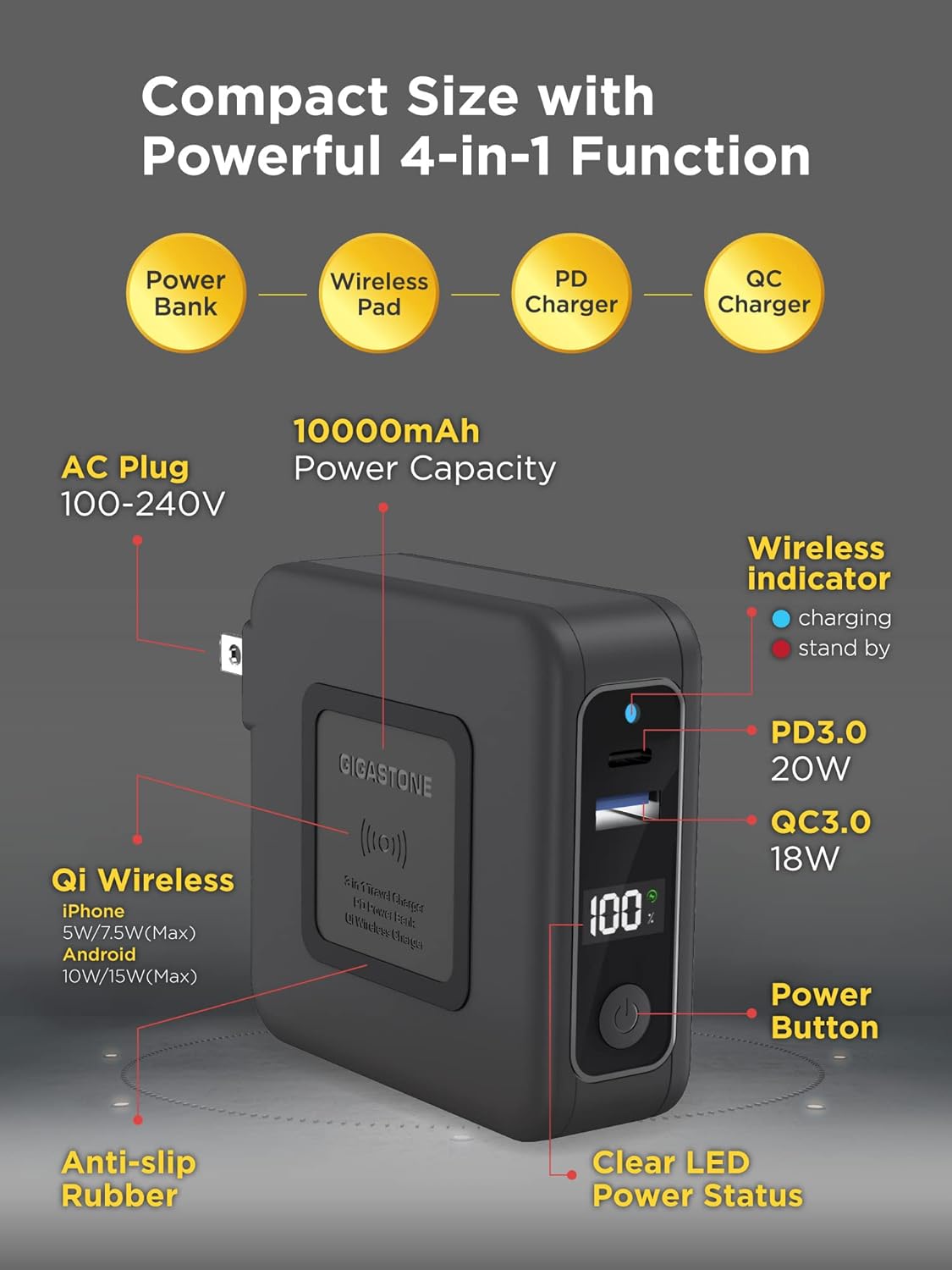
Figure 2: Functional diagram illustrating the four main capabilities of the device: Power Bank, Wireless Charging Pad, Power Delivery (PD) Charger, and Quick Charge (QC) Charger.
Video 1: An overview demonstrating the various charging functions and portability of the Gigastone QP-10200 Power Bank.
Setup
Charging the Power Bank
The Gigastone Power Bank features a built-in AC plug for convenient recharging. Simply extend the foldable prongs and plug the device directly into a standard wall outlet (100-240V). The LED power display will indicate the charging status and current battery percentage.

Figure 3: The power bank being recharged by plugging its built-in AC prongs directly into a wall socket. No separate charging cable is needed for the power bank itself.
Initial Charge
Before first use, it is recommended to fully charge the power bank. Connect it to an AC outlet until the LED display shows 100%.
Operating Instructions
Wired Charging (USB-C PD & USB-A QC)
- Connect your device's charging cable to either the USB-C (PD 3.0 20W) or USB-A (QC3.0 18W) port on the power bank.
- Connect the other end of the cable to your device.
- The power bank will automatically begin charging your device. The LED display will show the remaining battery percentage.
The power bank supports fast charging for compatible devices, delivering up to 20W via USB-C PD and 18W via USB-A QC3.0. This allows for significantly faster charging times compared to standard chargers.

Figure 4: Illustration of the fast charging performance, demonstrating quicker charge times for various devices using the PD and QC ports.
Wireless Charging (Qi-Enabled)
- Ensure your device is Qi-enabled.
- Place your Qi-enabled device directly on the wireless charging pad area of the power bank.
- Ensure the device is centered on the pad for optimal charging. The wireless charging indicator will illuminate when charging is active.
The wireless output ranges from 5W to 15W, providing efficient charging for various smartphones and other Qi-enabled accessories.
Simultaneous Charging
The Gigastone Power Bank can charge up to three devices simultaneously using a combination of wired and wireless charging. For example, you can charge two devices via USB ports and one wirelessly at the same time.

Figure 5: The power bank simultaneously charging a smartphone wirelessly, a Nintendo Switch, and another smartphone via its USB ports.
Using as a Wall Charger
When plugged into an AC outlet, the power bank functions as a wall charger. It can charge connected devices while also recharging its internal battery. This allows for continuous power supply without interruption.
Maintenance
Cleaning
Wipe the surface of the power bank with a soft, dry cloth. Do not use abrasive cleaners, solvents, or harsh chemicals, as these may damage the device.
Storage
Store the power bank in a cool, dry place away from direct sunlight, extreme temperatures, and high humidity. If storing for extended periods, charge the power bank to approximately 50-70% every three months to maintain battery health.
Battery Longevity
To maximize the lifespan of the lithium polymer battery, avoid fully discharging the power bank regularly. It is best to recharge it before it drops below 20% capacity.
Troubleshooting
| Problem | Possible Cause | Solution |
|---|---|---|
| Device not charging (wired) | Low power bank battery; Loose cable connection; Incompatible cable/device. | Recharge power bank; Ensure cable is securely connected; Try a different cable or device. |
| Device not charging (wireless) | Device not Qi-enabled; Device not properly aligned; Obstruction (e.g., thick case). | Verify Qi compatibility; Reposition device on charging pad; Remove thick phone cases. |
| Slow charging | Using non-fast charging port/cable; Multiple devices charging simultaneously; Device not supporting fast charge. | Use PD/QC compatible port and cable; Charge fewer devices at once; Check device's charging specifications. |
| Power bank not recharging | AC plug not fully inserted; Wall outlet issue. | Ensure plug is fully inserted; Try a different wall outlet. |
| LED display not working | Power bank fully discharged; Device malfunction. | Recharge power bank; If issue persists, contact customer support. |
Specifications
- Model: QP-10200
- Battery Capacity: 10,000 mAh (Lithium Polymer)
- USB-C Output: PD 3.0, 20W Max
- USB-A Output: QC3.0, 18W Max
- Wireless Output: 5W / 7.5W (iPhone) / 10W / 15W (Android)
- AC Input: 100-240V
- Product Dimensions: 3.22 x 3.14 x 1.17 inches
- Item Weight: 9.9 ounces
- Safety Features: Over current, over charge, overheat, over voltage, short circuit, static electricity protection.

Figure 6: Overview of the multi-protection features and physical dimensions of the power bank, highlighting its robust safety design.
Warranty and Support
The Gigastone 3-in-1 Power Bank comes with a 1-year manufacturer's warranty. Gigastone is committed to providing excellent customer support. For any inquiries or assistance, please refer to the contact information below:
- Address: 17520 Von Karman Ave, Irvine, CA 92614
- Tel: +1-949-450-2900
- E-mail: service@gigastone.com
- Website: www.gigastone.com
Our global presence ensures 24/7 communication and support for our worldwide customers with the fastest response times.
Figure 7: Gigastone's commitment to global manufacturer warranty and support.
Ask a question about this manual
Ask about setup, troubleshooting, compatibility, parts, safety, or missing instructions. Manuals+ will review the question and use this page’s manual context to help answer it.