
Introduction
Thank you for choosing the Unicview RB700 Foldable Electric Treadmill. This manual provides essential information for the safe and efficient operation, assembly, and maintenance of your new fitness equipment. Please read all instructions carefully before use and retain this manual for future reference.

The Unicview RB700 treadmill offers a powerful 600W motor, a speed range of 1 to 8 km/h, and a foldable design for convenient storage. It includes a safety handlebar with a mobile device holder and an LCD display for tracking workout data.
Package Contents
Carefully unpack all components and verify that you have received the following items:
- Unicview RB700 Treadmill Unit
- Safety Handlebar
- Mobile Device Holder
- Remote Control
- Power Cable
- Lubricant Oil
- Assembly Tools (screws, Allen wrench)
- User Manual
This video demonstrates the unboxing process and identification of all package contents for the Unicview RB700 treadmill.
Setup Instructions
The Unicview RB700 treadmill requires minimal assembly. Follow these steps to set up your treadmill:
- Remove the treadmill from its packaging and place it on a flat, stable surface.
- Unfold the safety handlebar by lifting it into the upright position.
- Secure the handlebar using the provided screws and Allen wrench. Ensure both sides are firmly attached.
- Attach the mobile device holder to the top of the handlebar.
- Connect the power cable to the treadmill and plug it into a suitable power outlet.

The Unicview RB700 treadmill features a compact design with overall dimensions of 125 cm in length, 50 cm in width, and 98 cm in height when the handlebar is upright.
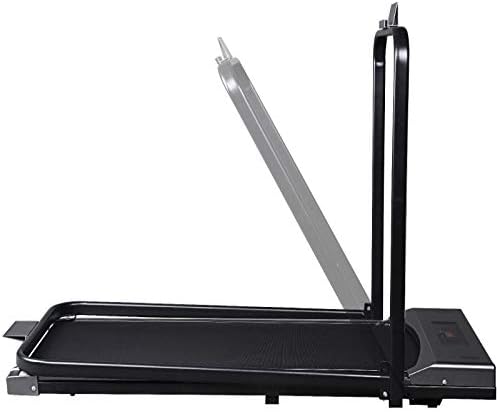
The treadmill is designed to be foldable, allowing the handlebar to be lowered for easy storage in small spaces.

Its ultra-compact design allows for convenient storage under furniture like a sofa or bed, or vertically against a wall, making it ideal for homes with limited space.
Operating Instructions
The Unicview RB700 treadmill is controlled via the included remote control. Ensure the treadmill is plugged in and powered on before use.
Starting and Adjusting Speed:
- Stand on the side rails of the treadmill before starting.
- Use the remote control to start the treadmill. The belt will begin moving at a low speed.
- Adjust the speed using the '+' and '-' buttons on the remote control. The speed can be set from 1 km/h to 8 km/h.
- To stop the treadmill, press the 'Stop' button on the remote control.
Monitoring Your Workout:
The integrated LCD display provides real-time feedback on your exercise session:
- TIME: Displays the duration of your workout.
- SPEED: Shows your current walking or running speed.
- DISTANCE: Tracks the total distance covered during your session.
- CALORIES: Estimates the calories burned.
Using the Mobile Device Holder:
Place your mobile phone or tablet securely in the dedicated holder on the handlebar for entertainment or to follow guided workouts.
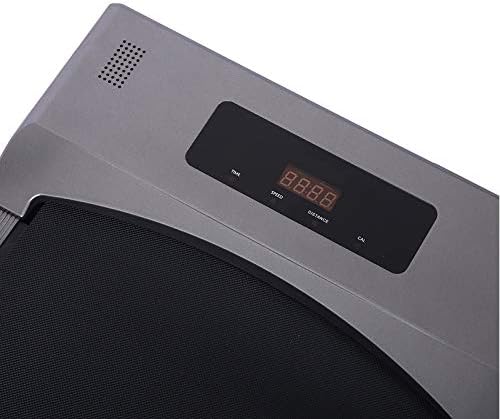
The integrated LCD display panel provides real-time information on your workout, including time elapsed, current speed, distance covered, and calories burned.

The included remote control allows for convenient adjustment of speed and starting/stopping the treadmill during your workout.
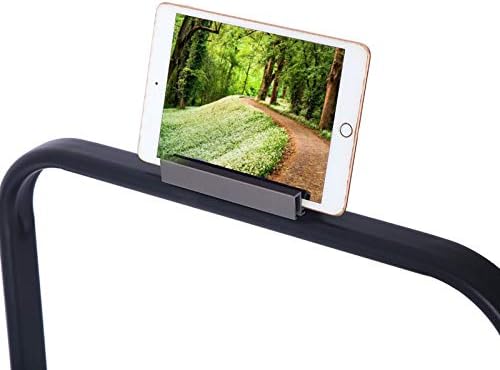
A dedicated holder is integrated into the safety handlebar, providing a secure place for your mobile phone or tablet during exercise.
This video demonstrates the operational aspects of the Unicview RB700 treadmill, including starting the machine, adjusting speed using the remote control, and walking/running on the belt.
Maintenance
Regular maintenance ensures the longevity and optimal performance of your treadmill. Always unplug the treadmill before performing any maintenance.
- Cleaning: Wipe down the treadmill with a damp cloth after each use to remove sweat and dust. Avoid using abrasive cleaners.
- Belt Lubrication: Periodically lubricate the running belt according to the instructions in the full user manual (not provided in this summary) to reduce friction and wear. Use only the recommended lubricant.
- Belt Tension and Alignment: Check the running belt tension and alignment regularly. Adjust as needed following the detailed instructions in the full user manual.
- Storage: When not in use, fold the treadmill and store it in a dry, clean area away from direct sunlight and extreme temperatures.
Troubleshooting
If you encounter any issues with your Unicview RB700 treadmill, refer to the following common troubleshooting tips:
- Treadmill not starting: Ensure the power cable is securely plugged into both the treadmill and a working electrical outlet. Check if the main power switch is in the 'ON' position.
- Belt not moving smoothly: The running belt may require lubrication or adjustment. Refer to the maintenance section or the full user manual for detailed instructions.
- Unusual noises: Stop the treadmill immediately and inspect for any loose parts or obstructions. If the noise persists, contact customer support.
- Remote control not responding: Check the battery in the remote control and replace if necessary. Ensure there are no obstructions between the remote and the treadmill's sensor.
For more complex issues, please contact Unicview customer support.
Specifications
| Feature | Specification |
|---|---|
| Model Number | RB700 |
| Motor Power | 600W |
| Speed Range | 1 km/h to 8 km/h |
| Running Surface Dimensions (L x W) | 104 cm x 39 cm |
| Product Dimensions (L x W x H) | 125 cm x 50 cm x 98 cm |
| Product Weight | 21 kg |
| Maximum User Weight | 100 kg |
| Material | Stainless Steel |
| Special Feature | Foldable |
| Display | LCD (Time, Speed, Distance, Calories) |

The running surface measures 104 cm in length and 39 cm in width, suitable for both walking and light running.
Warranty and Support
The Unicview RB700 Foldable Electric Treadmill comes with a 2-year warranty. For any inquiries, technical assistance, or warranty claims, please contact Unicview customer support.
Unicview provides dedicated after-sales service and technical support in Spain.

Unicview offers comprehensive after-sales service and technical support for its products.