
1. Introduction
Thank you for choosing the Steelpro AXEL-009 1 DIN Car Stereo. This manual provides essential information for the safe and efficient operation of your new car stereo. Please read it thoroughly before installation and use, and keep it for future reference.
Safety Information
- Always ensure the vehicle is parked safely before operating the stereo's advanced functions.
- Professional installation is highly recommended to prevent damage to the unit or your vehicle.
- Do not expose the unit to moisture or extreme temperatures.
- Avoid using abrasive cleaners on the unit.
2. Package Contents
Please check that all the following items are included in your package:
- Steelpro AXEL-009 Car Stereo Unit
- Detachable Faceplate
- Remote Control
- Wiring Harness
- User Manual (this document)
3. Product Overview
Familiarize yourself with the components of your Steelpro AXEL-009 car stereo.

Figure 3.1: Front view of the Steelpro AXEL-009 car stereo, showing the main unit, detachable faceplate, and included remote control. The faceplate features a central rotary knob, display, and various control buttons.
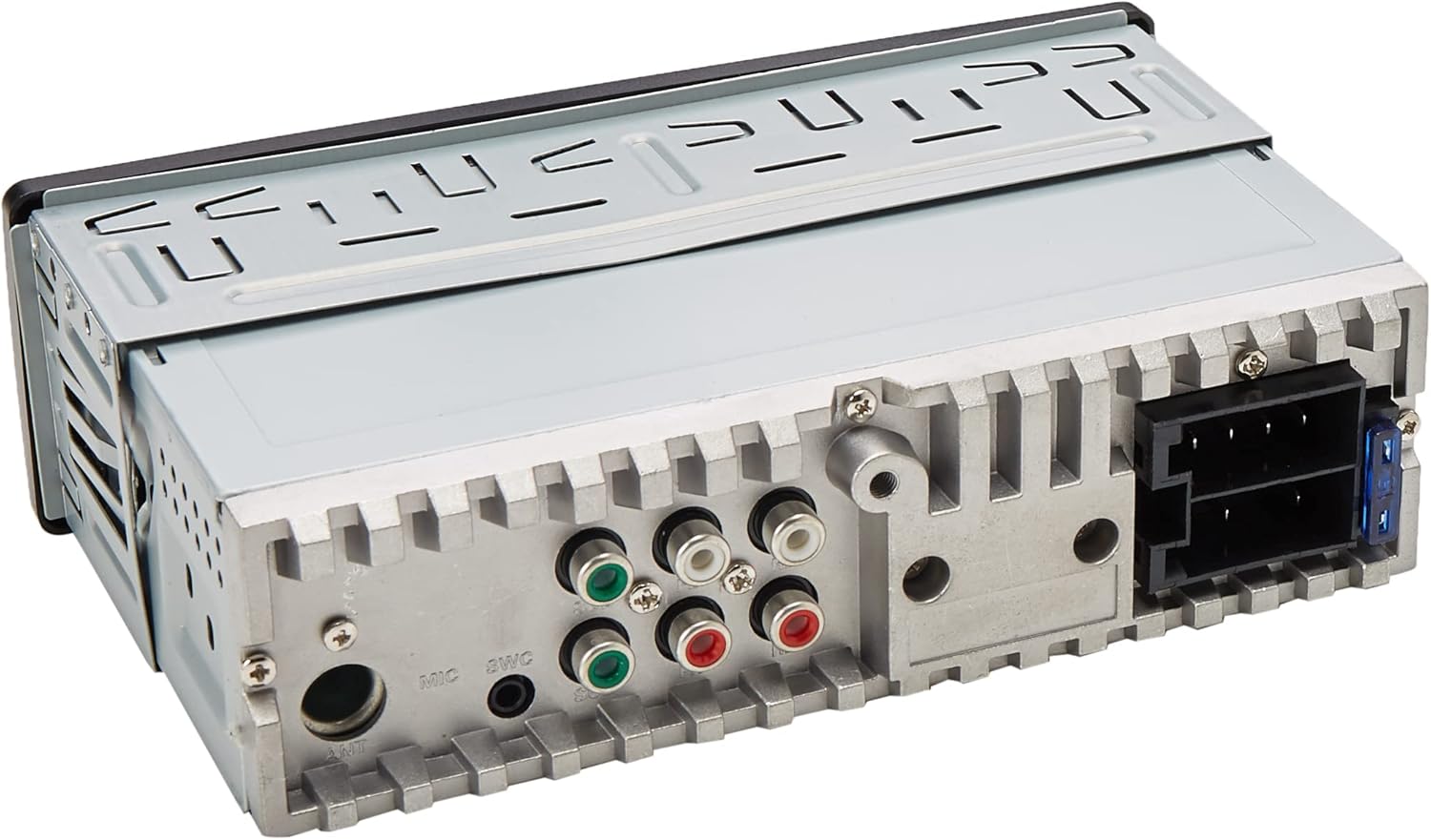
Figure 3.2: Rear view of the Steelpro AXEL-009 car stereo, illustrating the various input and output ports, including the main power harness connector, RCA outputs, and antenna input.
Key Features:
- 1 DIN Standard Size
- Detachable Faceplate
- Bluetooth for Hands-Free Calls and Audio Streaming
- USB Port with 5V/2A Fast Charging
- Auxiliary Input (3.5mm)
- FM Radio with 18 Station Memory
- Siri Voice and Google App Control
- 10-Band Equalization via App
- Supports MP3/WMA/FLAC Audio Formats
- Pre-Amplified Front RCA Outputs (x2) and Dedicated Subwoofer RCA Output (x2)
- Digital Display and Mute Button
- Remote Control Included
4. Setup and Installation
This section provides general guidelines for installing your car stereo. Due to the complexity of automotive electrical systems, professional installation is strongly recommended.
4.1. Installation Guidelines
- The AXEL-009 is a standard 1 DIN size unit (7 inches wide by 2 inches high). Ensure your vehicle's dashboard opening is compatible.
- Disconnect the vehicle's negative battery terminal before starting any electrical work.
- Mount the unit securely in the dashboard using the provided mounting hardware.
- Ensure adequate ventilation around the unit to prevent overheating.
4.2. Wiring Connections
Refer to the wiring diagram provided with your unit's harness for specific connections. General connections include:
- Power: Connect the yellow wire to constant 12V, red wire to accessory 12V, and black wire to ground.
- Speakers: Connect speaker wires to the corresponding vehicle speaker wires, ensuring correct polarity.
- Antenna: Connect the vehicle's antenna cable to the stereo's antenna input.
- RCA Outputs: Use RCA cables to connect to external amplifiers for front speakers or a subwoofer, if applicable.
After all connections are made, reconnect the vehicle's negative battery terminal and test the unit.
5. Operating Instructions
This section details the basic operation of your Steelpro AXEL-009 car stereo.
5.1. Basic Functions
- Power On/Off: Press the POWER button to turn the unit on or off.
- Volume Control: Rotate the central knob to adjust the volume.
- Mute: Press the MUTE button to instantly silence the audio. Press again to restore.
- Source Selection: Press the MODE button to cycle through available sources (FM, Bluetooth, USB, AUX).
- Detachable Faceplate: To remove the faceplate, press the release button (usually on the left side) and gently pull it off. This acts as an anti-theft measure.
5.2. Radio Operation (FM)
- Select FM Mode: Press the MODE button until FM is displayed.
- Auto Scan: Press and hold the BAND button to automatically scan and store strong stations (up to 18 presets).
- Manual Tuning: Use the SEEK buttons (<< / >>) for manual frequency adjustment.
- Preset Recall: Press the numbered preset buttons (1-6) to recall stored stations.
5.3. Bluetooth Operation
- Pairing:
- Ensure Bluetooth is enabled on your mobile device.
- Select Bluetooth mode on the car stereo. The display will show "PAIRING" or similar.
- On your mobile device, search for Bluetooth devices and select "AXEL-009" (or similar name).
- Once paired, the stereo will confirm the connection.
- Hands-Free Calling:
- Answer/End Call: Press the CALL button (or similar icon) on the stereo or remote.
- Dialing: Use your phone to dial, and the audio will transfer to the stereo.
- Audio Streaming: Once paired, you can play music from your mobile device, and it will stream wirelessly to the car stereo. Use the stereo's controls for play/pause, skip track.
5.4. USB Playback and Charging
- USB Connection: Insert a USB flash drive into the front USB port. The unit will automatically switch to USB mode and begin playback.
- Supported Formats: The stereo supports MP3, WMA, and FLAC audio formats.
- Navigation: Use the FOLDER buttons to navigate through folders and the TRACK buttons to skip tracks. The display will show track titles and artist ID3 tags.
- USB Charging: The USB port provides 5V/2A for fast charging of compatible mobile devices.
5.5. Auxiliary Input (AUX)
- Connect Device: Plug a 3.5mm audio cable from your external audio device (e.g., MP3 player, smartphone) into the front AUX input jack.
- Select AUX Mode: Press the MODE button until AUX is selected.
- Audio will now play through the car stereo. Control playback from your external device.
5.6. Siri Voice and Google App Control
- The AXEL-009 supports voice control via Siri (for iOS devices) or Google Voice (for Android devices).
- Download the dedicated control app (available for Android and iOS) to unlock full control over the stereo, including a 10-band equalizer and other settings.
6. Maintenance
Proper maintenance ensures the longevity and optimal performance of your car stereo.
- Cleaning the Unit: Use a soft, dry cloth to wipe the unit's surface. For stubborn dirt, dampen the cloth lightly with water. Do not use harsh chemicals or abrasive cleaners.
- Cleaning the Faceplate: When the faceplate is detached, clean it gently with a soft, dry cloth. Avoid touching the electrical contacts.
- Avoid Extreme Conditions: Do not expose the unit to direct sunlight for extended periods or to extreme temperatures.
7. Troubleshooting
If you encounter issues with your car stereo, refer to the following common problems and solutions:
| Problem | Possible Cause | Solution |
|---|---|---|
| No power | Blown fuse; incorrect wiring; loose connection. | Check the fuse; verify wiring connections (constant 12V, accessory 12V, ground); ensure connections are secure. |
| No sound | Volume too low; Mute function active; incorrect speaker wiring; incorrect source selected. | Increase volume; deactivate Mute; check speaker connections; select the correct audio source. |
| Bluetooth not connecting | Bluetooth not enabled on device; device too far; incorrect pairing procedure. | Ensure Bluetooth is on and discoverable; bring device closer; repeat pairing steps. |
| USB not reading | Unsupported file format; damaged USB drive; incompatible USB device. | Ensure files are MP3/WMA/FLAC; try a different USB drive; ensure USB drive is formatted correctly. |
| Poor radio reception | Loose antenna connection; weak signal area; damaged antenna. | Check antenna connection; try tuning in a different location; inspect antenna for damage. |
If the problem persists after trying these solutions, please contact Steelpro customer support or consult a qualified technician.
8. Specifications
Technical specifications for the Steelpro AXEL-009 Car Stereo:
- Model: AXEL-009
- Type: 1 DIN Car Stereo
- Max Power Output: 100 Watts x 4 channels
- RMS Power Output: 50 Watts x 4 channels
- Audio Output Mode: Stereo
- Speaker Surround Sound Configuration: 4.0
- Connectivity Technology: Auxiliary, Bluetooth, RCA, USB
- Compatible Devices: Mobile phones, Mobile devices, MP3 players
- Special Features: Voice control (Siri/Google Voice), App control (Android/iOS), Detachable faceplate, Digital display, Mute button, Remote control, Shock resistant
- USB Port: 5V/2A Fast Charging, Supports MP3/WMA/FLAC, Folder and ID3 Tag reading
- Auxiliary Input: 3.5mm jack
- Radio Frequency Range: 87.5 - 107.9 MHz (FM)
- Radio Presets: 18 stations
- Audio Outputs: 2x Front Pre-Amplified RCA, 2x Dedicated Subwoofer RCA
- Dimensions (Unit): Standard 1 DIN (approx. 7" W x 2" H)
- Package Dimensions: 21.6 x 16.9 x 7.9 cm; 570 g
9. Warranty and Support
Steelpro products are manufactured to high-quality standards. For information regarding warranty coverage, please refer to the warranty card included in your product packaging or visit the official Steelpro website.
For technical support, troubleshooting assistance, or service inquiries, please contact Steelpro customer service through their official channels. Keep your purchase receipt as proof of purchase for warranty claims.


