1. Product Overview
The CHITENG Barcode Scanner (Model C981L) is a high-performance 1D and 2D QR code scanner designed for efficiency and ease of use. It features a plug-and-play USB connection, making it compatible with a wide range of operating systems. Its robust design and advanced decoding capabilities make it ideal for various professional settings.

Image: The CHITENG Barcode Scanner with its integrated USB cable, showcasing its compact and ergonomic design.
2. Key Features
- Plug & Play: Simple USB connection, no drivers required.
- High Compatibility: Works with Windows XP/7/8/10, Mac OS, and Linux.
- Versatile Scanning: Supports 1D and 2D barcodes (QR, PDF417, Data Matrix, etc.) from both paper and screens.
- Multiple Trigger Modes: Auto-sensing Scan, Manual Scan, and Continuous Scan.
- Durable Design: Constructed with military-grade ABS material and anti-shock silicone for enhanced durability and drop resistance up to 1.5 meters (5 feet).
- Advanced Decoding: Capable of scanning incomplete, damaged, fuzzy, and high-density barcodes.
- Customizable Output: Supports prefix/suffix setting and character deletion/insertion.
3. Package Contents
Please verify that all items are present in your package:
- CHITENG Barcode Scanner (Model C981L)
- Integrated USB Cable
- User Manual (this document)
4. Setup Guide
4.1 Connecting the Scanner
The CHITENG Barcode Scanner is designed for plug-and-play operation. Simply connect the integrated USB cable to an available USB port on your computer or host device.

Image: The scanner is compatible with Windows (7/8/10/XP), Linux, Mac, and Android systems.
Video: Demonstrates connecting the USB cable to the scanner and then to a computer, highlighting its plug-and-play functionality and compatibility with various operating systems.
4.2 System Compatibility
The scanner is compatible with the following operating systems:
- Windows XP / 7 / 8 / 10 / 11
- Mac OS
- Linux
- Android
5. Operating Instructions
5.1 Scanning Modes
The scanner supports three primary trigger scanning modes:
- Manual Scan: Press the trigger button to activate the scan beam and read barcodes.
- Auto-sensing Scan: The scanner automatically detects a barcode in its field of view and activates the scan beam without requiring a trigger press.
- Continuous Scan: The scan beam remains continuously active, allowing for rapid, successive scanning of multiple barcodes.
Video: Demonstrates the auto-sensing and continuous scanning modes, showing how the scanner can read barcodes without manual trigger presses in these modes.
5.2 Decoding Capabilities
The scanner offers superior decoding capabilities, allowing it to read various types of barcodes quickly and accurately:
- 1D Barcodes: Code 128, Code 39, EAN-13, ITF-14, UPC-E, EAN-8, Code 39, CodeBar, GS1-128, etc.
- 2D Barcodes: QR Code, PDF417, Data Matrix, MicroPDF417, etc.
- Versatile Reading: Capable of scanning barcodes from both printed labels and digital displays (mobile phones, PC monitors).
- Error Correction: Can read incomplete codes, damaged codes (e.g., with stains or fuzziness), and high-density barcodes.

Image: Illustrates the scanner's ability to read various 1D barcodes (Code 128, Code 39, EAN-13, ITF-14) and 2D barcodes (QR, Data Matrix, MicroPDF417).
Video: Shows the scanner's decoding capacity for both 1D and 2D barcodes, including scanning from a physical label.
5.3 Versatile Functions
The scanner offers powerful editing functions to customize scanned data:
- Prefix/Suffix Setting: Add custom characters before or after the scanned data.
- Deleting/Insetting Character: Remove or insert characters within the scanned data.

Image: Illustrates how to add prefixes, suffixes, or insert characters in the middle of scanned barcode data.
6. Maintenance
To ensure optimal performance and longevity of your CHITENG Barcode Scanner, follow these maintenance guidelines:
- Cleaning: Use a soft, dry cloth to clean the scanner's exterior. For the scanning window, use a lint-free cloth lightly dampened with a mild, non-abrasive cleaner. Avoid harsh chemicals or abrasive materials.
- Storage: Store the scanner in a cool, dry place away from direct sunlight and extreme temperatures.
- Cable Care: Avoid bending or twisting the USB cable excessively to prevent internal damage.
7. Troubleshooting
If you encounter issues with your barcode scanner, please refer to the following common troubleshooting steps:
- No Scan Output: Ensure the USB cable is securely connected to both the scanner and the computer. Verify that the scanner is powered on (if applicable) and the scan beam is visible when activated.
- Incorrect Data Output: Check the scanner's configuration settings. Refer to the full user guide for instructions on resetting to factory defaults or adjusting data formatting (e.g., prefix/suffix settings).
- Scanner Not Recognized: Try connecting the scanner to a different USB port or a different computer to rule out port or system-specific issues. Ensure your operating system is compatible.
- Poor Scan Performance: Ensure the barcode is clean, clear, and not excessively damaged. Adjust the distance and angle of the scanner to the barcode.
For more detailed troubleshooting or persistent issues, please contact CHITENG customer support.
8. Specifications
Detailed technical specifications for the CHITENG Barcode Scanner (Model C981L):
| Feature | Specification |
|---|---|
| Product Dimensions | 3.55 x 2.6 x 6.5 inches |
| Item Weight | 8.4 ounces |
| Item Model Number | C981L |
| Manufacturer | CHITENG |
| Compatible Devices | Desktop, Laptop |
| Connectivity Technology | USB Cable |
| Operating Voltage | 5 Volts |

Image: Technical drawing illustrating the physical dimensions of the barcode scanner.
8.1 Durability
The scanner features a robust construction for enhanced durability:
- Anti-shock Design: Military-grade ABS material and anti-shock silicone provide protection against impacts.
- Drop Resistance: Designed to withstand drops from up to 1.5 meters (5 feet).
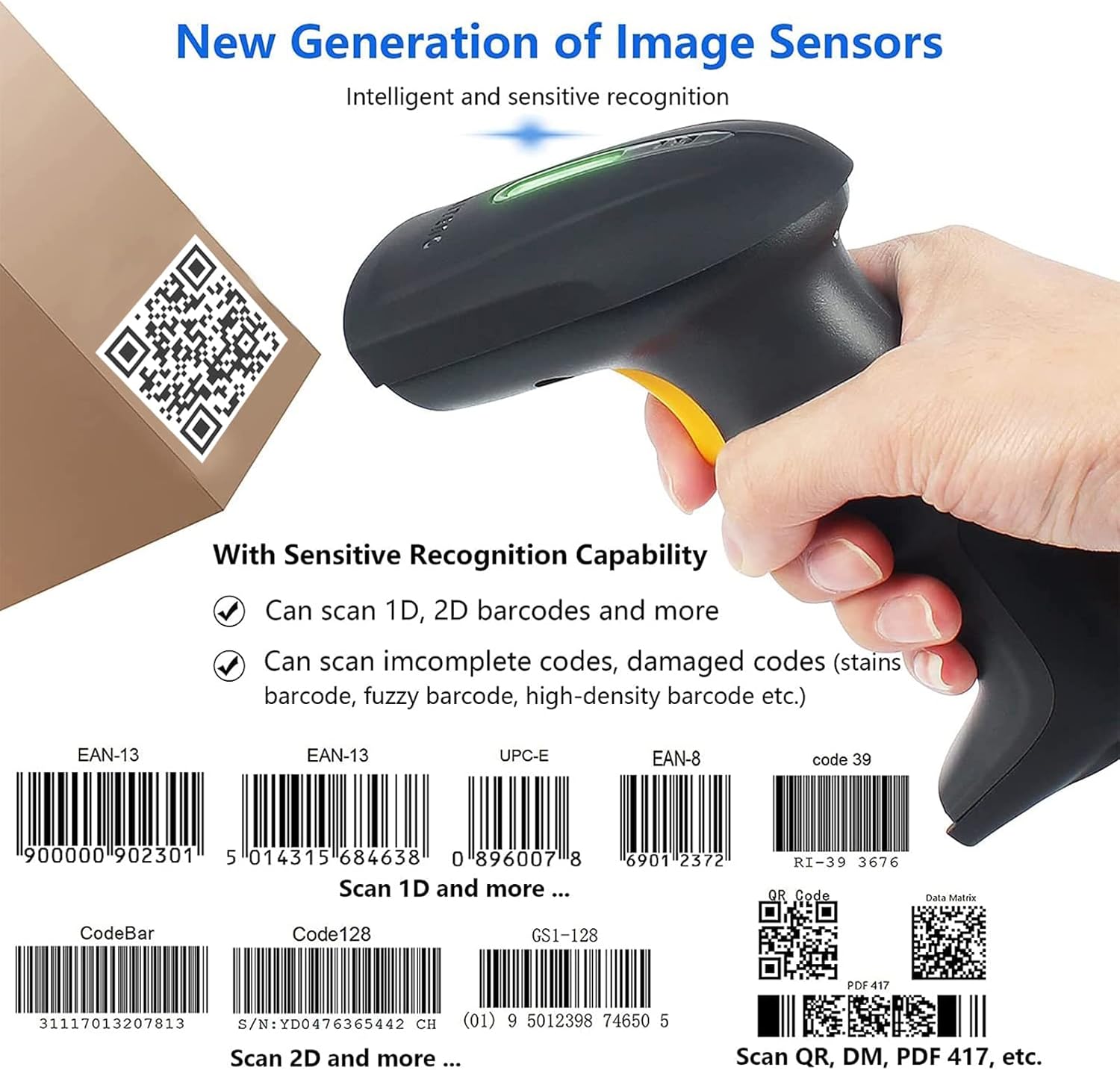
Image: The scanner's anti-shock silicone design, emphasizing its ability to resist damage from falls.
Video: Demonstrates the scanner's shockproof design by showing it being dropped from a height of 1.5 meters (5 feet).
9. Applications
The CHITENG Barcode Scanner is suitable for a wide range of applications, including but not limited to:
- Supermarkets and Retail Stores
- Warehouses and Inventory Management
- Libraries and Book Management
- Pharmacies and Drugstores
- Office and File Management
- Point-of-Sale (POS) Systems

Image: A visual representation of the scanner's diverse applications across different industries and environments.
10. Warranty and Support
CHITENG products are manufactured to the highest quality standards. This product comes with a standard manufacturer's warranty. Please refer to the warranty card included in your package for specific terms and conditions.
For technical support, warranty claims, or any inquiries regarding your CHITENG Barcode Scanner, please contact our customer service team through the contact information provided on our official website or the product packaging.


