
Samsung SM-G781BZBGINS
Samsung Galaxy S20 FE 5G User Manual
Model: SM-G781BZBGINS
1. Product Overview
The Samsung Galaxy S20 FE 5G is a feature-rich smartphone designed for a comprehensive mobile experience. It combines advanced camera capabilities, a vibrant display, and robust performance with 5G connectivity.
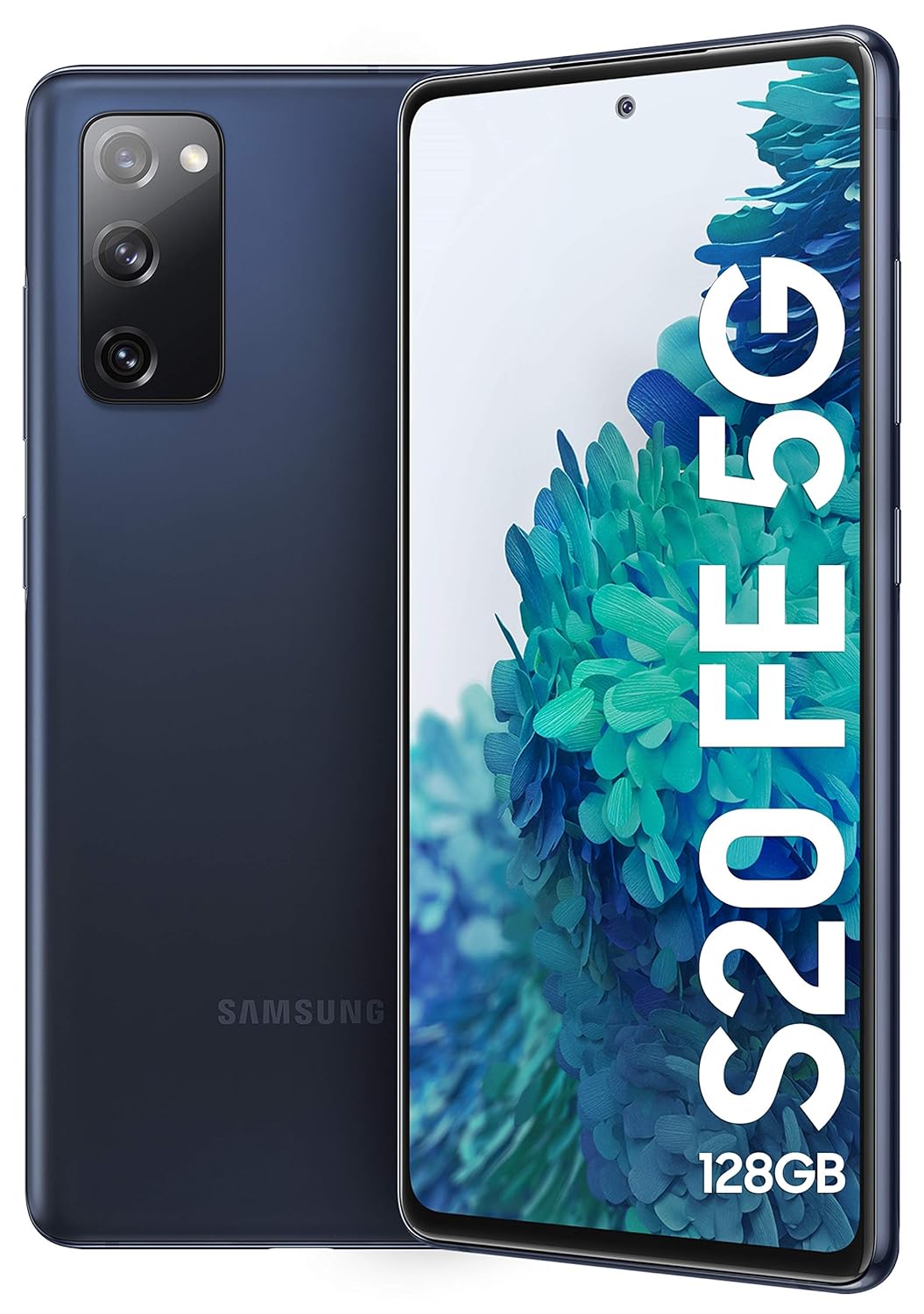
Image: Front and rear view of the Samsung Galaxy S20 FE 5G in Cloud Navy. The device features a triple camera setup on the rear and a punch-hole display on the front.
Key Features:
- Processor: Qualcomm Snapdragon 865 Octa-Core processor for powerful performance.
- Memory & Storage: 8GB RAM and 128GB internal memory, expandable up to 1TB via MicroSD.
- Display: 6.5-inch Infinity-O Super AMOLED Display with 120Hz Refresh rate (1080 x 2400 FHD+ Resolution).
- Camera System: Triple Rear Camera (12MP Dual Pixel OIS Wide, 8MP OIS Tele, 12MP Ultra Wide) and a 32MP Front Punch Hole Camera.
- Battery: 4500 mAh (Non-removable) with Super Fast Charging and Fast Wireless Charging support.
- Durability: IP68 Rated for dust and water resistance.
- Connectivity: 5G Ready, Dual SIM (Hybrid Sim Slot), Bluetooth, NFC, Wi-Fi.

Image: Diagram highlighting key features of the Samsung Galaxy S20 FE 5G, including the Snapdragon 865 processor, Pro-Grade Triple Camera setup, 6.5" 120Hz sAMOLED display, 4500mAh battery, 5G readiness, IP68 rating, 128GB storage, 8GB RAM, and 25W fast charging.
2. Package Contents
Verify that all items are present in the product packaging:
- Samsung Galaxy S20 FE 5G Handset
- Non-removable Battery (pre-installed)
- Travel Adapter (15W)
- USB Cable (Type-C)
- User Manual (this document)
3. Initial Setup
3.1. Charging the Battery
Before first use, fully charge the device battery using the provided travel adapter and USB cable. The device supports Super Fast Charging (up to 25W) and Fast Wireless Charging.

Image: Illustration indicating the 4500mAh battery capacity of the Samsung Galaxy S20 FE 5G, with support for Super Fast Charging and Fast Wireless Charging.
3.2. Inserting SIM and MicroSD Cards
The Galaxy S20 FE 5G features a hybrid SIM slot. You can use either two Nano-SIM cards or one Nano-SIM card and one MicroSD card for expandable storage up to 1TB.
- Locate the SIM tray on the side of the device.
- Insert the ejection pin into the hole on the tray to open it.
- Place the Nano-SIM card(s) and/or MicroSD card into the tray with the gold contacts facing down.
- Gently push the tray back into the slot until it is flush with the device.
3.3. Powering On/Off
- To Power On: Press and hold the Side key until the Samsung logo appears.
- To Power Off: Press and hold the Side key and Volume Down key simultaneously, then tap "Power off" on the screen. Alternatively, swipe down from the top of the screen to open the Quick Panel, tap the Power icon, and then tap "Power off".
4. Operating Your Device
4.1. Display and Navigation
The 6.5-inch Infinity-O Super AMOLED display offers a smooth visual experience with a 120Hz refresh rate. Navigate using touch gestures, including tap, swipe, pinch-to-zoom, and long press.

Image: Multiple Samsung Galaxy S20 FE 5G phones showcasing the 120Hz Super Smooth Display and various on-trend color options.
4.2. Camera Functions
The device is equipped with a versatile triple rear camera system and a high-resolution front camera.
- Rear Cameras: 12MP Wide (Dual Pixel, OIS), 8MP Telephoto (OIS), 12MP Ultra Wide. Features include 30X Space Zoom, Single Take, and Night Mode.
- Front Camera: 32MP F2.2 Punch Hole Camera.

Image: Detailed breakdown of the Samsung Galaxy S20 FE 5G's camera system, showing the 12MP Ultra Wide, 12MP Wide-angle, 8MP Telephoto rear cameras, and the 32MP Front Camera.
4.3. Connectivity
The Galaxy S20 FE 5G supports various connectivity options:
- 5G Network: Enjoy high-speed data connectivity. Note: N28 band for Standalone 5G network is not compatible.
- Wi-Fi: Connect to wireless networks for internet access.
- Bluetooth: Pair with wireless accessories like headphones and speakers.
- NFC: For contactless payments and data transfer.
5. Maintenance and Care
5.1. Dust and Water Resistance (IP68)
The device is rated IP68 for dust and water resistance. This means it can withstand immersion in up to 1.5 meters of fresh water for up to 30 minutes. Avoid exposing the device to salt water, chlorinated water, or liquids other than fresh water. If the device gets wet, dry it thoroughly before use or charging.

Image: A close-up of the rear camera module of the Samsung Galaxy S20 FE 5G with water splashing around it, illustrating its IP68 dust and water protection rating.
5.2. Cleaning Your Device
Use a soft, lint-free cloth to clean the screen and body of the device. Avoid using abrasive cleaners or solvents.
5.3. Software Updates
Regularly check for and install software updates to ensure optimal performance and security. Updates can be found in the device's settings menu under "Software update."
6. Troubleshooting
Common Issues and Solutions:
- Device not turning on: Ensure the battery is charged. If not, connect to the charger and wait a few minutes before attempting to power on.
- Screen unresponsive: Perform a forced restart by pressing and holding the Side key and Volume Down key for more than 7 seconds.
- Battery draining quickly: Reduce screen brightness, close unused apps, disable unnecessary features like Wi-Fi or Bluetooth when not in use.
- Network connectivity issues: Check if Airplane mode is off. Restart the device. Verify SIM card is properly inserted.
- Apps crashing: Clear the app's cache and data in settings, or reinstall the app. Ensure the device software is up to date.
7. Specifications
| Feature | Detail |
|---|---|
| Model Number | SM-G781BZBGINS |
| Operating System | Android 11.0 |
| Processor | Qualcomm Snapdragon 865 Octa-Core (CPU Speed: 2.73 GHz) |
| RAM | 8 GB |
| Internal Storage | 128 GB (Expandable up to 1 TB via MicroSD) |
| Display | 6.5-inch Infinity-O Super AMOLED, 120Hz Refresh rate, 1080 x 2400 (FHD+) Resolution |
| Rear Camera | Triple: 12MP (Wide, OIS), 8MP (Telephoto, OIS), 12MP (Ultra Wide) |
| Front Camera | 32MP F2.2 |
| Battery Capacity | 4500 mAh (Non-removable) |
| Charging | Super Fast Charging (25W supported), Fast Wireless Charging |
| Water & Dust Resistance | IP68 Rated |
| Dimensions (LxWxH) | 160 x 75 x 8 mm |
| Weight | 190 g |
| Connectivity | 5G, Wi-Fi, Bluetooth, NFC, USB, GLONASS |
| SIM Type | Dual Nano SIM (Hybrid Slot) |
8. Warranty and Support
8.1. Warranty Information
The Samsung Galaxy S20 FE 5G comes with a 1 Year Manufacturer Warranty from the date of purchase. This warranty covers manufacturing defects and issues arising from normal use. Please retain your proof of purchase for warranty claims.
8.2. Customer Support
For technical assistance, service, or warranty inquiries, please contact Samsung Customer Support:
- Toll-Free Number: 1800 40 7267864 (Samsung India)
- Email: support.india@samsung.com
- Manufacturer Address: Samsung India Electronics Pvt ltd, 6th Floor, DLF Centre, Sansad Marg, New Delhi - 110001.
9. Important Safety Information
Please read all safety information before using your device to ensure safe and proper use. Follow all warnings and precautions to prevent injury to yourself or others and to prevent damage to your device.
- Do not disassemble, modify, or repair your device.
- Do not expose the device to extreme temperatures (too hot or too cold).
- Use only Samsung-approved batteries, chargers, accessories, and supplies.
- Keep the device and all accessories out of reach of small children and pets.
- Avoid placing the device near or in heating appliances, cooking appliances, or high-pressure containers.
- Do not use the device during a thunderstorm.
Related Documents - SM-G781BZBGINS
 |
Samsung Galaxy S20 User Manual: Features, Settings, and Troubleshooting Comprehensive user manual for Samsung Galaxy S20 series phones, covering device layout, basic functions, advanced features, settings, and troubleshooting tips for optimal performance and safety. |
 |
Samsung Galaxy S20 Series User Manual Comprehensive user manual for Samsung Galaxy S20 series smartphones, covering setup, features, settings, and troubleshooting for models like SM-G980F, SM-G985F, and SM-G988B. |
 |
三星 SM-G980F/DS, SM-G985F/DS, SM-G988B/DS 用户手册 三星 SM-G980F/DS, SM-G985F/DS, SM-G988B/DS 智能手机的用户手册,提供设备设置、功能使用、故障排除等详细信息。 |
 |
Посібник користувача Samsung Galaxy S20 Series Детальний посібник користувача для смартфонів Samsung Galaxy S20, S20+ та S20 Ultra, що охоплює налаштування, функції, програми та усунення несправностей. |
 |
Samsung Galaxy S20 5G, S20+ 5G, S20 Ultra 5G User Manual Explore the comprehensive user manual for Samsung Galaxy S20 5G, S20+ 5G, and S20 Ultra 5G smartphones. This guide covers setup, features, camera, apps, settings, and more to help you get the most out of your device. |
 |
Samsung Galaxy S20 Series User Manual Comprehensive user manual for Samsung Galaxy S20, S20+, S20 Ultra 5G, and S20+ 5G smartphones, covering setup, features, settings, and troubleshooting. |
Ask a question about this manual
Ask about setup, troubleshooting, compatibility, parts, safety, or missing instructions. Manuals+ will review the question and use this page’s manual context to help answer it.