
Introduction
This manual provides detailed instructions for the setup, operation, and maintenance of your Gmatrix URC-1LC Universal 2-in-1 Remote Control. This remote is designed to control both your Roku player (excluding Roku Sticks) and your television, simplifying your entertainment experience.
1. Setup
1.1 Battery Installation
The Gmatrix URC-1LC remote control requires two (2) AAA batteries (not included) for operation. Follow these steps to install the batteries:
- Locate the battery compartment on the back of the remote control.
- Press down on the tab and slide the battery cover downwards to open it.
- Insert two AAA batteries, ensuring the positive (+) and negative (-) terminals align correctly with the markings inside the compartment.
- Slide the battery cover back into place until it clicks securely.

1.2 TV Control Setup
The remote is pre-coded for several popular TV brands. If your TV is one of the pre-coded brands, it may work without additional setup. If not, or if you wish to program it for a specific TV, follow these instructions:
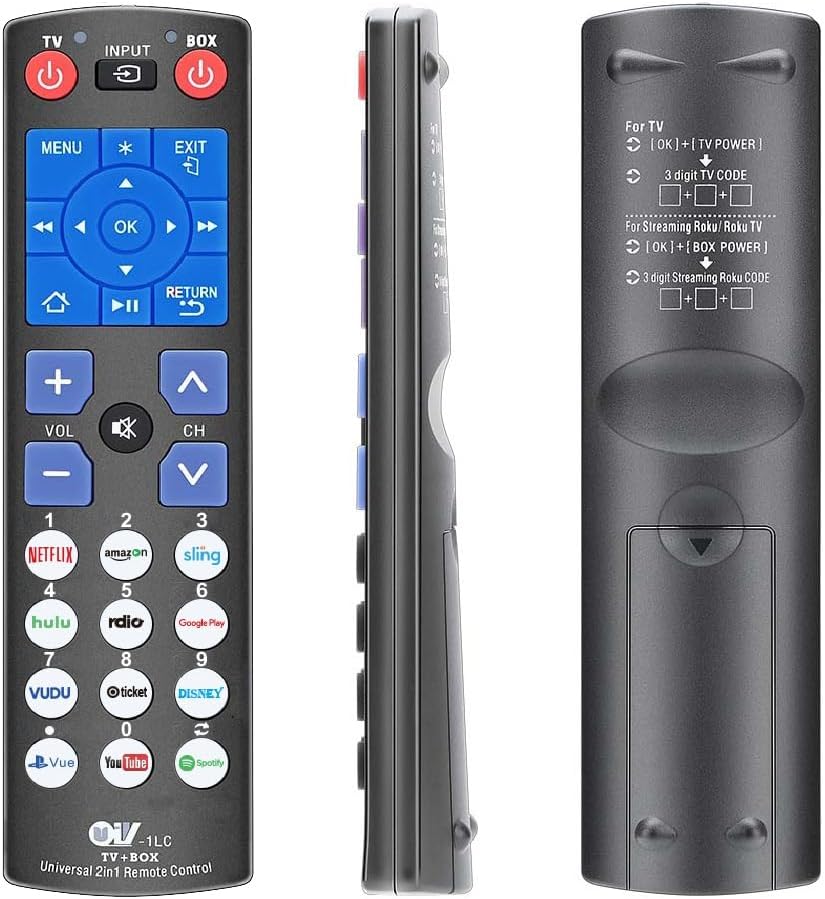
Pre-coded TV Brands: Samsung (default), Vizio, LG, SONY, SHARP, Philips, Toshiba, Panasonic, Insignia, Dynex.
To program TV functions (Power, Volume+/-, Mute, Input):
- Turn on your TV manually.
- Press and hold the [OK] button and the [TV POWER] button simultaneously for approximately 3 seconds until the indicator light illuminates.
- Enter the 3-digit code for your TV brand. Refer to the code list provided with your remote or search online for universal remote codes for your TV brand.
- Point the remote at your TV and press the [TV POWER] button. If the TV turns off, the code is correct. If not, repeat the process with a different code for your TV brand.
- Once the TV turns off, press the [OK] button to save the code. The indicator light will turn off.
1.3 Roku Player Control Setup
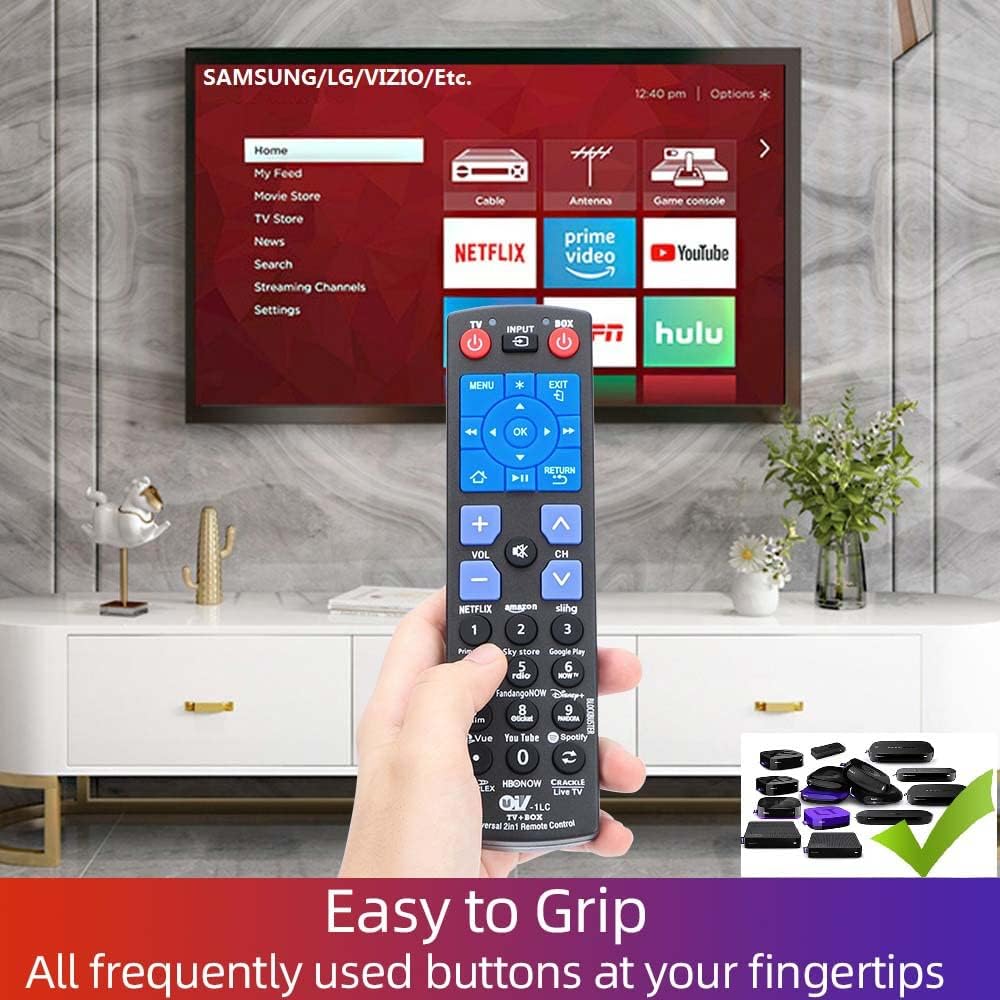
The Gmatrix URC-1LC remote control is pre-programmed to work with most Roku box players (e.g., Roku Express, Premiere, Ultra, Roku 1, 2, 3, 4, and ONN/Roku Smart Soundbar). No additional programming is typically required for these devices. Simply insert batteries and point the remote at your Roku player.
Important Note: This remote operates via Infrared (IR) signal and requires a direct line of sight to your device. It is NOT compatible with Roku Sticks or Roku devices that require Wi-Fi Direct (RF) pairing, voice control, or have a headphone jack.

2. Operating Instructions
2.1 Button Functions
Familiarize yourself with the functions of each button on your Gmatrix URC-1LC remote control:
- TV POWER: Turns the television on or off.
- BOX POWER: Turns the Roku player on or off.
- INPUT: Cycles through the TV's input sources.
- MENU: Displays the main on-screen menu for the active device.
- EXIT: Exits the current menu or screen.
- OK: Confirms a selection or action.
- Navigation (Up/Down/Left/Right): Navigates through on-screen menus and content.
- HOME: Immediately returns to the Home screen of the Roku player.
- RETURN: Goes back to the previous menu or screen.
- OPTIONS (*): Displays additional options when available.
- VOL +/-: Adjusts the volume of the TV.
- CH +/-: Changes channels on the TV.
- MUTE: Cuts off the sound temporarily.

2.2 Shortcut Buttons
The remote features 12 dedicated shortcut buttons for quick access to popular streaming channels. Simply press the corresponding button to launch the application:
- Netflix
- Amazon
- Sling
- Hulu
- Radio
- Google Play
- Vudu
- Mgo
- Disney+
- Pvue
- Youtube
- Spotify
2.3 Learning Function (DIY Buttons)
The Gmatrix URC-1LC remote includes 9 learnable buttons that can be programmed to mimic functions from other original infrared remotes (e.g., for soundbars, DVD players, or additional TV functions). This allows you to consolidate multiple remotes into one.
To use the learning function:
- Ensure both the Gmatrix remote and the original remote are powered on and have fresh batteries.
- Place the two remotes head-to-head (infrared emitters facing each other) at a distance of 1-3 cm.
- On the Gmatrix remote, press and hold the [OK] button and the desired learnable button (e.g., one of the numeric keypad buttons if not used for TV channels) for approximately 3 seconds until the indicator light illuminates steadily.
- On the original remote, press the button you wish to learn (e.g., a soundbar power button). The indicator light on the Gmatrix remote should blink, indicating it has received the signal.
- Press the same learnable button on the Gmatrix remote again to save the learned function. The indicator light will turn off.
- Repeat for any other functions you wish to learn.
3. Compatibility
The Gmatrix URC-1LC remote control offers broad compatibility:
3.1 Compatible Roku Players
- Roku Express (Models: 3700, 3900, 3930)
- Roku Express+ (Models: 3710, 3910, 3931)
- Roku Premiere (Models: 3920, 4620)
- Roku Premiere+ (Model: 4630)
- Roku Ultra (Models: 4640, 4660, 4662, 4670)
- Roku 1, SE (Model: 2710)
- Roku 2 (Models: 2720, 3000, 3050, 4210)
- Roku 2 XD (Model: 3050)
- Roku 2 XS (Model: 3100)
- Roku 3 (Models: 4200, 4230)
- Roku 4 (Model: 4400)
- ONN/Roku Smart Soundbar (Model: 9101)
3.2 Compatible Smart TVs with Built-in Roku
This remote is compatible with various Smart TVs that have built-in Roku functionality, including but not limited to:
- TCL (e.g., 32S321, 43S425, 65S425 series)
- Hisense (e.g., 50R7E, 32H4E1, 58R6E series)
- ONN
- SHARP
- INSIGNIA
- SANYO
- RCA
- Westinghouse
- Magnavox
- HITACHI
- LG
- Philips
- JVC
- ELEMENT
- Haier
3.3 Incompatible Devices
- Roku Sticks: This remote is not compatible with any Roku Stick models.
- Voice Control: The remote does not support voice commands.
- Headphone Jack: The remote does not feature a headphone jack for private listening.
- Pairing: This remote uses an IR signal and does not require or support Bluetooth/Wi-Fi pairing.

4. Maintenance
4.1 Battery Replacement
When the remote's performance degrades or buttons become unresponsive, it is likely time to replace the batteries. Follow the battery installation steps (Section 1.1) to replace the two AAA batteries with fresh ones.
4.2 Cleaning
To clean your remote control, use a soft, dry cloth. For stubborn dirt, lightly dampen the cloth with water or a mild, non-abrasive cleaner. Avoid using harsh chemicals or excessive moisture, as this can damage the remote's electronics.
5. Troubleshooting
- Remote not responding:
- Ensure fresh AAA batteries are correctly installed.
- Check for a clear line of sight between the remote's IR emitter and the device's IR receiver. Remove any obstructions.
- Verify that the remote is pointed directly at the device.
- TV control not working:
- Re-attempt the TV Control Setup (Section 1.2) with different codes for your TV brand.
- Ensure your TV is an IR-controlled model.
- Roku control not working:
- Confirm your Roku device is a compatible Roku player box, not a Roku Stick.
- Ensure your Roku player has a visible IR receiver.
- Learning function issues:
- Ensure the original remote is functioning correctly and has fresh batteries.
- Maintain a close distance (1-3 cm) and direct alignment between the IR emitters of both remotes during the learning process.
- Try the learning process in a dimly lit room to avoid interference from strong ambient light.
6. Specifications
- Model: URC-1LC
- Power Supply: 2 x 1.5V AAA Batteries (Not Included)
- Signal Type: Infrared (IR)
- Dimensions: Approximately 6.81 x 2.36 x 0.91 inches (17.3 x 6.0 x 2.3 cm)
- Item Weight: Approximately 2.89 ounces (82 grams)
- Max Number of Supported Devices: 2 (One Roku Player, One TV)
- Special Features: Ergonomic design, 12 dedicated streaming shortcuts, 9 learnable DIY buttons.
- Limitations: No voice control, no headphone jack, no pairing button/status LED.
7. Support
For further assistance, troubleshooting not covered in this manual, or warranty inquiries, please refer to the Gmatrix official website or contact Gmatrix customer support through your purchase platform.