
1. Introduction
Thank you for choosing the FYC Folding Treadmill. This manual provides essential information for the safe and effective use, assembly, operation, and maintenance of your new fitness equipment. Please read this manual thoroughly before operating the treadmill and retain it for future reference.
Important Safety Information
- Always consult with a physician before starting any new exercise program.
- Place the treadmill on a flat, stable surface with adequate clearance around it.
- Ensure the safety key is properly attached to both the treadmill and your clothing before beginning any workout.
- Do not allow children or pets near the treadmill while it is in operation.
- Keep hands and feet clear of all moving parts.
- Unplug the treadmill from the power source when not in use or before cleaning and maintenance.
- Do not operate the treadmill if it is damaged or malfunctioning.
2. Package Contents
Verify that all components are present in the package:
- FYC Folding Treadmill Unit
- Folding Table (if applicable to specific model variant)
- Tool Kit
- Power Cord
- Safety Key
- User Manual (this document)
3. Setup and Assembly
The FYC Folding Treadmill is designed for minimal assembly. Most of the unit comes pre-assembled. Follow these steps to prepare your treadmill for use:
- Unpacking: Carefully remove the treadmill from its packaging.
- Unfolding the Handlebar: The handlebar mechanism typically involves rotating a knob or securing a latch. Rotate the knob(s) to release the handlebar and raise it to the upright position. Secure it firmly.
- Inserting the Tablet Holder: If included, insert the tablet holder into the designated slot on the console.
- Initial Lubrication: Before first use, apply the provided silicone oil/lubricant between the running belt and the platform. Refer to the Maintenance section for detailed lubrication instructions.
- Power Connection: Connect the power cord to the treadmill and then to a grounded electrical outlet.

4. Operating Instructions
Control Panel and Display
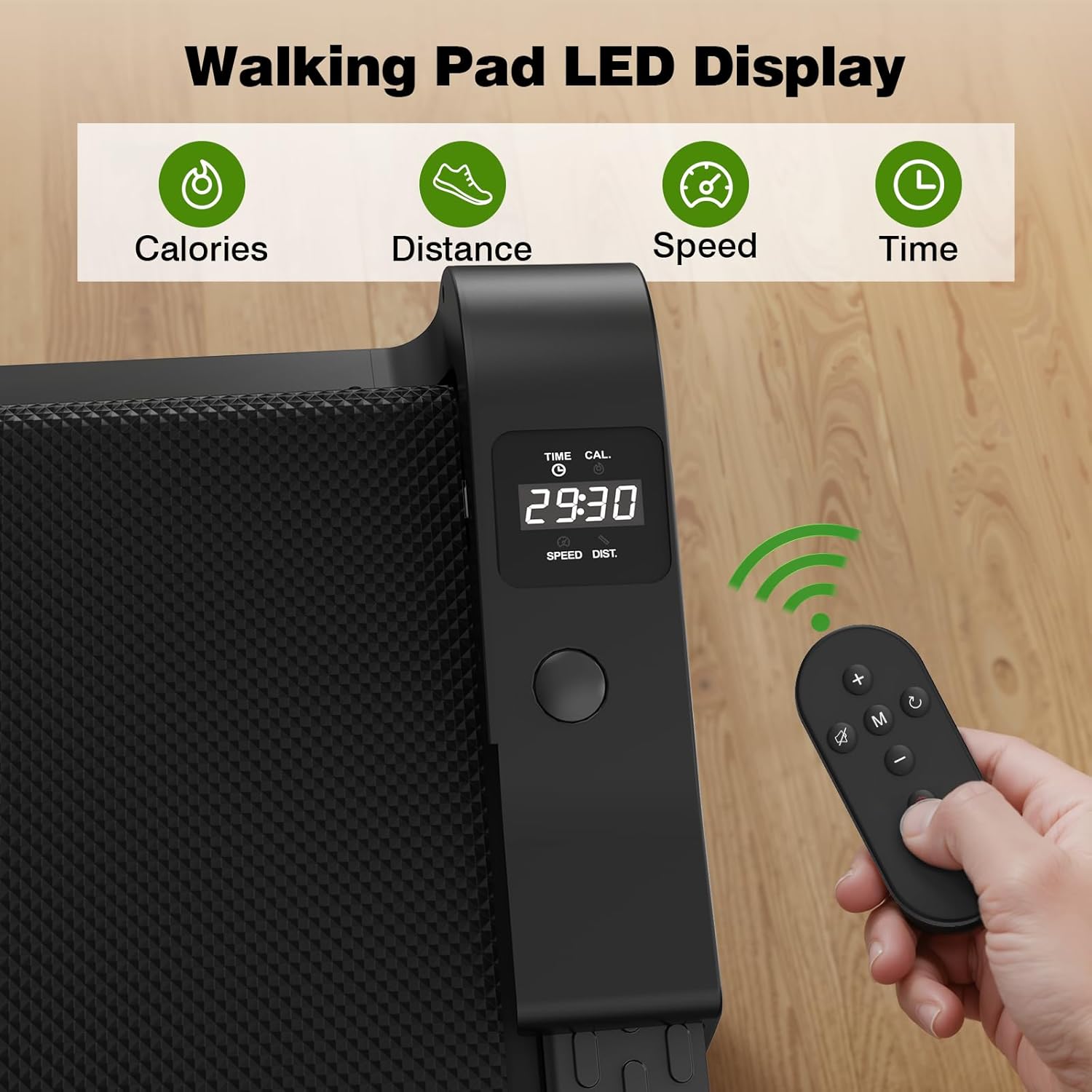
The treadmill features a multifunctional LED display that tracks your workout data. The display typically shows:
- Time: Duration of your workout.
- Speed: Current speed of the running belt.
- Distance: Total distance covered.
- Calories: Estimated calories burned.
- Steps: Number of steps taken (if applicable).
Control the treadmill using the integrated buttons on the console or the provided remote control.
Starting a Workout
- Ensure the treadmill is plugged in and the power switch (if present) is ON.
- Attach the safety key clip to your clothing and place the magnetic end onto the designated area on the console. The treadmill will not operate without the safety key in place.
- Step onto the treadmill, placing your feet on the side rails.
- Press the START button on the console or remote. The belt will typically start at a low speed after a short countdown.
- Adjust the speed using the '+' and '-' buttons on the console or remote to your desired pace.
Using Preset Programs
The treadmill includes 12 preset programs designed for various fitness goals. To select a program:
- While the treadmill is in standby mode, press the 'Program' or 'Mode' button to cycle through the available programs (P1-P12).
- Once you have selected your desired program, press START to begin the workout. The treadmill will automatically adjust speed according to the program's profile.
Stopping a Workout
- To pause or stop the workout, press the STOP button on the console or remote.
- In an emergency, pull the safety key from the console. The treadmill will immediately stop.

5. Maintenance
Regular maintenance ensures the longevity and optimal performance of your treadmill.
Lubrication of the Running Belt
The running belt requires regular lubrication to reduce friction and wear. Use only the silicone oil provided or recommended by FYC.
- Turn off and unplug the treadmill.
- Loosen the rear roller bolts slightly to lift the belt.
- Apply a small amount of silicone lubricant evenly under the center of the running belt.
- Tighten the rear roller bolts.
- Plug in the treadmill and run it at a low speed (e.g., 1-2 mph) for 5 minutes to distribute the lubricant.
Frequency: Lubricate every 30-50 hours of use or every 1-2 months, depending on usage.
Running Belt Adjustment
If the running belt shifts to one side or slips, it may need adjustment.
- Centering the Belt: If the belt drifts to one side, use the provided Allen wrench to turn the corresponding rear roller bolt a quarter turn clockwise. Run the treadmill for a few minutes and observe. Repeat until the belt is centered. If it drifts to the other side, turn the opposite bolt.
- Tightening the Belt: If the belt slips during use, turn both rear roller bolts a quarter turn clockwise simultaneously. Do not overtighten, as this can cause excessive wear.
Cleaning
- Wipe down the console and exterior surfaces with a damp cloth after each use. Avoid harsh chemicals.
- Periodically vacuum under the treadmill to prevent dust and debris from accumulating.
6. Troubleshooting
Refer to this section for solutions to common issues.
| Problem | Possible Cause | Solution |
|---|---|---|
| Treadmill does not start | Power cord not connected; Safety key not in place; Power switch OFF | Ensure power cord is securely plugged in; Place safety key on console; Turn power switch ON |
| Running belt slips | Belt too loose; Insufficient lubrication | Tighten running belt (refer to Maintenance); Lubricate running belt (refer to Maintenance) |
| Running belt drifts to one side | Belt alignment issue | Adjust running belt (refer to Maintenance) |
| Unusual noise from motor area | Lack of lubrication; Loose components; Motor issue | Lubricate running belt; Check for loose screws and tighten; If noise persists, contact customer support |
| E05 Error Code | Motor overheating or malfunction | Turn off the treadmill and unplug it. Allow it to cool down for at least 30 minutes. If the error persists after restarting, contact customer support. |
7. Specifications
| Feature | Detail |
|---|---|
| Product Dimensions (Extended) | 125D x 51.8W x 115.8H Centimetres (approx. 49.2D x 20.4W x 45.6H inches) |
| Item Weight | 21 kg (approx. 46.3 lbs) |
| Horsepower | 1.5 HP (Continuous Duty) / 2.5 HP (Peak) |
| Maximum Speed | 4 Miles per Hour (approx. 6.4 km/h) |
| Running Surface | 14.9” x 41.3” (approx. 37.8 cm x 104.9 cm) |
| Number of Programs | 12 Preset Programs |
| Display Type | LED Display (Time, Speed, Distance, Calories, Step) |
| Frame Material | Alloy Steel |
| Material | Rubber (Running Belt) |
| Power Source | Electric |
| Special Features | Foldable, Portable, Shock-absorbing |
| Recommended Use | Walking, Jogging |
8. Storage
The FYC Folding Treadmill is designed for convenient storage in small spaces.
- Folding: Ensure the treadmill is turned off and unplugged. Follow the reverse steps of assembly to fold the handlebar down.
- Moving: Utilize the built-in transport wheels to easily move the folded treadmill.
- Placement: The folded treadmill can be stored upright against a wall, under a sofa, or in a corner, requiring minimal floor space.

9. Warranty and Support
The FYC Folding Treadmill comes with a 1-year warranty from the date of purchase.
If you encounter any issues with your treadmill, have questions about its operation, or require assistance, please contact our customer service team. Provide your purchase details and model number for efficient support.
Contact Information: Refer to your purchase documentation or the FYC official website for the most current customer support contact details.


