
Introduction
Thank you for choosing the Jamara Volvo A40G 1:20 2.4GHz Remote Control Dump Truck. This manual provides essential information for the safe and efficient operation, setup, and maintenance of your new model. Please read these instructions carefully before first use to ensure proper function and to prevent damage.
Safety Information
WARNING: Use under direct adult supervision.
WARNING: Not suitable for children under 36 months. Contains small parts that can be swallowed. Choking hazard! Keep away from small children.
- Always operate the model in a safe environment, away from people, pets, and obstacles.
- Do not operate near water or in wet conditions.
- Ensure all batteries are inserted with correct polarity.
- Do not mix old and new batteries, or different types of batteries.
- Remove batteries from the model and remote control when not in use for extended periods.
- Do not attempt to modify or disassemble the model or remote control.
Package Contents
Please check the package contents to ensure all items are present:
- 1 x Jamara Volvo A40G 1:20 Remote Control Dump Truck Model
- 1 x 2.4 GHz Remote Control
- 1 x Instruction Manual

Image: The Jamara Volvo A40G dump truck and its remote control displayed within its retail packaging.
Setup
Battery Installation
Batteries are not included and must be purchased separately. Use alkaline or Nickel-Metal Hydride (NiMH) batteries.
Remote Control Battery Installation:
- Locate the battery compartment on the back of the 2.4 GHz remote control.
- Open the battery compartment cover.
- Insert 2 x AA 1.5V batteries, ensuring correct polarity (+/-).
- Close the battery compartment cover securely.
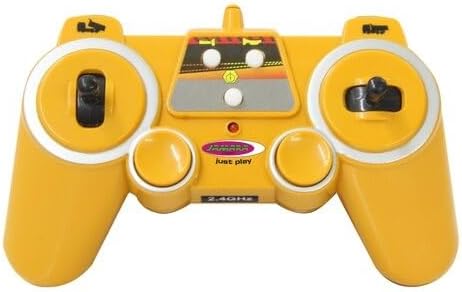
Image: A detailed view of the 2.4 GHz remote control, showing its ergonomic design and control sticks.
Model Battery Installation:
- Locate the battery compartment on the underside of the dump truck model.
- Open the battery compartment cover.
- Insert 4 x AA 1.5V batteries, ensuring correct polarity (+/-).
- Close the battery compartment cover securely.

Image: The Jamara Volvo A40G remote control dump truck positioned next to its yellow 2.4 GHz remote control.
Operating Instructions
Once batteries are installed in both the model and the remote control, power on both devices. The 2.4 GHz frequency allows for multi-player operation without interference.
Basic Controls:
- Forward/Backward: Use the left joystick (or corresponding button) to move the dump truck forward or backward.
- Left/Right: Use the right joystick (or corresponding button) to steer the dump truck left or right. The model features authentic articulated steering.
- Stop: Release the joysticks to bring the dump truck to a stop.
Special Functions:
- Dump Bed Up/Down: Use the designated button(s) on the remote control to raise and lower the dump bed.
- Realistic Engine Sound: The model features a realistic engine sound. This sound can be switched off using a button on the remote control.
- Horn: Press the horn button on the remote control to activate the horn sound.
- Reverse Warning Sound: When moving backward, the model emits a reverse warning sound for added realism.
- Demo Mode: Activate the demo mode to see the dump truck perform a pre-programmed sequence of movements.
- Auto-Standby Mode: To conserve battery life, the model will enter an auto-standby mode after a period of inactivity.

Image: The Jamara Volvo A40G remote control dump truck with its yellow dump bed fully raised, simulating material unloading on a construction site.

Image: A front-angle view of the Jamara Volvo A40G dump truck, highlighting its detailed cabin and illuminated headlights.

Image: A side profile of the Jamara Volvo A40G dump truck with its dump bed in the lowered position, showcasing its articulated design.
Maintenance
- Cleaning: Wipe the model with a soft, dry cloth. Do not use chemical cleaners or water directly on the electronics.
- Storage: Store the model and remote control in a cool, dry place away from direct sunlight.
- Battery Care: Always remove batteries from both the model and remote control if not used for an extended period to prevent leakage.
Troubleshooting
| Problem | Possible Cause | Solution |
|---|---|---|
| Model does not respond to remote control. | Batteries are low or incorrectly installed. Model or remote control is not powered on. Out of range. | Check and replace batteries. Ensure both devices are switched on. Move closer to the model. |
| Weak performance or slow movement. | Low battery power in the model. | Replace the model's batteries with fresh ones. |
| Interference during operation. | Other 2.4 GHz devices nearby. | Move to an area with less electronic interference. The 2.4 GHz system is designed to minimize this. |
| Dump bed not raising/lowering. | Obstruction or low battery power. | Check for any physical obstructions. Replace model batteries. |
Specifications
| Feature | Detail |
|---|---|
| Model Name | Volvo A40G |
| Brand | Jamara |
| Scale | 1:20 |
| Radio Control Type | 2.4 GHz |
| Dimensions (L x W x H) | 39.5 x 13.2 x 14.5 cm |
| Weight | ~ 860 g |
| Material | Plastic |
| Color | Yellow |
| Model Battery Requirement | 4 x AA 1.5V batteries (not included) |
| Remote Control Battery Requirement | 2 x AA 1.5V batteries (not included) |
| Recommended Age | 6 years and up |
| Special Features | Authentic articulated steering, dump bed up/down, realistic engine sound (switchable), horn, reverse warning sound, auto-standby mode, 2-wheel drive, demo mode. |
| Manufacturer Reference | 405056 |
Warranty and Support
Information regarding specific warranty terms and support contacts is not available in the provided product details. Please refer to the manufacturer's official website or contact your retailer for warranty claims and technical support.
Manufacturer Contact: Jamara; Am Lauerbühl 5|88317|Aichstetten|DE; info@jamara.com


