Introduction
This manual provides detailed instructions for the operation and maintenance of your Skechers Analog-Digital Men's Watch, model SR5159. Please read this manual thoroughly to ensure proper use and to maximize the lifespan of your watch.
Product Overview
The Skechers SR5159 is an analog-digital watch featuring a gun-metal plated alloy case, a brown genuine leather strap, and a negative display dial with yellow accents. It combines traditional analog timekeeping with digital functions.
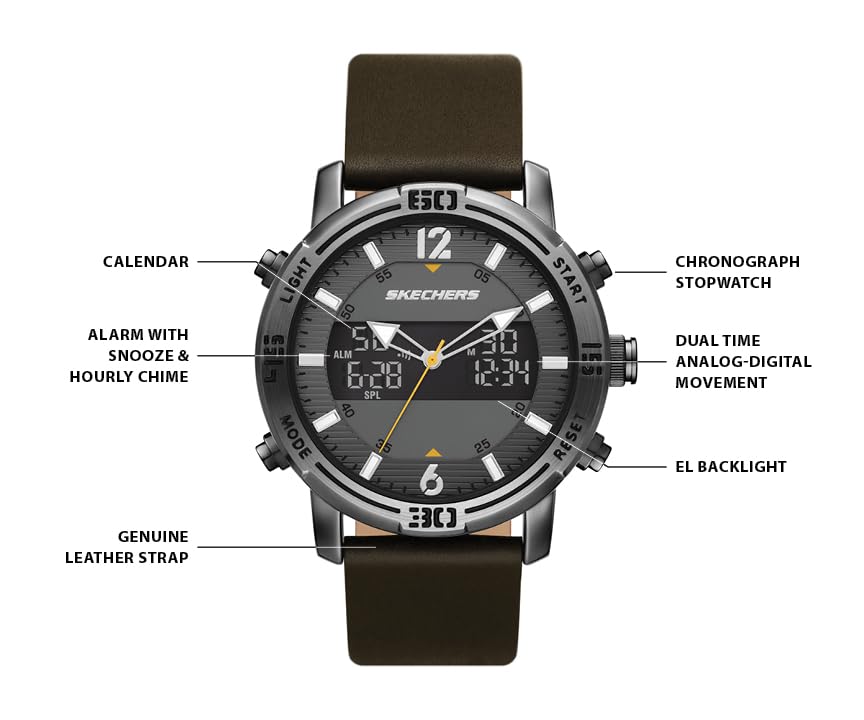
Figure 1: Watch Face and Features
This image highlights the key features of the Skechers SR5159 watch face, including the analog-digital movement, chronograph, alarm, calendar, and EL backlight. It also points out the genuine leather strap.
- Case Size: 47mm diameter
- Band Size: 24mm width, interchangeable
- Movement: Analog-digital with 3-hand analog display
- Crystal: Mineral
- Case Material: Gun-metal plated alloy
- Strap Material: Dark brown genuine leather
- Water Resistance: 100 Feet (30 Meters) - suitable for splashes and brief immersion, not for diving.
Setup
1. Initial Power On and Time Setting
Your watch comes with a pre-installed battery. If the digital display is blank, the battery may need activation or replacement. For initial setup, follow these steps:
- Analog Time Setting: Pull out the crown (center button on the right side) to the first position. Rotate the crown to set the analog hour and minute hands. Push the crown back in to secure the time.
- Digital Time Setting: Refer to the "Operating Instructions" section for detailed steps on setting the digital time, date, and other functions.
2. Adjusting the Strap
The watch features a genuine leather strap with a buckle closure. Adjust the strap to fit comfortably on your wrist.

Figure 2: Watch on Wrist
This image shows the Skechers SR5159 watch worn on a wrist, demonstrating its fit and appearance. Ensure the strap is adjusted for comfort and security.
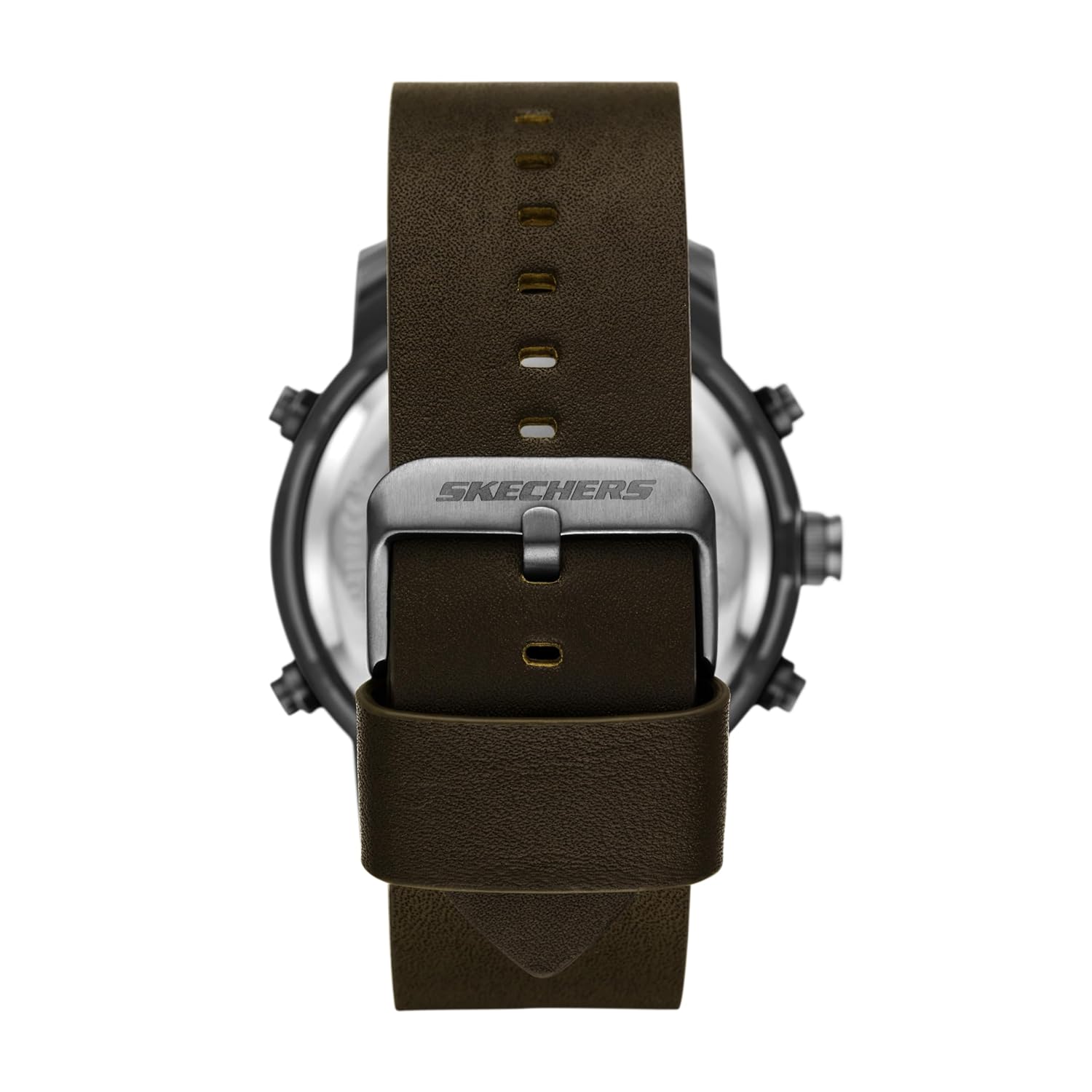
Figure 3: Watch Strap and Buckle Detail
A close-up view of the watch's dark brown genuine leather strap and the Skechers-branded buckle closure. The strap is interchangeable with other 24mm Skechers watch straps.
Operating Instructions
The Skechers SR5159 features multiple buttons for controlling its digital functions. Refer to Figure 1 for button identification.
Button Functions:
- LIGHT Button (Top Left): Activates the EL backlight for the digital display.
- MODE Button (Bottom Left): Cycles through digital modes (Time, Alarm, Stopwatch, Dual Time, Calendar).
- START Button (Top Right): Used to start/stop functions in Stopwatch mode, adjust values in setting modes.
- RESET Button (Bottom Right): Used to reset functions in Stopwatch mode, select items in setting modes.
- Crown (Center Right): Sets analog time.
Setting Digital Time and Date:
- From the normal time display, press the MODE button repeatedly until the time setting mode is indicated (e.g., flashing seconds).
- Press the RESET button to select the value you wish to adjust (seconds, hours, minutes, year, month, day).
- Use the START button to increase the selected value. Hold START to rapidly advance.
- Once all values are set, press the MODE button to exit the setting mode and return to the normal time display.
Using the Alarm:
- Press the MODE button until the Alarm mode is displayed.
- Press the RESET button to select the hour or minute to set.
- Use the START button to adjust the alarm time.
- Press MODE to confirm and exit. To turn the alarm ON/OFF, press START while in Alarm mode.
- The watch also features an hourly chime, which can be toggled ON/OFF in the alarm setting mode.
Using the Chronograph (Stopwatch):
- Press the MODE button until the Stopwatch mode is displayed.
- Press START to begin timing.
- Press START again to pause timing.
- Press RESET to clear the stopwatch to zero.
Using the EL Backlight:
Press the LIGHT button (top left) to illuminate the digital display for a few seconds in low-light conditions.
Maintenance
Cleaning Your Watch:
- Wipe the watch case and mineral crystal with a soft, dry cloth.
- For the leather strap, avoid prolonged exposure to water, direct sunlight, and harsh chemicals. Clean with a slightly damp cloth and allow to air dry.
Water Resistance:
This watch is water resistant to 100 feet (30 meters). This means it is suitable for short periods of exposure to water such as rain, sudden splashes, or showering. It is not suitable for swimming, diving, or prolonged submersion.
Important: Do not operate any buttons or the crown while the watch is wet or submerged, as this can compromise the water resistance.
Battery Replacement:
The watch uses one product-specific battery. When the digital display becomes dim or stops functioning, the battery may need replacement. It is recommended to have the battery replaced by a qualified watch technician to ensure proper sealing and maintain water resistance.
Troubleshooting
| Problem | Possible Cause | Solution |
|---|---|---|
| Analog hands not moving | Crown is pulled out; battery low/dead. | Push crown in completely. If issue persists, replace battery. |
| Digital display blank or dim | Battery low/dead. | Replace battery. |
| Digital time incorrect | Incorrectly set. | Follow "Setting Digital Time and Date" instructions. |
| Water inside watch | Water resistance compromised (e.g., buttons pressed underwater, extreme temperature changes). | Immediately take to a qualified watch technician for inspection and repair. Do not attempt to dry it yourself. |
Specifications
- Model Number: SR5159
- Case Diameter: 47 mm
- Band Width: 24 mm
- Movement Type: Quartz (Analog-Digital)
- Case Material: Gun-metal plated alloy
- Band Material: Genuine Leather (Brown)
- Crystal Material: Mineral
- Water Resistance: 3 ATM / 30 Meters / 100 Feet
- Battery Type: 1 x Product Specific (included)
- Item Weight: 120 g
- Product Dimensions: 30 x 24 x 1 cm

Figure 4: Men's Case Size Guide
This guide illustrates various watch case sizes and thicknesses to help understand the dimensions of the SR5159 model (47mm case diameter).
Warranty and Support
Warranty Information:
Your Skechers SR5159 watch comes with a 2-Year Manufacturer's Limited Warranty. This warranty covers manufacturing defects under normal use. It does not cover damage resulting from accidents, improper use, unauthorized repairs, or normal wear and tear.
Please retain your proof of purchase for warranty claims.
Customer Support:
For warranty service or technical assistance, please contact Skechers customer support. Refer to the official Skechers website or your purchase documentation for the most current contact information.
Manufacturer: Fossil India Pvt Ltd, Skechers
Importer/Packer: Fossil India Pvt. Ltd. Khata Khatoni No-147/150 Min, Khasra No-190/3 &188,191, Village-Tipra, Barotiwala, Tehsil Baddi, District Solan (H.P) - 174103


