
Introduction
This user manual provides comprehensive instructions for the installation, operation, and maintenance of your LeftSuper JSD-520 12V Universal Car MP3 Stereo. Please read this manual thoroughly before using the product to ensure proper function and safety.
Safety Information
Observe the following safety precautions to prevent damage to the device or injury to yourself.
- Do not place the device near high-temperature conditions.
- Do not dispose of the device in fire.
- Do not immerse the device in water.
- Ensure proper wiring and power supply (12V DC) to avoid electrical hazards.
Package Contents
Verify that all items listed below are included in your package:
- 1 x LeftSuper JSD-520 Bluetooth Car Stereo
- 1 x Remote Control
- 1 x Cable Set (Wiring Harness)
- 1 x User Manual (this document)
Product Overview
Familiarize yourself with the main components and controls of your JSD-520 car stereo.

Figure 1: Front view of the LeftSuper JSD-520 Car MP3 Stereo.
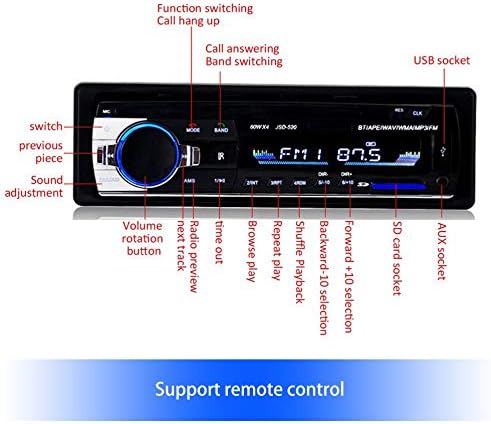
Figure 2: Detailed view of the front panel controls and their functions.
The front panel features a rotary volume knob, various function buttons, a USB socket, an SD card slot, and an AUX input. Key controls include:
- Volume Rotation Button: Adjusts audio volume. Press to select functions or confirm.
- MODE Button: Switches between radio, Bluetooth, USB/SD, and AUX modes.
- BAND Button: Switches between FM1, FM2, and FM3 radio bands. Also used for call answering.
- AMS Button: Automatic Memory Store for radio stations.
- EQ/LOUD Button: Adjusts equalizer settings and activates loudness function.
- USB Socket: For connecting USB flash drives.
- SD Card Socket: For inserting SD/MMC memory cards.
- AUX Socket: For connecting external audio devices via a 3.5mm jack.
- DIR+/DIR- Buttons: For folder navigation (USB/SD).
- Number Buttons (1-6): Preset radio stations, also used for specific functions like play/pause, repeat, shuffle.
Installation
Proper installation is crucial for optimal performance. It is recommended to have the unit installed by a qualified professional.
Wiring Diagram
Refer to the wiring harness included in the package for detailed connection instructions. The rear panel provides connections for power, speakers, and auxiliary audio output.
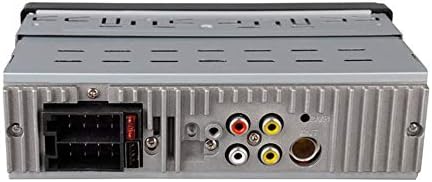
Figure 3: Rear view with wiring connections.
- Power Connection: Connect the yellow wire to constant 12V (+BATT), red wire to accessory 12V (+ACC), and black wire to ground (-GND).
- Speaker Connections: Connect the speaker wires according to the color codes provided on the wiring harness. Ensure correct polarity.
- RCA Outputs: For connecting external amplifiers (if applicable).
Operating Instructions
Power On/Off
Press the power button (usually the volume knob) to turn the unit on or off.
FM Radio Operation
- Press the MODE button to select FM radio mode.
- Press the BAND button to switch between FM1, FM2, and FM3 bands.
- Press the ◀◀ (previous track) or ▶▶ (next track) buttons to manually tune frequencies.
- Press and hold ◀◀ or ▶▶ for automatic station search.
- Press the AMS button to automatically scan and store strong stations.
- Use number buttons (1-6) to select preset stations.
Bluetooth Function
The unit supports Bluetooth hands-free calling and audio streaming.
- Press the MODE button to switch to Bluetooth mode. The display will show "BT".
- On your mobile device, search for Bluetooth devices and select "JSD-520" to pair.
- Once paired, you can play audio from your device or make/receive calls.
- Press the BAND button to answer an incoming call.
- Press the MODE button to hang up a call.
USB/SD Card Playback
Insert a USB flash drive into the USB socket or an SD/MMC card into the SD card slot. The unit will automatically switch to USB/SD mode and begin playback.
- Use ◀◀ and ▶▶ buttons to skip tracks.
- Use DIR+ and DIR- buttons to navigate folders.
- Press the 1 button for play/pause.
- Press the 2 button for repeat playback.
- Press the 3 button for shuffle playback.
AUX Input
Connect an external audio device (e.g., smartphone, MP3 player) to the AUX socket on the front panel using a 3.5mm audio cable.
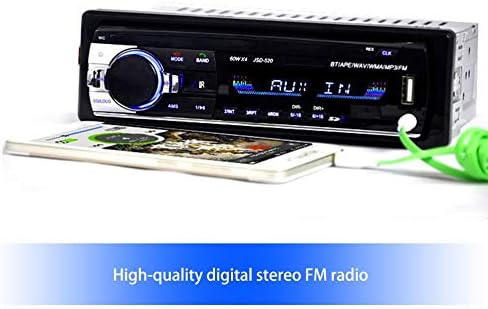
Figure 4: Connecting an external device via AUX input.
- Press the MODE button until "AUX IN" is displayed.
- Audio from the connected device will now play through the car stereo. Control playback from the external device.
Remote Control
The included remote control allows for convenient operation of the stereo from a distance. Functions mirror those on the front panel.
Key Features
The LeftSuper JSD-520 offers a range of features for an enhanced in-car audio experience.

Figure 5: Overview of key product features.
- Bluetooth Hands-Free Function: Safely make and receive calls while driving.
- High-Quality Digital Stereo FM Radio: Enjoy clear reception across FM1, FM2, and FM3 bands.
- USB / SD / MMC Card Reader: Play your favorite music directly from memory cards and USB drives.
- AUX Audio Input: Connect external audio sources for versatile playback.
- Enhanced Output and Bass: Delivers improved audio quality.
- Remote Control Support: Convenient operation from anywhere in the vehicle.
- Loudness Control: Adjust front left and right channel output for balanced sound.
Specifications
Detailed technical specifications for the LeftSuper JSD-520 Car MP3 Stereo.
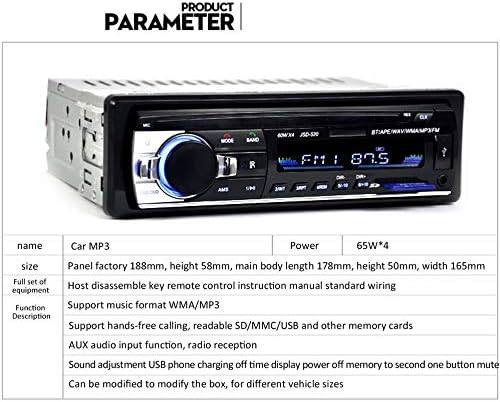
Figure 6: Product parameter table.
| Parameter | Value |
|---|---|
| Model Name | JSD-520 Car MP3 |
| Color | Black |
| Power Supply | 12V DC |
| Output Power | 65W x 4 |
| OSD Language | English |
| Connectivity Technology | Bluetooth |
| Compatible Devices | Speakers |
| Audio Output Mode | Stereo |
| Surround Sound Channel Configuration | 2.0 |
| Number of Channels | 2 |
| Supported Internet Services | Spotify (Note: This may refer to general compatibility, not built-in app) |
| Control Method | Remote |
| Product Dimensions | 21 x 13 x 8 cm |
| Panel Size (Factory) | 188mm (width), 58mm (height) |
| Main Body Size | 178mm (length), 50mm (height), 165mm (width) |
| Supported Music Formats | WMA/MP3 |
| Additional Functions | Hands-free calling, AUX audio input, Radio reception, Sound adjustment, USB phone charging (off time display), Power-off memory, One-button mute. |
Troubleshooting
If you encounter issues with your JSD-520 car stereo, refer to the following common problems and solutions:
- No Power: Check power connections (12V constant, 12V accessory, ground). Ensure the car's fuse is not blown.
- No Sound: Verify speaker connections and polarity. Check volume level and mute function. Ensure correct audio source is selected.
- Bluetooth Pairing Issues: Ensure Bluetooth is enabled on your mobile device and the stereo is in Bluetooth mode. Delete previous pairings and try re-pairing.
- USB/SD Not Playing: Ensure the USB drive or SD card is formatted correctly (FAT32) and contains supported audio files (WMA/MP3). Try a different USB/SD card.
- Poor Radio Reception: Check antenna connection. Try a different location or adjust the antenna.
If the problem persists, consult a qualified technician.
Maintenance
To ensure the longevity and optimal performance of your car stereo, follow these maintenance guidelines:
- Cleaning: Use a soft, dry cloth to clean the unit's surface. Do not use abrasive cleaners or solvents.
- Avoid Liquids: Keep the unit away from liquids to prevent damage.
- Temperature: Avoid exposing the unit to extreme temperatures, both hot and cold.
Warranty and Support
For warranty information or technical support, please refer to the purchase documentation or contact LeftSuper customer service. Keep your proof of purchase for any warranty claims.