
EZVALO LY-52
EZVALO Under Cabinet Lighting User Manual
Model: LY-52
Introduction
Thank you for choosing the EZVALO Under Cabinet Lighting. This product is designed to provide efficient and versatile illumination for various indoor spaces such as kitchens, closets, stairs, and more. Featuring a long-lasting rechargeable battery, motion sensing capabilities, and adjustable color temperatures, this light offers convenience and enhanced visibility. Please read this manual carefully before use to ensure proper installation and operation.
What's in the Box
- 1X Motion Sensor Light
- 2X Magnetic Adhesives
- 1X Charging Cable
- 1X Technical Manual
Key Features
- Long-Lasting Battery Life: Equipped with a 2200mAh rechargeable battery, providing up to 6 hours of illumination at maximum brightness or 7-22 days in auto motion sensor mode. The detachable battery design allows for convenient recharging without removing the entire light fixture.
- Upgraded Motion Sensor with 3 Modes: Features a motion sensor that detects movement within a 10ft & 120° range, automatically turning off after 20 seconds of inactivity. Offers three operational modes: Always On, Auto Day Mode, and Auto Night Mode.
- Dimmable with 3 Color Temperatures: Utilizes 76 high-efficiency LEDs for glare-free, eye-comfortable lighting. Choose from Warm (3500K), Natural (4200K), or Daylight (5700K) color temperatures. Supports smooth 10%-100% dimming with a memory function to recall your preferred brightness setting.
- Magnetic Installation: Built-in magnets allow for direct installation on metal surfaces. For non-metal surfaces, use the included magnetic adhesive pads for easy and secure mounting.

Figure 1: Motion sensor capabilities, detecting movement within 10ft and 120 degrees.

Figure 2: The light features a 2200mAh high-capacity removable battery for convenient charging.
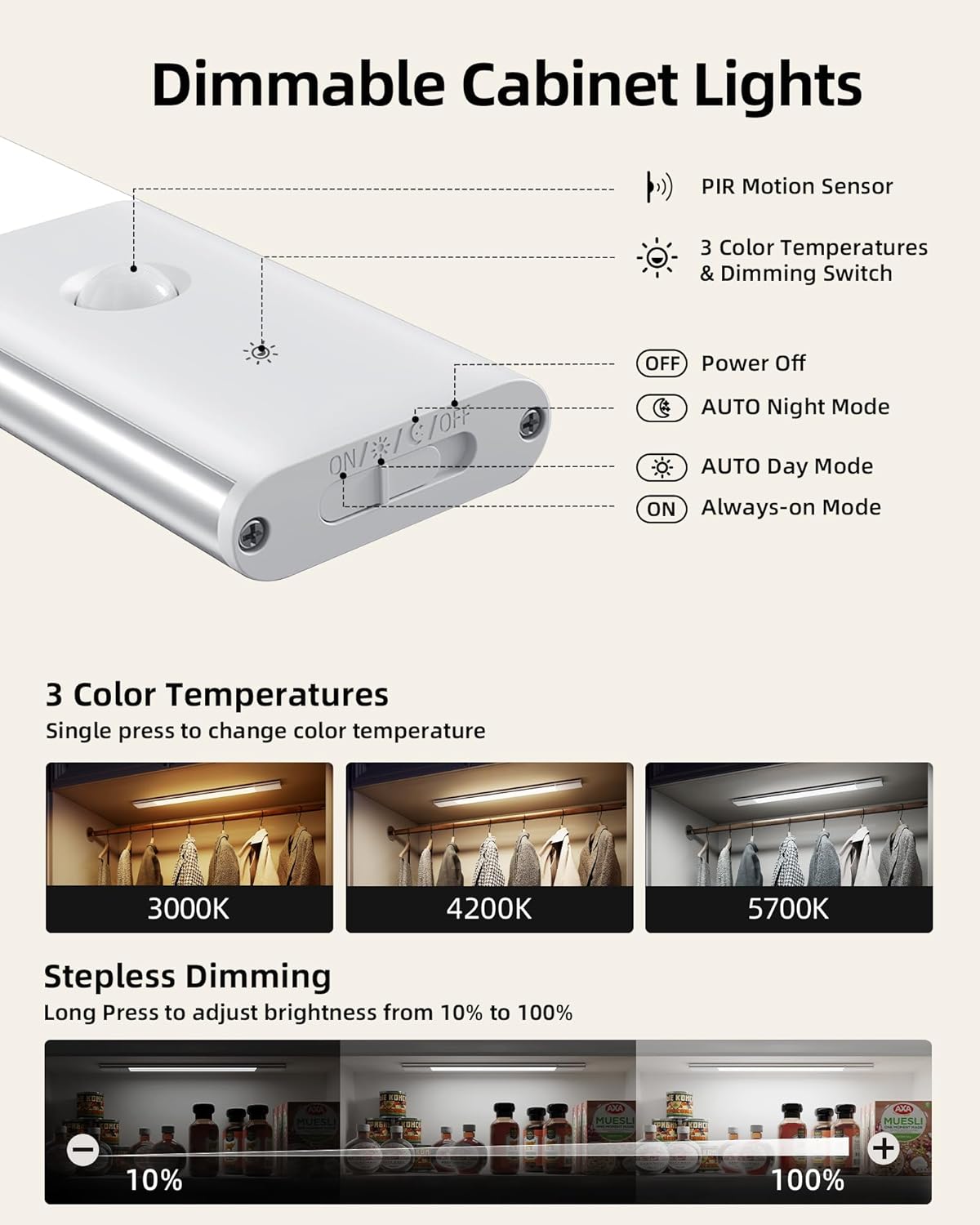
Figure 3: Control panel illustrating the PIR motion sensor, 3 color temperatures, and dimming switch.
Setup and Installation
Mounting the Light
The EZVALO Under Cabinet Light offers flexible installation options due to its built-in magnets.
- For Metal Surfaces: Simply attach the light directly to any metal surface. The strong built-in magnets will hold it securely in place.
- For Non-Metal Surfaces: Use the provided magnetic adhesive pads.
- Step 1: Clean the desired installation surface thoroughly to ensure it is free of dust and grease.
- Step 2: Peel off the protective film from one side of the magnetic adhesive pad and firmly press it onto the light fixture.
- Step 3: Peel off the protective film from the other side of the magnetic adhesive pad and press the light firmly onto the cleaned non-metal surface (e.g., under a cabinet, inside a closet).
NOTE: Ensure batteries are securely fastened into the light fixture to ensure proper contact and stable operation before installation.
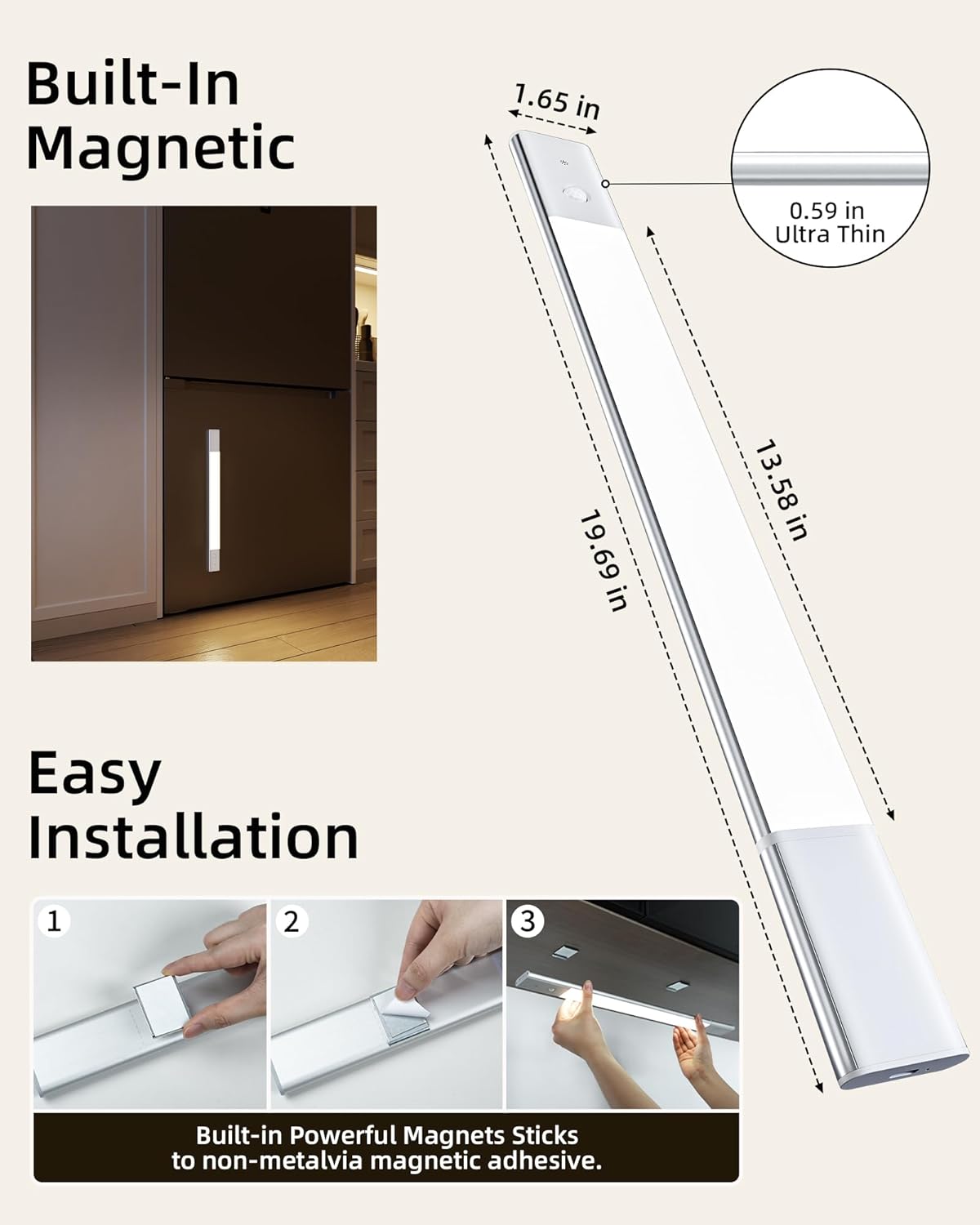
Figure 4: Easy installation process using built-in magnets and adhesive pads for non-metal surfaces.
Operating Instructions
Powering On/Off
Locate the side switch on the light fixture. Slide the switch to the 'ON' position to activate the light. To turn off the light completely, slide the switch to the 'OFF' position.
Mode Selection
The light features three operational modes, selectable via the control panel buttons:
- Always On Mode (ON): Provides continuous lighting, ideal for tasks requiring constant illumination.
- Auto Day Mode (AUTO DAY): Motion-activated lighting that turns on when movement is detected, regardless of ambient light conditions.
- Auto Night Mode (AUTO NIGHT): Smart motion-activated lighting that only activates in darkness when movement is detected, conserving battery life during daylight hours.
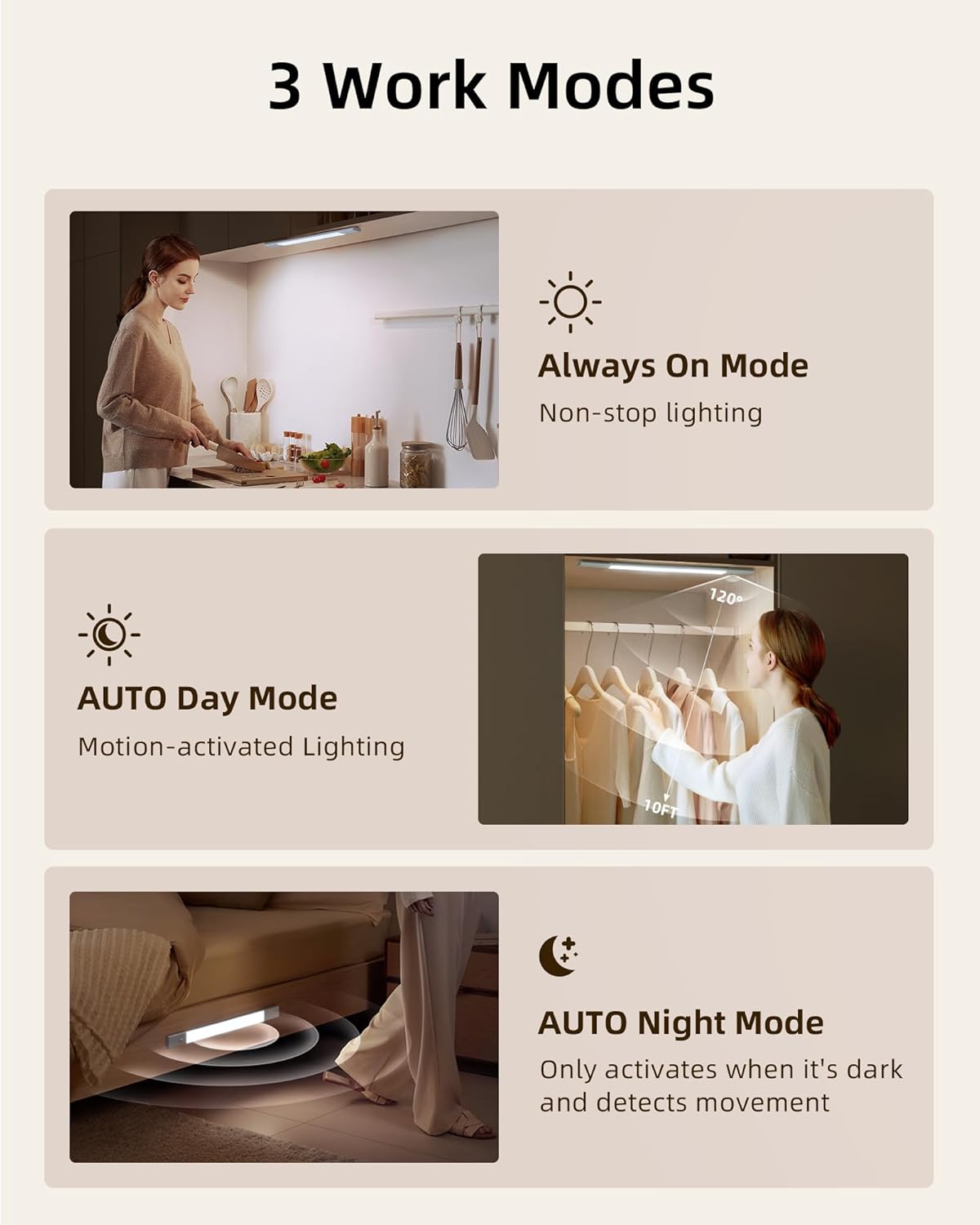
Figure 5: Visual representation of the three distinct work modes for the EZVALO light.
Color Temperature Adjustment
The light offers three color temperature options to suit your preference:
- Warm White (3500K)
- Natural White (4200K)
- Daylight (5700K)
To change the color temperature, single press the designated button on the control panel. The light will cycle through the available options.
Brightness Dimming
The light supports stepless dimming from 10% to 100% brightness. To adjust the brightness, long press the dimming button. Release the button when the desired brightness level is achieved. The light features a memory function that will recall your last brightness setting.
Maintenance
Cleaning
To clean the light fixture, gently wipe it with a soft, dry cloth. Avoid using abrasive cleaners, solvents, or harsh chemicals, as these may damage the surface or internal components.
Battery Charging and Replacement
When the battery level is low, the light's performance may diminish. To recharge the battery:
- Carefully detach the battery module from the light fixture.
- Connect the provided charging cable to the battery module and a suitable USB power source (e.g., computer USB port, wall adapter).
- The charging indicator light will show the charging status (e.g., red for charging, green for fully charged).
- Once fully charged, disconnect the cable and reinsert the battery module into the light fixture, ensuring it clicks securely into place.
If the battery needs replacement, please contact EZVALO customer support for assistance or refer to the product specifications for compatible battery types.
Troubleshooting
| Problem | Possible Cause | Solution |
|---|---|---|
| Light does not turn on. | Battery is depleted; Side switch is OFF; Battery not properly connected. | Charge the battery; Slide the side switch to ON; Ensure battery is securely inserted. |
| Motion sensor not working. | Incorrect mode selected (e.g., Always On); Sensor obstructed; Ambient light too bright (in Auto Night Mode). | Switch to Auto Day or Auto Night Mode; Clear any obstructions from the sensor; Ensure sufficient darkness for Auto Night Mode. |
| Light flickers or is dim. | Low battery; Loose battery connection. | Recharge the battery; Re-seat the battery module firmly. |
| Cannot change color temperature or brightness. | Incorrect button press; Malfunction. | Ensure you are single pressing for color temp and long pressing for dimming; If issue persists, contact customer support. |
Technical Specifications
| Feature | Specification |
|---|---|
| Brand | EZVALO |
| Model Name | LY-50 |
| Item Model Number | LY-52 |
| Color | Silver |
| Material | Aluminum, Acrylonitrile Butadiene Styrene |
| Product Dimensions | 19.69"L x 1.65"W x 0.59"H |
| Item Weight | 10.6 ounces (0.3 Kilograms) |
| Power Source | Battery Powered |
| Battery Type | 1 Lithium Ion battery (included) |
| Battery Capacity | 2200mAh |
| Light Source Type | LED |
| Number of Light Sources | 76 LEDs (as per feature bullets, 48 in specs might be a typo or different variant) |
| Brightness | 100 Lumen |
| Color Temperatures | 3500K (Warm White), 4200K (Natural White), 5700K (Daylight) |
| Control Method | Push Button, Touch |
| Special Features | Dimmable, Detachable Battery, Motion Sensor |
| Indoor/Outdoor Usage | Indoor |
| Water Resistance Level | Not Water Resistant |
Warranty and Customer Support
EZVALO is committed to providing excellent customer service and stands behind the quality of its products. This product comes with a Lifetime Warranty.
If you have any questions, concerns, or require assistance regarding your EZVALO Under Cabinet Lighting, please do not hesitate to contact our customer care team. We are dedicated to ensuring your satisfaction.
For support, please refer to the contact information provided on the product packaging or the official EZVALO website.
Related documentsLY-52

Ask a question about this manual
Ask about setup, troubleshooting, compatibility, parts, safety, or missing instructions. Manuals+ will review the question and use this page’s manual context to help answer it.